Lecture 7

Data Visualization I: Distributions and Group Comparisons

Byeong-Hak Choe

SUNY Geneseo

October 21, 2026

📊 One numeric distribution

🧭 A useful chart answers a question

  • Data visualization represents data through positions, lengths, colors, and other visual features.
  • Why use it? Charts make patterns easier to see than a long table of values and help us explain findings to others.
  • A distribution describes how values occur across a variable’s range: which values are common, uncommon, or absent.
  • Variation means how much the observed values differ from one another. Values may cluster closely or spread widely.
  • Our first question: How does city fuel economy vary across vehicles in the dataset?

🚗 Each row in mpg describes a vehicle

manufacturer model year cty drv class
audi a4 1999 18 f compact
audi a4 1999 21 f compact
audi a4 2008 20 f compact
audi a4 2008 21 f compact
  • mpg comes with ggplot2. It contains data on 234 vehicles from 1999 and 2008.
  • Each row describes a particular version of a vehicle model, not an individual car sold.

📏 Variable names need meanings and units

Column Meaning Type for this comparison
cty City fuel economy in miles per gallon Numeric
drv Drive system, coded 4, f, or r Categorical
class Vehicle class, such as compact or SUV Categorical
  • A higher miles-per-gallon (mpg) value means the vehicle travels farther per gallon of fuel.
  • A numeric value has a meaningful magnitude. A category identifies a group, even if its label looks like a number.

🧰 ggplot2 is part of the tidyverse

library(tidyverse)
mpg <- mpg    # ggplot2::mpg

?mpg  # description of the `mpg` data.frame
  • library(tidyverse) loads ggplot2 along with packages such as dplyr.
  • mpg is available after loading ggplot2. This example needs no CSV import.
  • The same plotting structure also works with a data frame we import ourselves.

📊 A histogram shows a distribution of a numeric variable

ggplot(data = mpg,
       mapping = aes(x = cty)) +
  geom_histogram()
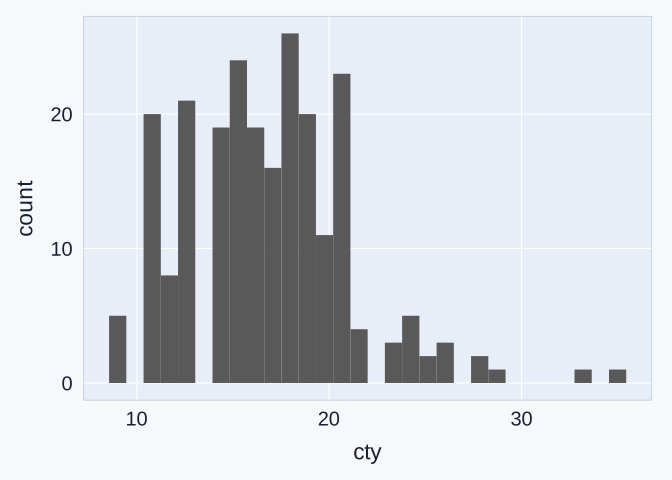
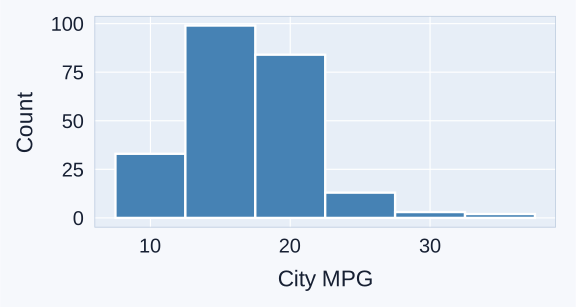
Histogram of city fuel economy for 234 vehicles in the dataset. Most values fall between roughly 12 and 22 MPG, with a longer tail toward higher MPG.

  • A histogram groups numeric values into equal-width intervals called bins, arranged along the horizontal axis.
  • The height of each bar represents the number of observations in each bin. Here, the vertical axis counts vehicles.

🧩 Data, aesthetic mappings, and geometric objects

Essential component Its job in our histogram
Data frame: data = mpg Supplies the observations in rows and variables in columns
Aesthetic mappings: mapping = aes(x = cty) Connect variables to visual features, such as position or color
Geometric object: geom_histogram() Chooses how to draw the data. This geom groups values into bins and draws bars
  • Geom functions (geom_*()) draw objects such as bars, points, or lines. We choose the geom to match our question.
  • aes() is short for aesthetics. Here, x = cty maps city MPG to horizontal position. The geom_histogram() calculates the vertical counts automatically.
  • data = and mapping = are argument names. R lets us omit these names when we supply the arguments in that order.

➕ + connects the plot’s parts

ggplot(data = mpg,
       mapping = aes(x = cty)) +
  geom_histogram()
  • Put + at the end of a line when the plotting expression continues on the next line.
  • Each + adds a plot component. We can add more layers or settings with another +, such as labs() for labels.

At the R console

A + at the R console prompt means R is waiting for the rest of an unfinished command. Do not type that prompt into your code.

🖌️ A fixed appearance belongs outside aes()

ggplot(data = mpg,
       mapping = aes(x = cty)) +
  geom_histogram(
    fill = "steelblue",
    color = "black"
  )
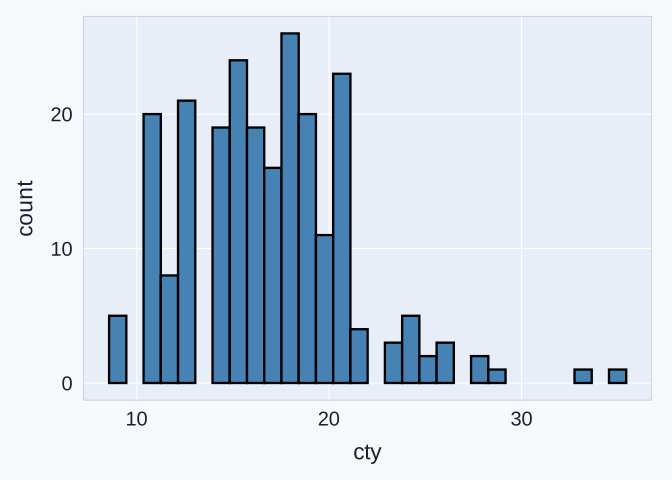
City MPG histogram with blue interiors and black borders separating the bins.

  • fill controls the inside of the bars. color controls their outlines.
  • Both settings stay outside aes() because they give all bars one appearance. aes(x = cty) maps a data column.

🏷️ labs() provides readable labels

ggplot(data = mpg,
       mapping = aes(x = cty)) +
  geom_histogram(fill = "steelblue",
                 color = "white") +
  labs(x = "City fuel economy (MPG)",
       y = "Number of vehicles")
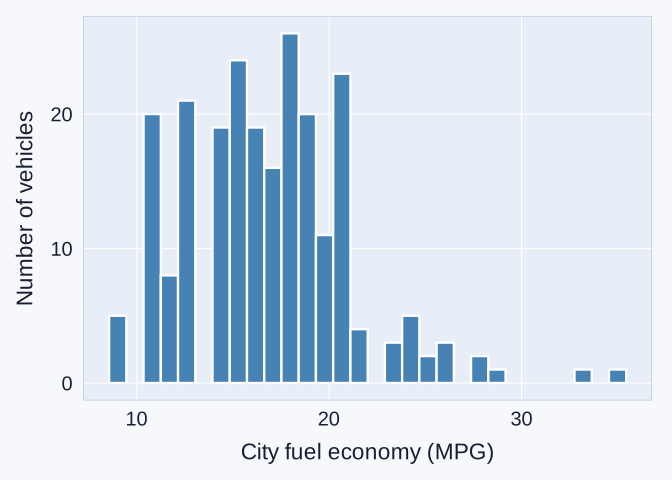
City MPG histogram with readable axes labeled City fuel economy (MPG) and Number of vehicles.

  • labs() changes displayed text. The column name remains cty.
  • Recognize what it does. It is optional in classwork and homework answers, while project charts need clear labels and units.

📏 Bin width changes the visible detail

Bin width: 1 MPG
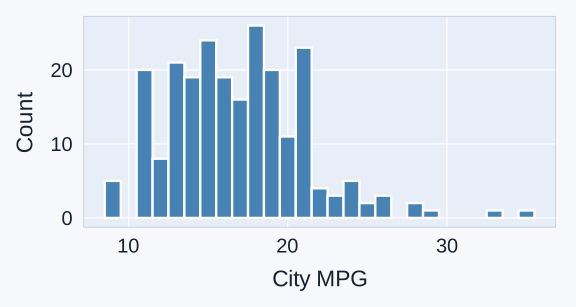
City MPG histogram with one-MPG bins, showing several local peaks and gaps.

geom_histogram(binwidth = 1)

Bin width: 5 MPG

City MPG histogram with five-MPG bins, showing less detail than the one-MPG histogram of the same observations.

geom_histogram(binwidth = 5)
  • binwidth sets each interval’s width. These bins are 1 MPG or 5 MPG wide.
  • Distribution shape is sensitive to bin width. Narrow bins reveal detail. Wide bins can hide peaks or gaps. The 234 rows stay the same.

📊 Uniform, unimodal, and bimodal

Uniform
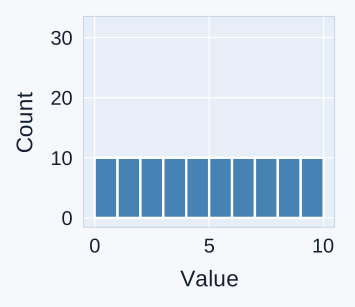
Example uniform histogram: ten equal-width bins each contain ten observations, giving equal bar heights.

Roughly similar bar heights across bins.

Unimodal
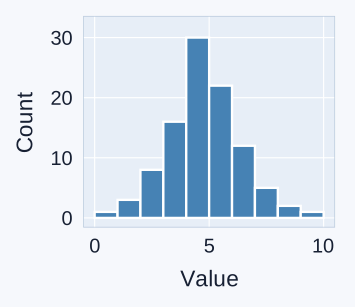
Example unimodal histogram: counts rise to one clear peak near the middle and then fall.

One clear peak (mode).

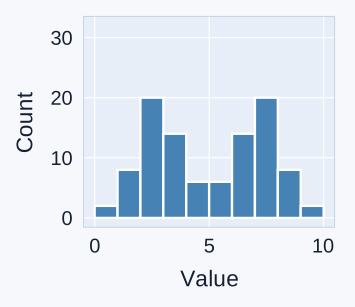
Bimodal

Example bimodal histogram: two clear peaks near 2.5 and 7.5, separated by a dip near the middle.

Two clear peaks separated by a dip.

🧭 Skewness, mean, median, and mode
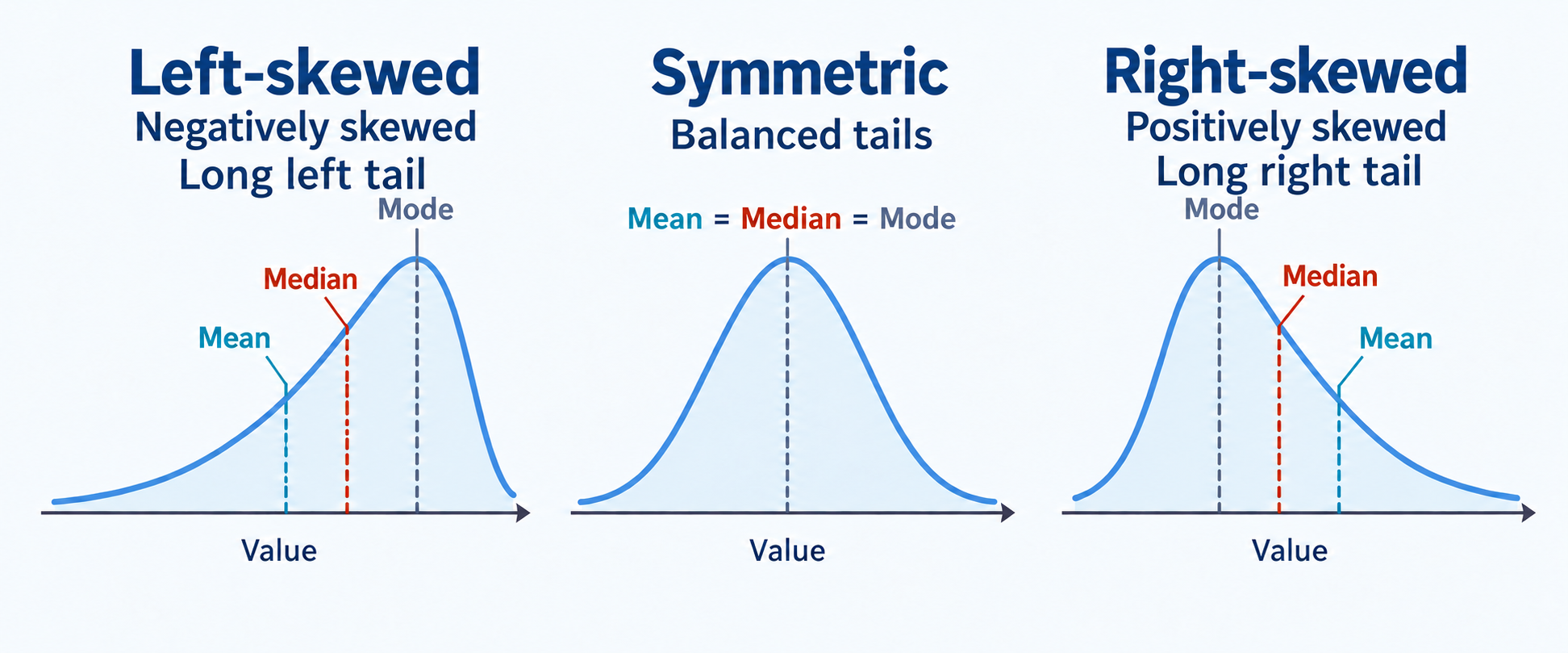
Three single-peaked distribution examples. Left-skewed is also labeled negatively skewed, with a long left tail and mean below median below mode. The symmetric example has coincident mean, median, and mode. Right-skewed is also labeled positively skewed, with a long right tail and mode below median below mean.

  • Like a histogram, a smooth curve shows distribution shape. Skewness is asymmetry: one tail extends farther than the other.
  • Left (negative) skew has a longer tail toward smaller values. Right (positive) skew has a longer tail toward larger values. Follow the longer tail, not the side with most values.

🔎 Reading the city-MPG distribution
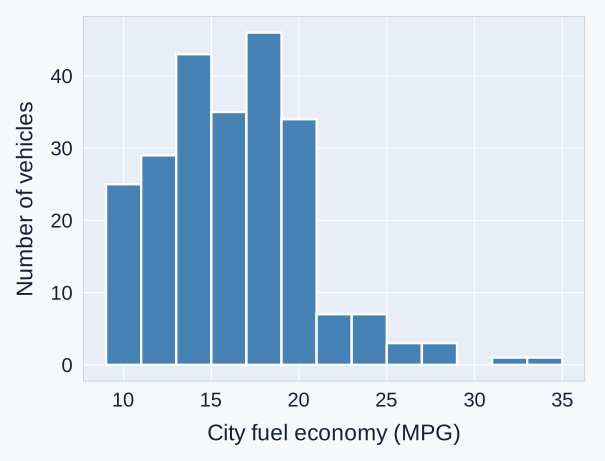
City fuel economy histogram with most vehicles near 12 to 22 MPG and a longer tail toward the high-MPG values. Observed city MPG ranges from 9 to 35.

  • Typical values: most vehicles cluster roughly between 12 and 22 MPG in city driving.
  • Spread and shape: values range from 9 to 35 MPG, with a longer tail toward higher MPG. This is right skew.
  • Unusual values: high-MPG vehicles deserve a closer look at their rows and context. A histogram alone cannot tell us why they differ.

✍️ Classwork 10: Distributions

  • Use histograms to examine city fuel economy and distribution shapes.

🚙 Distributions across groups

🚙 drv identifies the drive system

Value of drv Meaning
4 Four-wheel drive
f Front-wheel drive
r Rear-wheel drive
  • Our next question: How does city fuel economy differ across drive systems?
  • The numeric variable remains cty. The categorical variable drv tells us which group each row belongs to.

🪟 Facets separate the distributions

ggplot(data = mpg,
       mapping = aes(x = cty)) +
  geom_histogram(binwidth = 2) +
  facet_wrap(~ drv)
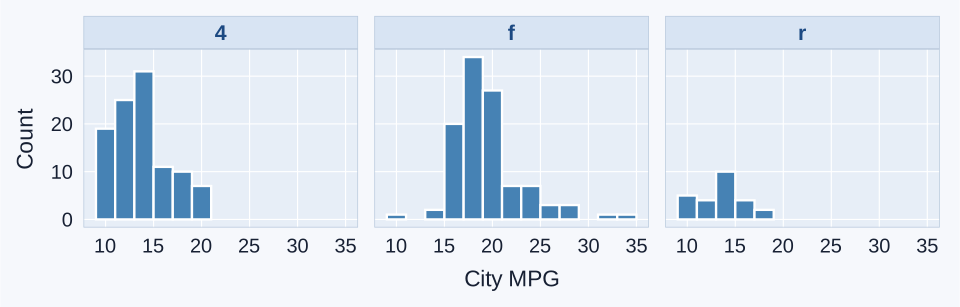
Histograms of city fuel economy in separate panels for four-wheel, front-wheel, and rear-wheel drive, with two-MPG bins and shared axes.

  • facet_wrap(~ drv) means “make panels by drive system.” Each row appears in its group’s panel.

📐 Shared bins and axes support comparisons

  • Every panel uses 2-MPG bins and the same axes. The same position represents the same value across panels.
  • Front-wheel-drive vehicles tend toward higher city MPG in these observations.
  • The groups contain different numbers of vehicles. Taller count bars can reflect a larger group, as well as how values concentrate within it.

👁️ Design with colorblindness in mind
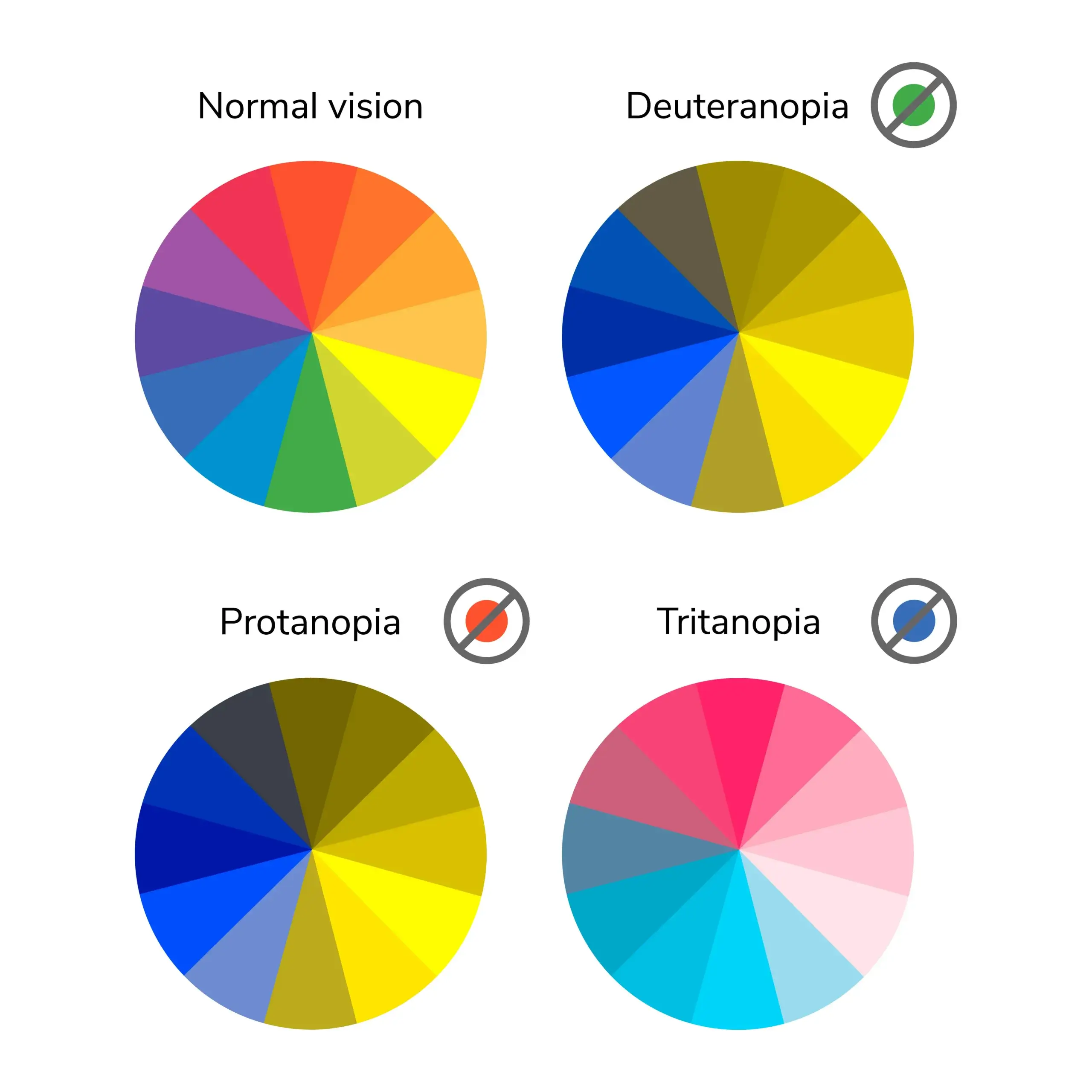
Illustrative color-wheel simulations: typical color vision alongside deuteranopia, protanopia, and tritanopia. Some hues become harder to distinguish. These are examples, not a diagnostic test.

  • Color-vision deficiency can make some colors difficult to distinguish.
  • Among people with Northern European ancestry, inherited red–green deficiency affects about 8% of males and 0.5% of females.
  • Choose colorblind-friendly palettes and keep labels or panels so readers can identify groups without relying on color alone.

🧰 ggthemes and Tableau palettes

install.packages("ggthemes")  # Install once
library(ggthemes)            # Load in each R session
  • Tableau is business intelligence (BI) software for exploring data and building interactive dashboards.
    • scale_fill_tableau() and scale_color_tableau() are inspired by Tableau’s color palette.
Mapped feature Matching scale
fill: interiors scale_fill_tableau()
color: points or lines scale_color_tableau()
  • These scales apply a palette (a set of colors) to the mapped categories. We use their defaults without adding options.

🎨 Mapping fill and choosing a palette

ggplot(data = mpg,
       mapping = aes(x = cty, fill = drv)) +
  geom_histogram(binwidth = 2, color = "white",
                 show.legend = FALSE) +
  facet_wrap(~ drv) +
  scale_fill_tableau()
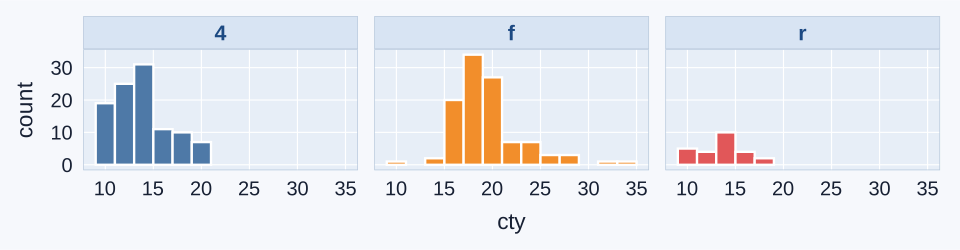
City-MPG histograms in three labeled drive-system panels, with blue, orange, and red fills from the default Tableau palette. Labels identify the groups even without color.

  • fill = drv maps groups to colors. scale_fill_tableau() chooses the color palette.
  • show.legend = FALSE hides the legend (color key).

📦 Boxplots compare a numeric variable across categories

ggplot(data = mpg,
       mapping = aes(x = drv,
                     y = cty,
                     fill = drv)) +
  geom_boxplot(show.legend = FALSE) +
  scale_fill_tableau() +
  labs(x = "Drive system",
       y = "City fuel economy (MPG)")
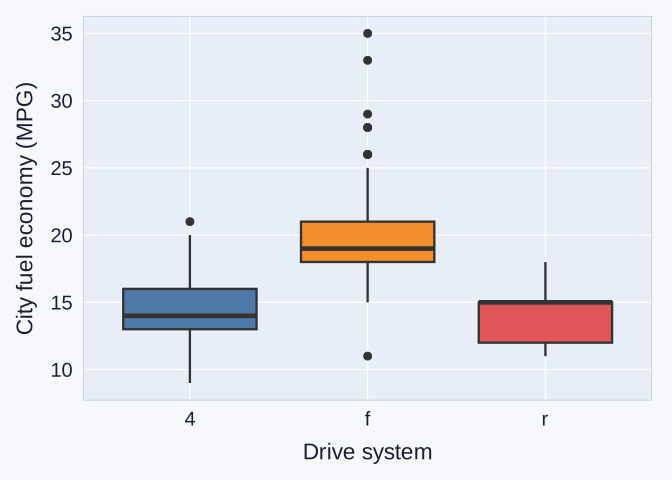
City-MPG boxplots by drive system. Four-wheel drive has median 14 MPG, front-wheel drive median 19 MPG, and rear-wheel drive median 15 MPG.

  • We now map both axes: a category on x and its numeric values on y.
  • geom_boxplot() calculates a separate summary for each drive-system group. fill = drv inside aes() gives each group its own color.

⚖️ Histograms and boxplots provide different detail

Display Especially useful for Main limitation
Histograms Peaks, gaps, tails, and distribution shape Bin width changes visible detail
Boxplots Comparing group medians and spread compactly Can hide peaks and gaps within groups
  • Both displays summarize the same city-MPG observations.
  • The chart choice depends on which features the reader needs to compare.

✍️ Classwork 11: Grouped distributions

  • Compare drive systems using faceted histograms and boxplots.

📊 Distribution of a categorical variable

🚗 geom_bar() counts categories

ggplot(data = mpg,
       mapping = aes(y = class,
                     fill = class)) +
  geom_bar(show.legend = FALSE) +
  scale_fill_tableau() +
  labs(x = "Number of vehicles",
       y = "Vehicle class")
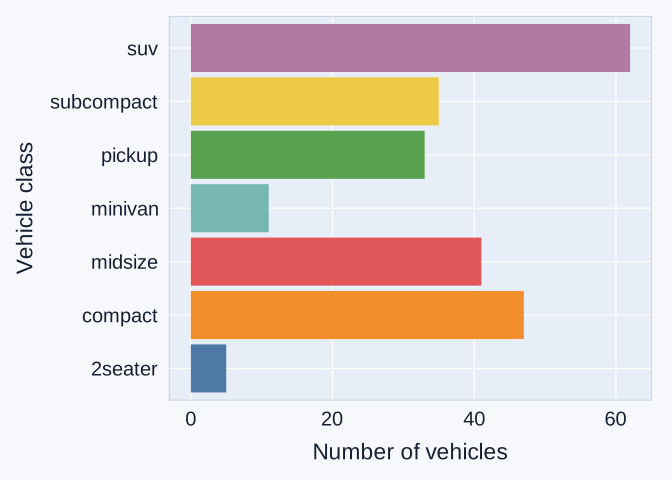
Horizontal bar chart counting vehicles in seven vehicle classes. SUVs have the largest count and two-seaters the smallest.

  • A categorical distribution shows how many observations belong to each category. Here, our question is: Which vehicle classes are most common in mpg?
  • geom_bar() counts rows automatically. Map class to y for horizontal bars and to fill inside aes() for category colors.

🧱 Bar charts and histograms group values differently

Histogram Bar chart
Variable Numeric, such as city MPG Categorical, such as vehicle class
Grouping Numeric intervals called bins Named categories
Order Follows the numeric scale Chosen to support the comparison
  • Histograms show a numeric distribution using adjacent intervals.
  • A bar chart compares categories through bar length. Its numeric value axis should begin at zero.

🔢 count() creates a table of counts

class_counts <- mpg |>
  count(class)
class n
2seater 5
compact 47
midsize 41
minivan 11
pickup 33
subcompact 35
suv 62
  • count(class) creates one row per vehicle class.
  • The new column n gives the number of original rows in that class.
  • The seven counts add to 234, the total number of vehicles in mpg.

📊 geom_col() uses numbers already in a column

ggplot(data = class_counts,
       mapping = aes(x = n,
                     y = class,
                     fill = class)) +
  geom_col(show.legend = FALSE) +
  scale_fill_tableau() +
  labs(x = "Number of vehicles",
       y = "Vehicle class")
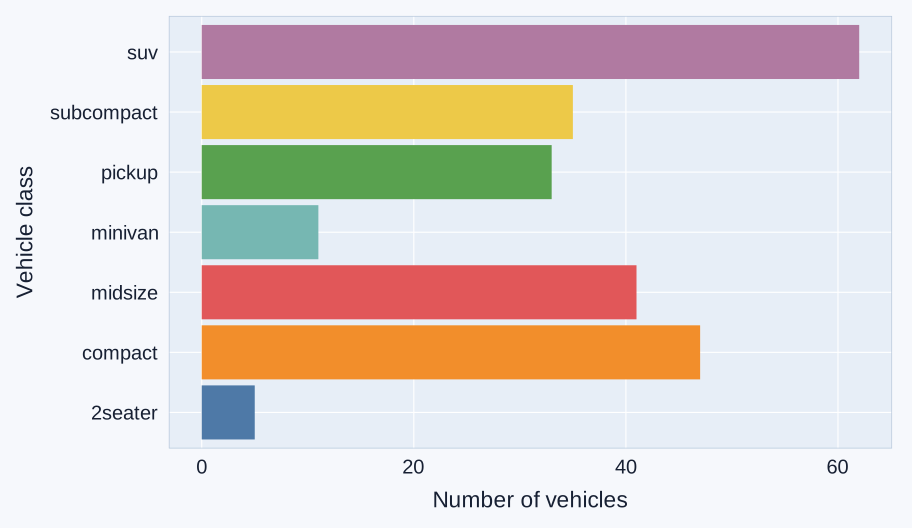
Horizontal bars plotting n from the seven-row class_counts table. The classes remain in alphabetical order, with SUVs at 62 vehicles and two-seaters at 5.

  • Use class_counts data.frame from the previous slide: one row per vehicle class, with its count in n.
  • x = n sets each bar’s length. geom_col() uses these supplied values, while geom_bar() counts rows automatically.

🪜 Sorted bars make rankings easier to read

ggplot(data = class_counts,
  mapping = aes(
    x = n,
    y = fct_reorder(class, n),
    fill = class)) +
  geom_col(show.legend = FALSE) +
  scale_fill_tableau() +
  labs(x = "Number of vehicles",
       y = "Vehicle class")
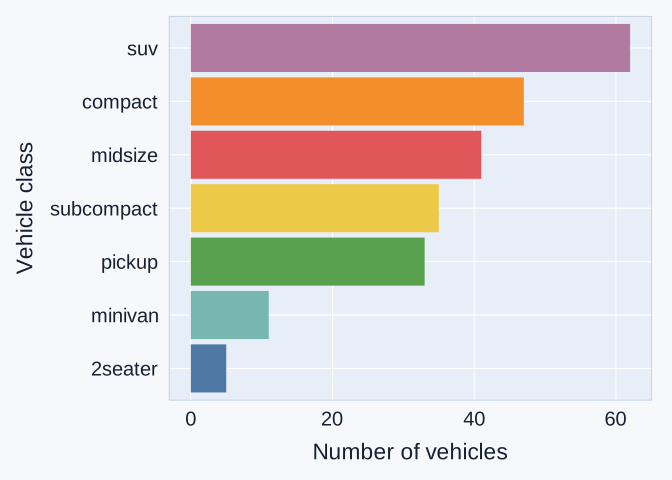
Vehicle-class counts sorted with SUVs at the top at 62 vehicles and two-seaters at the bottom at 5.

  • Using the same table and counts, fct_reorder(class, n) orders the categories using their corresponding counts.
  • Here, the largest count appears at the top. Horizontal bars leave room for the category names.

✍️ Classwork 12: Distribution of a Categorical Variable

  • Compare category counts and plot a prepared summary table.

✈️ Categorical distributions across groups

✈️ Airlines across three NYC-area airports

flights <- nycflights13::flights

airline_flights <- flights |>
  filter(carrier == "AA" |
         carrier == "DL" |
         carrier == "UA")
Column Categories used
origin EWR: Newark
JFK: John F. Kennedy
LGA: LaGuardia
carrier AA: American
DL: Delta
UA: United
  • Each row is one 2013 flight record. We keep only these three airlines at the three NYC-area airports.
  • Our question: How do airline counts and shares differ across airports? These records do not count passengers.

📊 Stacked bars: totals and their breakdown

ggplot(data = airline_flights,
       mapping = aes(x = origin,
                     fill = carrier)) +
  geom_bar() +
  scale_fill_tableau()
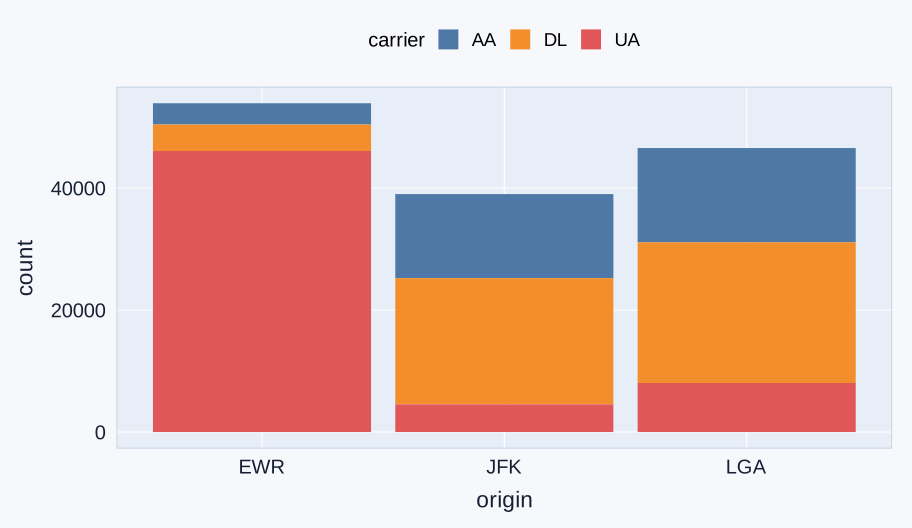
Stacked flight-record counts for American, Delta, and United at EWR, JFK, and LGA in 2013. Airport totals for the selected airlines are 53,916, 39,018, and 46,570.

  • fill = carrier gives each airline a color. geom_bar() stacks the airline counts within each airport.
  • The total bar height counts records for AA, DL, and UA combined at that airport.
  • Use this chart for airport totals and their airline breakdown. Some segments start at different heights, making their counts harder to compare.

📊 position = "dodge": grouped counts

ggplot(data = airline_flights,
       mapping = aes(x = origin,
                     fill = carrier)) +
  geom_bar(position = "dodge") +
  scale_fill_tableau()
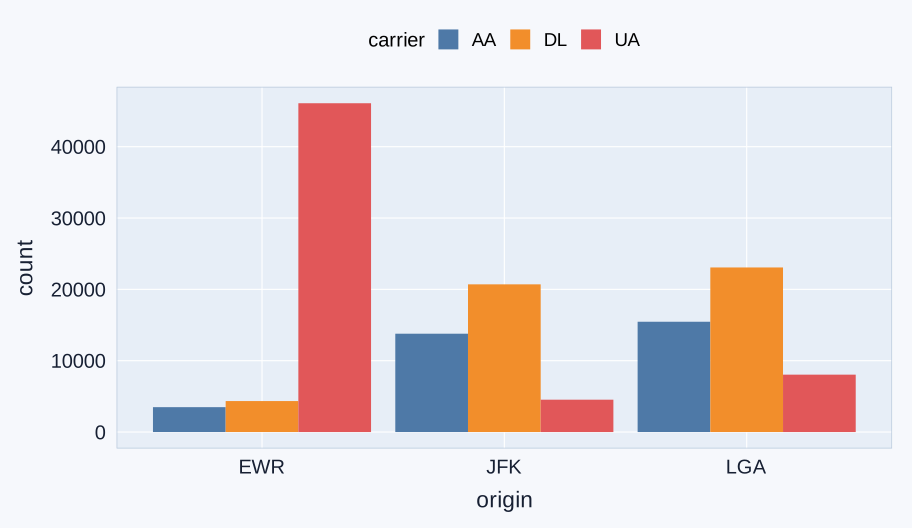
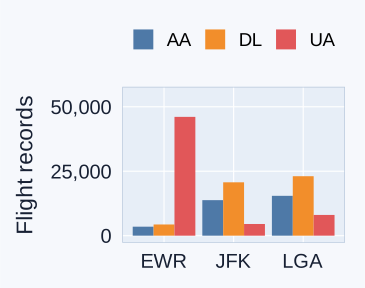
Nine equal-width bars compare American, Delta, and United flight-record counts within EWR, JFK, and LGA. United has 46,087 records at EWR, much more than either of the other selected airlines there.

  • Our question: Which airline has the most flight records at each airport?
  • position = "dodge" puts the airline bars side by side. All bars start at zero, and their heights are flight-record counts.

💯 position = "fill": within-group proportions

ggplot(data = airline_flights,
       mapping = aes(x = origin,
                     fill = carrier)) +
  geom_bar(position = "fill") +
  scale_fill_tableau()
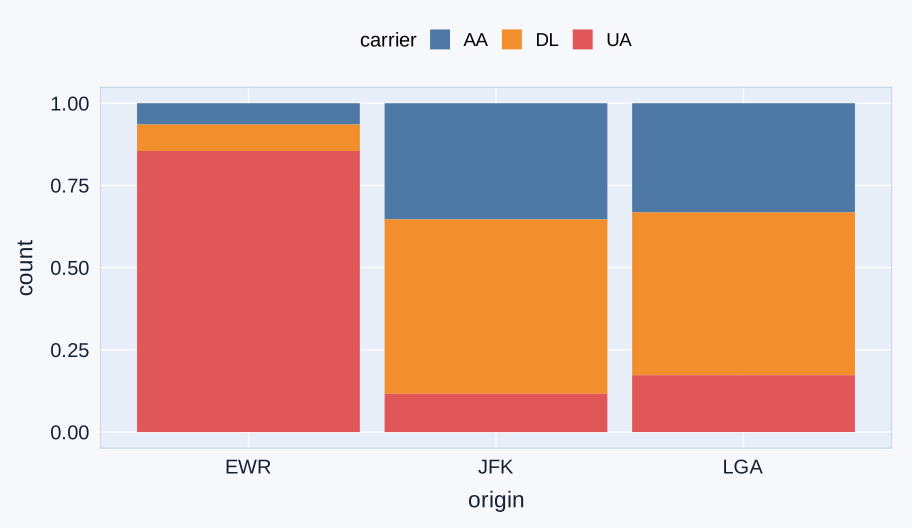
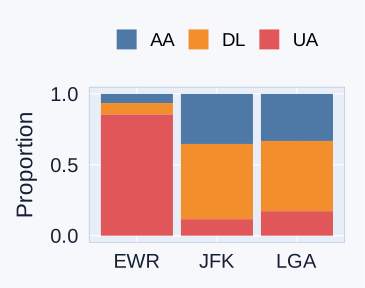
Each airport bar has a total height of one. Segment heights show American, Delta, and United shares of the selected-airline flight records at that airport.

  • fill = carrier assigns colors. position = "fill" rescales each airport’s selected-airline total to 1 (100%).
  • Each segment shows an airline’s share within that airport. Its denominator is AA + DL + UA records at that airport.
  • Compare the airline mix here. Equal total heights hide differences in the number of flight records.

🧭 Bar-chart choice depends on the question

Same 139,504 flight records from 2013 in every panel. Colors identify AA, DL, and UA.

Stacked counts
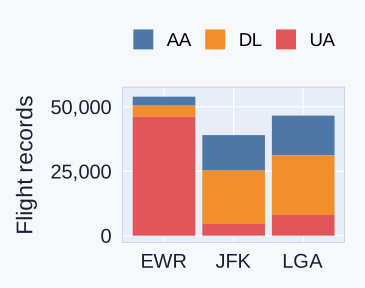
Stacked selected-airline counts for EWR, JFK, and LGA, totaling 53,916, 39,018, and 46,570 flight records.

Use: totals and breakdown.

Watch out: segments may lack a shared baseline.

Side by side

Nine equal-width airline-count bars within EWR, JFK, and LGA. All bars start at zero and use the same count scale as the stacked panel.

Use: subgroup counts.

Watch out: many bars can crowd the chart.

100% stacked

Within-airport proportions for American, Delta, and United. Each airport bar has height one, hiding differences in selected-airline totals.

Use: within-group proportions.

Watch out: totals are hidden.

🔢 count(origin, carrier) counts combinations

airport_airline_counts <- airline_flights |>
  count(origin, carrier)
origin carrier n
EWR AA 3487
EWR DL 4342
EWR UA 46087
JFK AA 13783
JFK DL 20701
JFK UA 4534
LGA AA 15459
LGA DL 23067
LGA UA 8044
  • Each row is one airport-and-airline combination. n counts its flight records.

🧮 A larger count can mean a smaller share

Airport American records Selected-airline total American share
JFK 13,783 39,018 35.3%
LGA 15,459 46,570 33.2%
  • LGA has more American flight records, which the count chart shows.
  • JFK has a larger share for American among the three selected airlines, which the proportional chart shows.
  • The denominators differ: 39,018 at JFK versus 46,570 at LGA. A larger count can therefore represent a smaller share.

🧩 The same grammar supports different questions

Question Mapping Drawing layer
How does city MPG vary? aes(x = cty) geom_histogram()
How does city MPG differ by drive system? aes(x = drv, y = cty, fill = drv) geom_boxplot()
How many vehicles are in each class? aes(y = class, fill = class) geom_bar()
How do airline counts differ across airports? aes(x = origin, fill = carrier) geom_bar(position = "dodge")
What counts are in our class-count table? aes(x = n, y = class, fill = class) geom_col()
  • We choose the data and mappings, then add the layer suited to our question.
  • The next lecture extends this grammar to relationships and time trends.

✍️ Classwork 13: Distribution of a Categorical Variable Across Groups

  • Compare side-by-side counts with within-group proportions, then check a two-variable count table.