library(tidyverse)
library(ggthemes)

purchases <- read_csv("https://bcdanl.github.io/data/cafe-purchases.csv")
locations <- read_csv("https://bcdanl.github.io/data/cafe-locations.csv")Homework 3
Data Types, Joining Tables, and Data Visualization
Homework 3 questions based on Lectures 6 and 7, with an emphasis on Lecture 7.
Instructions
This homework covers Lectures 6 and 7, with more emphasis on Lecture 7. Answer all 36 questions, worth 100 points:
- Concepts: 50 points. Questions 1–15 are multiple-choice questions; Questions 16–18 are fill-in-the-blank questions.
- R programming: 50 points. Questions 19–36 each contain one R-code blank.
- Questions 1–7 and 19–21 focus on Lecture 6. The other 26 questions focus on Lecture 7.
For each multiple-choice question, select the one best answer. For each conceptual blank, enter only the requested term or value. For each coding question, enter only the R code that replaces [?], not the entire code block. Include quotation marks when the missing code is a character string.
A coding blank may require a complete filter condition, aesthetic mapping, or plot layer, rather than just one word. Read the requested result and use the target visualization to check your completed code.
Run the setup code below once, then write and test your answers in an R script. Treat each question as a separate task using the original setup objects. A question does not require you to have completed an earlier question’s code. Chart labels and axis tick formatting are provided for readability and are not assessed; you do not need to add extra formatting code to your answers.
For each question with ggplot() code, a target visualization shows the expected result after filling in the blank. The completed code used to generate that image is not displayed.
All plotted categories use a ggthemes Tableau or colorblind-friendly fill scale. Text labels, panel headings, and legends identify groups so that color is not the only cue.
Use only course materials, R functions, operators, and methods covered in class through Lecture 7. If you are unsure whether a method is allowed, ask before submitting.
Submission: Submit your answers through the Brightspace quiz. Check Brightspace for the due date and attempt limit.
ImportantGenerative AI is not permitted
Complete this homework independently. Do not use generative AI tools to generate, revise, explain, debug, or check your answers or R code. Use the lectures, classwork, and your own course notes. Please ask Prof. Choe if you need help.
Practice Data: Campus Dining Purchases
The following data describe 24 food purchases. One row in purchases represents one purchase, not one unique student. The same student could make more than one purchase, so purchase counts must not be described as counts of students.
locations is a lookup table with one row per listed location. The location codes intentionally appear in a different order from the purchase records. Some codes occur in only one of the two tables.
If ggthemes is not installed in your R environment, run install.packages("ggthemes") once before running the setup code. The setup uses library(ggthemes) to load it in the current R session.
purchases data.frame
locations data.frame
Variable descriptions
| Table | Variable | Description |
|---|---|---|
purchases |
purchase_id |
A numeric identifier for a purchase. The numbers are labels, not amounts or rankings. |
| Both tables | location_code |
The code used to match a purchase to its dining location. |
purchases |
meal_period |
The meal period: Lunch or Dinner. |
purchases |
order_method |
How the purchase was ordered: App or Counter. |
purchases |
wait_minutes |
Time in minutes from placing the order to receiving it. Zero would mean no waiting. |
locations |
location_name |
The readable name associated with a listed location code. |
Part I: Multiple Choice — Concepts
Question 1
2 points
A dining office stores purchases in a CSV file. Every row uses the same columns, although some cells in an optional notes column are blank. How is this dataset organized?
- Unstructured, because at least one cell is blank.
- Structured, because the records share a defined row-and-column layout.
- Semi-structured, because every CSV file has a different set of fields in each row.
- It cannot be classified until the blank cells are replaced with zero.
Question 2
2 points
R stores purchase_id as numbers such as 301 and 302. Given the variable description above, which statement is correct?
- Purchase 302 represents more food than purchase 301.
- The difference between two purchase IDs measures waiting time.
- The mean purchase ID summarizes the typical purchase amount.
- The IDs are nominal labels, even though R stores them as numbers.
Question 3
3 points
A dining manager assigns maintenance requests the priorities Low, Medium, and High. Which comparison is justified by these labels alone?
- A High-priority request is exactly three times as urgent as a Low-priority request.
- The priorities can be ranked, but equal-sized differences between levels are not established.
- The priorities have no meaningful order.
- Coding the priorities as 1, 2, and 3 proves that every step has the same size.
Question 4
3 points
A cafe records refrigerator temperature in degrees Celsius and customer waiting time in minutes. Which statement correctly distinguishes these measurements?
- Both are nominal because they are recorded in a table.
- A temperature of 10°C is twice as hot as 5°C, but a 10-minute wait is not twice a 5-minute wait.
- Waiting time has a meaningful zero and supports ratios; Celsius temperature supports differences but not the same kind of ratio interpretation.
- Neither variable supports calculating differences between observations.
Question 5
2 points
A table’s rules require a unique purchase_id and a numeric wait_minutes value. Which proposed new record violates both rules?
- It reuses an existing purchase ID and records waiting time as the text
"five". - It uses a new purchase ID and records waiting time as the number
5. - It uses a new purchase ID and records waiting time as the number
0. - It uses a new purchase ID and the same waiting time as another purchase.
Question 6
2 points
The dining office uses PostgreSQL to manage stored tables, updates, and access permissions. What role does PostgreSQL play?
- It is a database management system (DBMS).
- It is a single row in the purchase table.
- It is the
purchasesdata frame in the current R session. - It is a measurement scale such as nominal or ratio.
Question 7
3 points
Suppose a left join starts with purchases and adds location_name from locations, matching on location_code. What should happen to purchase 324, whose location code is L9?
- The purchase must be deleted because
L9has no matching location record. - The purchase must receive the name from the third row of
locationsbecause it is the last purchase. - The purchase remains, and the added location name is
NAbecause no matching lookup record exists. - The purchase remains, and the missing location name becomes the number
0.
Question 8
3 points
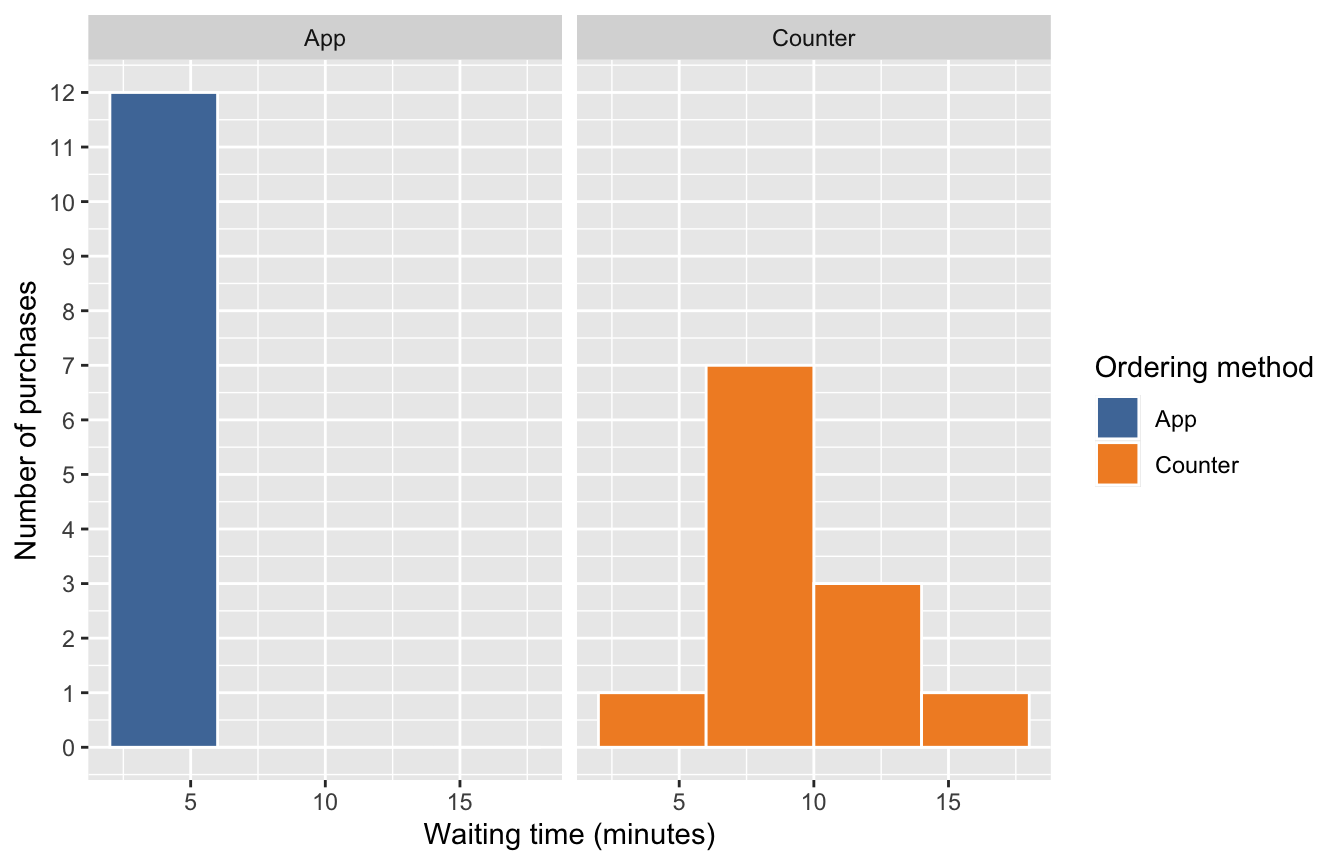
Use the faceted histograms below. Each panel shows one ordering method, with shared axes and 4-minute bins. Each bin includes its lower endpoint but not its upper endpoint. Across both panels, how many purchases had waits of at least 8 minutes but less than 16 minutes?
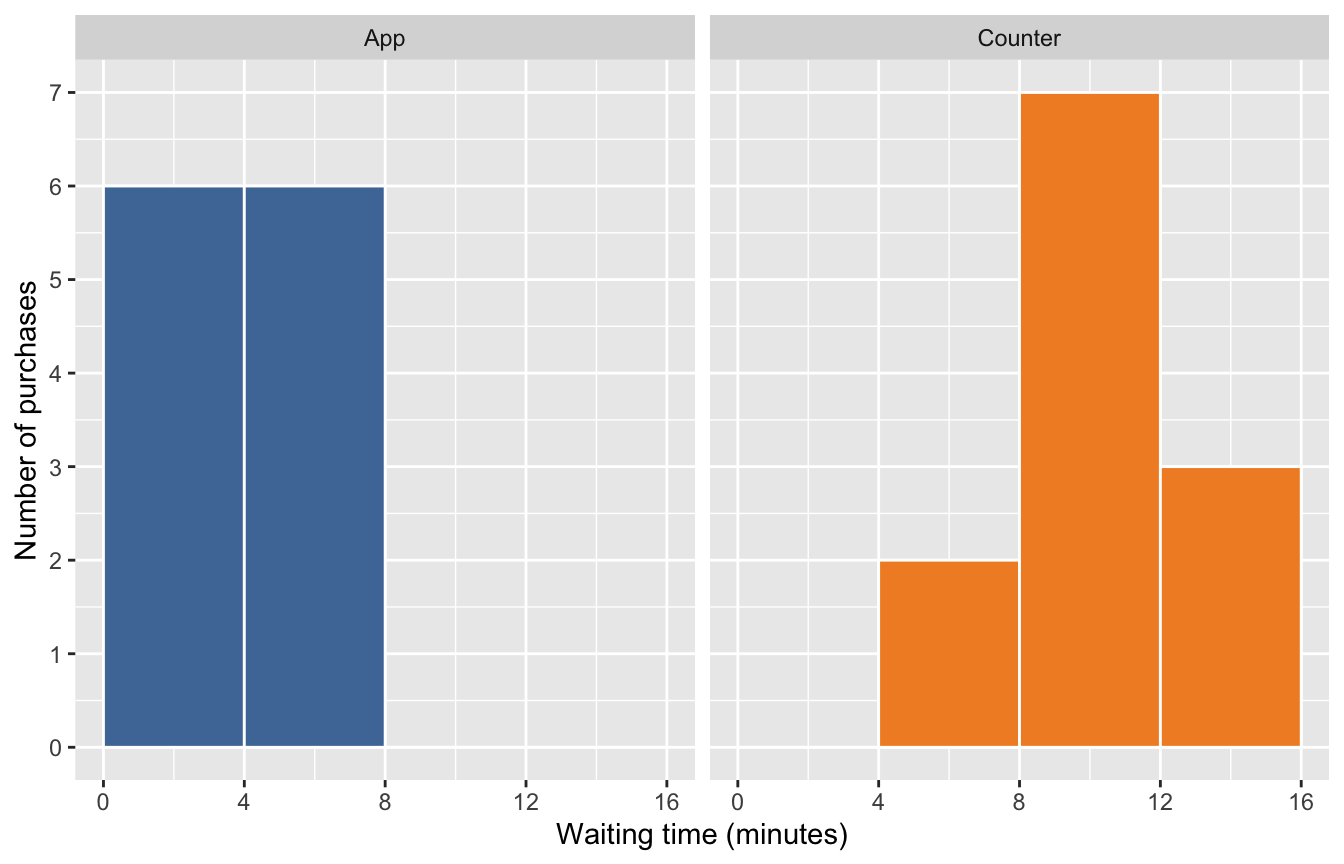
- 7 purchases, using only the 8-to-under-12-minute bin.
- 10 purchases, adding the counts in the two bins from 8 to under 16 minutes across both panels.
- 10 different students, each of whom must have made exactly one purchase.
- 18 purchases, adding all bins beginning at 4 minutes or more.
Question 9
3 points
You redraw the histograms in Question 8 using 2-minute bins instead of 4-minute bins, without filtering or changing the data. Which statement is correct?
- The dataset now contains twice as many purchase records.
- The recorded waiting times change to fit the new bins.
- The visible peaks and gaps may change, but the same 24 waiting times are plotted.
- The narrower bins guarantee that the population distribution is bimodal.
Question 10
3 points
Use the boxplots below. Which comparison of the median and the spread of the middle 50% is best supported by these observations?
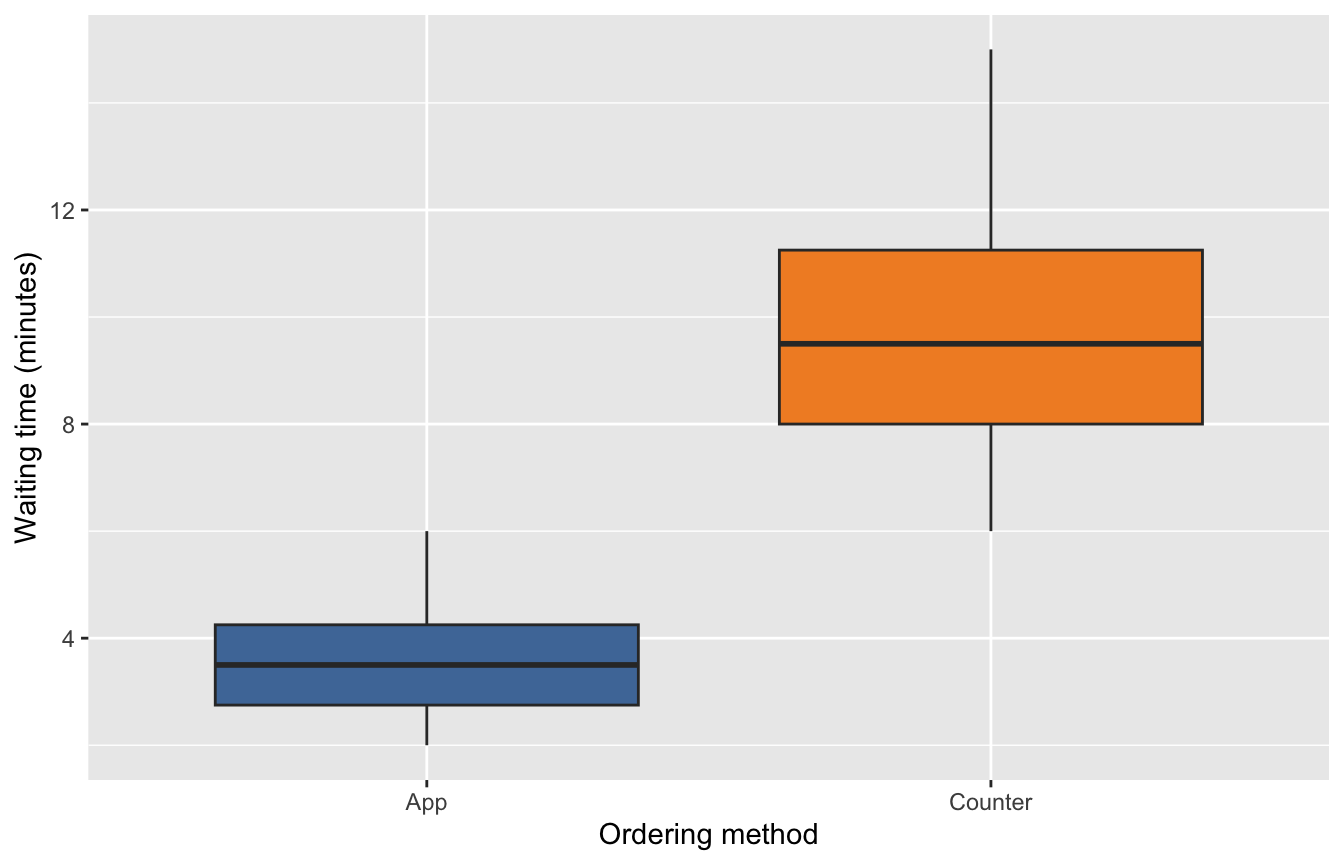
- The App group has both a lower median and a narrower interquartile range than the Counter group.
- The Counter group has both a lower median and a narrower interquartile range than the App group.
- Using the app is proven to cause shorter waiting times for every student.
- Each box contains every observed waiting time in its group.
Question 11
3 points
You want all histogram bars to have blue interiors, rather than assigning colors based on a data variable. Which setting expresses this intention?
- Put
fill = wait_minutesinsideaes(). - Put
color = "steelblue"insideaes()to set the interiors. - Put
fill = "steelblue"outsideaes(), as an argument togeom_histogram(). - Replace
wait_minuteswith the text"steelblue"in the data frame.
Question 12
3 points
A chart distinguishes two ordering methods using only red and green. Which revision best helps readers who have difficulty distinguishing these colors?
- Remove the category labels so readers concentrate on the colors.
- Keep the same colors and identify each method only as “the red one” or “the green one.”
- Change the underlying purchase counts until the colored groups look more different.
- Use a colorblind-friendly palette and retain text labels or labeled panels that identify the groups.
Question 13
3 points
A prepared table has one row per ordering method, with its purchase count already stored in a column named n. You map x = n and y = order_method. Which geometric object directly uses these supplied counts as bar lengths?
geom_histogram()geom_col()geom_boxplot()- Default
geom_bar(), which automatically treats any column namednas the bar length
Question 14
3 points
On another day, one cafe records 200 purchases and another records 50. A manager wants to compare the proportion ordered through the app within each cafe, rather than their total purchase counts. Which chart is most appropriate?
- A histogram with cafe names placed into numeric bins.
- Side-by-side count bars, interpreted as though counts were already percentages.
- A 100% stacked bar chart using
position = "fill", with cafe on the x-axis and ordering method mapped to fill. - A boxplot of the cafe identification numbers.
Question 15
3 points
You run purchases |> count(meal_period, order_method). All four meal-period-and-method combinations occur in the setup data. What does one row of the resulting table represent?
- One observed combination, such as Lunch and App, with
ngiving its purchase count. - One student, with
ngiving that student’s identification number. - One original purchase, with all 24 original rows retained.
- One waiting-time bin, with
ngiving its width in minutes.
Part II: Fill in the Blank — Concepts
Question 16
3 points
A histogram of purchase amounts has two clear peaks separated by a dip. This distribution is described as [?].
Enter the term for its number of peaks, not a direction of skew.
Question 17
3 points
In a different waiting-time dataset, most purchases have short waits, while a few have very long waits. Its longer tail points toward larger values. The distribution is [?]-skewed.
Enter only left or right.
Question 18
3 points
The table below describes purchases during lunch on another day, not the 24-row setup dataset.
| Meal period | Ordering method | Number of purchases |
|---|---|---|
| Lunch | App | 12 |
| Lunch | Counter | 8 |
These are the only two ordering methods in this table. In a 100% stacked bar for Lunch, the App segment would have a height of [?].
Enter the proportion as a decimal between 0 and 1, not a percentage or the purchase count.
Part III: Fill in the Blank — R Programming
Use the original purchases and locations objects from the setup code. Each question below contains exactly one blank. Run a completed version in your R script before submitting the code that replaces [?].
Question 19
2 points
Add the matching location name to every purchase, including purchases without a matching location record. Fill in the function name.
purchases_with_location <- purchases |>
  [?](locations, by = "location_code")
Question 20
2 points
The dining manager now starts with locations to retain every listed location, including Recreation Cafe, which has no purchase in the setup data. Complete the matching-key argument. Match codes, not row positions.
locations_with_purchases <- locations |>
  left_join(purchases, by = [?])
Question 21
2 points
For the join shown below, each location code occurs at most once in locations. Predict the number of rows in purchases_with_location, and use that number to complete the assignment.
purchases_with_location <- purchases |>
  left_join(locations, by = "location_code")

expected_rows <- [?]
Question 22
3 points
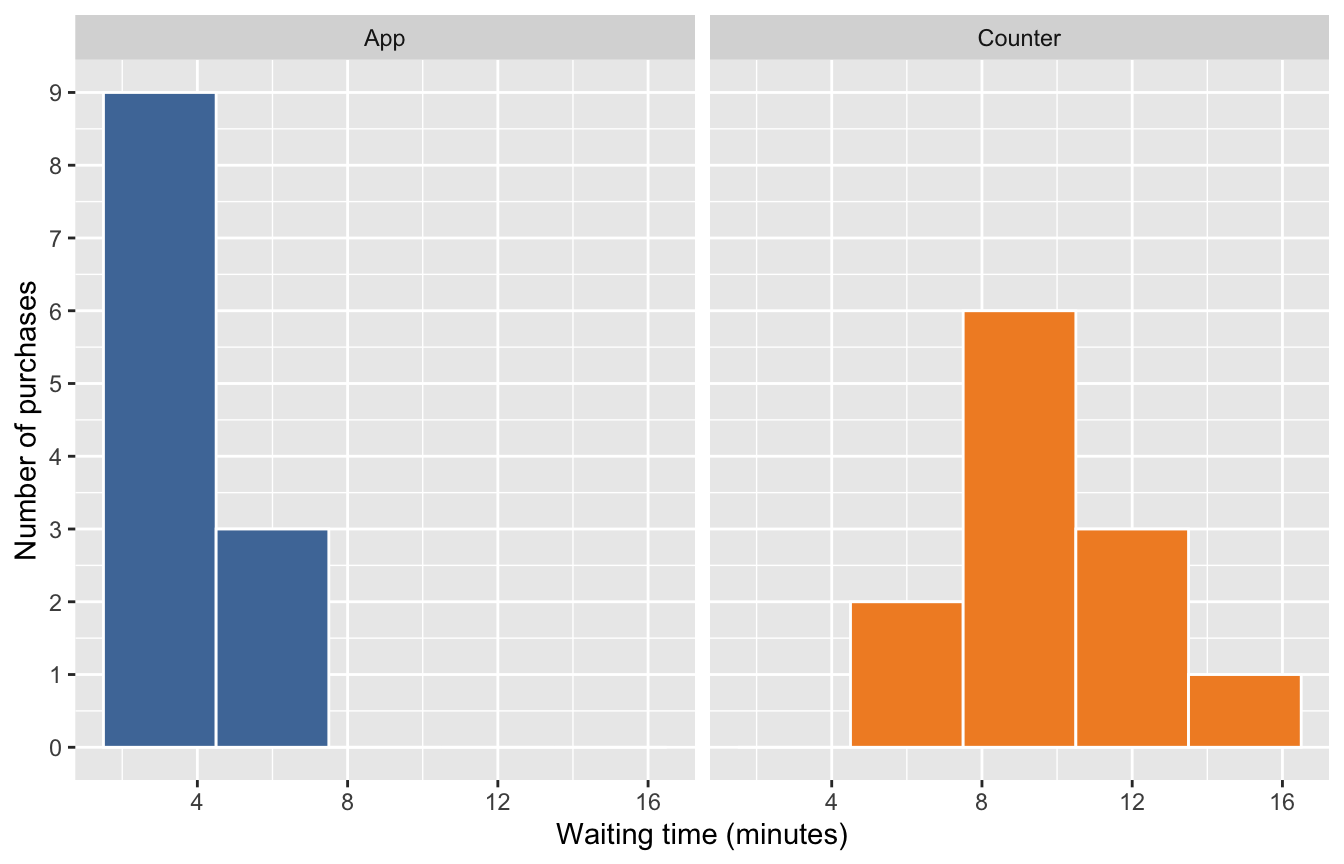
Compare the waiting-time distributions for App and Counter in separate panels. Complete the entire aesthetic mapping so waiting time determines horizontal position and ordering method determines the bar interiors.
ggplot(data = purchases,
       mapping = [?]) +
  geom_histogram(binwidth = 3, color = "white", show.legend = FALSE) +
  facet_wrap(~ order_method) +
  scale_fill_tableau()
Target visualization:
Question 23
3 points
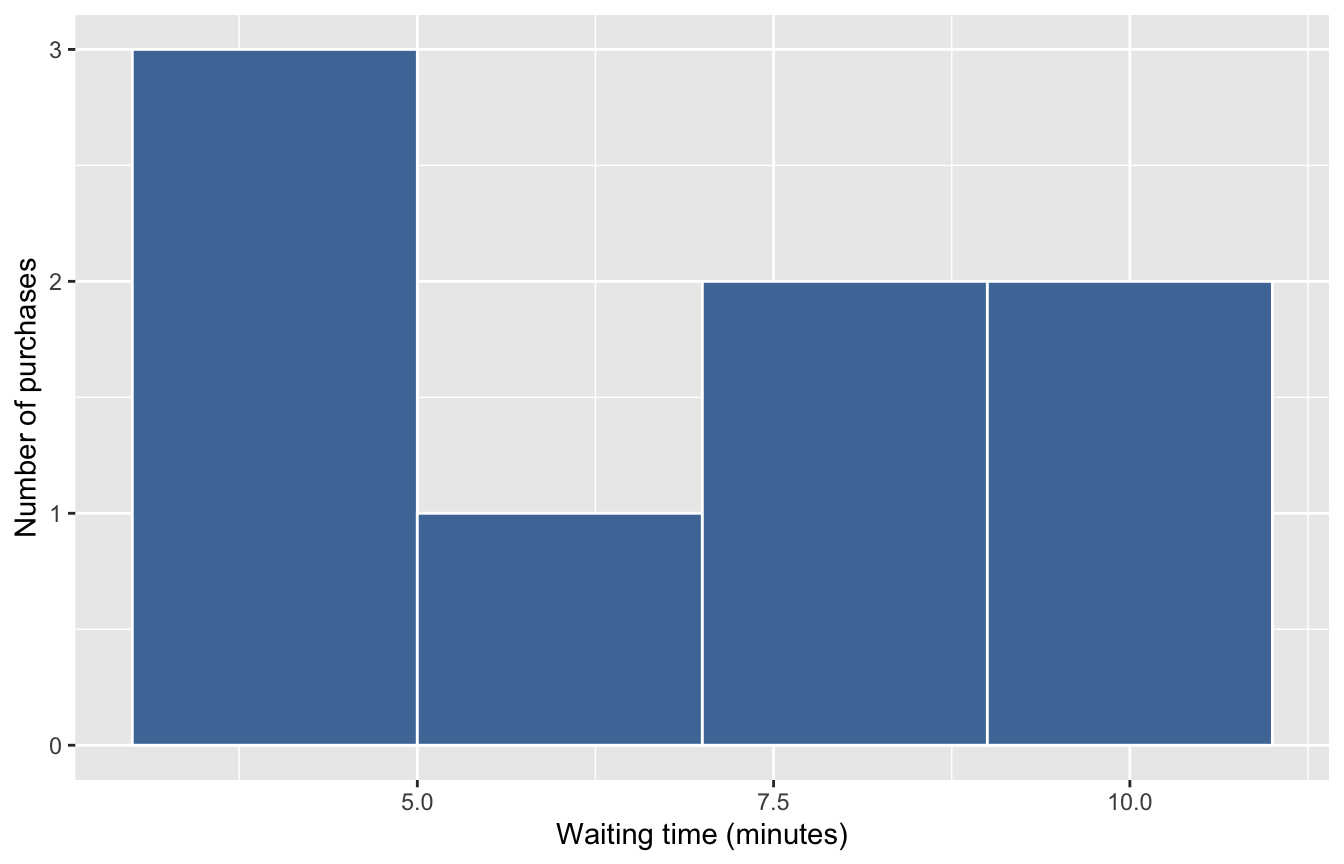
Show only Lunch purchases with waiting times of at least 4 minutes, then plot their waiting-time distribution. Complete the entire filter condition, combining the two requirements with &.
selected_purchases <- purchases |>
  filter([?])

ggplot(data = selected_purchases,
       mapping = aes(x = wait_minutes, fill = meal_period)) +
  geom_histogram(binwidth = 2, color = "white", show.legend = FALSE) +
  scale_fill_tableau()
Target visualization:
Question 24
3 points
Show waiting times in a separate histogram panel for each ordering method, using 4-minute-wide bins with white outlines. The fill mapping, faceting layer, and palette are already supplied. Complete the entire histogram layer, including the bin-width and outline settings.
ggplot(data = purchases,
       mapping = aes(x = wait_minutes, fill = order_method)) +
  [?] +
  facet_wrap(~ order_method) +
  scale_fill_tableau()
Target visualization:
Question 25
3 points
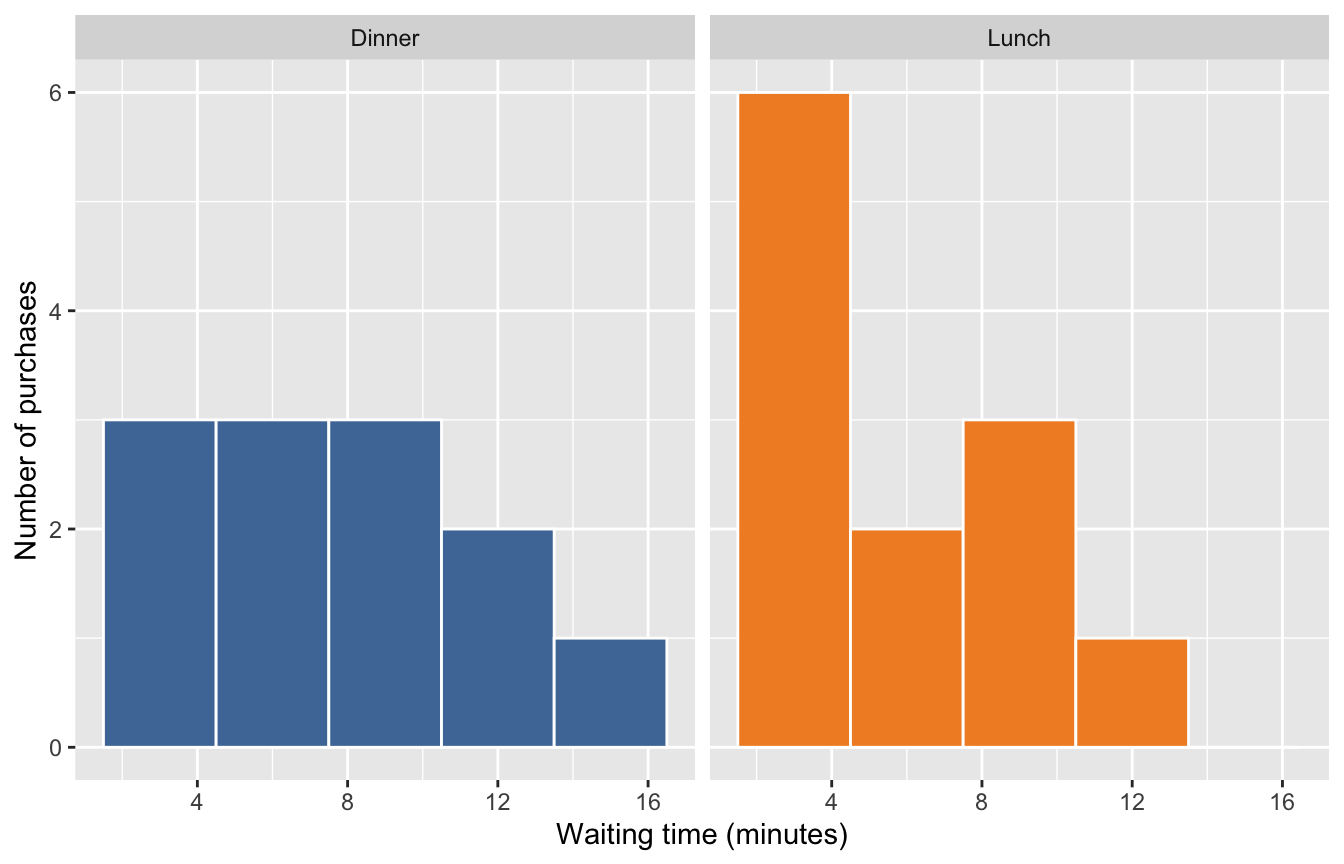
Display the waiting-time distribution in a separate panel for each meal period, using shared axes to support comparison. Complete the entire faceting layer. Keep the original purchases and the same 3-minute bin width.
ggplot(data = purchases,
       mapping = aes(x = wait_minutes, fill = meal_period)) +
  geom_histogram(binwidth = 3, color = "white", show.legend = FALSE) +
  [?] +
  scale_fill_tableau()
Target visualization:
Question 26
3 points
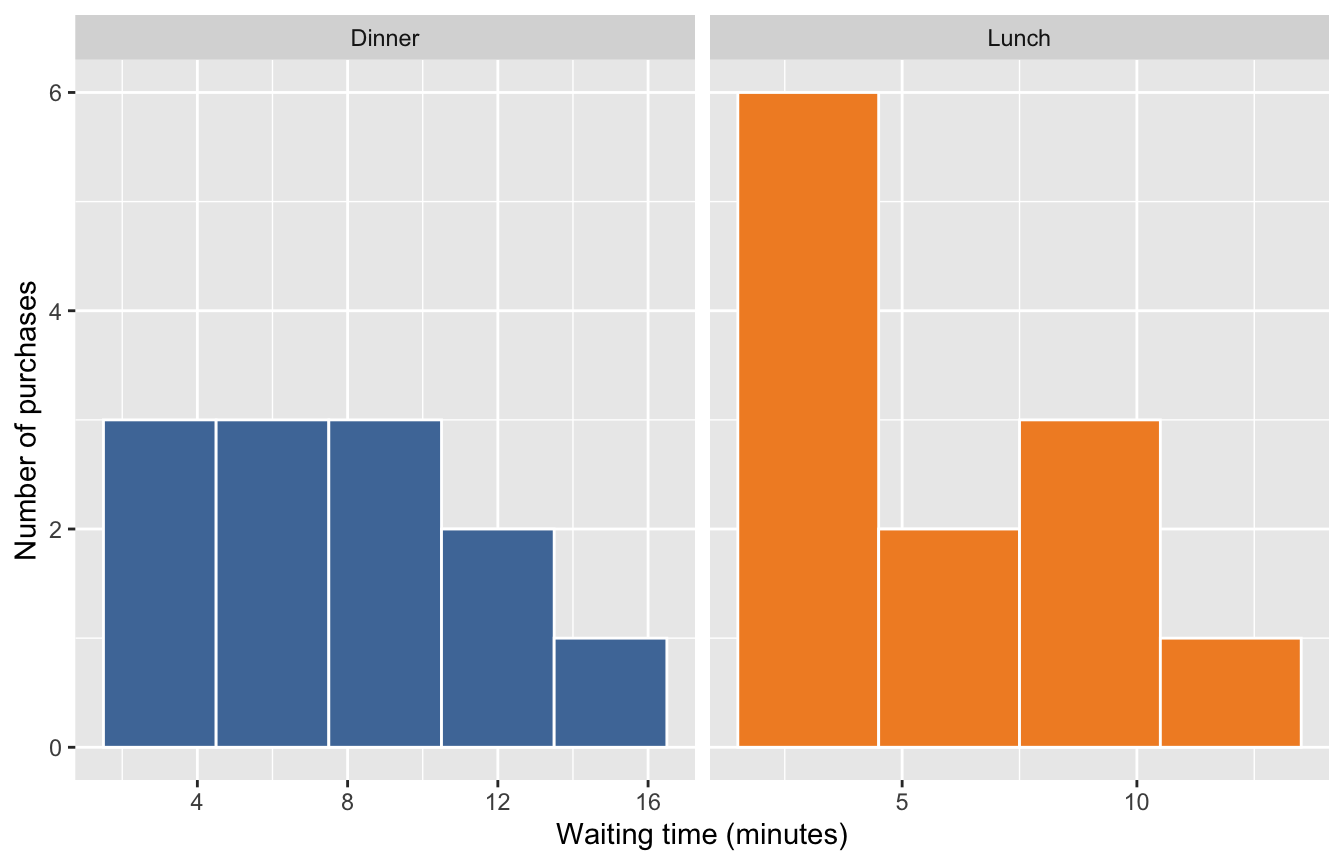
As an alternative design, let each meal-period panel have its own x-axis range, while keeping a shared y-axis scale. Fill in the character-string argument value discussed in Lecture 7.
ggplot(data = purchases,
       mapping = aes(x = wait_minutes, fill = meal_period)) +
  geom_histogram(binwidth = 3, color = "white", show.legend = FALSE) +
  facet_wrap(~ meal_period, scales = [?]) +
  scale_fill_tableau()
Target visualization:
Question 27
3 points
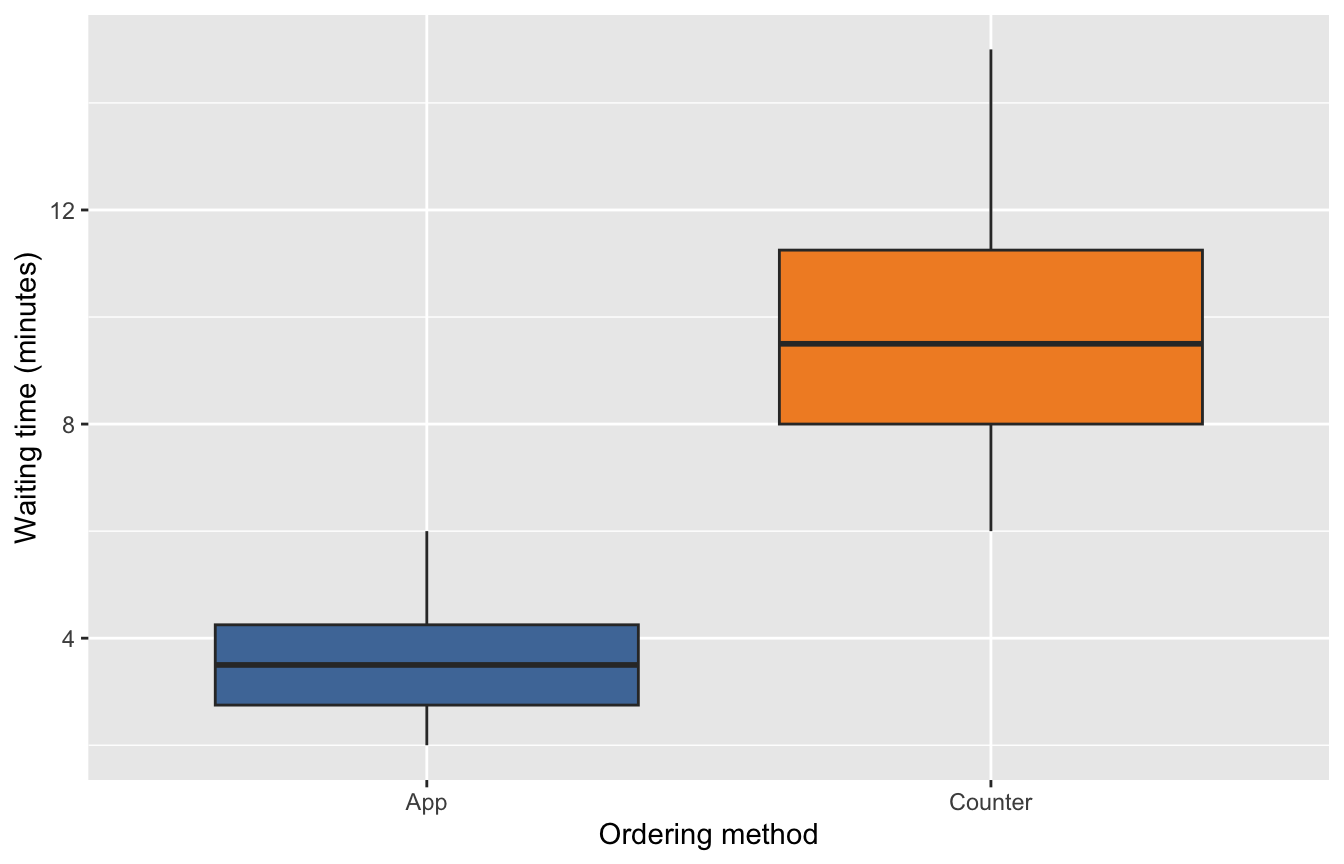
Compare waiting times between App and Counter using vertical boxplots. Complete the entire aesthetic mapping: ordering method determines the horizontal categories and box interiors, while waiting time determines vertical position.
ggplot(data = purchases,
       mapping = [?]) +
  geom_boxplot(show.legend = FALSE) +
  scale_fill_tableau()
Target visualization:
Question 28
3 points
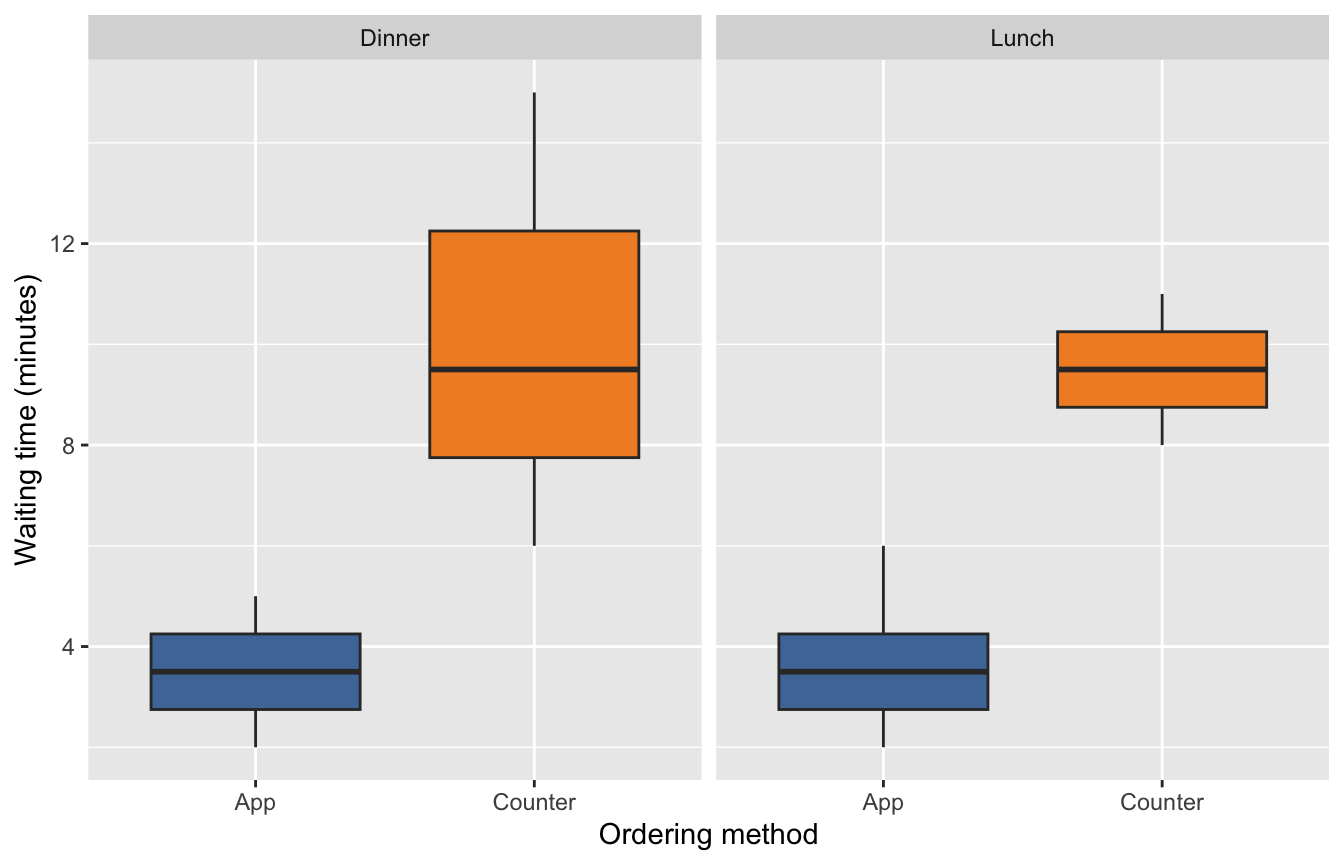
Within each meal period, compare the median, quartiles, and spread of waiting time between App and Counter purchases. The panels and mappings are supplied. Choose the geometric-object function that produces the required summaries, rather than histogram bins or category counts.
ggplot(data = purchases,
       mapping = aes(x = order_method, y = wait_minutes,
                     fill = order_method)) +
  [?](show.legend = FALSE) +
  facet_wrap(~ meal_period) +
  scale_fill_tableau()
Target visualization:
Question 29
3 points
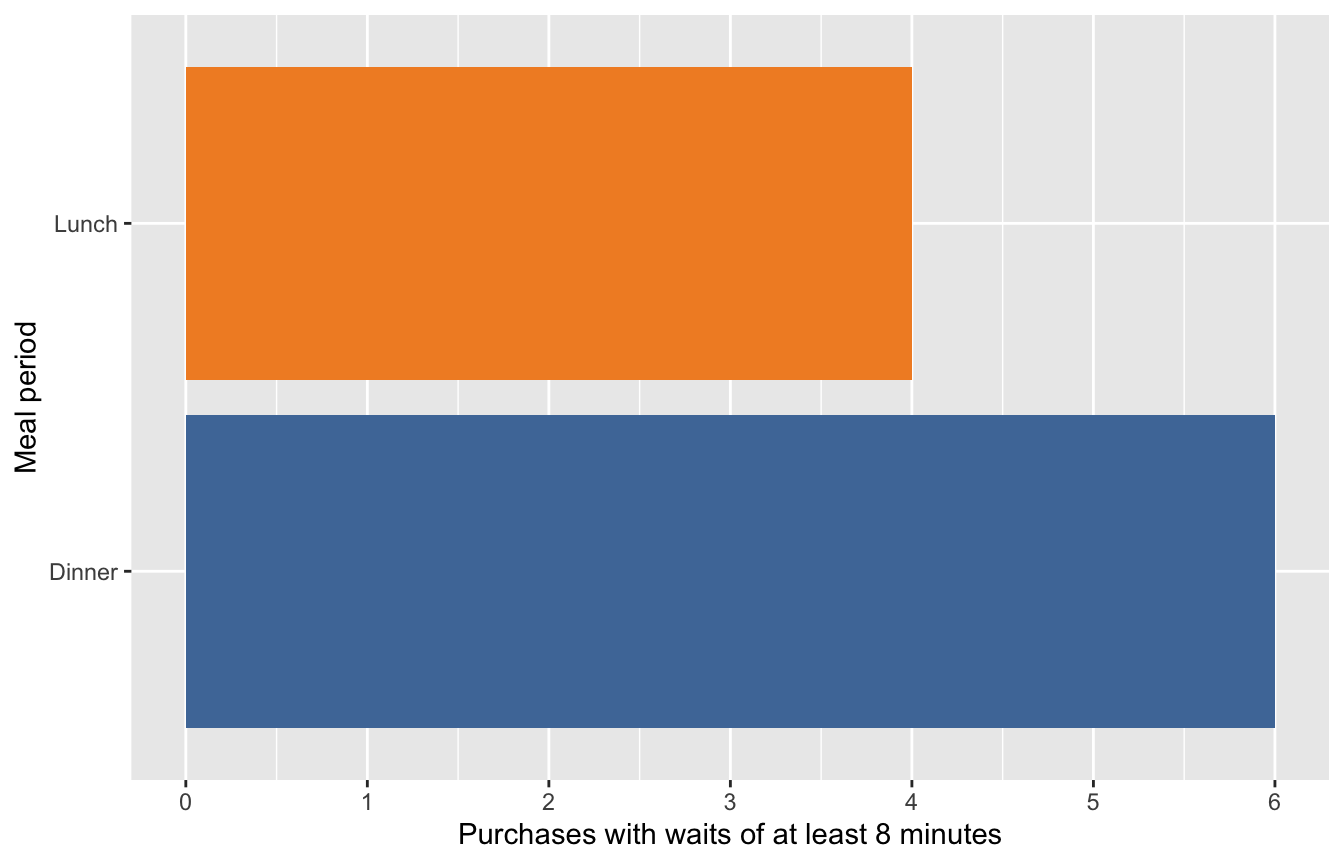
The manager wants to know how many purchases had waits of at least 8 minutes in each meal period. Use the purchase-level records to create horizontal count bars. Complete the filter condition, including waits of exactly 8 minutes.
purchases |>
  filter([?]) |>
  ggplot(mapping = aes(y = meal_period, fill = meal_period)) +
  geom_bar(show.legend = FALSE) +
  scale_fill_tableau()
Target visualization:
Question 30
3 points
Create one row for each meal-period-and-ordering-method combination, with the purchase count in n. Fill in the second grouping variable.
meal_method_counts <- purchases |>
  count(meal_period, [?])
Resulting data frame:
| meal_period | order_method | n |
|---|---|---|
| Dinner | App | 4 |
| Dinner | Counter | 8 |
| Lunch | App | 8 |
| Lunch | Counter | 4 |
Question 31
3 points
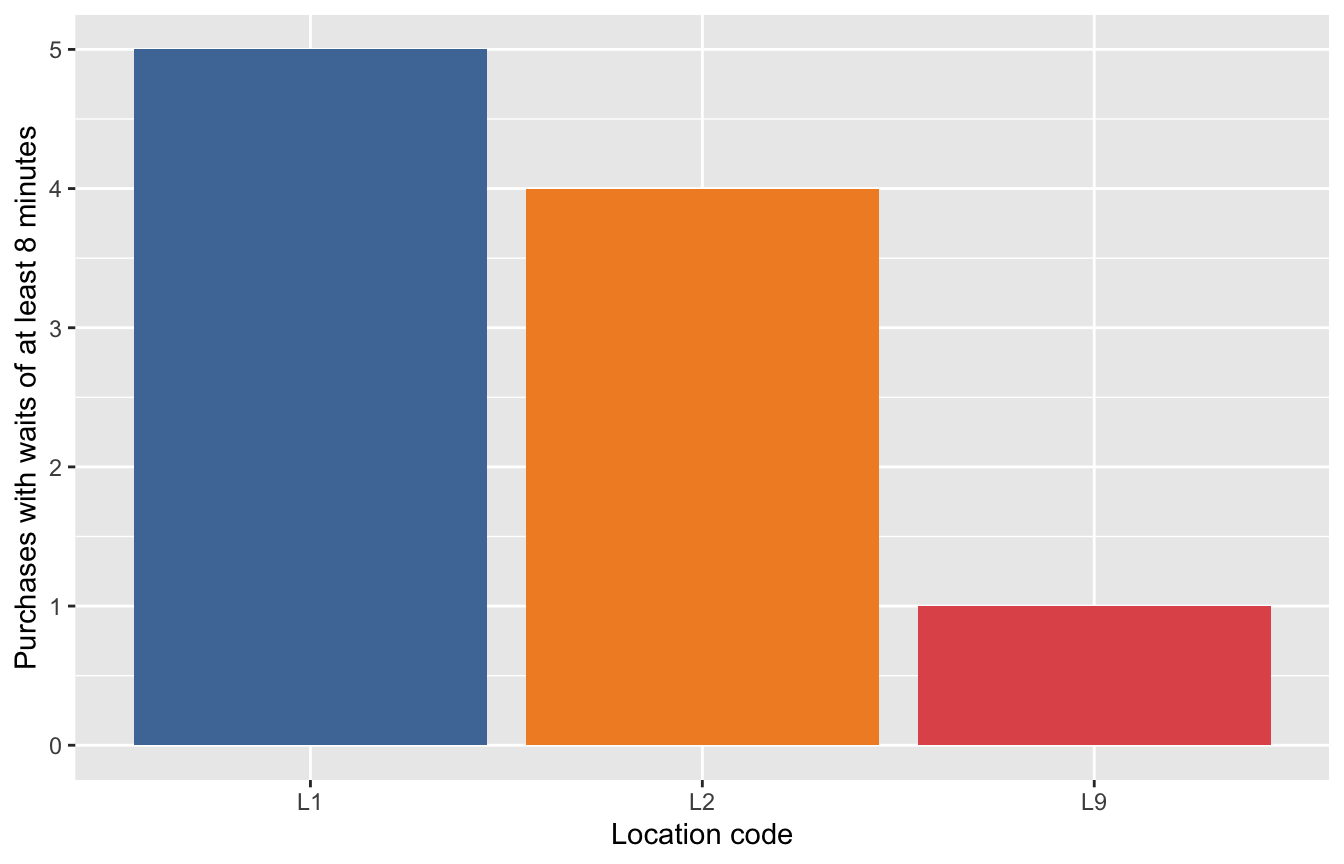
The code below first creates a summary table of purchases with waits of at least 8 minutes by location code. Use its n values to compare long-wait purchase counts across locations. Complete the entire aesthetic mapping for vertical bars: location code determines horizontal position and fill, and the supplied count determines height. Use the codes directly, including L9.
long_wait_counts <- purchases |>
  filter(wait_minutes >= 8) |>
  count(location_code)

ggplot(data = long_wait_counts,
       mapping = [?]) +
  geom_col(show.legend = FALSE) +
  scale_fill_tableau()
Target visualization:
Question 32
3 points
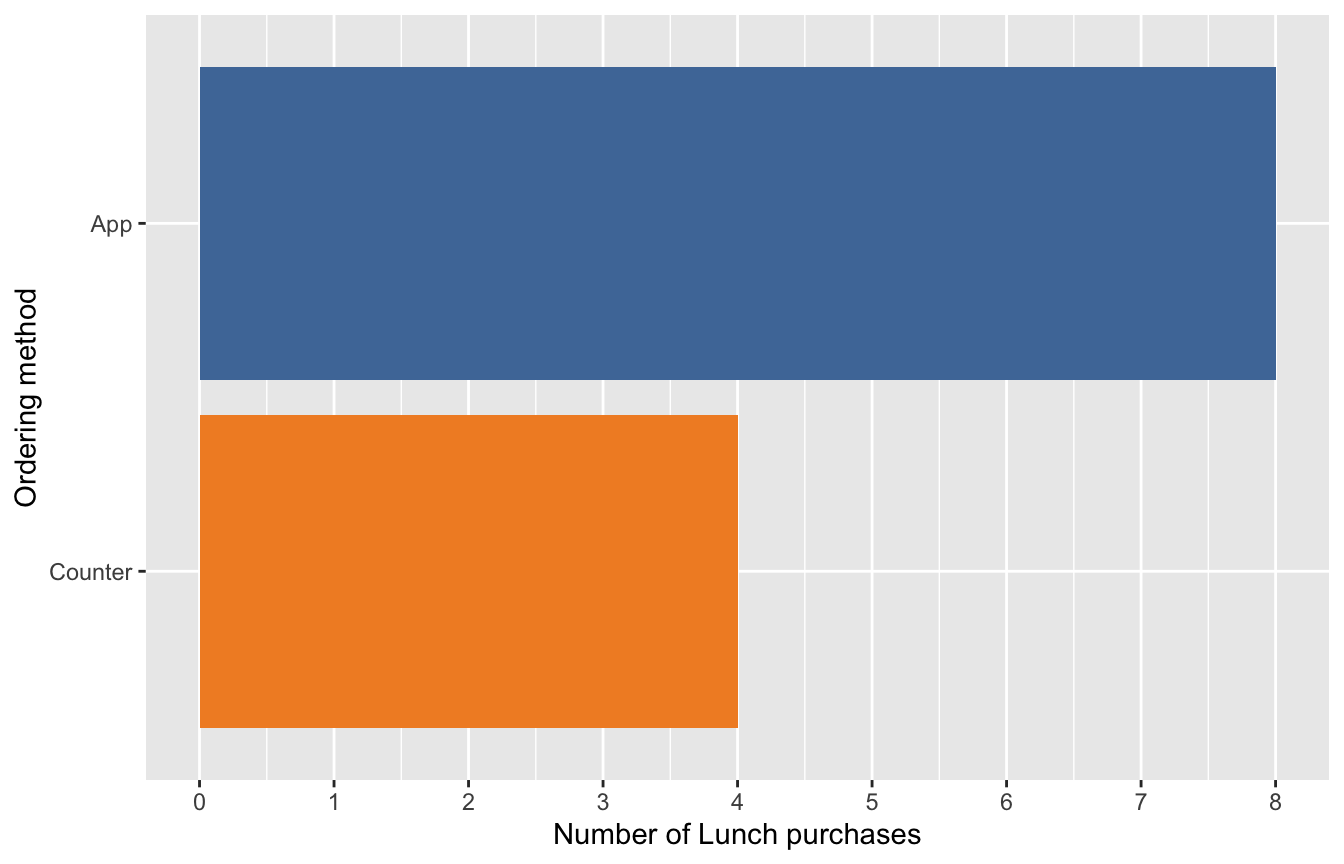
Use Lunch purchases only to compare ordering-method counts. Order the horizontal bars with the largest count at the top, rather than leaving the categories in alphabetical order. Complete the entire expression for the y-axis category ordering.
lunch_method_counts <- purchases |>
  filter(meal_period == "Lunch") |>
  count(order_method)

ggplot(data = lunch_method_counts,
       mapping = aes(x = n,
                     y = [?],
                     fill = order_method)) +
  geom_col(show.legend = FALSE) +
  scale_fill_tableau()
Target visualization:
Question 33
3 points
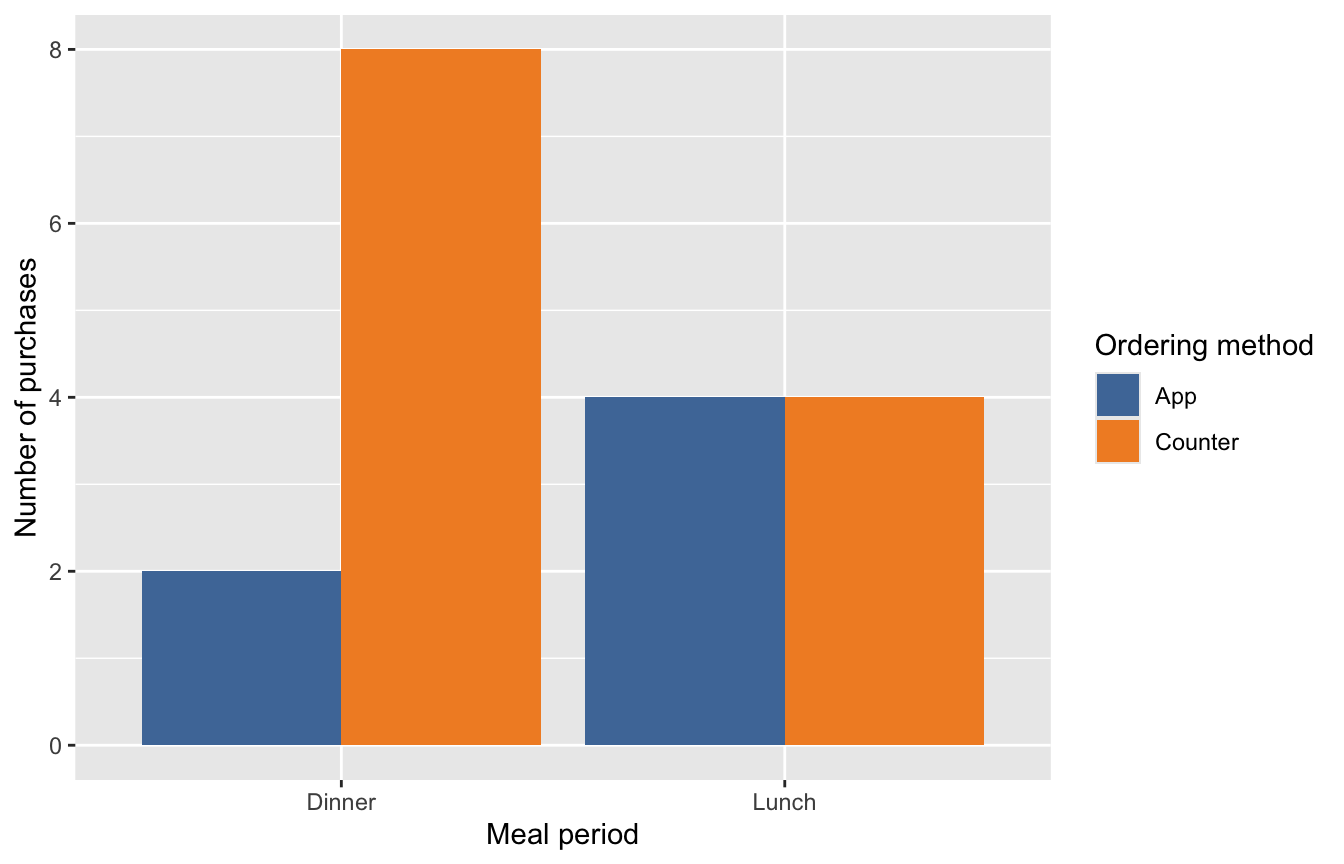
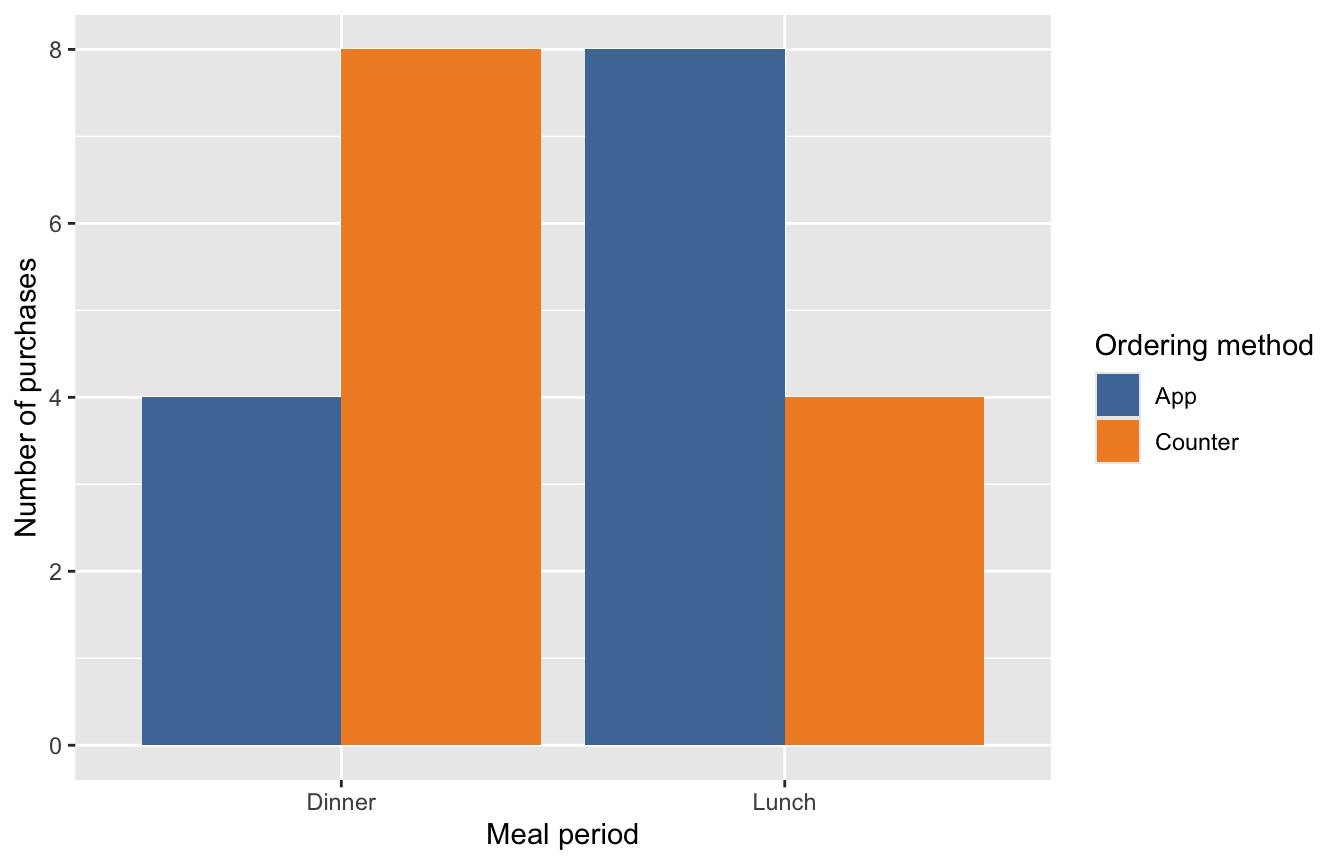
Within each meal period, compare App and Counter purchase counts side by side, with every bar starting at zero. Starting from the original purchase-level rows, complete the entire geometric layer, including the position setting.
ggplot(data = purchases,
       mapping = aes(x = meal_period,
                     fill = order_method)) +
  [?] +
  scale_fill_tableau()
Target visualization:
Question 34
3 points
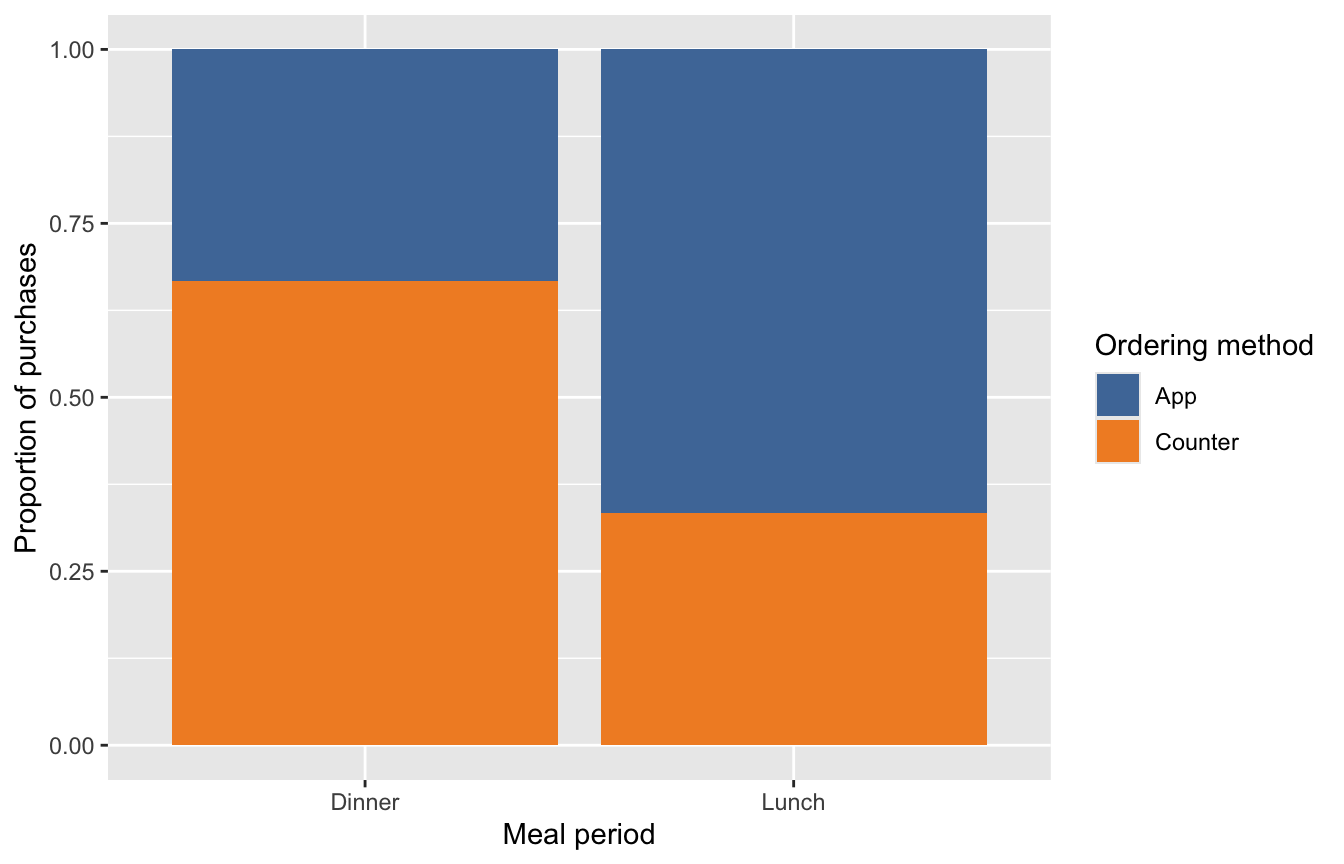
Compare the ordering-method proportions within each meal period. Each complete bar should have height 1. Starting from the original purchase-level rows, complete the entire geometric layer, including the position setting that uses each meal period’s total as its denominator.
ggplot(data = purchases,
       mapping = aes(x = meal_period,
                     fill = order_method)) +
  [?] +
  scale_fill_tableau()
Target visualization:
Question 35
2 points
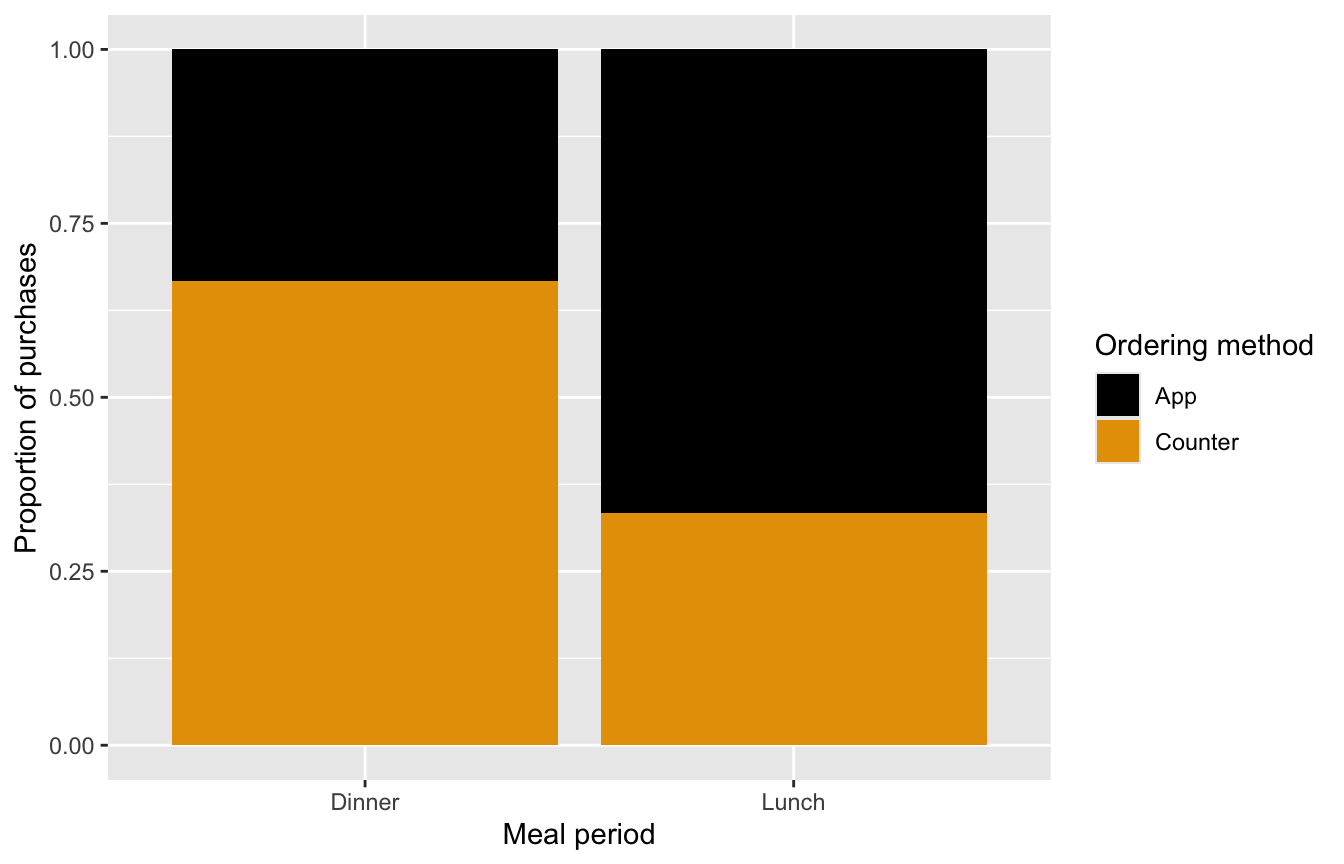
A teammate has chosen a scale for point and line colors, but the plot maps ordering method to bar interiors. Supply the complete ggthemes scale call whose name specifically identifies a colorblind-friendly fill palette. It should change the interiors without changing counts or proportions.
ggplot(data = purchases,
       mapping = aes(x = meal_period,
                     fill = order_method)) +
  geom_bar(position = "fill") +
  [?]
Target visualization:
Question 36
3 points
For purchases with waits of at least 4 minutes, this pipeline first creates one summary row per meal-period-and-ordering-method combination. Complete the entire geometric layer to compare the supplied n values side by side. Choose a layer that uses those counts, rather than counting the summary rows again.
NotePiping a data frame into ggplot()
my_data |> ggplot(mapping = aes(...)) passes my_data to the first argument, data, of ggplot(). It is equivalent to ggplot(data = my_data, mapping = aes(...)). Here, count() produces that input data frame; + then adds the plot layers.
purchases |>
  filter(wait_minutes >= 4) |>
  count(meal_period, order_method) |>
  ggplot(mapping = aes(x = meal_period,
                       y = n,
                       fill = order_method)) +
  [?] +
  scale_fill_tableau()
Target visualization: