Classwork 10

Advanced ggplot Charts

Author

Byeong-Hak Choe

Published

April 6, 2026

Modified

April 12, 2026

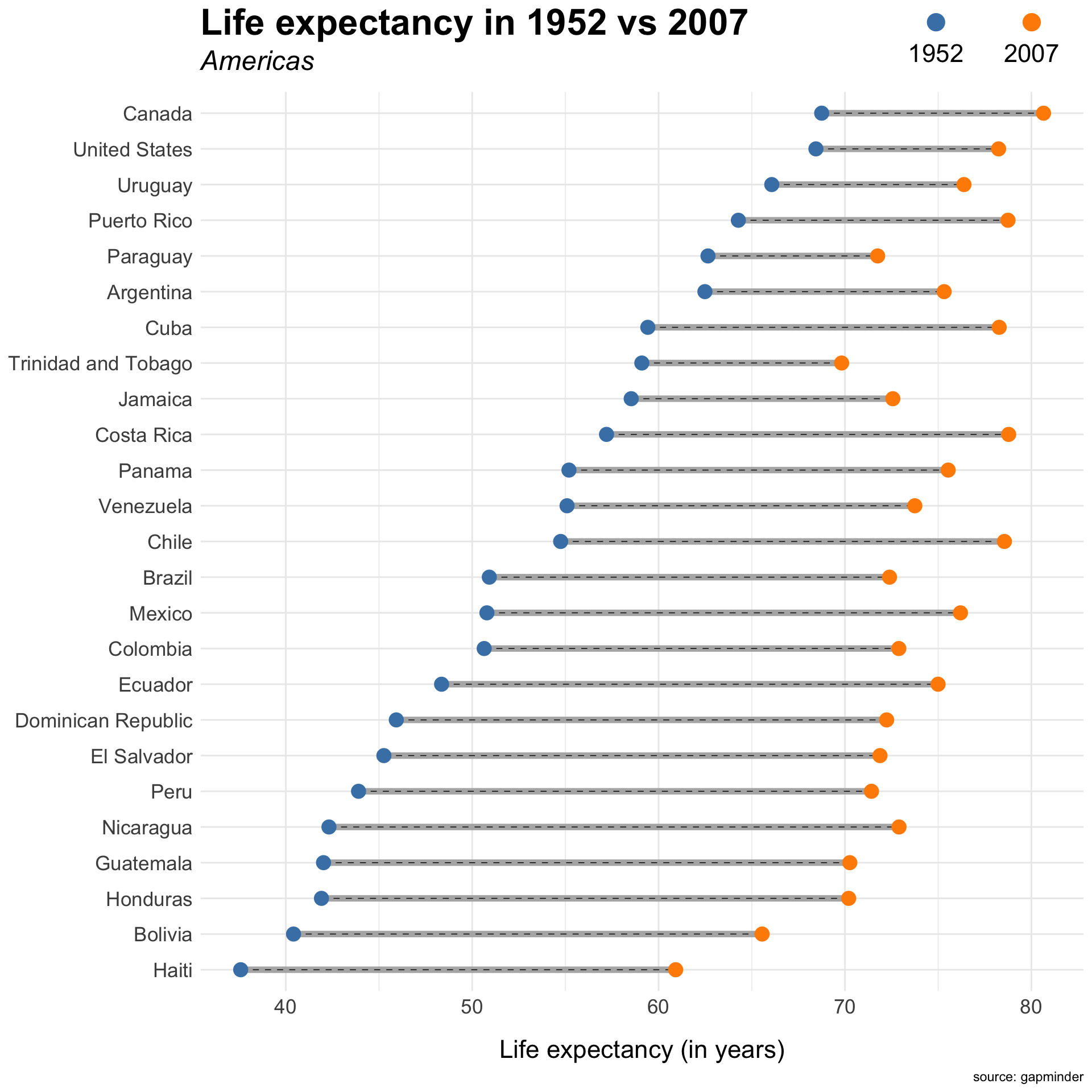
Question 1. Dumbbell Charts

Code
gap_dumbbell <- gapminder |>
  filter(year %in% c(1952, 2007), continent == "Americas") |>
  select(country, year, lifeExp) |>
  pivot_wider(names_from = year,
              values_from = lifeExp,
              names_prefix = "year_") |>
  mutate(change = year_2007 - year_1952) |>
  arrange(year_1952) |>
  mutate(country = fct_inorder(country))


ggplot(gap_dumbbell, aes(y = country)) +
  geom_segment(aes(x = year_1952,
                   xend = year_2007,
                   yend = country),
               linewidth = 2,
               color = "gray70") +
  geom_segment(aes(x = year_1952,
                   xend = year_2007,
                   yend = country),
               linewidth = .25,
               lty = 2,
               color = "black") +
  geom_point(aes(x = year_1952, color = "1952"), 
             size = 4) +
  geom_point(aes(x = year_2007, color = "2007"), 
             size = 4) +
  labs(
    x = "Life expectancy (in years)",
    y = NULL,
    title = "Life expectancy in 1952 vs 2007",
    subtitle = "Americas",
    caption = "source: gapminder"
  ) +
  scale_color_manual(values = c("steelblue", "darkorange"),
                     name = NULL,
                     guide = guide_legend(
                       keywidth = 4,
                       nrow = 1,
                       override.aes = list(size = 5)
                     )) +
  theme_minimal() +
  theme(axis.text.x = element_text(size = rel(1.5)),
        axis.text.y = element_text(size = rel(1.5)),
        axis.title.x = element_text(size = rel(1.5),
                                    margin = margin(15,0,0,0)),
        plot.title = element_text(size = 24, face = "bold"),
        plot.subtitle = element_text(size = 18, face = "italic"),
        legend.position = "top",
        legend.justification = 1,
        legend.text = element_text(size = rel(1.5)),
        legend.text.position = "bottom",
        legend.box.margin = margin(-55,0,0,0)
        )


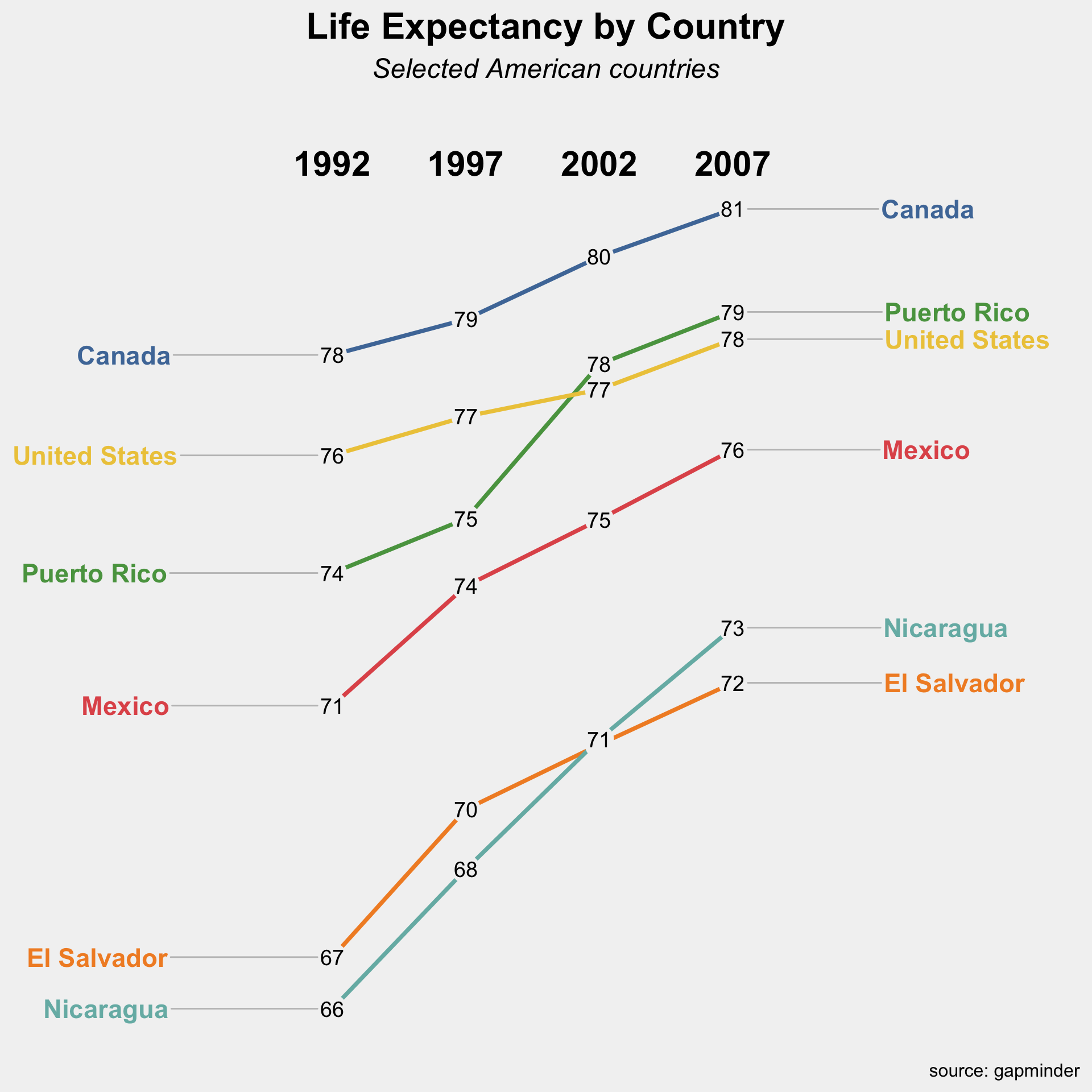
Question 2. Sloph Charts

  • Use direction, nudge_x, and hjust properly.
Code
ca_life <- gapminder::gapminder |>
  filter(
    continent == "Americas",
    country %in% c(
      "United States", "Mexico", "Canada",
      "Puerto Rico",
      "El Salvador", "Nicaragua"
    ),
    year %in% c(1992, 1997, 2002, 2007)
  ) |>
  select(country, year, lifeExp)

left_labs <- ca_life |>
  filter(year == 1992) |> 
  mutate(year = year - .5)

right_labs <- ca_life |>
  filter(year == 2007) |> 
  mutate(year = year + .5)

year_labs <- tibble(
  year = c(1992, 1997, 2002, 2007),
  y = 81.5
)

ggplot(ca_life, 
       aes(x = year, y = lifeExp, 
           group = country, 
           color = country)) +
  geom_line(linewidth = 1.3, 
            show.legend = FALSE) +
  geom_point(
    size = 8,
    show.legend = FALSE,
    color = "#f2f2f2"
  ) +
  geom_text(
    data = ca_life |>
      mutate(
        lifeExp = if_else(country == "El Salvador" & year == 2002, 
                          NA, lifeExp)
      ),
    aes(label = round(lifeExp)),
    color = "black",
    size = 5
  ) +
  geom_text_repel(
    data = left_labs,
    aes(label = country),
    direction = "x",
    nudge_x = -5.5,
    hjust = 1,
    box.padding = 0.25,
    segment.color = "grey75",
    segment.size = 0.5,
    size = 6,
    fontface = "bold",
    show.legend = FALSE
  ) +
  geom_text_repel(
    data = right_labs,
    aes(label = country),
    direction = "x",
    nudge_x = 5.0,
    hjust = 0,
    box.padding = 0,
    segment.color = "grey75",
    segment.size = 0.5,
    size = 6,
    fontface = "bold",
    show.legend = FALSE,
    check_overlap = FALSE
  ) +
  geom_text(
    data = year_labs,
    aes(x = year, y = y, label = year),
    inherit.aes = FALSE,
    size = 8,
    fontface = "bold",
  ) +
  scale_x_continuous(
    limits = c(1980, 2020),
    breaks = c(1992, 1997, 2002, 2007),
    labels = NULL,
    expand = c(0, 0)
  ) +
  scale_color_tableau() +
  labs(
    title = "Life Expectancy by Country",
    subtitle = "Selected American countries",
    caption = "source: gapminder"
  ) +
  theme_minimal(base_size = 16) +
  theme(
    panel.grid = element_blank(),
    axis.title = element_blank(),
    axis.text = element_blank(),
    axis.ticks = element_blank(),
    legend.position = "none",
    plot.title = element_text(size = 24, face = "bold", hjust = .5),
    plot.subtitle = element_text(size = 18, face = "italic", hjust = .5,
                                 margin = margin(0,0,25,0)),
    plot.caption = element_text(size = 12, hjust = 1, color = "black"),
    # plot.margin = margin(20, 100, 20, 120),
    panel.background = element_rect(fill = "#f2f2f2", color = NA),
    plot.background = element_rect(fill = "#f2f2f2", color = NA)
  )


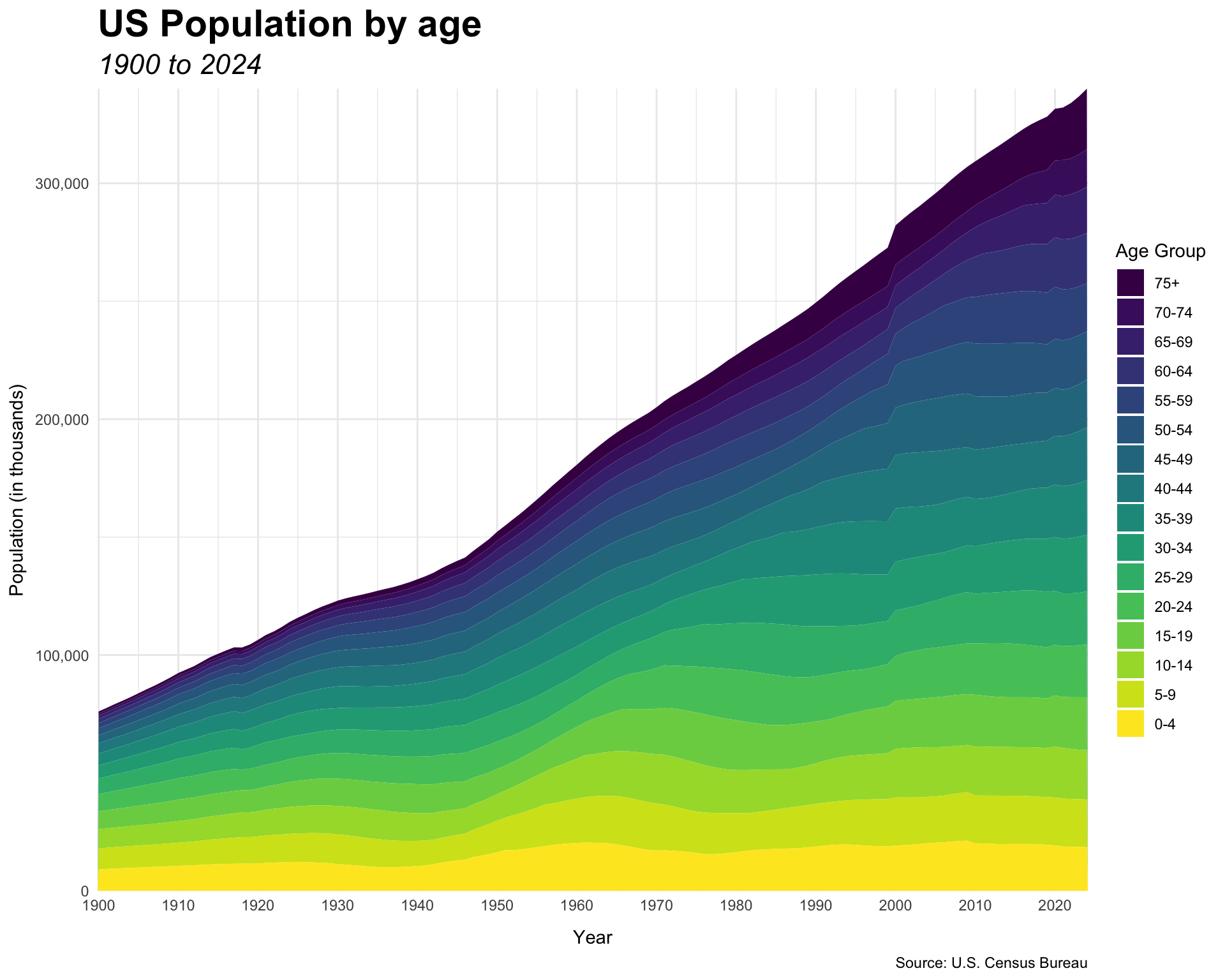
Question 3. Area Charts

Use this US population data

Code
pop <- read_csv("https://bcdanl.github.io/data/us_population_age_group_5yr_1900_2024_long.csv")
Code
pop2 <- pop |> 
  filter(age_group != "all",
         sex == "both") |> 
  mutate(age_group = factor(age_group,
                            levels = 
                              c("0-4", "5-9", 
                                "10-14", "15-19", 
                                "20-24", "25-29", 
                                "30-34", "35-39", 
                                "40-44", "45-49", 
                                "50-54", "55-59", 
                                "60-64", "65-69", 
                                "70-74", "75+")
                            ),
         age_group = fct_rev(age_group))

pop2 |> 
  ggplot(aes(x = year,
             y = population/1000, 
             fill = age_group)) +
  geom_area(color = NA) +
  labs(title = "US Population by age",
       subtitle = "1900 to 2024",
       caption = "Source: U.S. Census Bureau",
       x = "Year",
       y = "Population (in thousands)",
       fill = "Age Group") +
  scale_fill_viridis_d() +
  scale_y_comma(expand = c(0,0)) +
  scale_x_continuous(breaks = seq(1900,2020, 10),
                     expand = c(0,0)) +
  theme_minimal() +
  theme(
    axis.title.x = element_text(margin = margin(t = 10)),
    axis.title.y = element_text(margin = margin(r = 5)),
    plot.title = element_text(size = rel(2),
                              face = "bold"),
    plot.subtitle = element_text(size = rel(1.5),
                              face = "italic")
  )


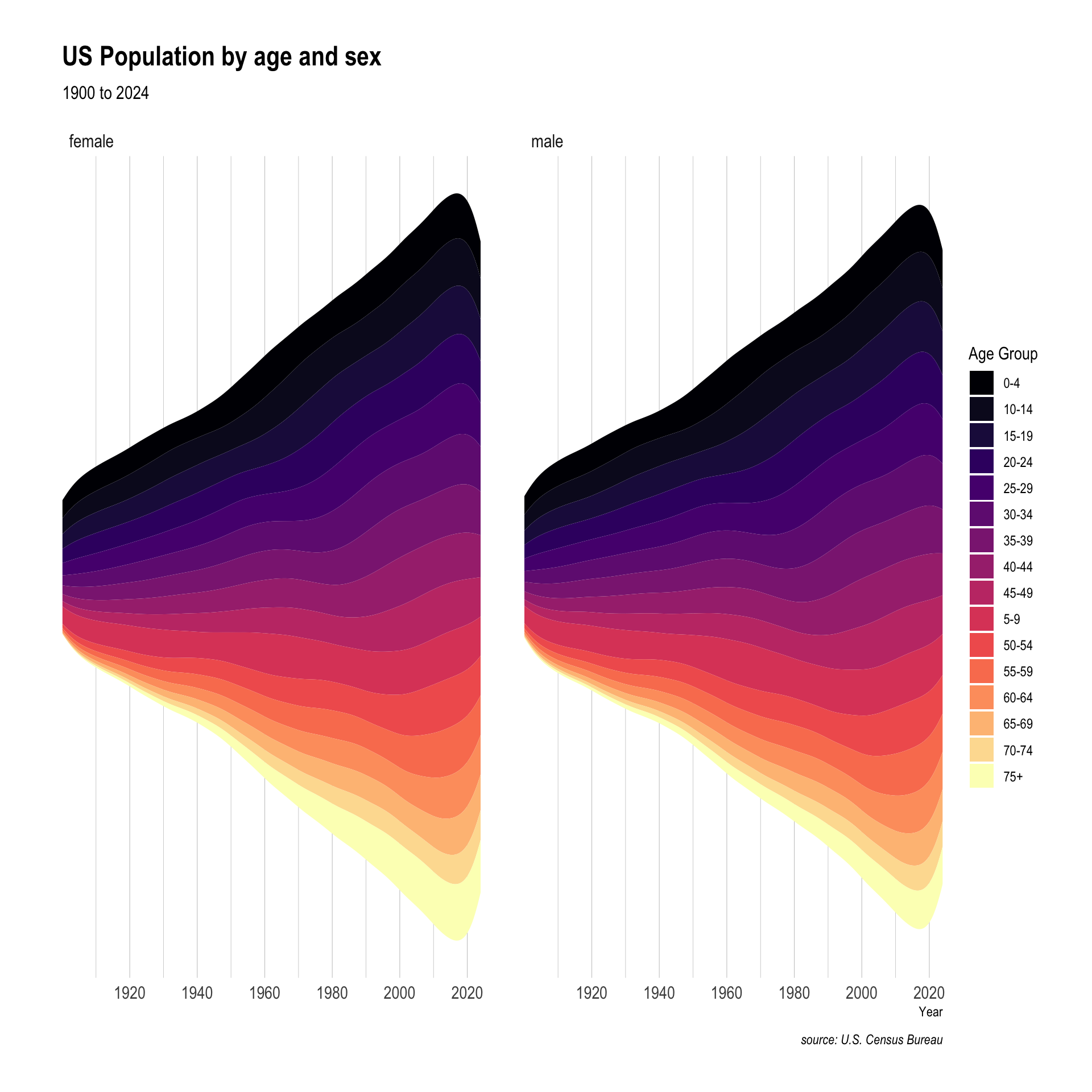
Question 4. Stream Charts

Code
pop |> 
  filter(age_group != "all",
         sex != "both") |> 
  ggplot(aes(x = year,
             y = population, 
             fill = age_group)) +
  geom_stream() +
  facet_wrap(~sex) +
  labs(title = "US Population by age and sex",
       subtitle = "1900 to 2024",
       caption = "source: U.S. Census Bureau",
       x = "Year",
       y = "",
       fill = "Age Group") +
  scale_fill_viridis_d(option = "magma") +
  scale_x_continuous(breaks = seq(1900,2020, 20),
                     expand = c(0,0)) +
  theme_ipsum() +
  theme(panel.grid.major.y = element_blank(),
        panel.grid.minor.y = element_blank(),
        axis.text.y = element_blank())


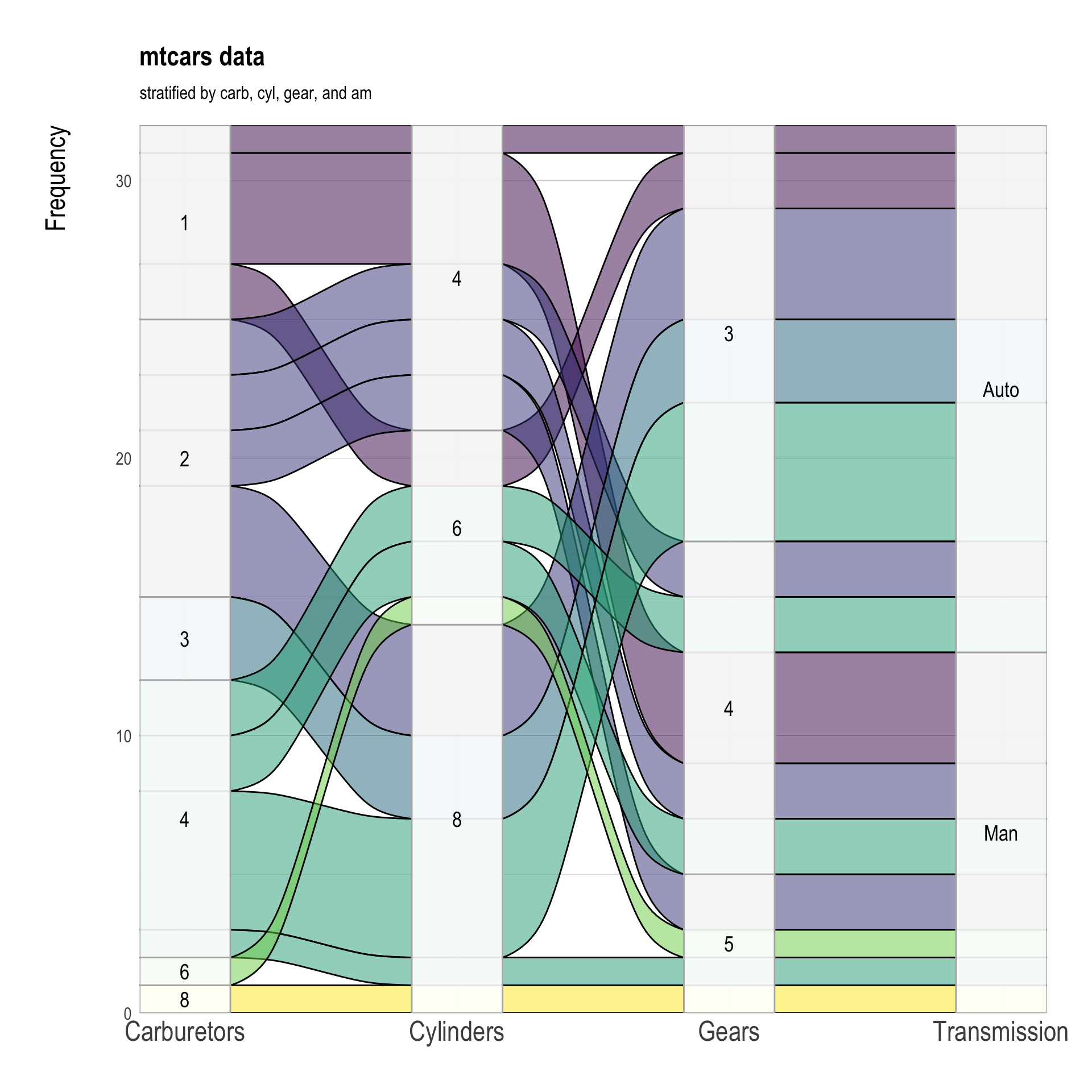
Question 5. Alluvial Diagrams

Use variables am, cyl, gear, and carb in the data.frame datasets::mtcars.

Code
mtcars_table <- mtcars |>
  mutate(am = factor(am, labels = c("Auto", "Man")),
         cyl = factor(cyl),
         gear = factor(gear),
         carb = factor(carb)) |>
  group_by(cyl, gear, carb, am) |>
  count()

ggplot(mtcars_table,
       aes(axis1 = carb,
           axis2 = cyl,
           axis3 = gear,
           axis4 = am,
           y = n)) +
  geom_alluvium(aes(fill = carb), color="black") +
  geom_stratum(alpha=.9, color = "grey70") +
  geom_text(stat = "stratum", 
            size = 5,
            aes(label = after_stat(stratum))) + 
  scale_x_discrete(limits = c("Carburetors", "Cylinders", 
                              "Gears", "Transmission"),
                   expand = c(0, 0)) +
  scale_y_continuous(expand = c(0, 0)) +
  scale_fill_viridis_d() +
  labs(title = "mtcars data",
       subtitle = "stratified by carb, cyl, gear, and am",
       y = "Frequency") +
  theme_ipsum() +
  theme(legend.position = "none",
        axis.text.x = element_text(size = rel(2)),
        axis.title.y = element_text(size = rel(2),
                                    margin = margin(r = 30))
        ) 


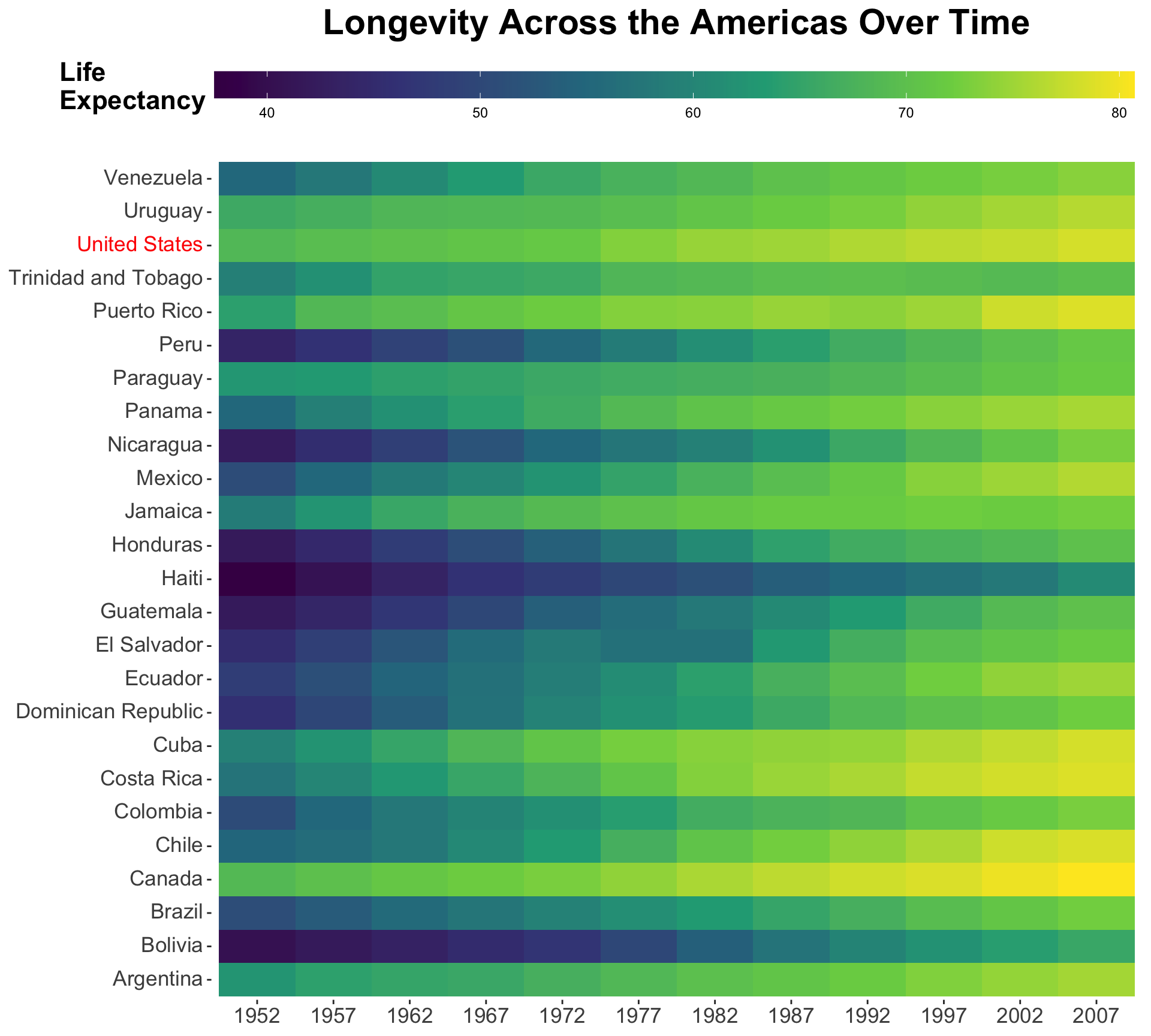
Question 6. Heatmaps

Code
americas <- gapminder::gapminder |>
  filter(continent == "Americas")

americas |>
  ggplot(aes(x = factor(year),
             y = country,
             fill = lifeExp)) +
  geom_tile() +
  scale_fill_viridis_c() +
  scale_y_discrete(
    labels = function(x) {
      ifelse(
        x == "United States",
        "<span style='color:red;'>United States</span>",
        x
      )
    }
  ) +
  labs(
    x = NULL,
    y = NULL,
    title = "Longevity Across the Americas Over Time",
    fill = "Life\nExpectancy"
  ) +
  theme(
    plot.title = element_text(hjust = .5, size = rel(2),
                              face = "bold",
                              family = "Arial"),
    legend.position = "top",
    legend.title = element_text(
      margin = margin(0, 5, 13, 0),
      face = "bold",
      size = rel(1.5)
    ),
    legend.box.margin = margin(0, 100, 0, 0),
    axis.text.x = element_text(size = rel(1.5)),
    axis.text.y = ggtext::element_markdown(size = rel(1.5)),
    panel.background = element_rect(fill = "white", color = NA),
    plot.background = element_rect(fill = "white", color = NA)
  ) +
  guides(
    fill = guide_colorbar(
      barheight = unit(.6, "cm"),
      barwidth = unit(8, "in")
    )
  )


Question 7. Correlation Heatmaps

Code
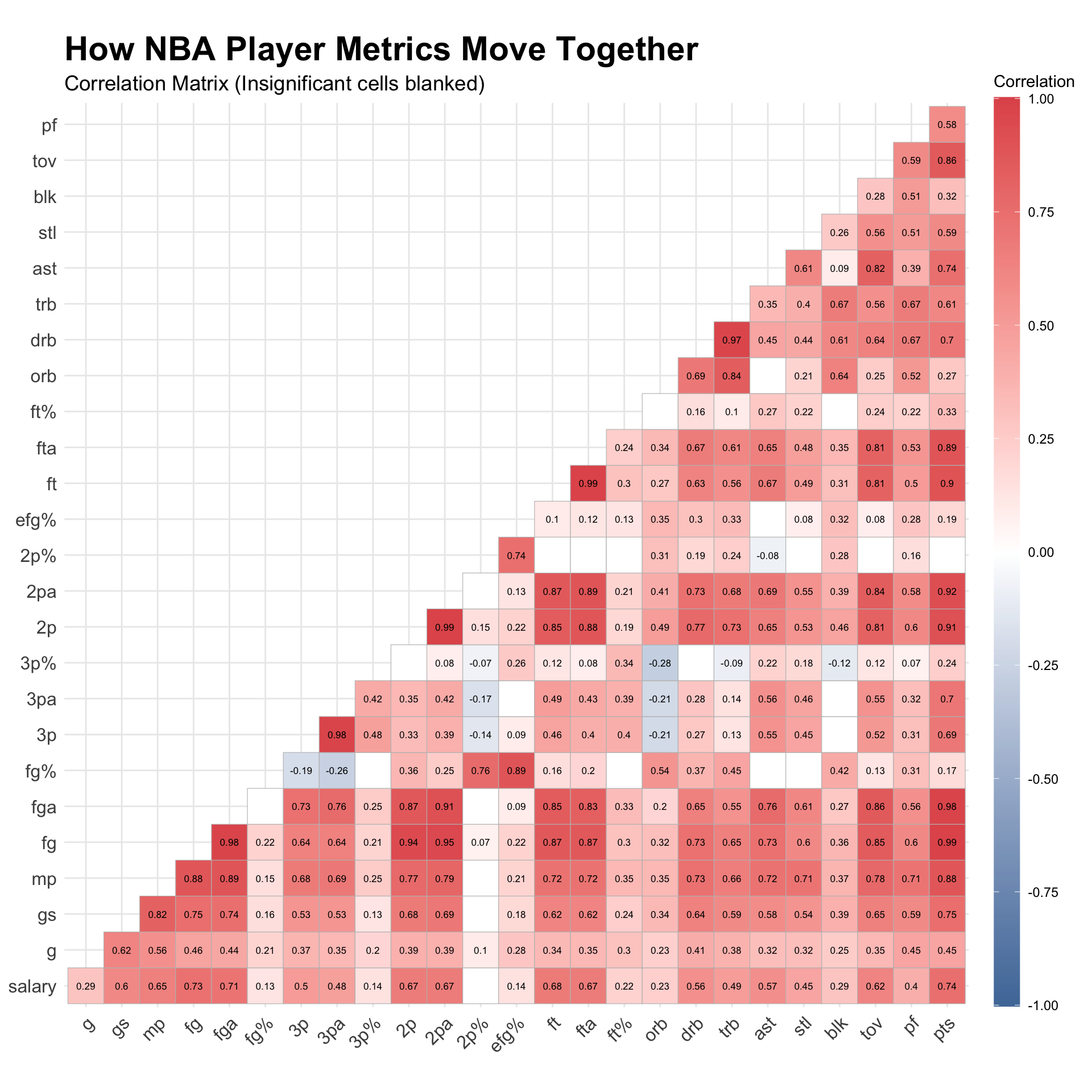
nba_players <- read_csv("https://bcdanl.github.io/data/nba_players_2022-23_2024-25.csv")


  • season_id: Season identifier used in your dataset

    • "2022" → 2022–23 season
    • "2023" → 2023–24 season
    • "2024" → 2024–25 season
  • rank: Player’s ranking on the stats table (Rk from Basketball Reference)

  • player: Full player name

  • pos: Player position (e.g., PG, SG, SF, PF, C)

  • age: Player age during the season

  • team_abbreviation: NBA team abbreviation (e.g., LAL, BOS, GSW)

  • salary: Player salary for that season (in USD)

  • g: Games played

  • gs: Games started

  • mp: Minutes played per game

  • fg: Field goals made per game

  • fga: Field goals attempted per game

  • fg%: Field goal percentage

  • 3p: Three-point field goals made per game

  • 3pa: Three-point field goals attempted per game

  • 3p%: Three-point shooting percentage

  • 2p: Two-point field goals made per game

  • 2pa: Two-point field goals attempted per game

  • 2p%: Two-point shooting percentage

  • efg%: Effective field goal percentage

    • Adjusts for the added value of 3-point shots
  • ft: Free throws made per game

  • fta: Free throws attempted per game

  • ft%: Free-throw percentage

  • orb: Offensive rebounds per game

  • drb: Defensive rebounds per game

  • trb: Total rebounds per game

  • ast: Assists per game

  • stl: Steals per game

  • blk: Blocks per game

  • tov: Turnovers per game

  • pf: Personal fouls per game

  • pts: Points per game

Source:

Code
nba_players2 <- nba_players |> 
  select(-(season_id:team_abbreviation)) |> 
  drop_na()

nba_players_cor <- nba_players2 |> 
  cor()

p_mat <- nba_players2 |> 
  cor_pmat() |> 
  round(2)

ggcorrplot(
  nba_players_cor,
  type = "lower",
  p.mat = p_mat,
  insig = "blank",
  lab = TRUE,
  lab_size = rel(2.25),
  colors = c("#4E79A7",
             "white",
             "#E15759"),
  title = "How NBA Player Metrics Move Together"
) +
  guides(
    fill = guide_colorbar(
      barheight = unit(8.33, "in")
    )
  ) +
  labs(
    subtitle = "Correlation Matrix (Insignificant cells blanked)",
    fill = "Correlation"
  ) +
  scale_fill_gradient2(
    low = "#4E79A7",
    mid = "white",
    high = "#E15759",
    midpoint = 0,
    limits = c(-1, 1),
    breaks = seq(-1, 1, by = 0.25)
  ) +
  theme(
    plot.title = element_text(size = rel(2),
                              face = "bold",
                              family = "Arial"),
    plot.subtitle = element_text(size = rel(1.25),
                                 family = "Arial"),
    legend.box.margin = margin(b = 20)
  )


Question 8. Word Cloud

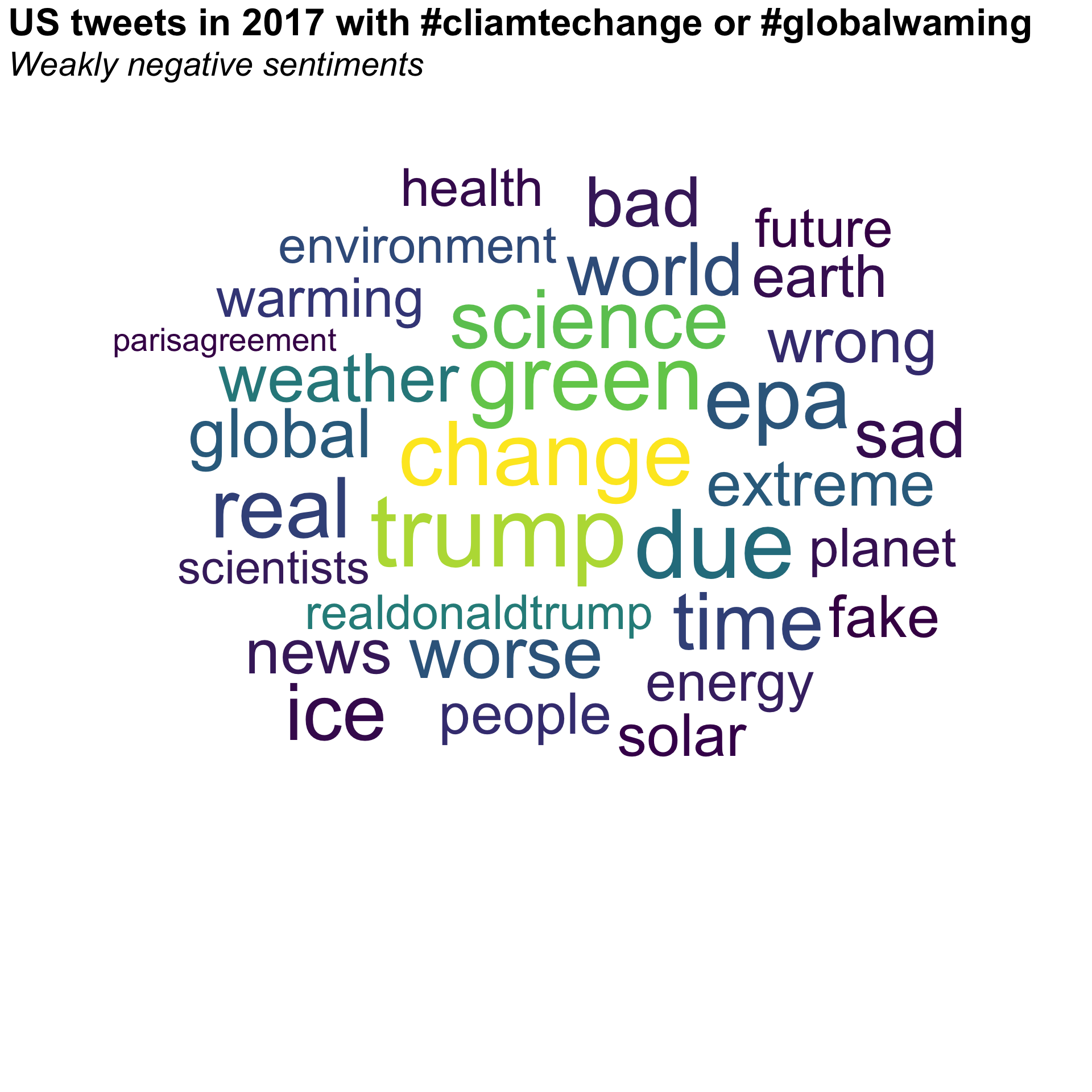
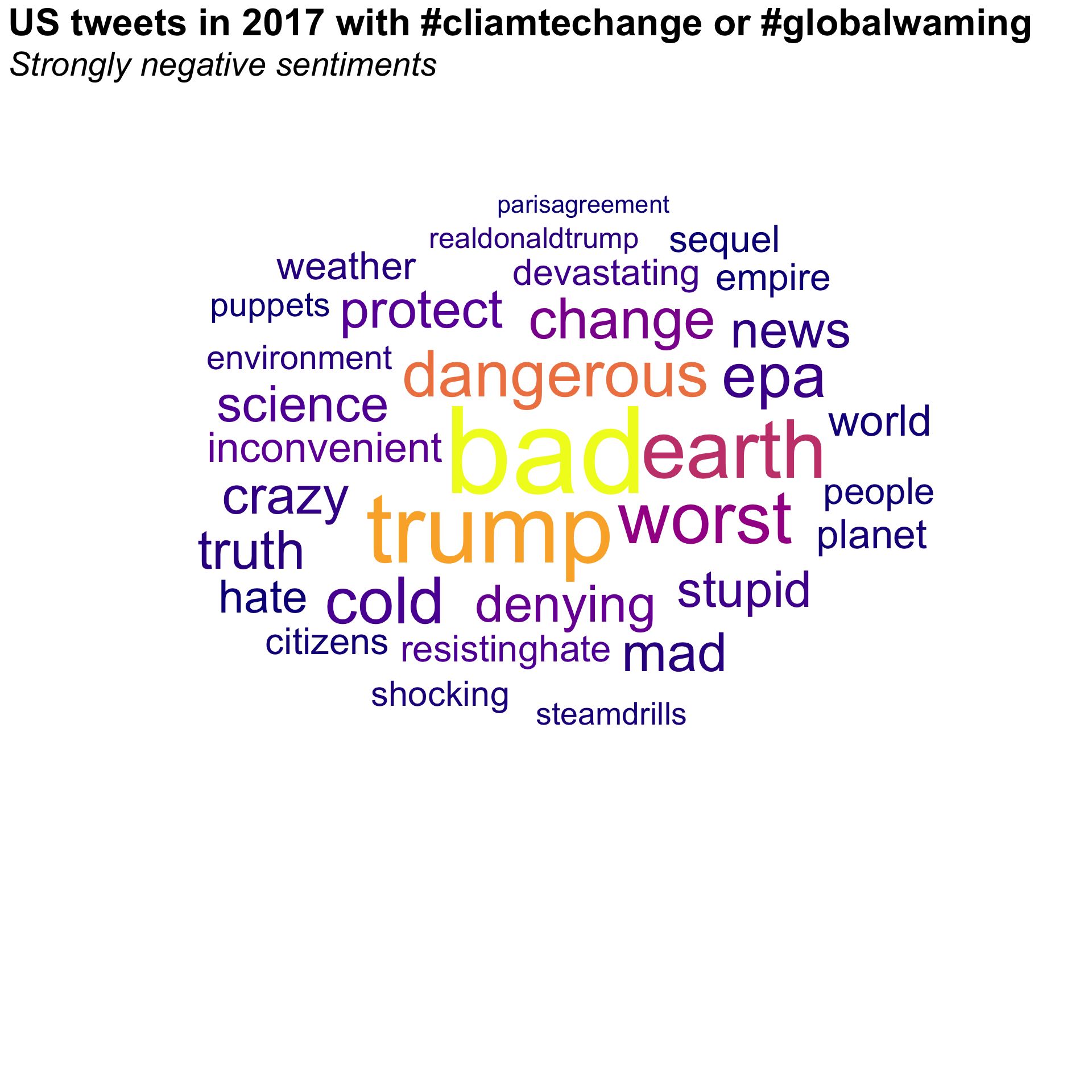
Use the following sets of U.S. tweets from 2017 containing #climatechange or #globalwarming:

  • x_cc_neg_weak: tweets with weakly negative sentiment
  • x_cc_neg_strong: tweets with strongly negative sentiment
Code
x_cc_neg_weak <- read_csv("https://bcdanl.github.io/data/UStweets_negative_weak_2017.csv")
x_cc_neg_strong <- read_csv("https://bcdanl.github.io/data/UStweets_negative_strong_2017.csv")
  • Plot word clouds for the top 30 words.
  • Remove the following words:
Code
c("climatechange", "globalwarming", "rt", "climate")
Code
x_words <- x_cc_neg_weak |>
  mutate(
    content = str_remove_all(content, "<[^>]+>"),   # remove HTML tags
    content = str_remove_all(content, "http[s]?://\\S+"), # remove URLs
    content = str_squish(content)  # trim ends and collapse repeated whitespace into single spaces
  ) |>
  unnest_tokens(word, content) |>
  anti_join(stop_words, by = "word") |>
  filter(
    str_detect(word, "^[a-z]+$")   # keep only pure alphabetic words
  ) |>
  count(word, sort = TRUE) |>
  filter(!(word %in% c("climatechange", "globalwarming",
                       "rt", "climate"))) |> 
  filter(dense_rank(-n) <= 30)

x_words |>
  ggplot(aes(label = word, size = n,
             color = n)) +
  geom_text_wordcloud_area() +
  scale_size_area(max_size = 50)+
  scale_color_viridis_c(option = "D") +
  theme_minimal() +
  theme(
    panel.grid = element_blank(),
    plot.title = element_text(
      size = rel(2.25),
      face = 'bold'
    ),
    plot.subtitle = element_text(
      size = rel(2),
      face = 'italic',
      margin = margin(b = -160)
    )
  ) + 
  labs(title = "US tweets in 2017 with #cliamtechange or #globalwaming",
       subtitle = "Weakly negative sentiments")

Code
x_words <- x_cc_neg_strong |>
  mutate(
    content = str_remove_all(content, "<[^>]+>"),   # remove HTML tags
    content = str_remove_all(content, "http[s]?://\\S+"), # remove URLs
    content = str_squish(content)  # trim ends and collapse repeated whitespace into single spaces
  ) |>
  unnest_tokens(word, content) |>
  anti_join(stop_words, by = "word") |>
  filter(
    str_detect(word, "^[a-z]+$")   # keep only pure alphabetic words
  ) |>
  count(word, sort = TRUE) |>
  filter(!(word %in% c("climatechange", "globalwarming",
                       "rt", "climate"))) |> 
  filter(dense_rank(-n) <= 30)

x_words |>
  ggplot(aes(label = word, size = n,
             color = n)) +
  geom_text_wordcloud_area() +
  scale_size_area(max_size = 50)  +
  scale_color_viridis_c(option = "C") +
  theme_minimal() +
  theme(
    panel.grid = element_blank(),
    plot.title = element_text(
      size = rel(2.25),
      face = 'bold'
    ),
    plot.subtitle = element_text(
      size = rel(2),
      face = 'italic',
      margin = margin(b = -160)
    )
    
  ) + 
  labs(title = "US tweets in 2017 with #cliamtechange or #globalwaming",
       subtitle = "Strongly negative sentiments")


Discussion

Welcome to our Classwork 10 Discussion Board! 👋

This space is designed for you to engage with your classmates about the material covered in Classwork 10.

Whether you are looking to delve deeper into the content, share insights, or have questions about the content, this is the perfect place for you.

If you have any specific questions for Byeong-Hak (@bcdanl) regarding the Classwork 10 materials or need clarification on any points, don’t hesitate to ask here.
All comments will be stored here.

Let’s collaborate and learn from each other!

Back to top