library(tidyverse)
library(ggthemes)

gapminder <- read_csv(
  "https://bcdanl.github.io/data/gapminder.csv"
)

countries_2007 <- gapminder |>
  filter(year == 2007)

three_continents <- countries_2007 |>
  filter(continent == "Americas" |
         continent == "Asia" |
continent == "Europe")Homework 4
Relationships, Log Transformations, Time Trends, and Career Preparation
Homework 4 based on Lectures 8 and 9, with R coding using Gapminder data read from a CSV file.
Instructions
This homework focuses on Lecture 8 and includes two Lecture 9 career questions. Answer all 32 questions, worth 100 points.
- Concepts: 50 points. Questions 1–13 are multiple-choice questions; Questions 14–16 are conceptual fill-in-the-blank questions.
- R programming: 50 points. Questions 17–32 each contain one R-code blank and use the
gapminderdata frame read from the CSV file below, or a setup subset derived from it. - Questions 12 and 13 connect the Andy and Oliver and Marcie career sessions, respectively, with Prof. Choe’s thoughts in Lecture 9.
For each multiple-choice question, select the one best answer. For a conceptual blank, enter only the requested term or number. For a coding question, enter only the R code that replaces [?], not the entire code block. Include quotation marks when the missing code is a character string.
A coding blank may require a complete condition, aesthetic mapping, or plot layer. Read the requested result carefully and compare your completed code with the target visualization. The completed code used to generate each target is hidden.
Run the setup below once, then write and test your answers in an R script. Each coding question starts from the original setup objects and can be completed independently. Plot labels, axis formatting, legend settings, and palette choices already supplied in a code block are part of the template; keep them as provided. They are not additional blanks.
Use the course materials and R methods covered through Lecture 8, together with the specified Lecture 9 career material. Colored group comparisons use a ggthemes colorblind-friendly palette. Labels, shapes, line types, and panels provide additional group cues where appropriate.
Submission: Submit your answers through the Brightspace quiz. Check Brightspace for the due date and attempt limit.
ImportantGenerative AI is not permitted
Complete this homework independently. Do not use generative AI tools to generate, revise, explain, debug, or check your answers or R code. Use the lectures, classwork, and your own course notes. Please ask Prof. Choe if you need help.
Setup and Data
All coding questions use the gapminder data frame. Read the CSV file directly from the web and create the subsets below.
If ggthemes is missing, run install.packages("ggthemes") once before loading it.
The gapminder Data Frame
gapminder has 1,704 country-year records for 142 countries, with observations every five years from 1952 through 2007 (12 recorded years per country). Each row represents one country in one recorded year, not one person. Countries receive equal weight in the plots; population is not used as a plot weight.
Variable descriptions
| Variable | Description |
|---|---|
country |
Country name. |
continent |
Continent category in the dataset. |
year |
Year of the country record, recorded every five years: 1952, 1957, and so on through 2007. |
lifeExp |
Life expectancy at birth, in years. This is a country-level measure, not an individual person’s age. |
pop |
Country population, in people. |
gdpPercap |
GDP per person, in the dataset’s dollar units. |
Setup subsets
countries_2007: the 142 country records for 2007.three_continents: the 88 records for the Americas, Asia, and Europe in 2007, including the United States. These groups are used for grouped fitted curves; Oceania has only two records in the 2007 subset.
All GDP and population values used in the logarithmic plots are positive. Connecting two recorded years with a line does not add observations for the intervening years.
Part I: Multiple Choice — Concepts
Question 1
3 points · Lecture 8
This scatterplot uses GDP per person on the horizontal axis and life expectancy on the vertical axis. What does one point represent?
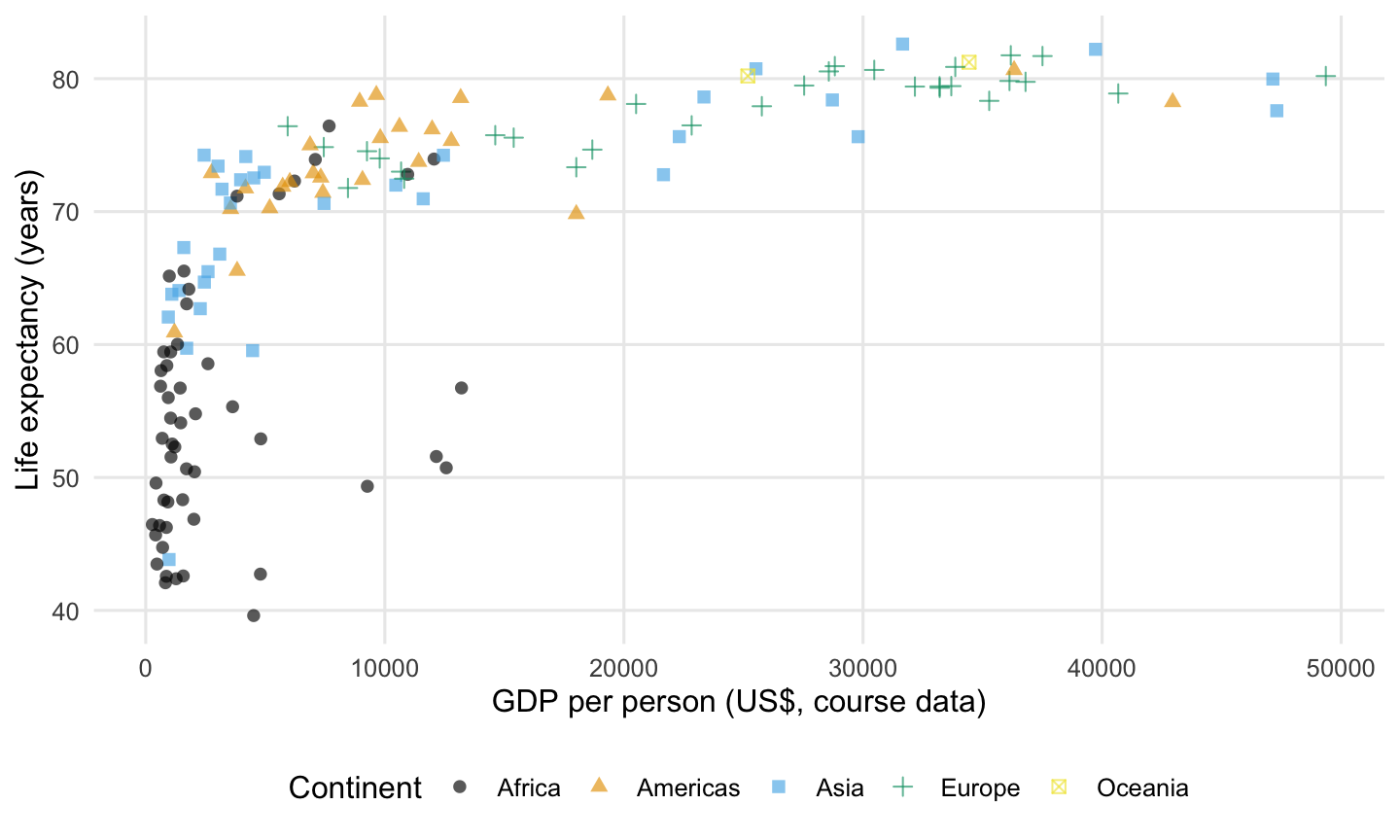
- One country’s GDP-per-person and life-expectancy values in 2007.
- One person’s income and eventual age at death.
- The total population of one continent across all years.
- The change in a country’s GDP between two years.
Question 2
3 points · Lecture 8
The curve summarizes the relationship between GDP per person and life expectancy in 2007. Which description best matches its direction and shape?
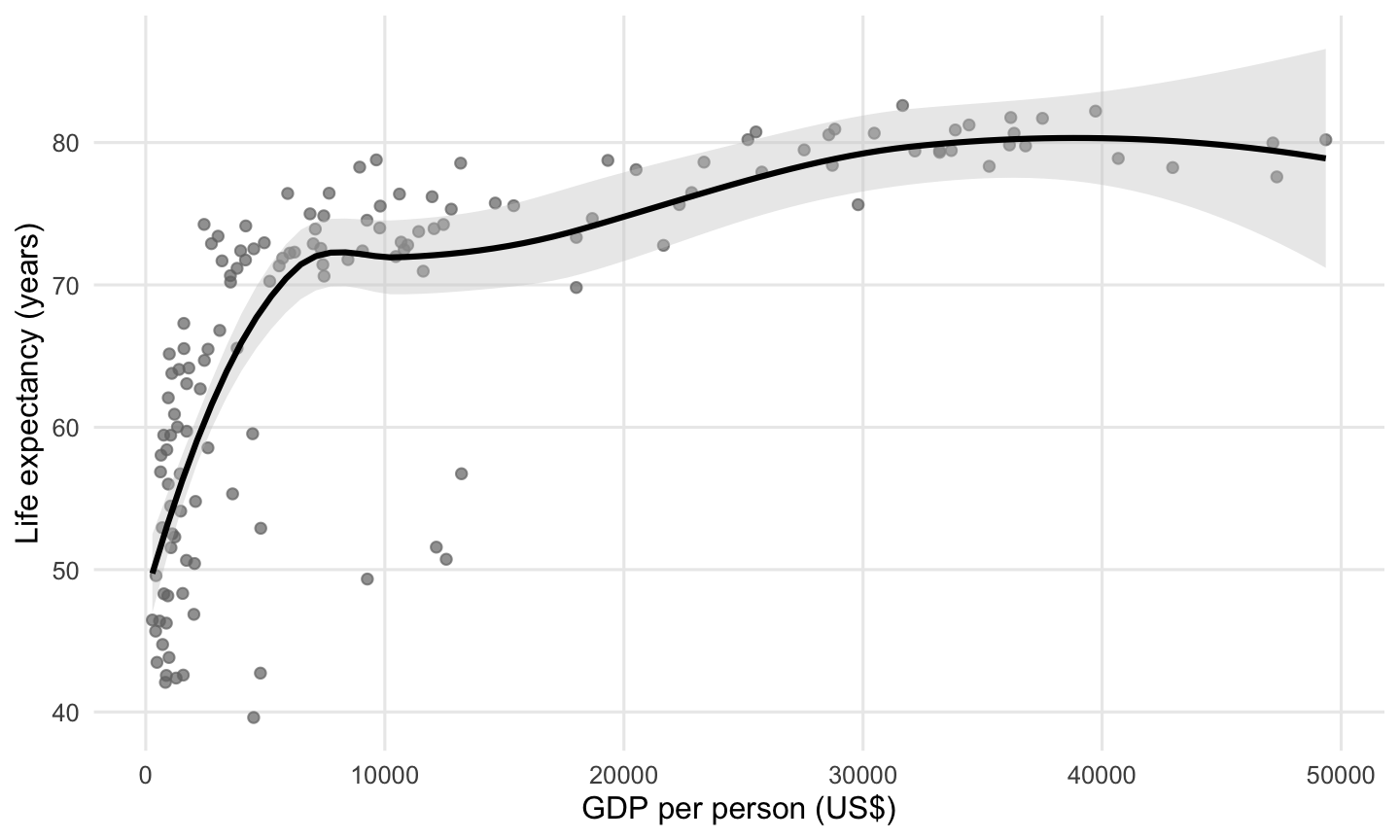
- Life expectancy generally decreases as GDP per person increases, and the decrease becomes faster at higher GDP values.
- There is no overall direction because the curve becomes flatter at higher GDP values.
- Life expectancy generally increases as GDP per person increases, but the upward curve becomes flatter at higher GDP values.
- Life expectancy first decreases and then increases as GDP per person increases.
Question 3
4 points · Lecture 8
The straight fitted line summarizes life expectancy against base-10 log GDP per person. Choose a GDP-per-person value on the horizontal axis. What does the fitted line tell us about life expectancy at that value?
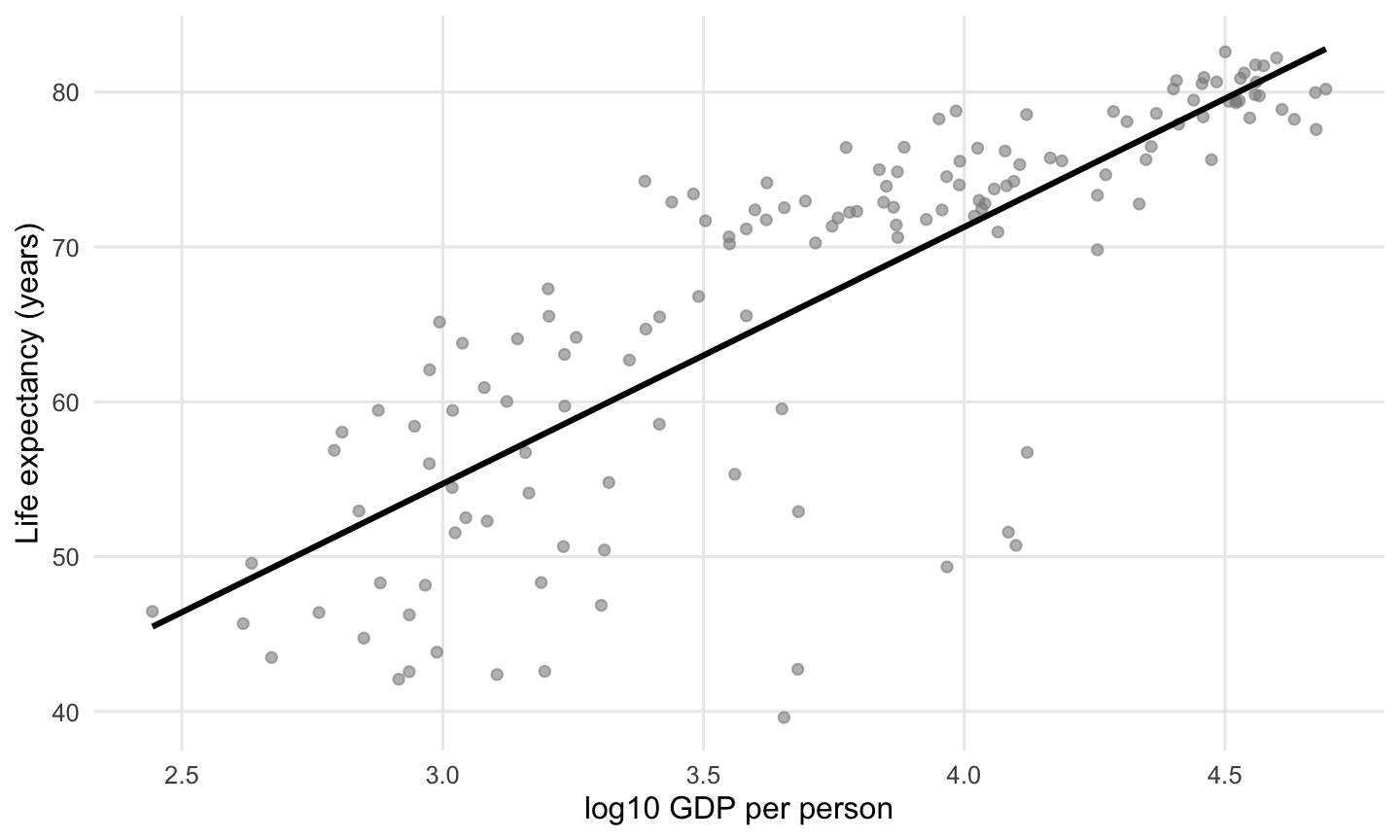
- The life expectancy that every country at that GDP value must have.
- The median GDP per person of the countries above the line.
- A guaranteed life expectancy after a country adopts a particular policy.
- An estimated average life expectancy at that GDP-per-person value, based on the plotted data and fitted model.
Question 4
4 points · Lecture 8
The grey ribbon around the fitted line is the default 95% confidence ribbon. Some country points fall outside it. Which interpretation is appropriate?
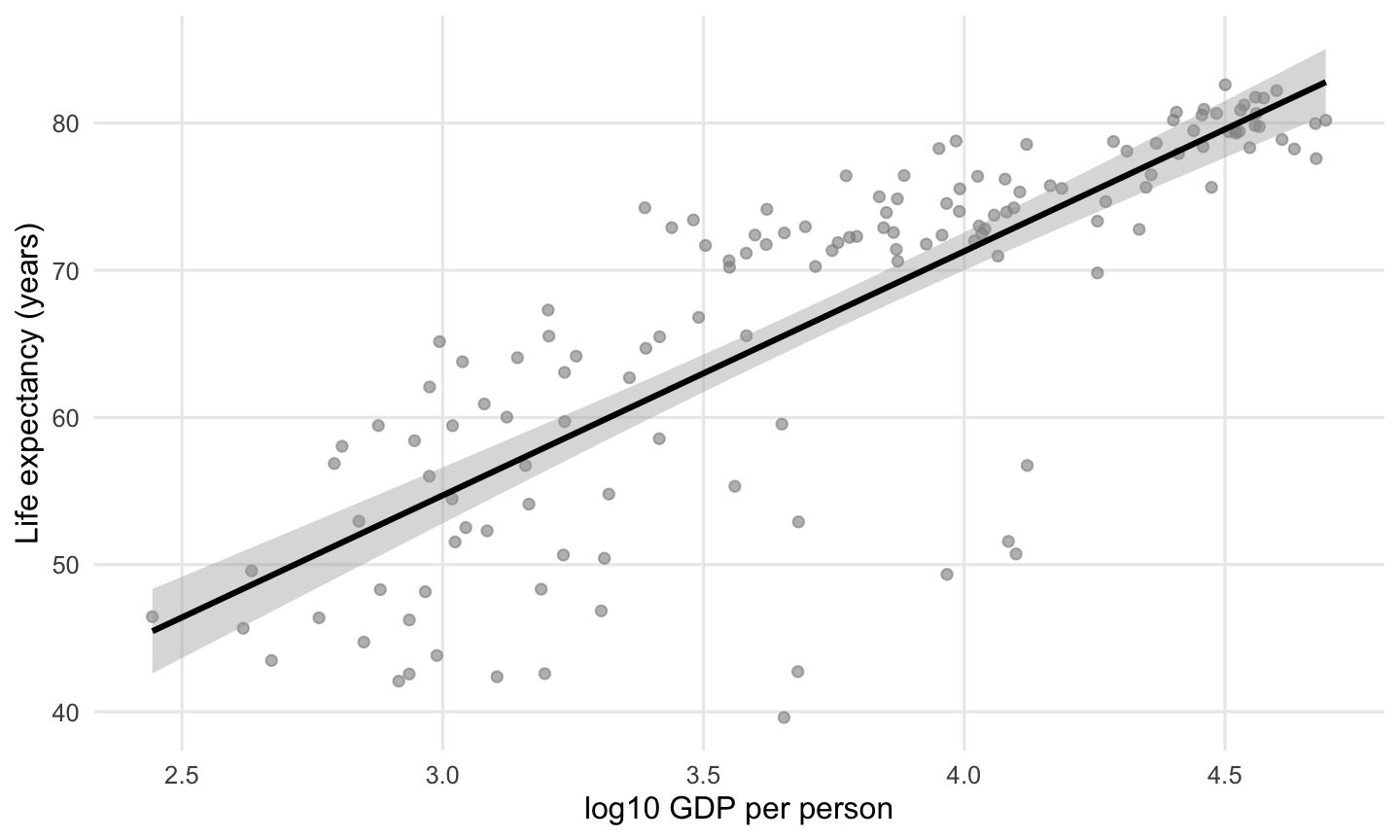
- The ribbon shows uncertainty around the estimated average relationship; it is not a band required to contain 95% of individual country observations.
- The graph is incorrect unless exactly 95% of all country points lie inside the ribbon.
- A point outside the ribbon must be a data-entry error.
- The ribbon gives the full minimum-to-maximum range of country life expectancy at every GDP value.
Question 5
3 points · Lecture 8
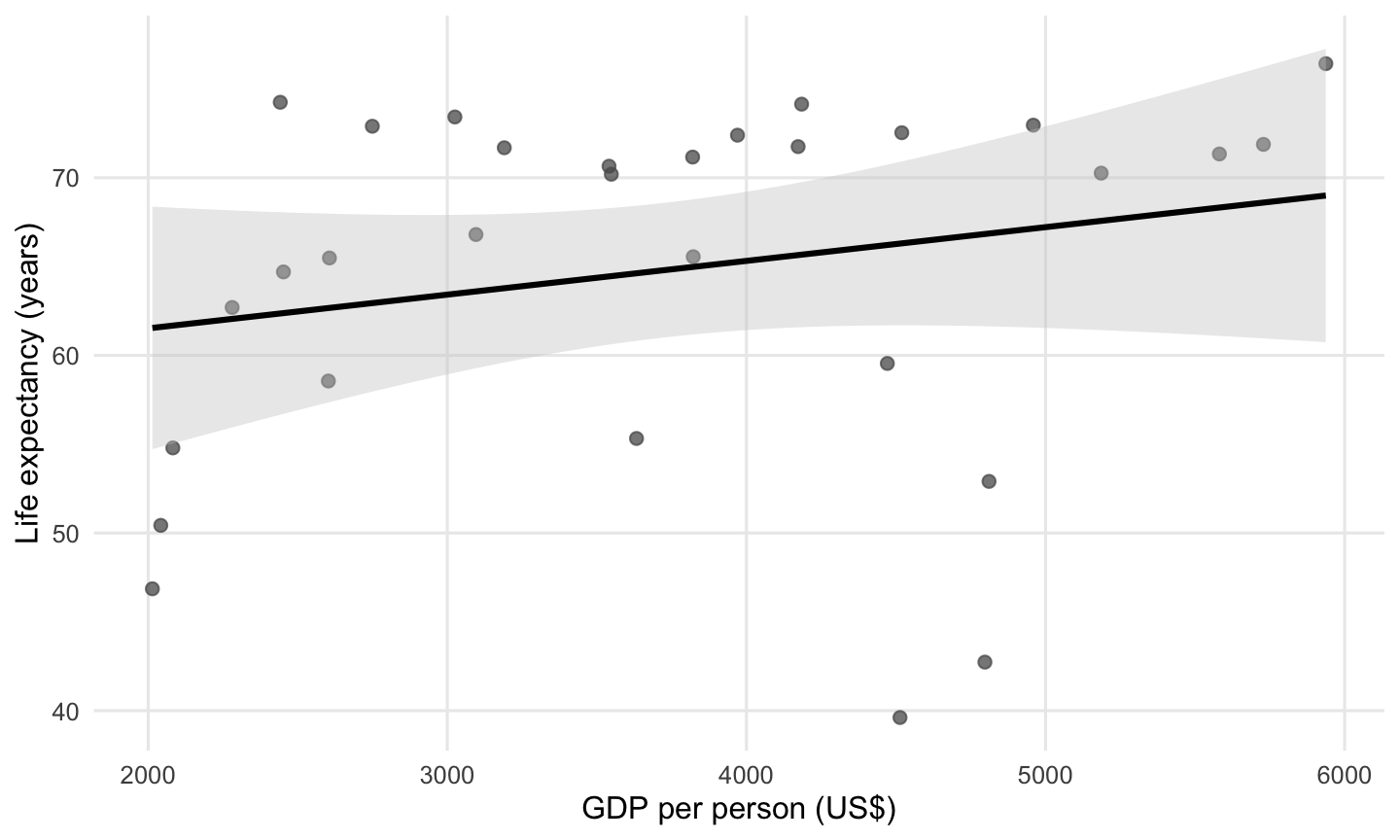
This plot includes the 2007 countries with GDP per person between $2,000 and $6,000. What does the vertical spread of the points around the fitted line show?
- Countries at similar GDP-per-person values have similar life expectancies, so the line captures almost all country differences.
- The spread measures how much each country’s GDP per person changed between 1952 and 2007.
- Countries with similar GDP per person can have quite different life expectancies, even though the line summarizes an overall pattern.
- The distance from a point to the line measures the uncertainty in that country’s recorded GDP per person.
Question 6
4 points · Lecture 8
The United States and South Africa are labeled in this 2007 country comparison. Which statement best compares their life expectancies with the fitted pattern?
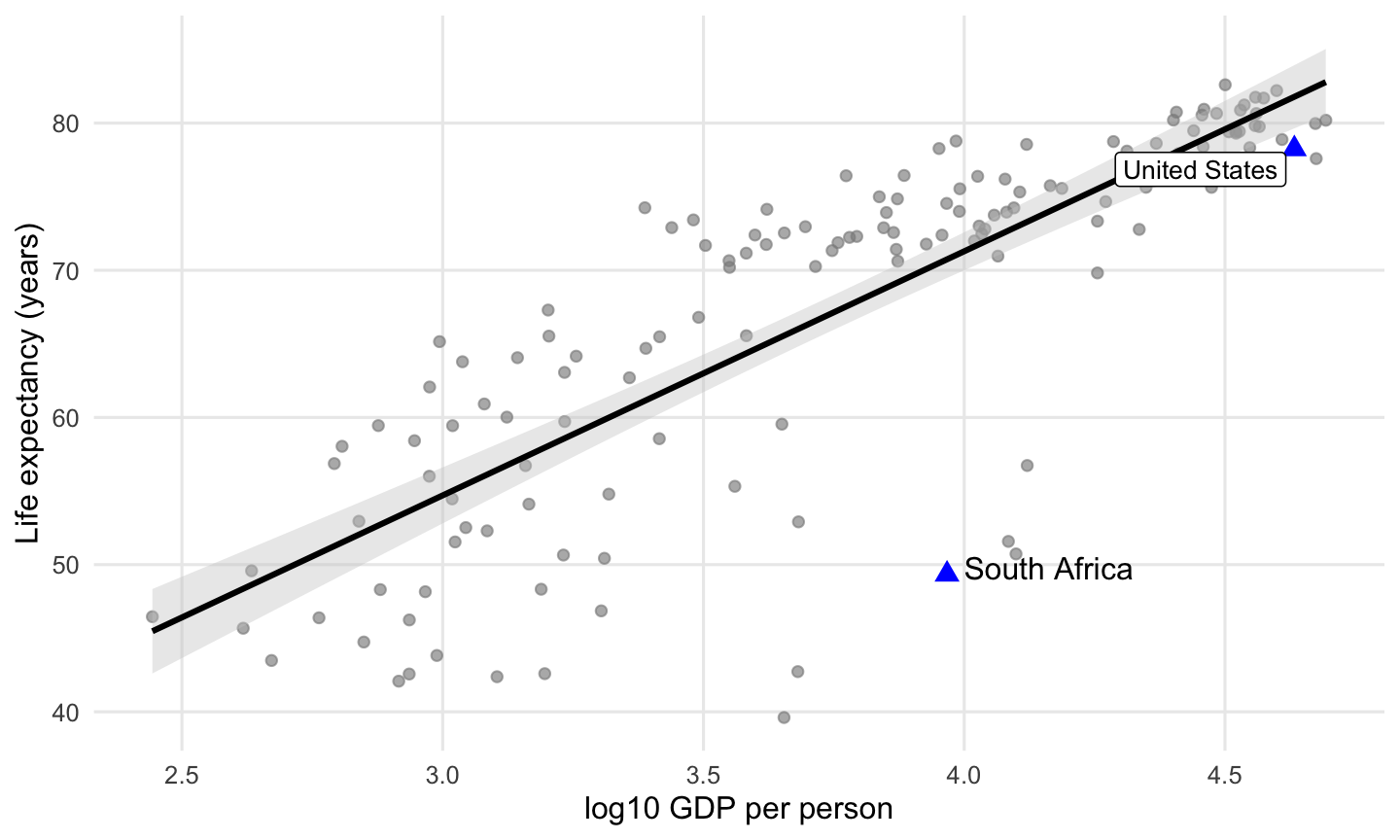
- Both countries lie above the fitted line, with South Africa farther from the fitted pattern at its GDP-per-person value.
- Both countries lie below the fitted line, with South Africa farther from the fitted pattern at its GDP-per-person value.
- Both countries lie below the fitted line, with the United States farther from the fitted pattern at its GDP-per-person value.
- South Africa lies above the fitted line, while the United States lies below the fitted pattern at its GDP-per-person value.
Question 7
3 points · Lecture 8
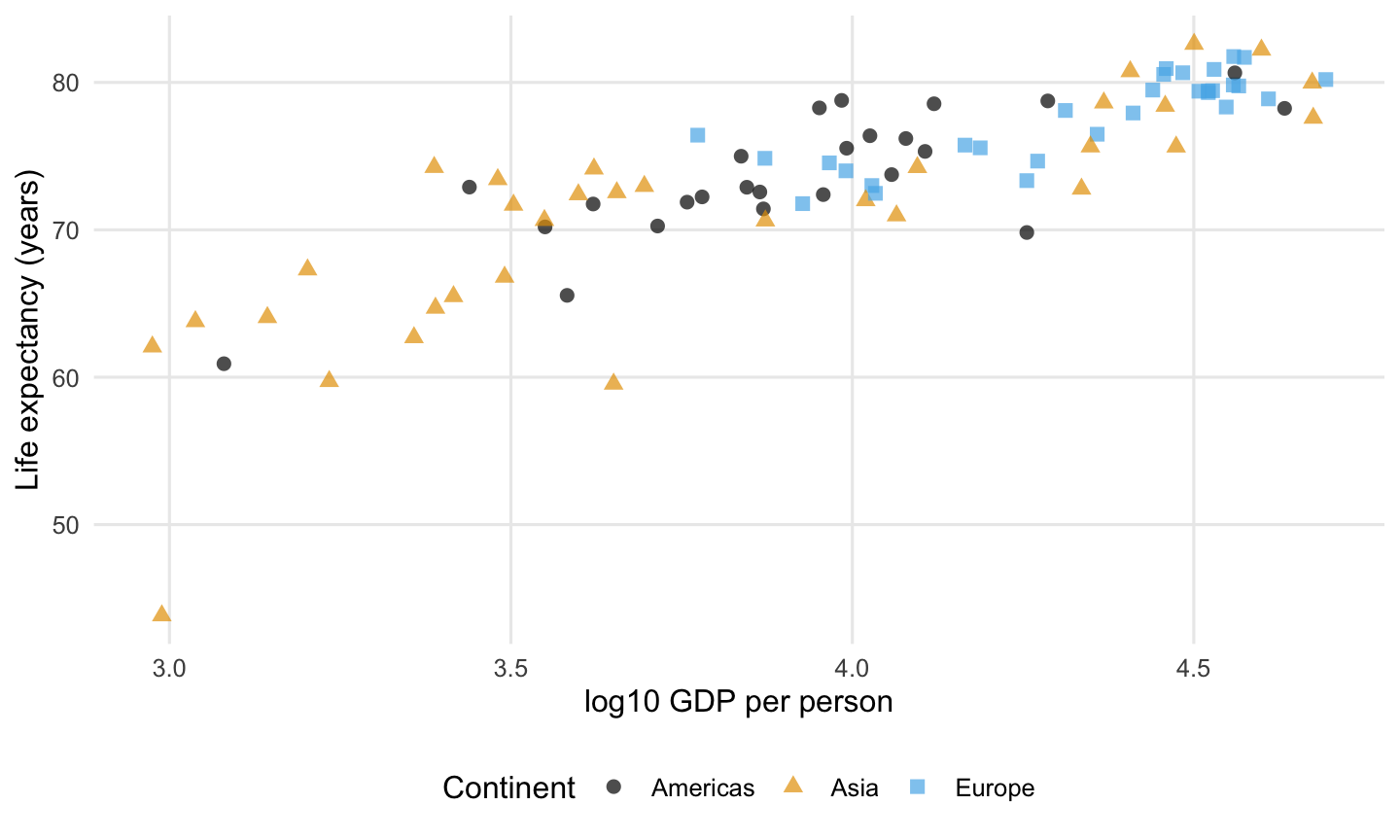
This chart includes the United States and other countries. Each continent is identified by both a point’s color and shape. How do the point shapes help when the chart is printed in black and white?
- Changing the symbols changes the numerical values of life expectancy.
- Every symbol becomes a separate country-year dataset.
- The shapes remove the need to name the groups in the legend.
- The point symbols provide another way to distinguish the continent groups when colors are difficult to distinguish.
Question 8
4 points · Lecture 8
The three panels use the same horizontal and vertical scales. Which comparison of their fitted straight lines is correct?
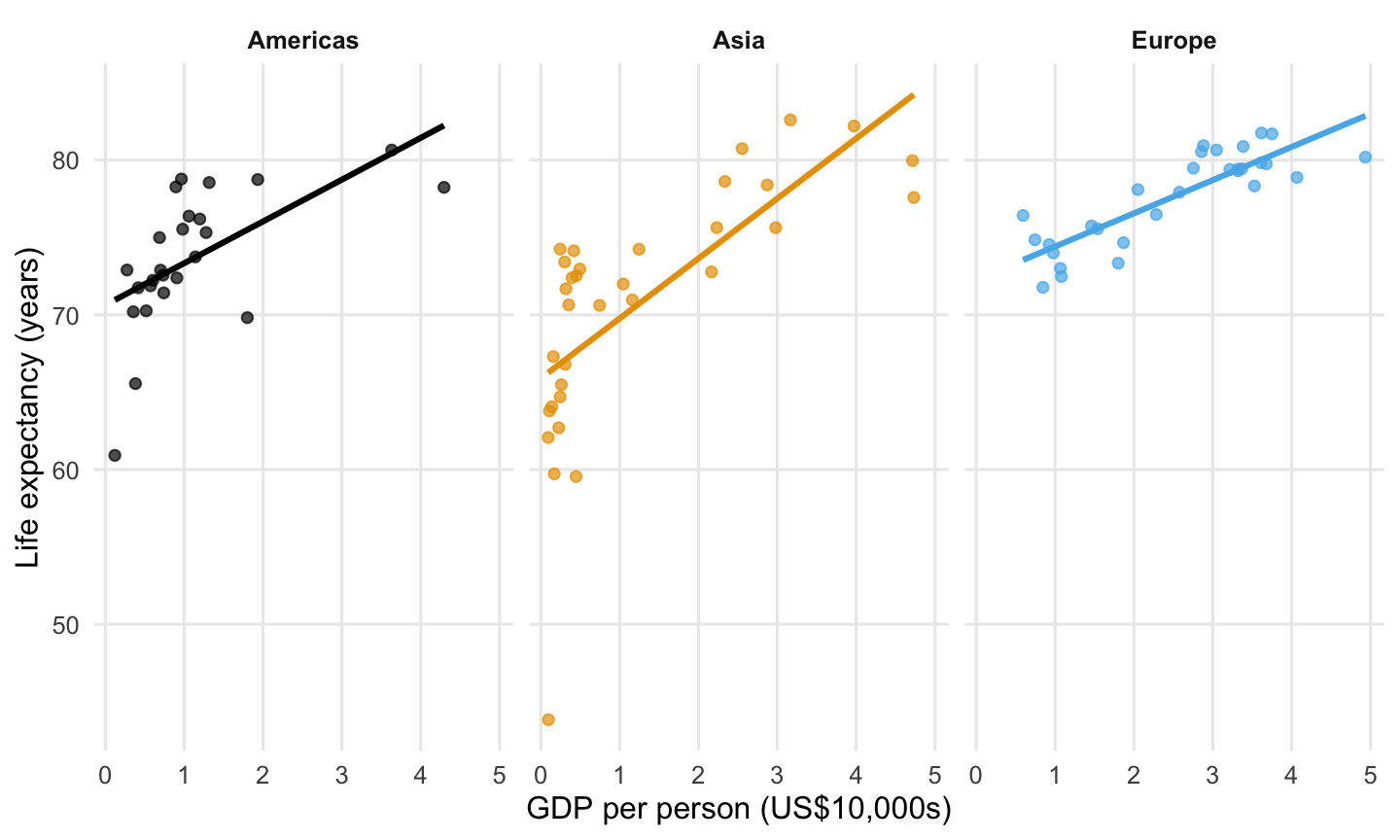
- The Americas’ fitted line has the steepest upward slope.
- Asia’s fitted line has the steepest upward slope.
- Europe’s fitted line has the steepest upward slope.
- The fitted lines have the same slope because they all rise.
Question 9
3 points · Lecture 8
On an ordinary dollar axis, the increase from $4,000 to $8,000 is smaller than the increase from $12,000 to $24,000. How do these two changes compare on a logarithmic axis?
- The second must remain three times as wide because it adds three times as many dollars.
- The first becomes wider because it begins at a smaller amount.
- They have equal horizontal distances because both multiply the starting value by two.
- They collapse to zero distance because logarithms remove all differences.
Question 10
3 points · Lecture 8
A scatterplot’s horizontal axis is labeled log10 GDP per person. The axis position 3 corresponds to $1,000, and position 4 corresponds to $10,000. What does moving from horizontal position 3 to position 4 mean?
- GDP per person increases by exactly one dollar.
- GDP per person becomes ten times as large; the vertical life-expectancy axis is still measured in years.
- Life expectancy must become ten times as large.
- Both axes have necessarily been transformed into logarithms.
Question 11
3 points · Lecture 8
The gapminder data frame records each country at five-year intervals. A line connects a country’s life-expectancy point for 1952 to its point for 1957. What can a reader conclude about 1953–1956 from that connecting segment alone?
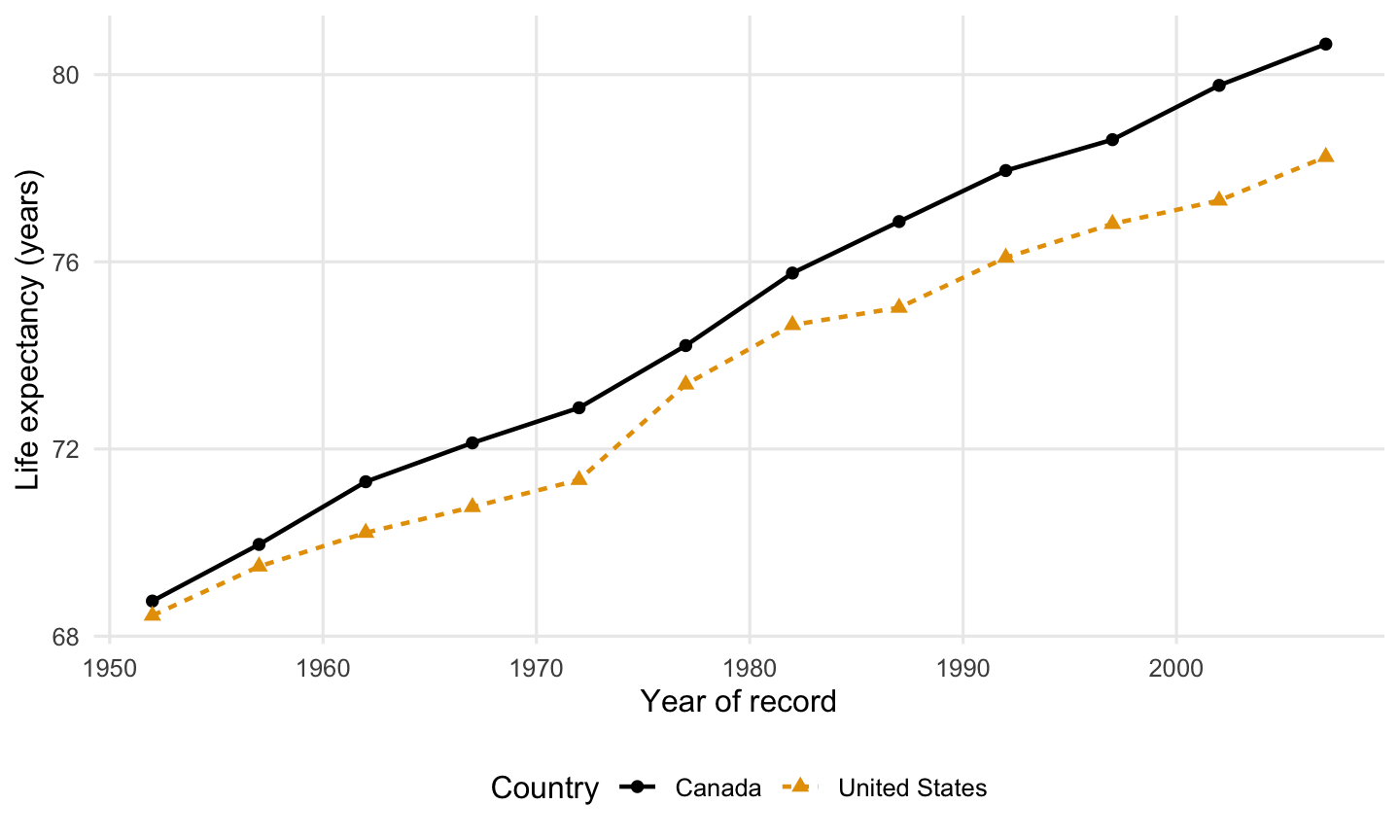
- The data frame contains an annual life-expectancy record at every point on the segment.
- Life expectancy must have stayed exactly equal to the 1952 value until 1957.
- The line forecasts life expectancy for years after 2007.
- The segment connects the recorded endpoints; it does not supply recorded annual values for 1953–1956.
Question 12
2 points · Lecture 9
Andy and Oliver, together with Prof. Choe’s thoughts: Leah has finished a course project and wants to apply for internships this month. She has little interview experience. Which plan best follows the career preparation advice in Lecture 9?
- Practice explaining her project decisions, seek Career Center feedback, and apply to suitable openings while reaching out to campus contacts.
- Build a second project using an employer’s tools, then begin applications and interview preparation once the new project is complete.
- Concentrate on sending applications with a shared résumé, and prepare project explanations after employers invite her to interview.
- Seek alumni referrals for a small set of roles, and use feedback from her first interviews to decide what preparation to do.
Question 13
3 points · Lecture 9
Marcie, together with Prof. Choe’s thoughts: Mateo has taken an introductory data course and is interested in product marketing and customer education. Which next learning goal best reflects the value of data skills in those roles, as discussed in Lecture 9?
- Learn a company’s reporting software so he can reproduce its existing dashboards and prepare reports in the formats its teams use.
- Use data to answer a customer question, check the evidence, and explain the findings and their limits to a nontechnical audience.
- Develop presentation and marketing skills first, then return to data analysis when the requirements of a particular position become clearer.
- Build a portfolio of advanced statistical models to demonstrate technical depth and distinguish his quantitative skills from those of other marketing applicants.
Part II: Fill in the Blank — Concepts
Question 14
2 points · Lecture 8
In a relationship plot, the variable whose values we want to understand or predict is called the [?] variable. In the country example, life expectancy plays this role. Enter the term used in Lecture 8.
Question 15
3 points · Lecture 8
A logarithmic axis gives the same horizontal distance to the change from $2,000 to $6,000 as to the change from $6,000 to $18,000. Each change multiplies the starting value by [?]. Enter one number.
Question 16
3 points · Lecture 8
An illustrative country’s GDP per person rises from $8,000 to $10,000. The percentage increase is [?]%. Enter only the number, without a percent sign.
Part III: Fill in the Blank — R Programming
Question 17
3 points · Lecture 8
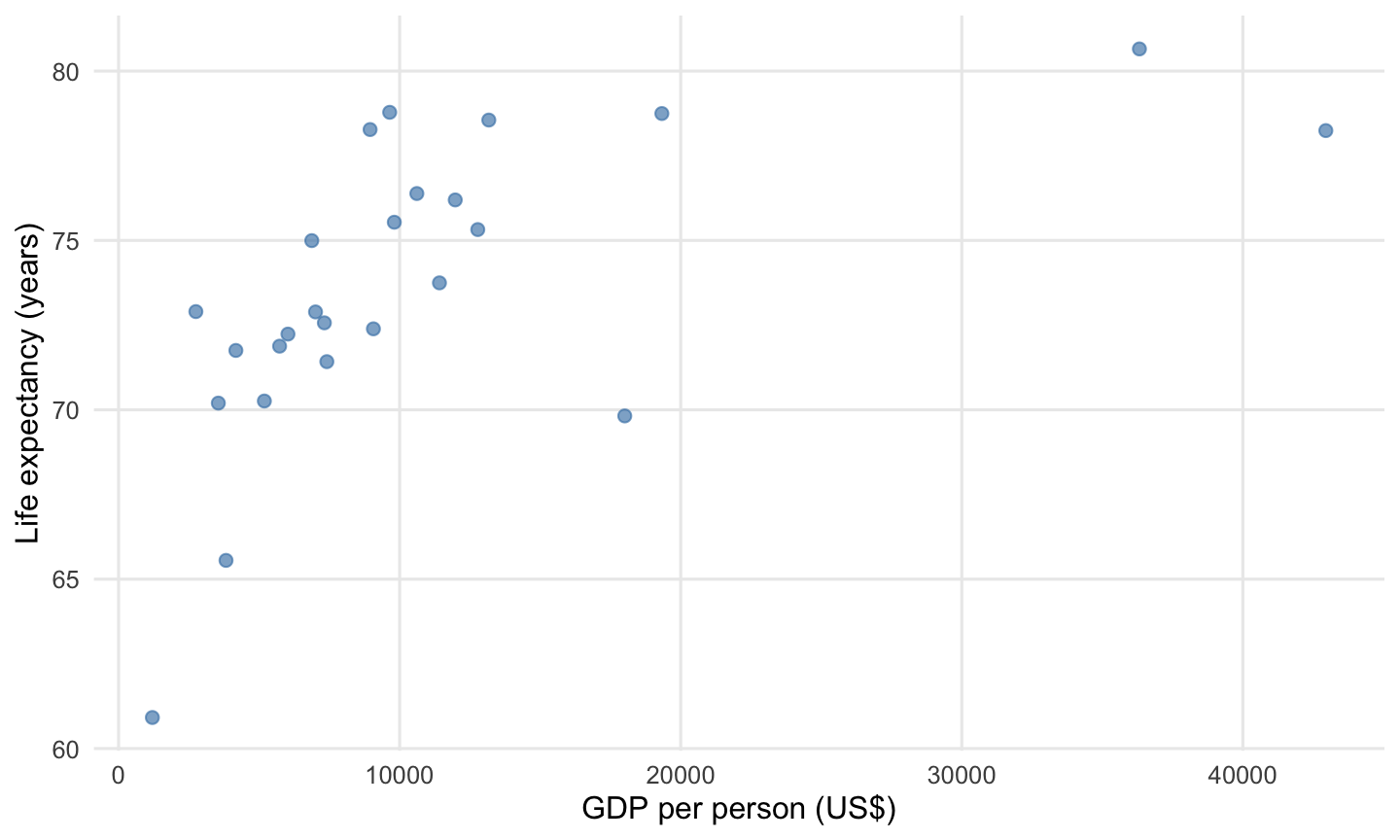
Reproduce the 2007 comparison for countries in the Americas, including the United States.
americas_2007 <- gapminder |>
  filter(year == 2007,
         continent == "Americas")

ggplot(data = americas_2007,
       mapping = [?]) +
  geom_point(color = "steelblue",
             alpha = 0.65,
             size = 2) +
  labs(x = "GDP per person (US$)",
       y = "Life expectancy (years)")
Target visualization:
Question 18
2 points · Lecture 8
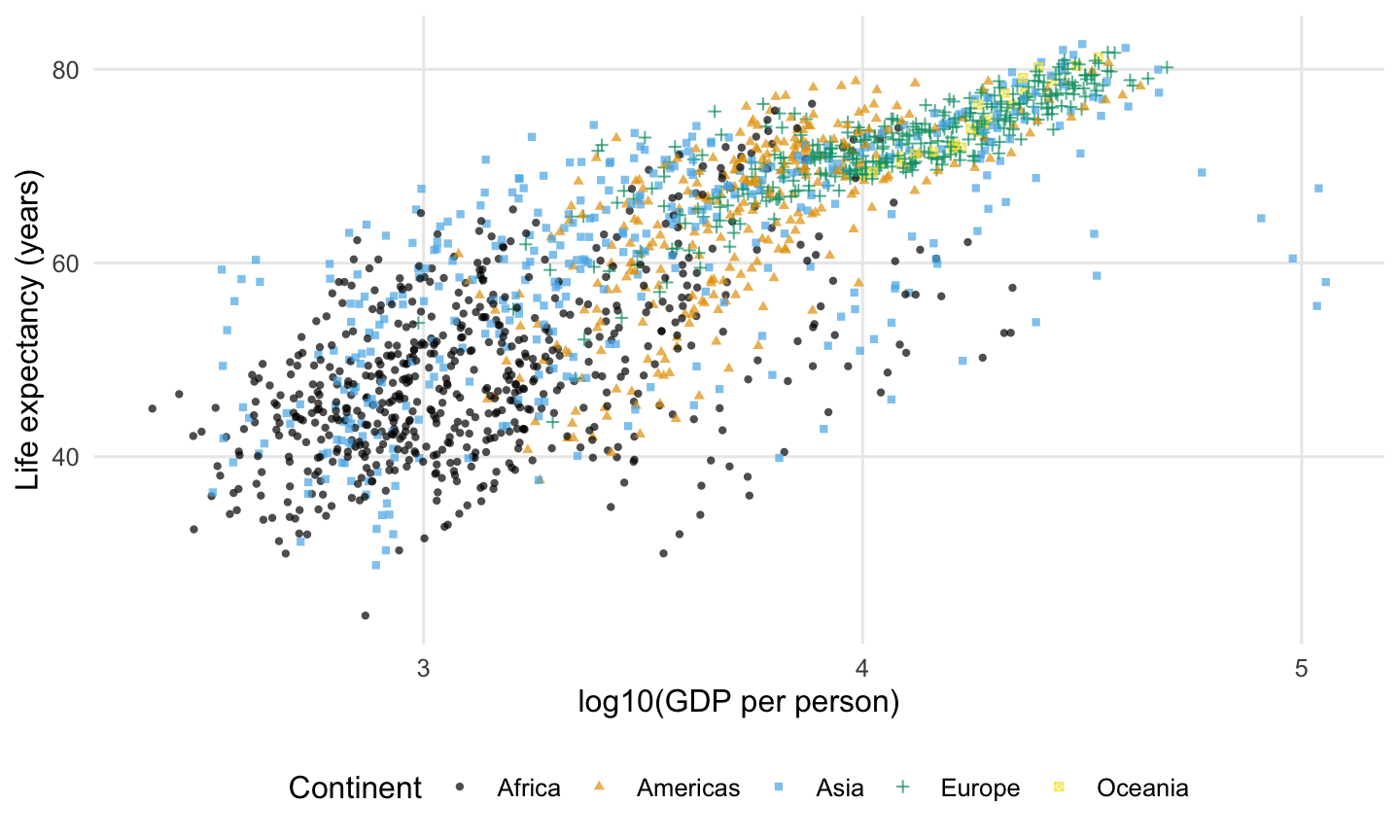
Reproduce this country-year scatterplot with points at 70% opacity.
ggplot(data = gapminder,
       mapping = aes(x = log10(gdpPercap),
                     y = lifeExp,
                     color = continent,
                     shape = continent)) +
  geom_point([?],
             size = 1.1) +
  scale_color_colorblind() +
  labs(x = "log10(GDP per person)",
       y = "Life expectancy (years)",
       color = "Continent",
       shape = "Continent")
Target visualization:
Question 19
2 points · Lecture 8
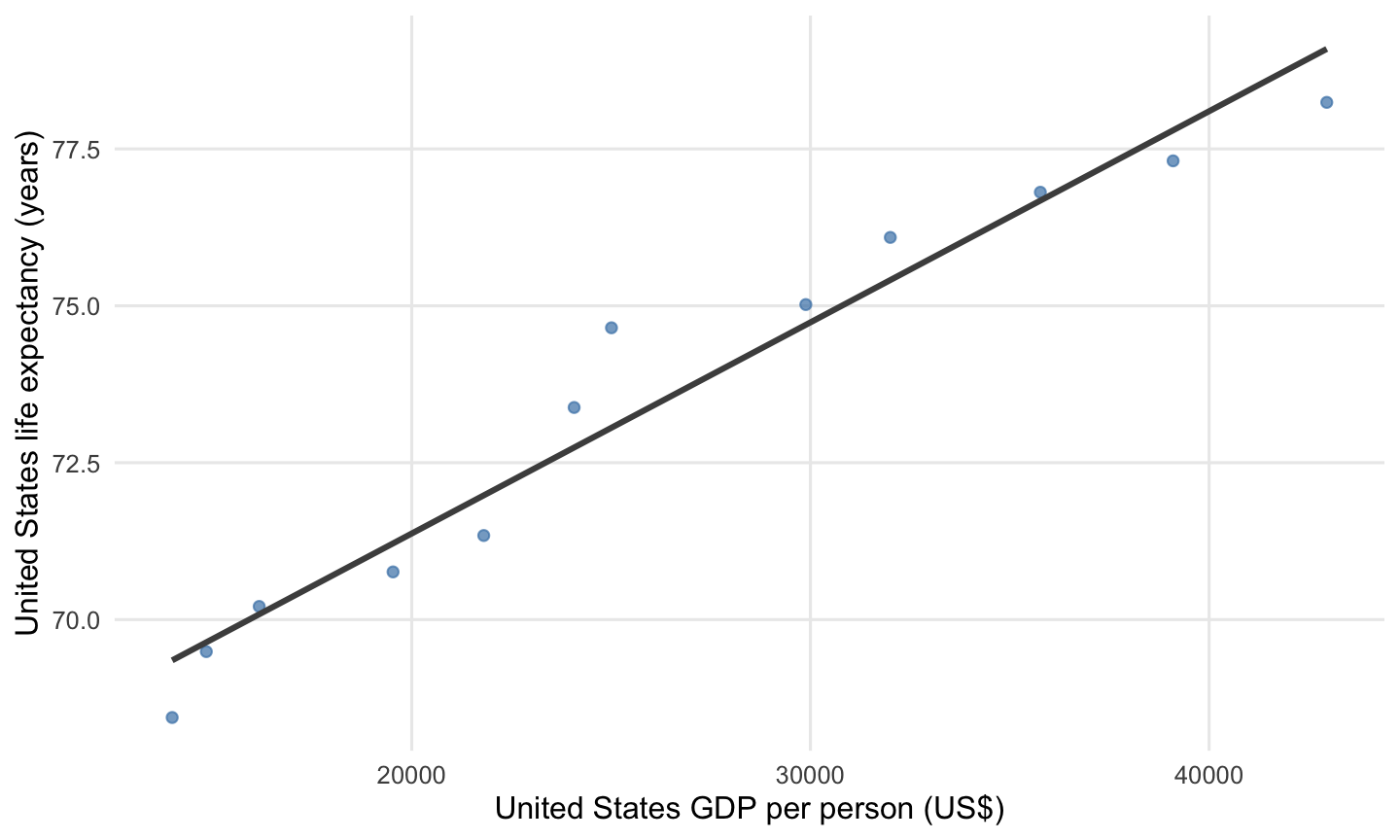
Complete the fitted trend for the United States.
us_history <- gapminder |>
  filter(country == "United States")

ggplot(data = us_history,
       mapping = aes(x = gdpPercap,
                     y = lifeExp)) +
  geom_point(alpha = 0.7,
             color = "steelblue") +
  geom_smooth(method = [?],
              se = FALSE,
              color = "grey30") +
  labs(x = "United States GDP per person (US$)",
       y = "United States life expectancy (years)")
Target visualization:
Question 20
2 points · Lecture 8
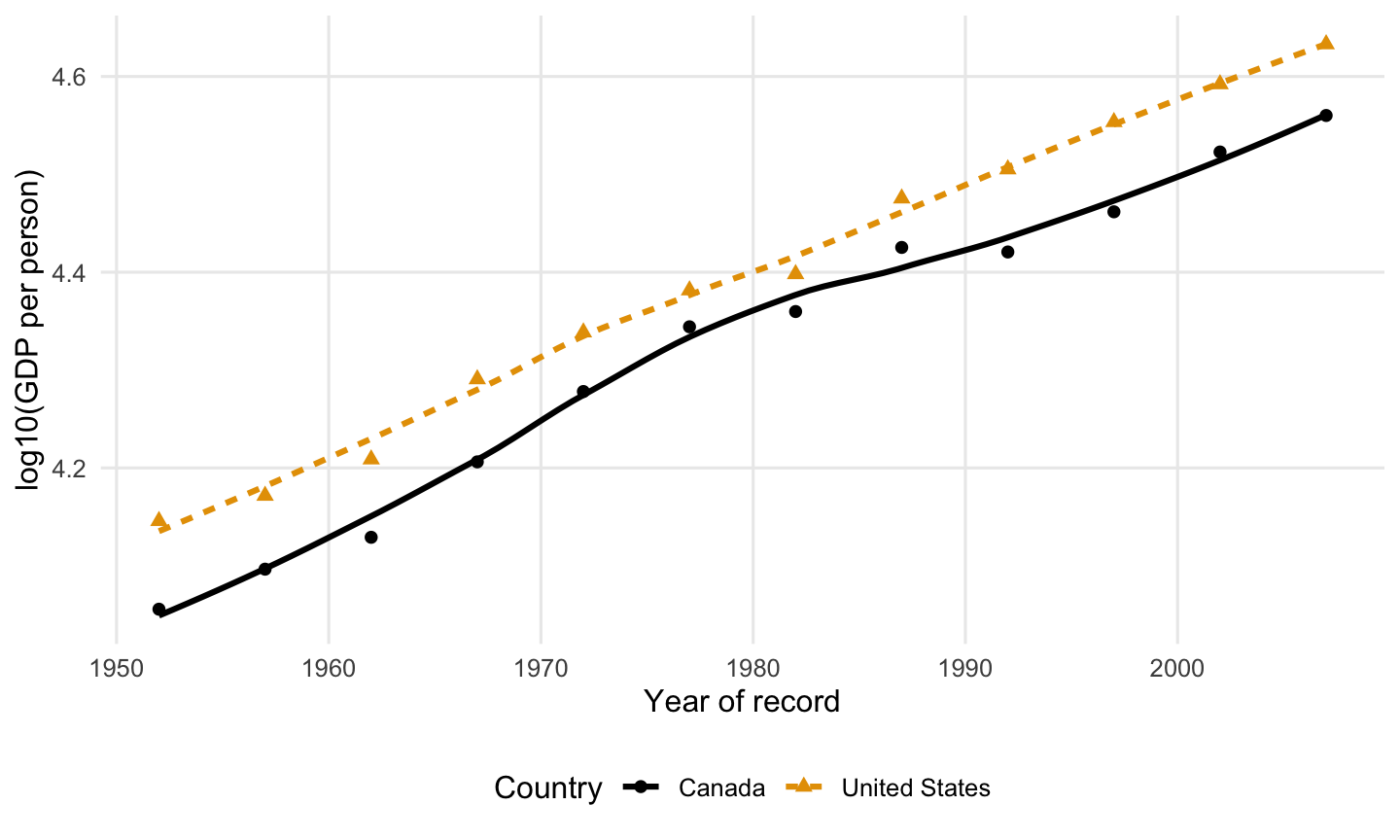
Match the target’s treatment of uncertainty.
us_canada_history <- gapminder |>
  filter(country == "United States" |
         country == "Canada")

ggplot(data = us_canada_history,
       mapping = aes(x = year,
                     y = log10(gdpPercap),
                     color = country,
                     linetype = country)) +
  geom_point(mapping = aes(shape = country),
             size = 2) +
  geom_smooth(se = [?]) +
  scale_color_colorblind() +
  labs(x = "Year of record",
       y = "log10(GDP per person)",
       color = "Country",
       linetype = "Country",
       shape = "Country")
Target visualization:
Question 21
3 points · Lecture 8
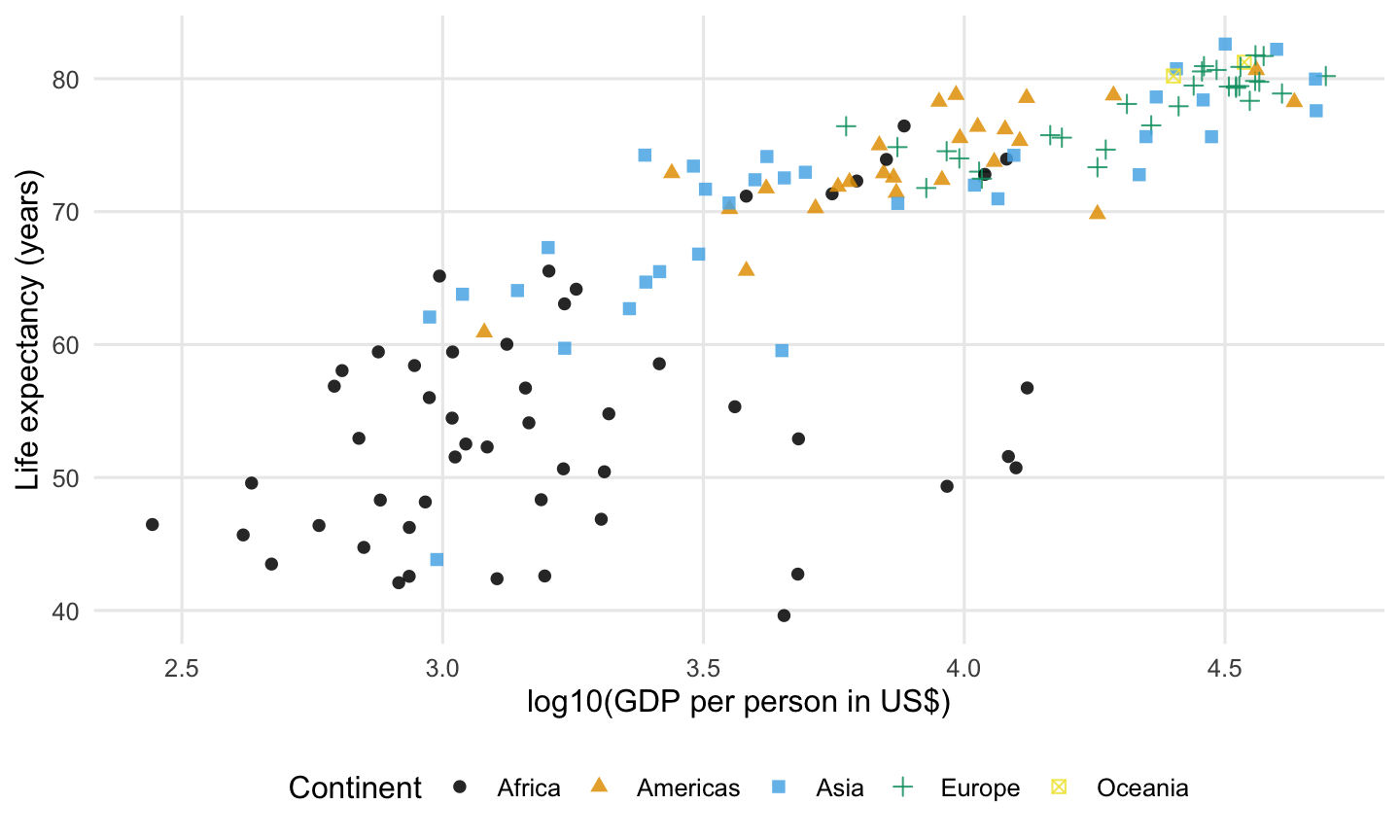
Reproduce the horizontal scale shown in the target.
ggplot(data = countries_2007,
       mapping = aes(x = [?],
                     y = lifeExp,
                     color = continent,
                     shape = continent)) +
  geom_point(alpha = 0.85,
             size = 2) +
  scale_color_colorblind() +
  labs(x = "log10(GDP per person in US$)",
       y = "Life expectancy (years)",
       color = "Continent",
       shape = "Continent")
Target visualization:
Question 22
2 points · Lecture 8
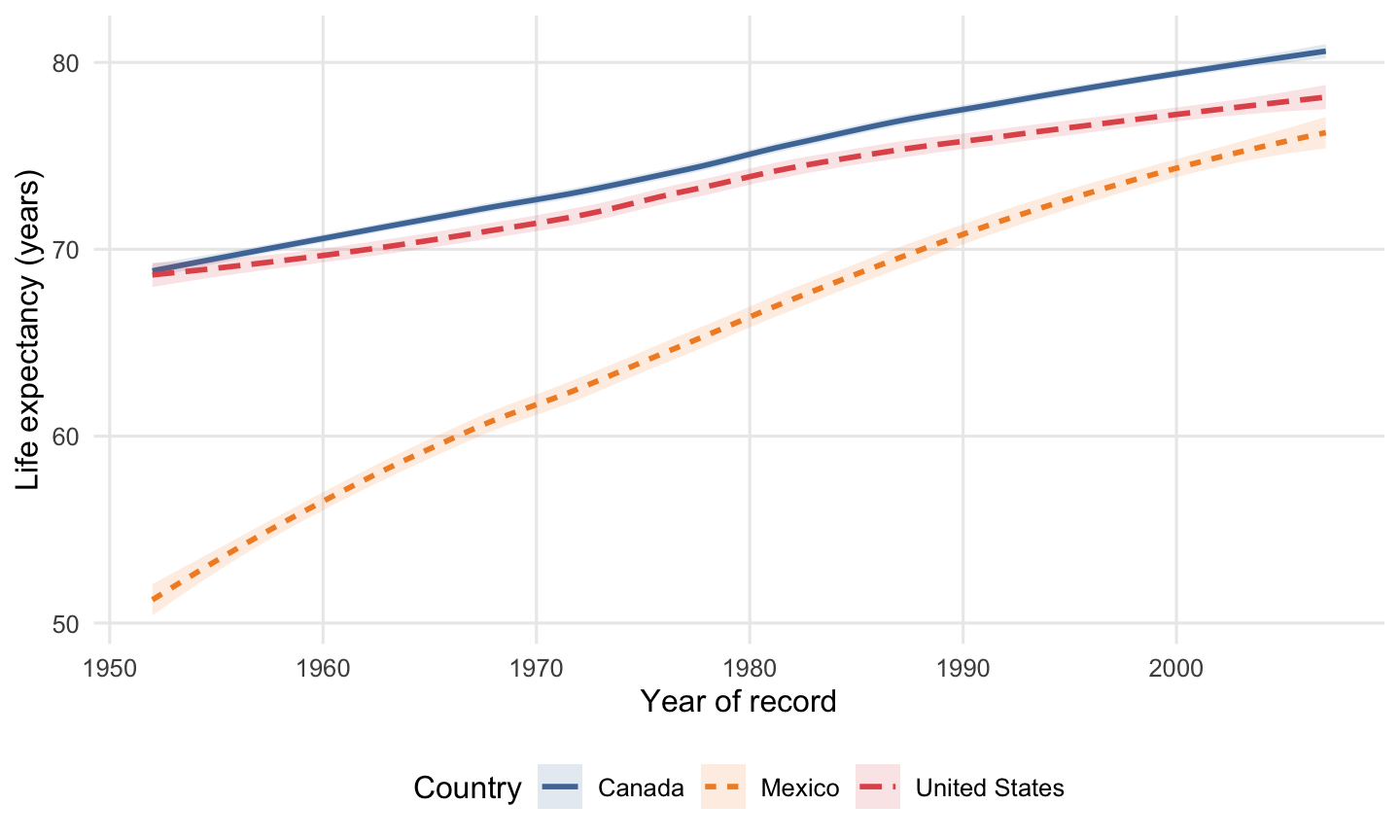
Reproduce these three countries’ trends and their uncertainty bands.
north_america_history <- gapminder |>
  filter(country == "United States" |
         country == "Canada" |
         country == "Mexico")

ggplot(data = north_america_history,
       mapping = aes(x = year,
                     y = lifeExp,
                     color = country,
                     fill = [?],
                     linetype = country)) +
  geom_smooth(alpha = 0.15,
              linewidth = 1) +
  scale_color_tableau() +
  scale_fill_tableau() +
  labs(x = "Year of record",
       y = "Life expectancy (years)",
       color = "Country",
       fill = "Country",
       linetype = "Country")
Target visualization:
Question 23
3 points · Lecture 8
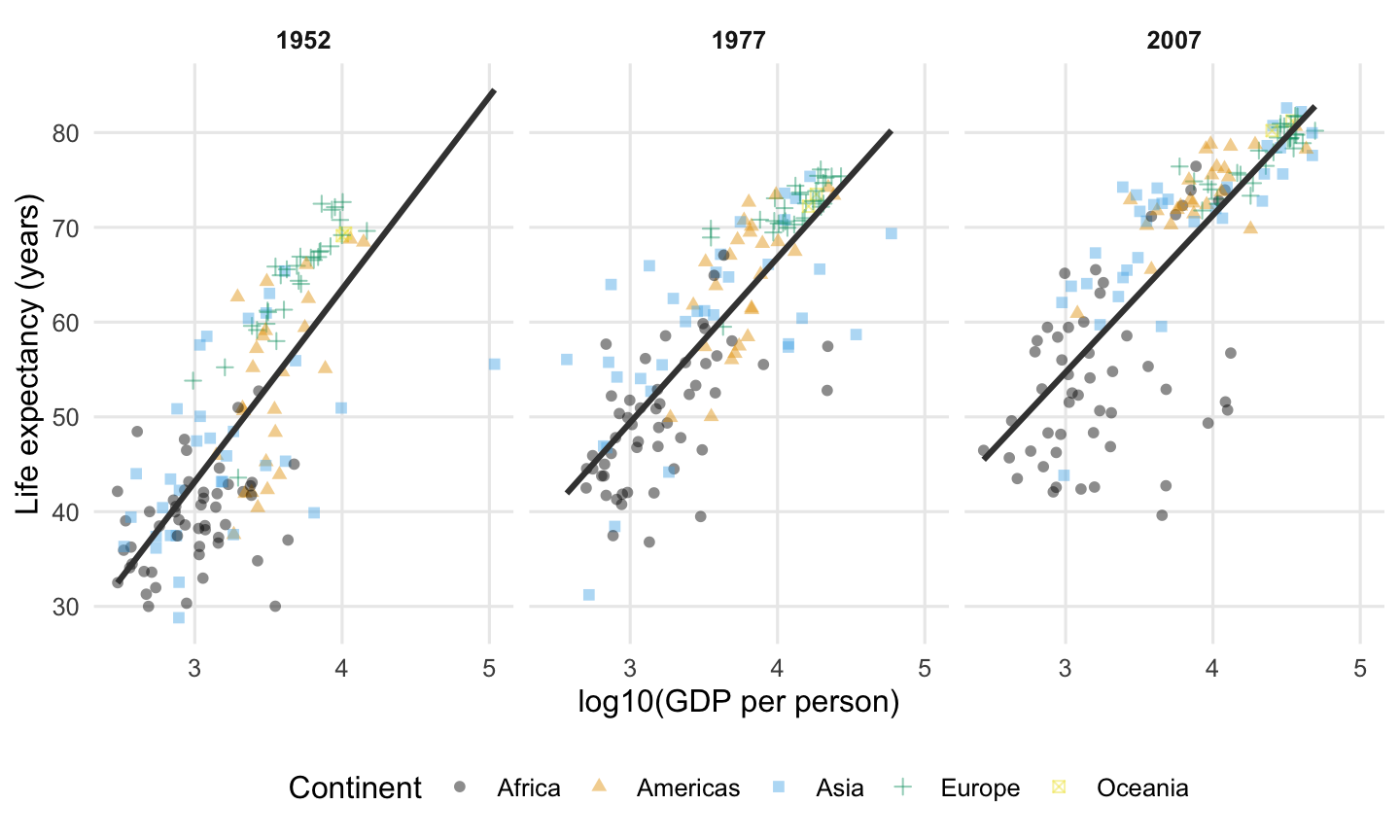
Arrange the comparisons for the three years as shown.
comparison_years <- gapminder |>
  filter(year == 1952 |
         year == 1977 |
         year == 2007)

ggplot(data = comparison_years,
       mapping = aes(x = log10(gdpPercap),
                     y = lifeExp)) +
  geom_point(mapping = aes(color = continent,
                           shape = continent),
             alpha = 0.45,
             size = 1.7) +
  geom_smooth(method = "lm",
              se = FALSE,
              color = "grey25") +
  [?] +
  scale_color_colorblind() +
  labs(x = "log10(GDP per person)",
       y = "Life expectancy (years)",
       color = "Continent",
       shape = "Continent")
Target visualization:
Question 24
3 points · Lecture 8
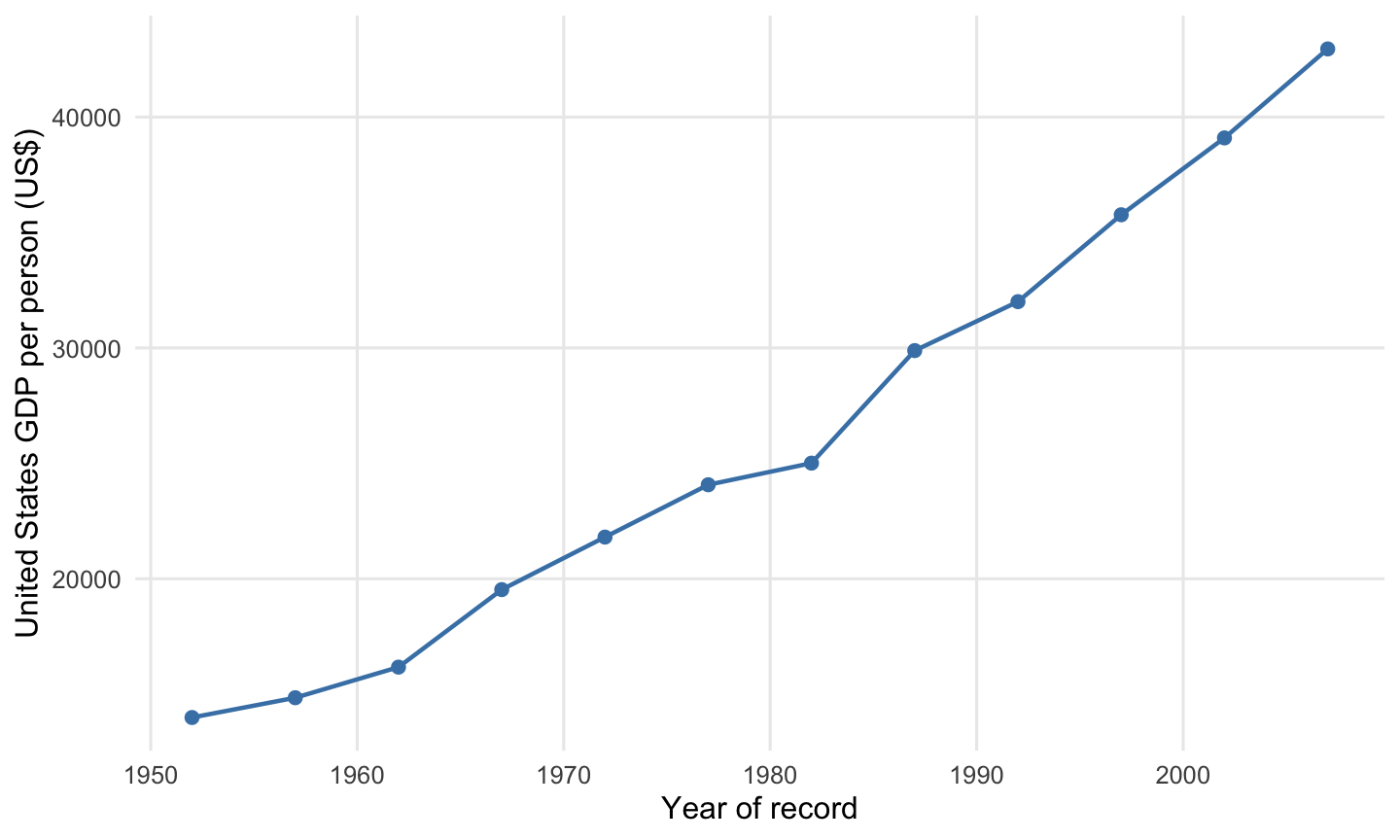
Complete the historical GDP series for the United States.
us_economy <- gapminder |>
  filter(country == "United States")

ggplot(data = us_economy,
       mapping = [?]) +
  geom_line(color = "steelblue",
            linewidth = 0.8) +
  geom_point(color = "steelblue",
             size = 2) +
  labs(x = "Year of record",
       y = "United States GDP per person (US$)")
Target visualization:
Question 25
4 points · Lecture 8
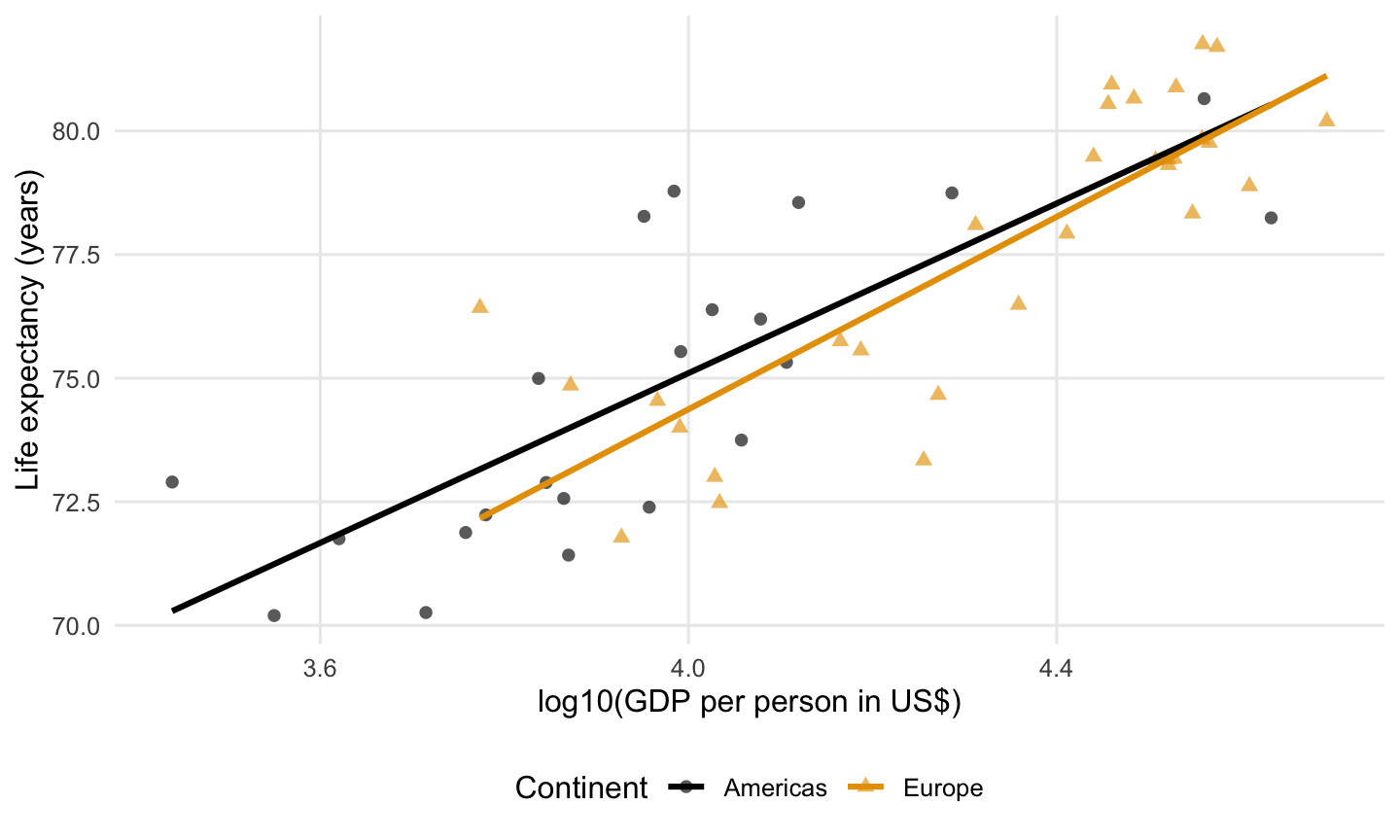
Plot the 2007 country records from the Americas or Europe with life expectancy at least 70 years, including the United States.
selected_countries <- three_continents |>
  filter([?])

ggplot(data = selected_countries,
       mapping = aes(x = log10(gdpPercap),
                     y = lifeExp,
                     color = continent,
                     shape = continent)) +
  geom_point(alpha = 0.65,
             size = 2) +
  geom_smooth(method = "lm",
              se = FALSE) +
  scale_color_colorblind() +
  labs(x = "log10(GDP per person in US$)",
       y = "Life expectancy (years)",
       color = "Continent",
       shape = "Continent")
Target visualization:
Question 26
4 points · Lecture 8
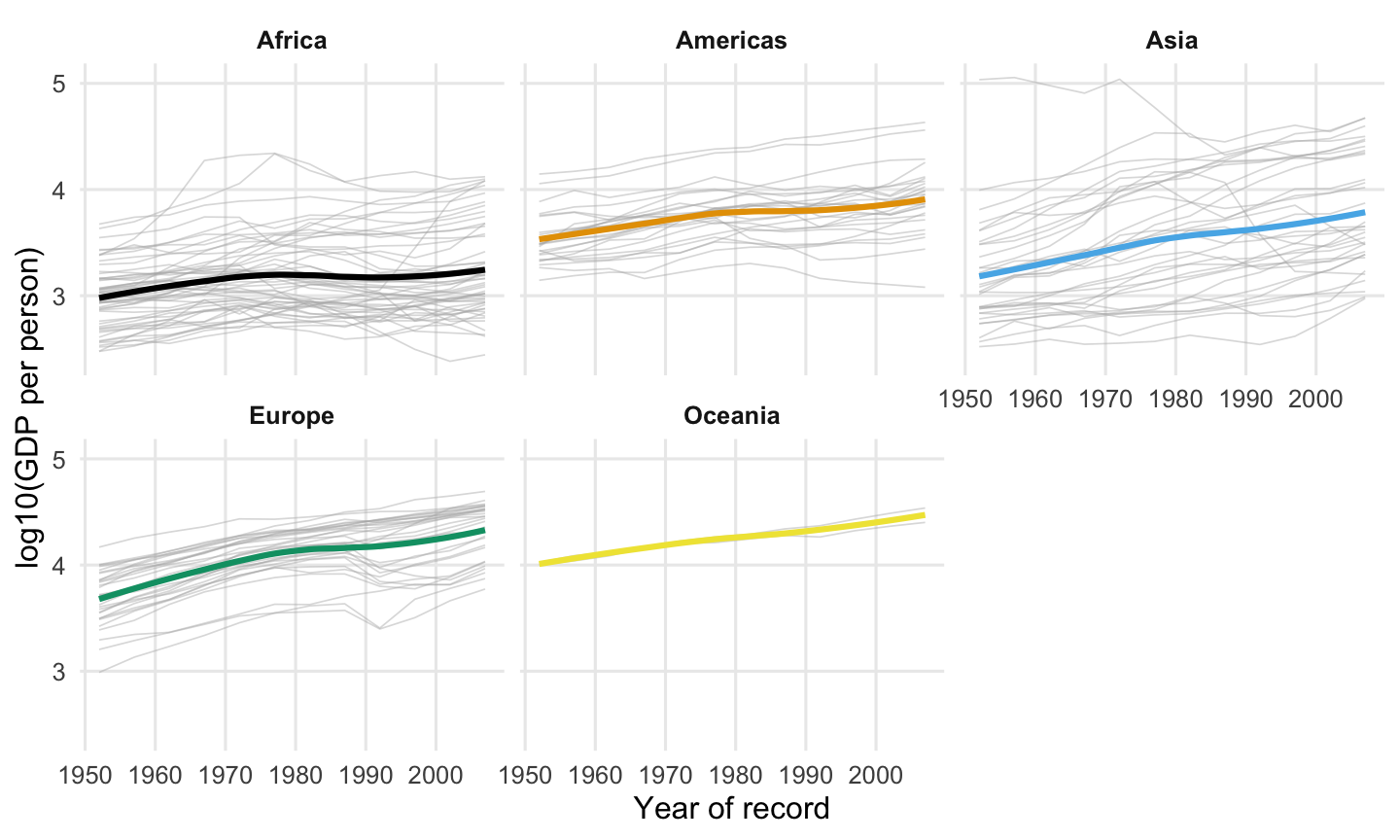
Complete the country histories and continental trends shown.
ggplot(data = gapminder,
       mapping = [?]) +
  geom_line(mapping = aes(group = country),
            color = "grey70",
            linewidth = 0.3,
            alpha = 0.45,
            show.legend = FALSE) +
  geom_smooth(se = FALSE,
              linewidth = 1.1,
              show.legend = FALSE) +
  facet_wrap(~ continent) +
  scale_color_colorblind() +
  labs(x = "Year of record",
       y = "log10(GDP per person)",
       color = "Continent")
Target visualization:
Question 27
4 points · Lecture 8
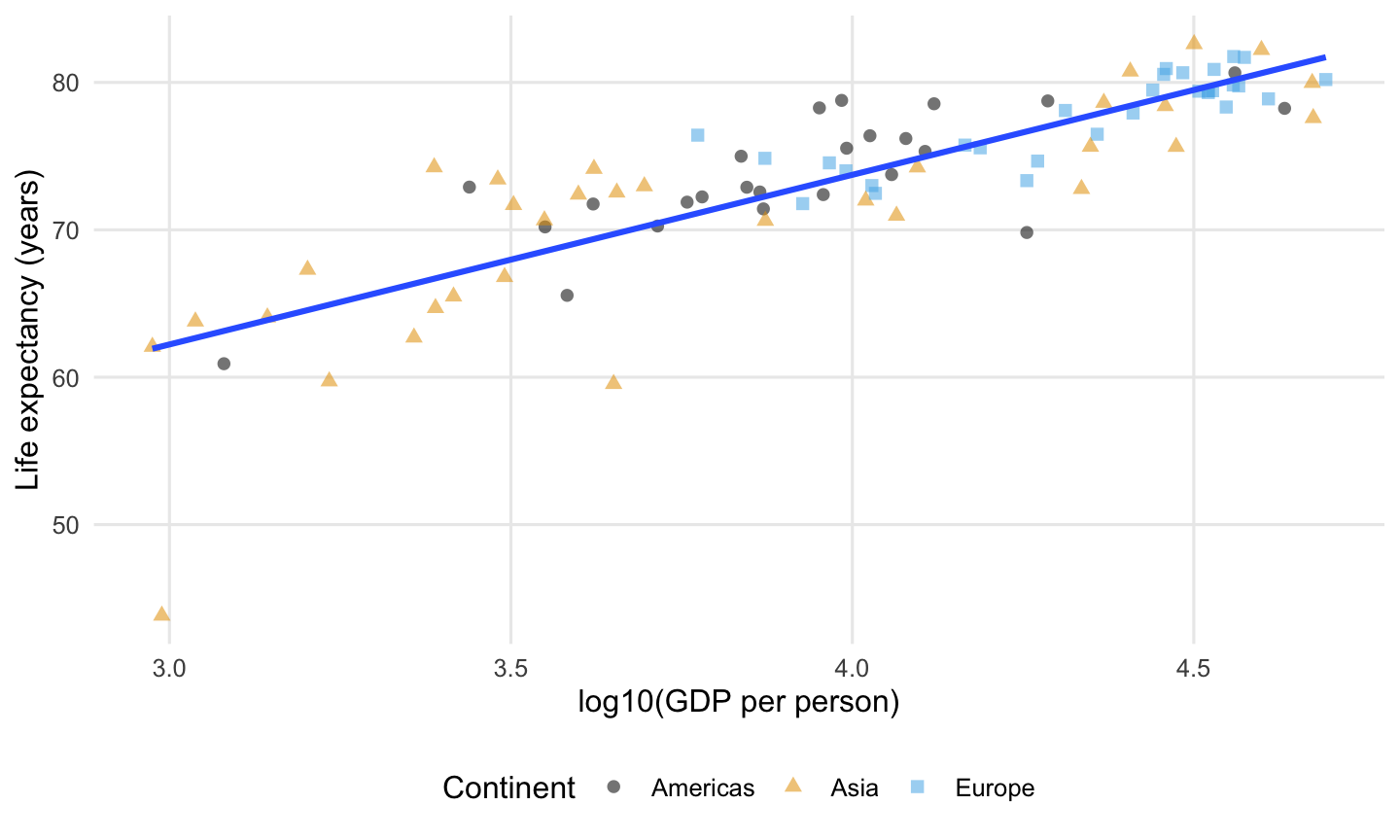
Add the overall fitted trend for the Americas, Asia, and Europe, including the United States.
ggplot(data = three_continents,
       mapping = aes(x = log10(gdpPercap),
                     y = lifeExp)) +
  geom_point(mapping = aes(color = continent,
                           shape = continent),
             alpha = 0.55,
             size = 2) +
  [?] +
  scale_color_colorblind() +
  labs(x = "log10(GDP per person)",
       y = "Life expectancy (years)",
       color = "Continent",
       shape = "Continent")
Target visualization:
Question 28
4 points · Lecture 8
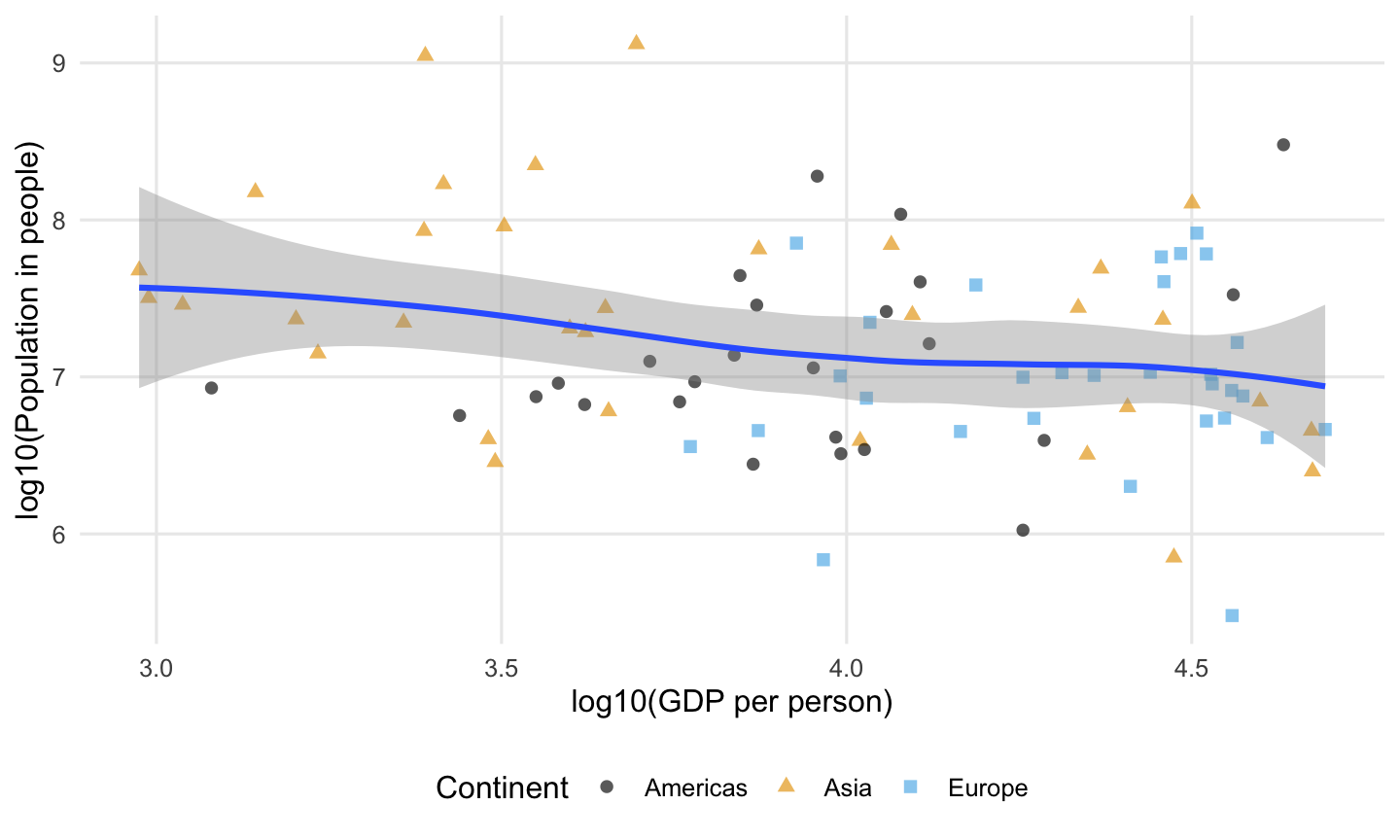
Reproduce the population–GDP relationship for the three continents, including the United States.
ggplot(data = three_continents,
       mapping = [?]) +
  geom_point(mapping = aes(color = continent,
                           shape = continent),
             alpha = 0.65,
             size = 2) +
  geom_smooth() +
  scale_color_colorblind() +
  labs(x = "log10(GDP per person)",
       y = "log10(Population in people)",
       color = "Continent",
       shape = "Continent")
Target visualization:
Question 29
4 points · Lecture 8
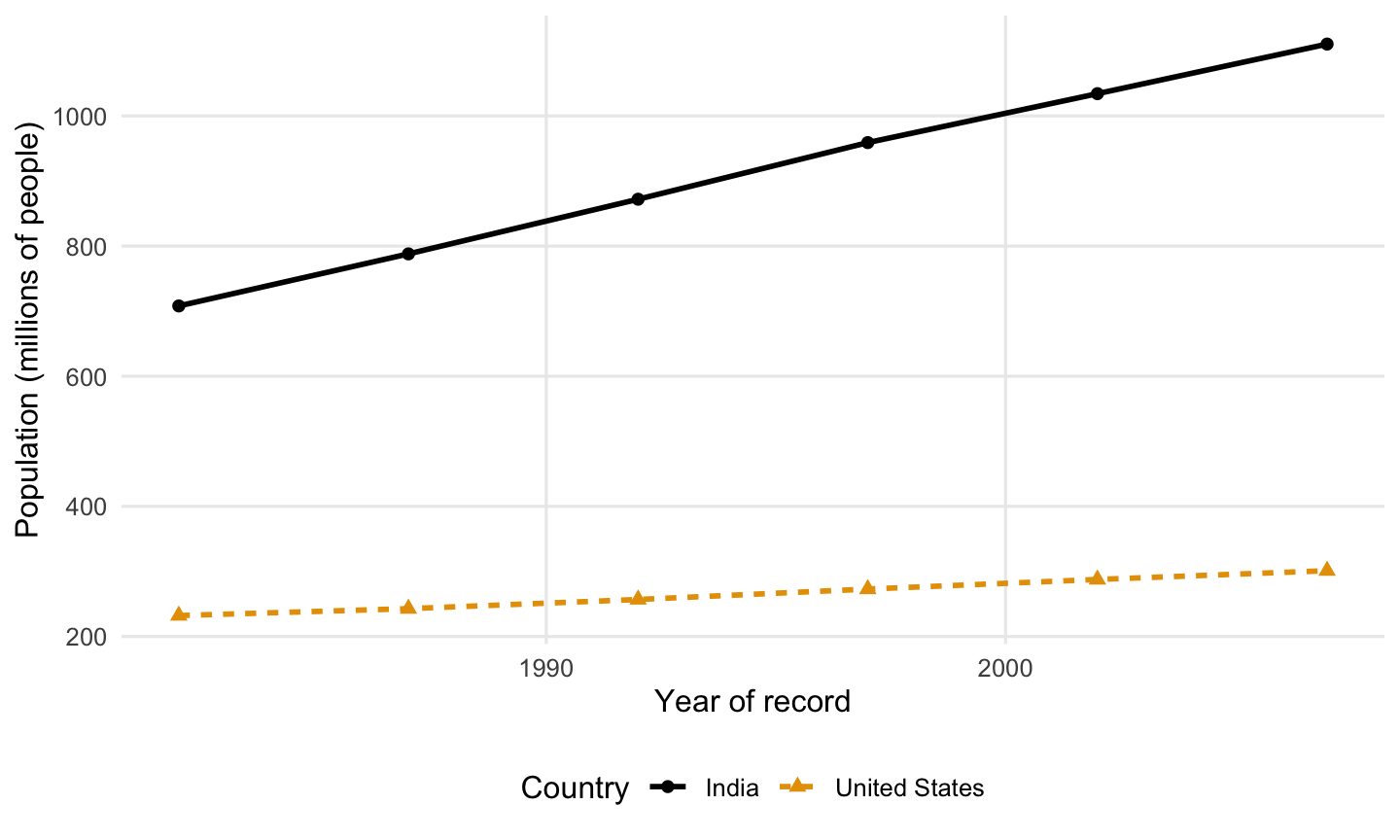
Keep the United States and India from 1982 through 2007, inclusive, then reproduce the population trends.
selected_population <- gapminder |>
  filter([?])

ggplot(data = selected_population,
       mapping = aes(x = year,
                     y = pop / 1000000,
                     color = country,
                     linetype = country)) +
  geom_line(linewidth = 1) +
  geom_point(mapping = aes(shape = country),
             size = 2) +
  scale_color_colorblind() +
  labs(x = "Year of record",
       y = "Population (millions of people)",
       color = "Country",
       linetype = "Country",
       shape = "Country")
Target visualization:
Question 30
4 points · Lecture 8
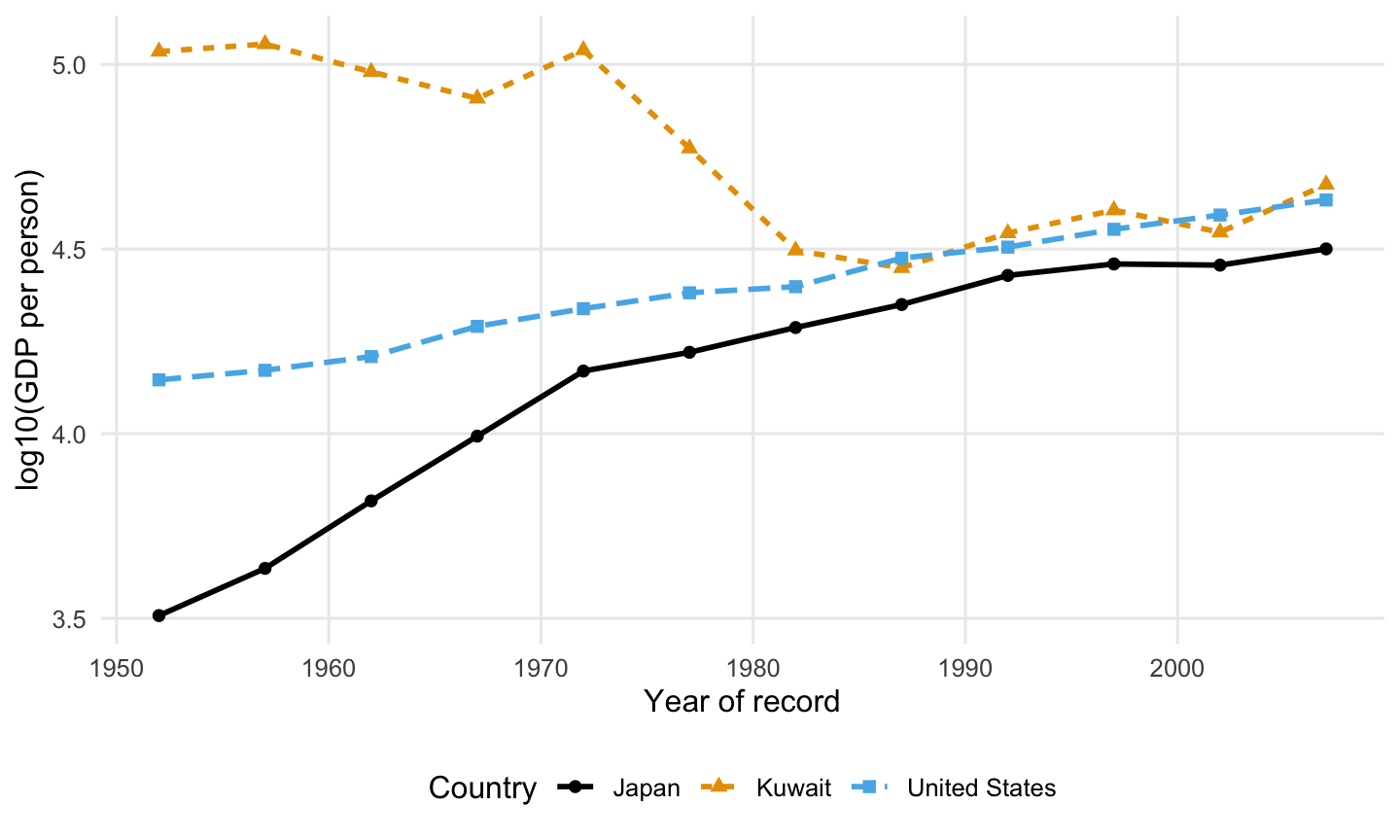
Reproduce these GDP histories.
gdp_histories <- gapminder |>
  filter(country == "Kuwait" |
         country == "United States" |
         country == "Japan")

ggplot(data = gdp_histories,
       mapping = [?]) +
  geom_line(linewidth = 1) +
  geom_point(mapping = aes(shape = country),
             size = 2) +
  scale_color_colorblind() +
  labs(x = "Year of record",
       y = "log10(GDP per person)",
       color = "Country",
       linetype = "Country",
       shape = "Country")
Target visualization:
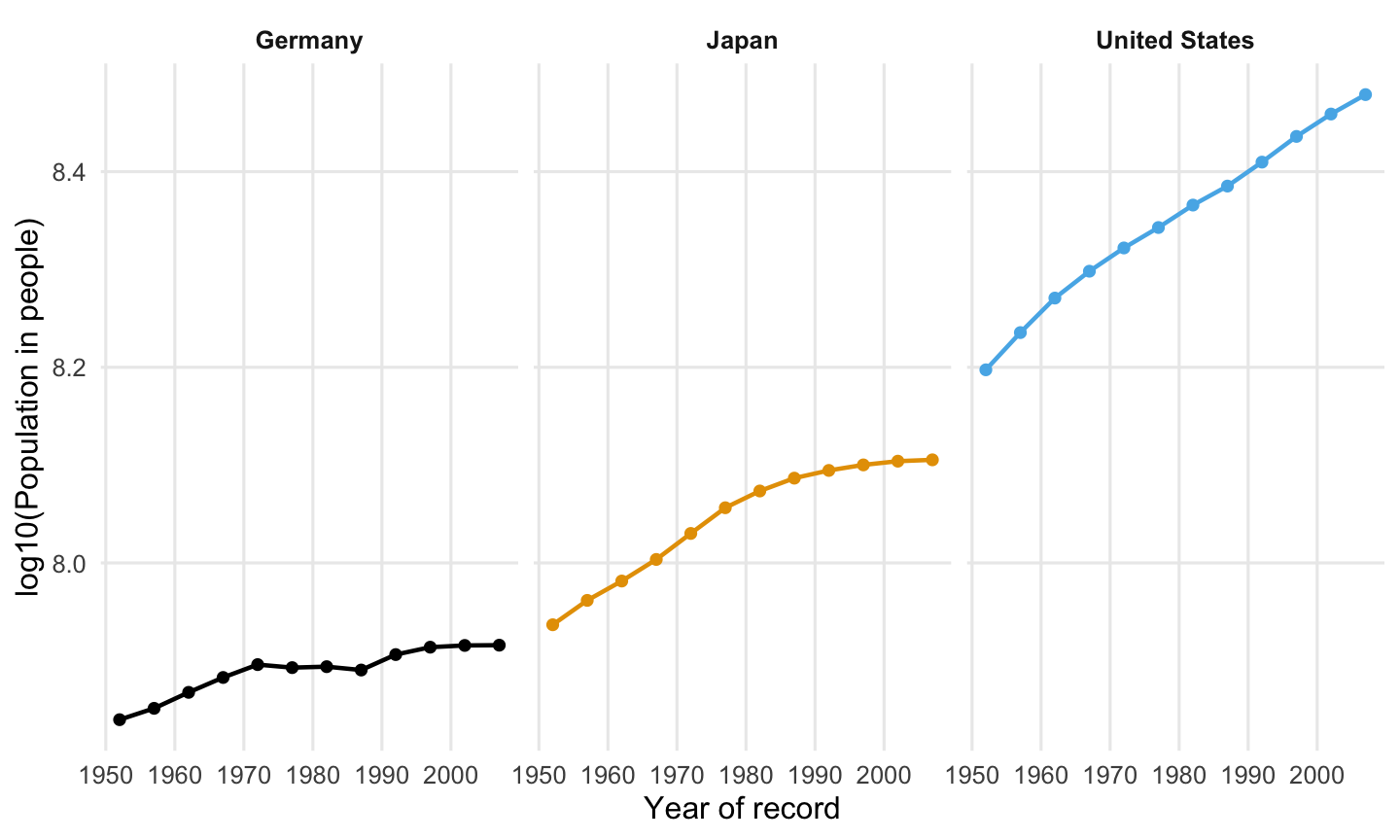
Question 31
3 points · Lecture 8
Reproduce the population histories in the three panels.
population_histories <- gapminder |>
  filter(country == "United States" |
         country == "Germany" |
         country == "Japan")

ggplot(data = population_histories,
       mapping = [?]) +
  geom_line(mapping = aes(color = country),
            linewidth = 0.8,
            show.legend = FALSE) +
  geom_point(mapping = aes(color = country),
             size = 1.6,
             show.legend = FALSE) +
  facet_wrap(~ country) +
  scale_color_colorblind() +
  labs(x = "Year of record",
       y = "log10(Population in people)")
Target visualization:
Question 32
3 points · Lecture 8
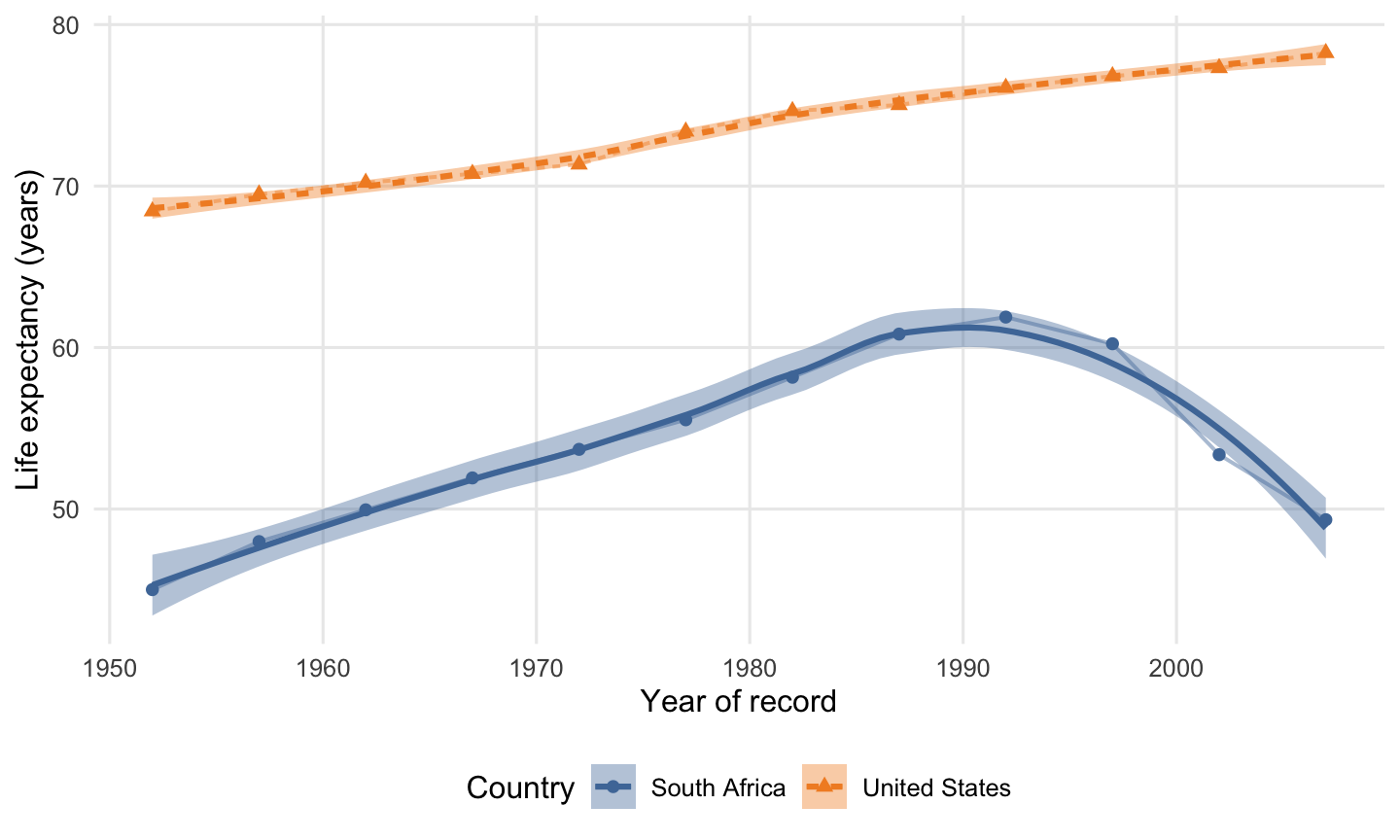
Add the fitted trends shown for the United States and South Africa.
life_histories <- gapminder |>
  filter(country == "United States" |
         country == "South Africa")

ggplot(data = life_histories,
       mapping = aes(x = year,
                     y = lifeExp,
                     color = country,
                     fill = country,
                     linetype = country)) +
  geom_line(linewidth = 0.7,
            alpha = 0.45) +
  geom_point(mapping = aes(shape = country),
             size = 2) +
  [?] +
  scale_color_tableau() +
  scale_fill_tableau() +
  labs(x = "Year of record",
       y = "Life expectancy (years)",
       color = "Country",
       fill = "Country",
       linetype = "Country",
       shape = "Country")
Target visualization: