Lecture 8
Agentic AI for Environmental Data Science
Byeong-Hak Choe
SUNY Geneseo
November 2, 2026
Today’s research task
One research artifact you can explain and verify.
Delegate a bounded task.
Inspect what ran.
Defend the result.
Suggested opening: ask who has copied code from a chatbot and then had to paste an error back. The new introduction builds a mental model of the agent, its tools, and its working context before applying these ideas to the wildfire projects. Allow approximately 15 minutes for this introduction and reserve about 20 minutes for the synthetic-data exercise. For a 75-minute meeting, discuss one project case live and assign the other case as reading. The companion starter is a clean teaching template, separate from the instructor’s active research repository.
Detailed reference, moved from the projected slide:
Use Codex to produce one research artifact that you can verify.
By the end of class, you should be able to:
Explain how an AI agent uses files and tools.
Give it a task with a clear output and stopping point.
Check environmental data before accepting an analysis.
Explain which decisions and conclusions remain yours.
Why researchers use agents
An agent-assisted workflow should leave a reproducible figure.
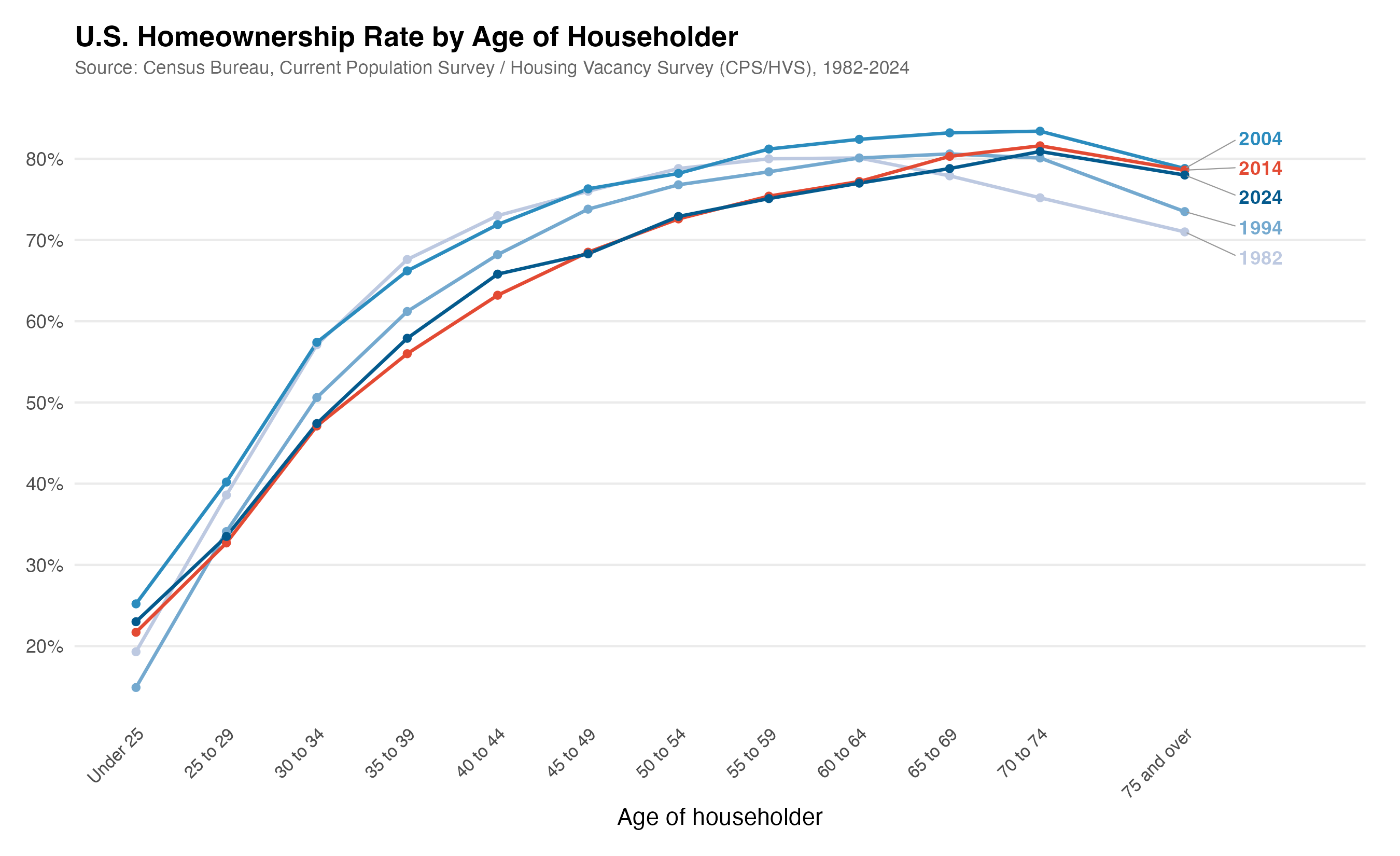
Presenter reference: Visual: Paul Goldsmith-Pinkham . His economics example; not wildfire data.
Ask students to name a routine coding obstacle from their own work. Separate a task that can be delegated from a research judgment they must defend. The examples here are course adaptations.
Detailed reference, moved from the projected slide:
Goldsmith-Pinkham emphasizes faster implementation and understanding the tools’ limits.
For our class, useful work includes reading unfamiliar R scripts, diagnosing a failed join, and rebuilding a figure.
The learning goal is to explain the result and how the workflow produced it.
Adapted from Goldsmith-Pinkham’s introductory post . Companion video overview, 1:43 .
The model and the agent system
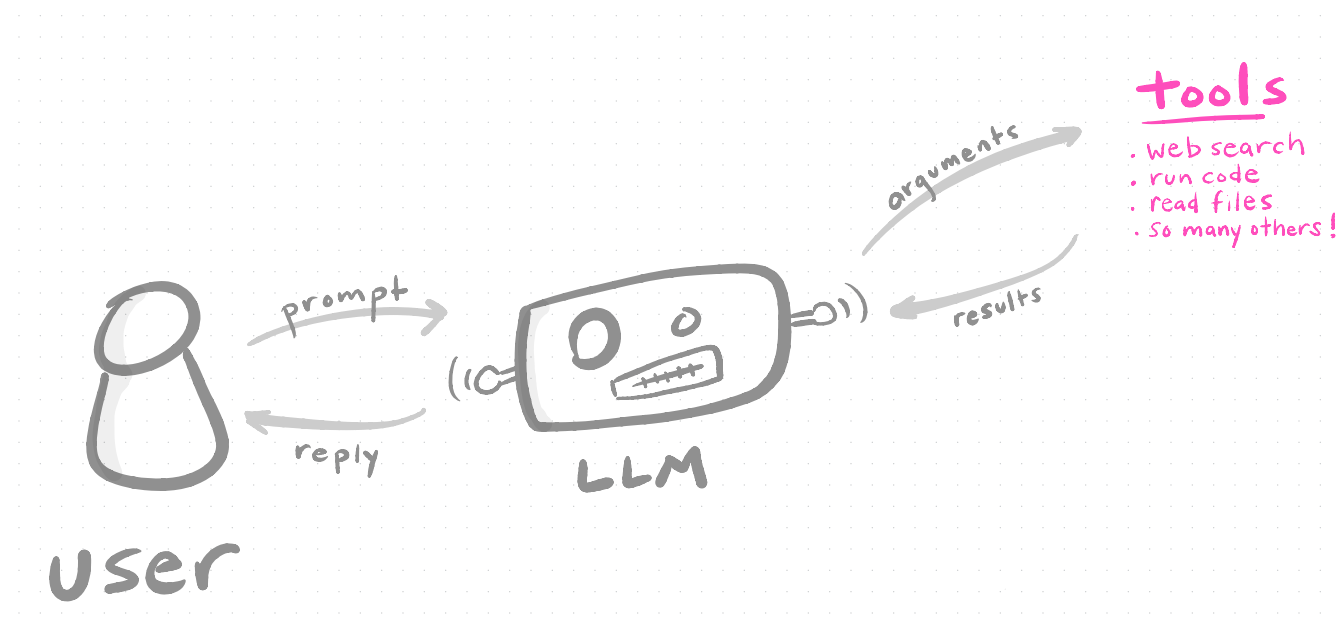
The model chooses a tool action. The application executes it and returns the result.
Presenter reference: Visual: Paul Goldsmith-Pinkham . Available tools depend on the environment.
An agent harness is the application machinery that connects the model to context, tools, execution, and controls. Students do not need to build one for this class. Codex provides that machinery. A tool request still has to be executed in an environment where the requested program and access exist. Models and interfaces can differ, so do not assume every AI tool has the same underlying model or capabilities.
Detailed reference, moved from the projected slide:
Language model Generates a response or requests a tool action from the context it receives
Agent application Organizes the work, invokes available tools, and returns their results to the model
Environment Supplies files, installed software, and configured access boundaries
The surrounding system determines which actions a model can carry out.
Official OpenAI explanation of the agent harness . Related video chapter: 6:52 .
What makes an AI system agentic?
A goal, available tools, and a feedback loop.
Goal
Audit a county-day file
Evidence
The file and its dictionary
Boundary
Preserve raw inputs; report failed checks
This is a working definition for the course. Agency is a property of the workflow around a model. A model generating a paragraph is different from a system choosing a file, writing code, executing it, reading the result, and revising the code. More autonomy does not establish more reliable science. Ask students to name one tool and one boundary in a familiar RStudio workflow.
Detailed reference, moved from the projected slide:
An agent uses a model to choose and carry out steps toward a task.
Goal
Audit a county-day smoke file
Tools
Read files, write R code, run commands, inspect outputs
Working context
Your question, instructions, data dictionary, recent results
Feedback
An error message, a failed check, or your correction
Boundaries
Allowed files, actions, data, and resource limits
A chatbot answer and a project agent
A suggestion
:: left_join (smoke, weather, by = c ("GEOID" , "date" ))An artifact you can inspect
A command can run and still produce the wrong dataset.
Avoid treating the browser-versus-local distinction as absolute: some chat products also have tools. The distinction here is between receiving an answer and delegating actions in a project. A many-to-many merge can run without an error and multiply observations. The rest of the lecture makes that risk concrete.
Detailed reference, moved from the projected slide:
“How do I join these tables?”
An explanation or code snippet
Does the idea make sense?
“Write and run this join in my project”
Changed files and an output table
The code, keys, row counts, and unmatched observations
“Check this result against the inputs”
A reproducible check
Whether the check catches a real possible error
A successful command can still produce an incorrect dataset.
Ways to use AI for coding
Suggestions · project actions · delegated tasks
Start with one agent and one task in this class.
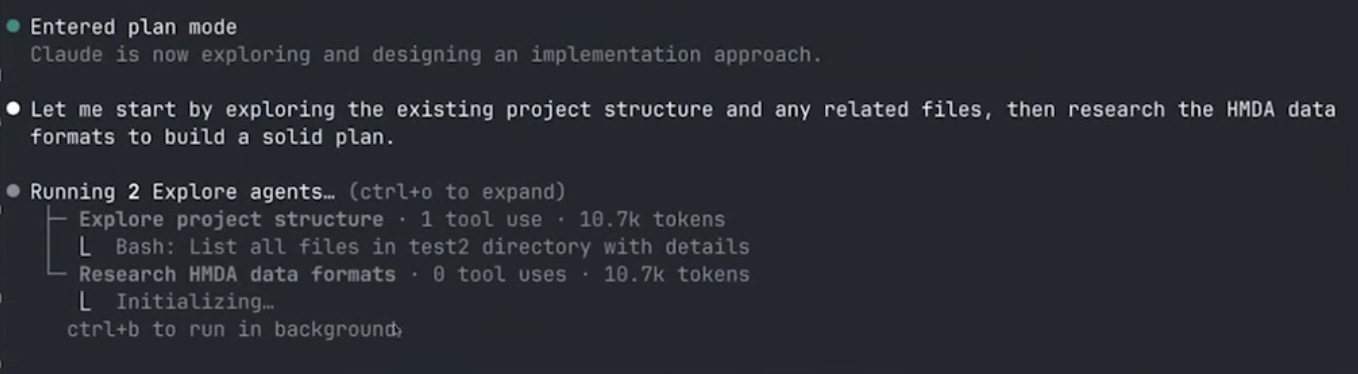
Presenter reference: Visual: Paul Goldsmith-Pinkham . Claude interface shown; an optional extension, not required setup.
The categories overlap. This is a teaching comparison, not a ranking of current products. Additional access and autonomy need a research purpose.
Detailed reference, moved from the projected slide:
Chat or autocomplete
Suggestions you run and inspect
Agent in an editor
Work across project files
Dedicated project agent
File edits and command execution
Connected tools
Access to approved external systems
Extended autonomous work
Longer tasks within configured boundaries
For this class: a project agent with a small task and visible outputs.
Adapted from the tool ladder in Goldsmith-Pinkham’s post . Choose a configuration that fits the task.
What actually runs the analysis?
R executes. Codex reads the result. You check it.
Presenter reference: Computed from the supplied synthetic starter. The audit intentionally fails.
Use the supplied starter as a concrete illustration, not a universal claim about where every AI product computes. R must be available to run this command. The local audit uses base R, so no extra packages, external data, or network connection are needed to execute it. Interacting with an online model is a separate service step. Writing plausible code does not mean that code ran. Later outputs must distinguish a suggested command, an attempted run, and a completed run with saved results.
Detailed reference, moved from the projected slide:
An agent can write a command such as:
For our local starter:
R executes the script on your computer.The filesystem stores the input CSVs and saved audit.Codex can inspect the command’s output and respond.You check whether the reported result answers the task.
The agent’s work cycle
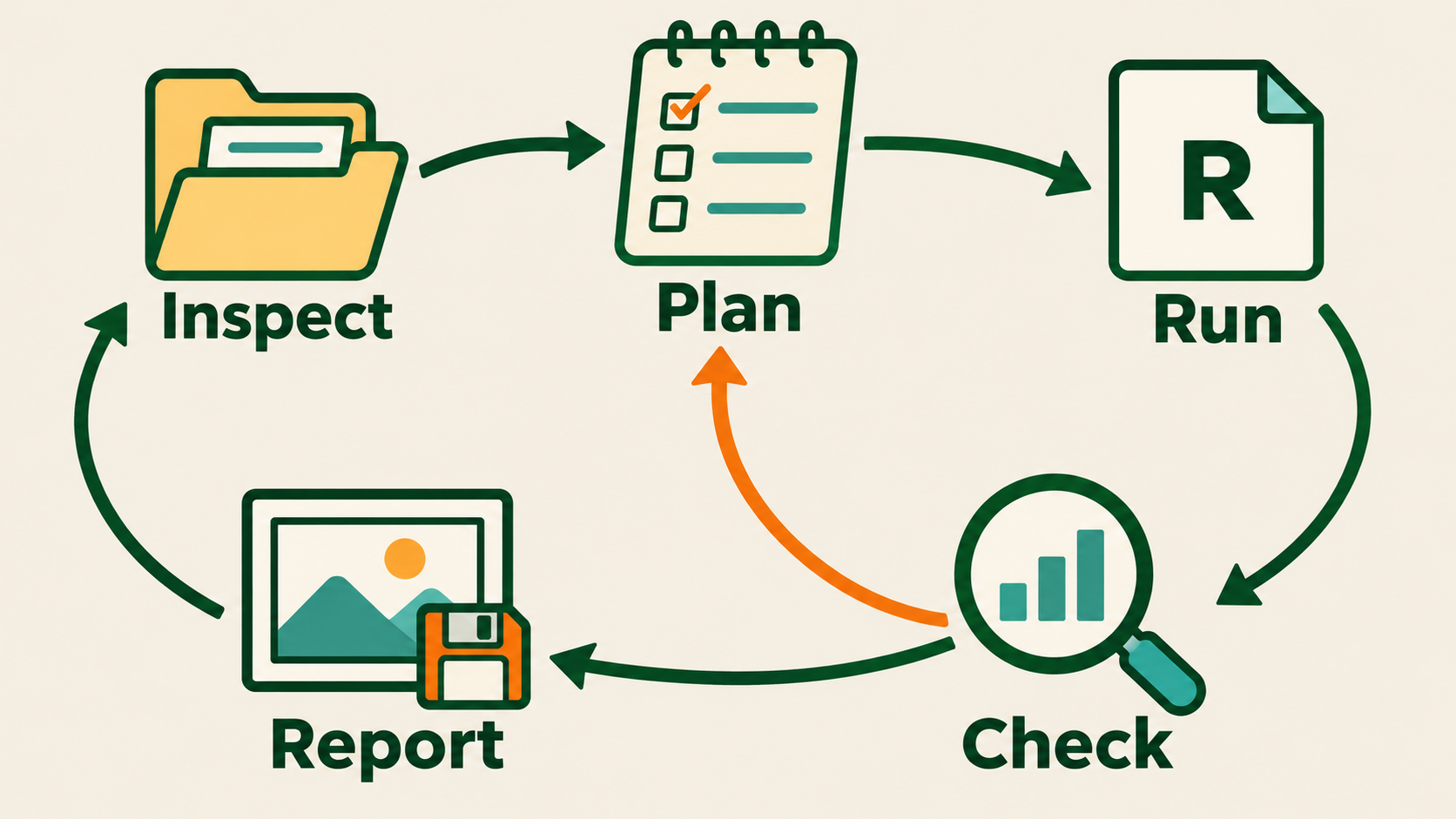
A failed check sends the task back for a justified correction.
Presenter reference: Original AI-generated teaching schematic; labels describe the course workflow.
Expected answer: inspect the duplicates and resolve their meaning before accepting the join. The agent can continue diagnosing and reporting the failure, but should not quietly average, drop, or relabel records. This cycle is a teaching workflow, not a requirement to approve every local edit. Once the task is bounded, allow ordinary code execution and repair within it.
Detailed reference, moved from the projected slide:
Inspect: read the project plan and a small input sample.Propose: identify the key, transformations, and expected output.Execute: write and run a script within the agreed task.Check: compare actual outputs with explicit expectations.Report: save the artifact, limitations, and next step.
You can correct the task when the output reveals a problem.
What should happen if the proposed key is not unique?
An example conversation
Illustrative dialogue
“Run the audit.”
“Show the duplicated records.”
“Propose a fix and a check.”
Each follow-up uses evidence from the previous step.
This is a constructed teaching dialogue, not a transcript from the video or a live Codex session. It matches the known toy fixture. Invite students to explain why stopping on a duplicate is a useful result. The final instruction requests a proposal because the duplicate-handling decision affects the data. Once that decision is settled, the agent can implement and check the bounded transformation. Correct a mistaken unit, source, or language choice early rather than letting the agent build on it.
Detailed reference, moved from the projected slide:
Illustrative dialogue using our synthetic starter:
Each follow-up uses evidence from the previous step.
The context window
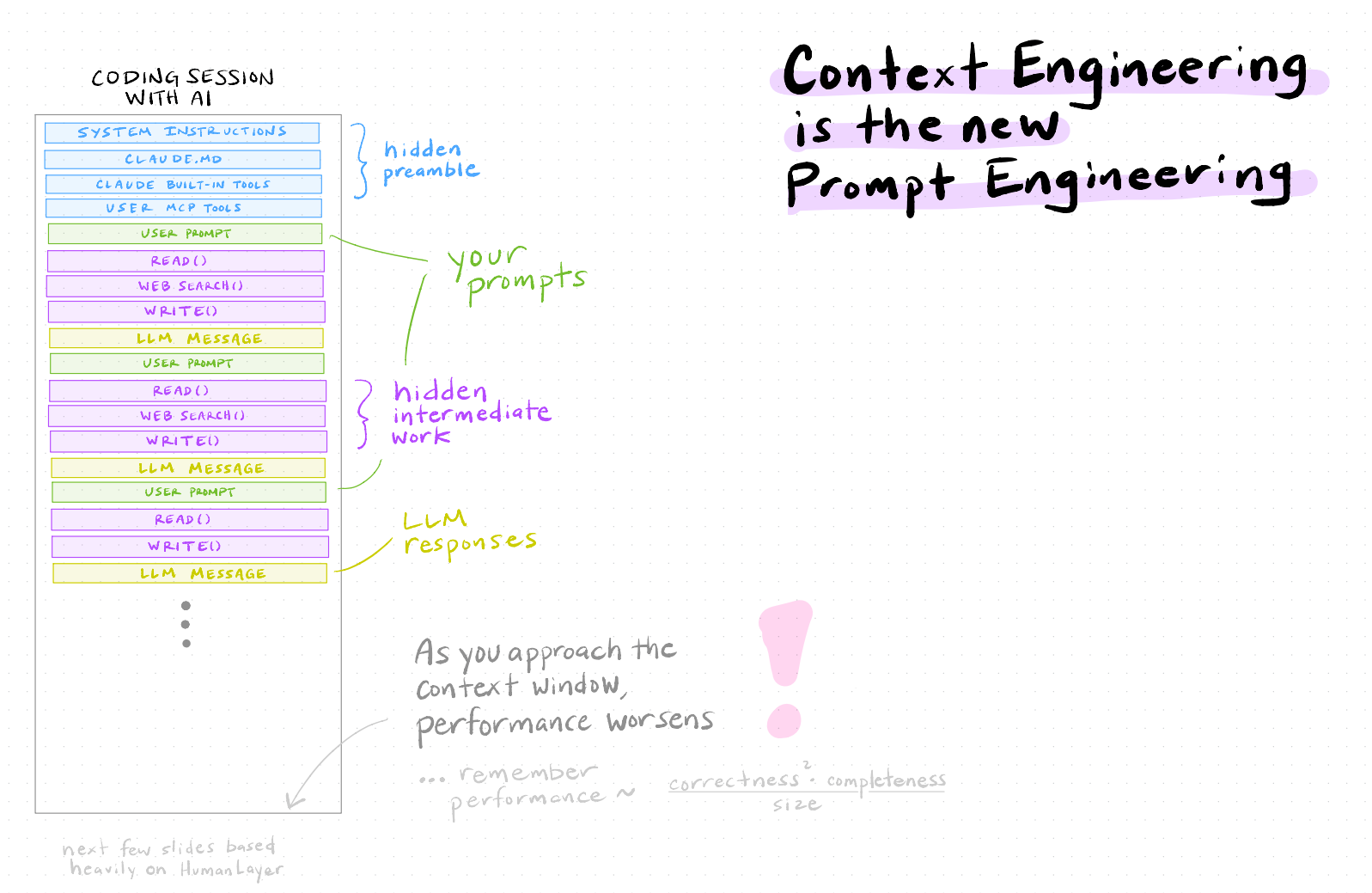
Your prompt is only part of the model’s working context.
Presenter reference: Visual: Paul Goldsmith-Pinkham . Original Claude labels; the performance equation is a heuristic, not a quantitative law.
A file existing in a project does not mean its entire contents are in the model’s current context. Give the agent relevant paths and have it inspect the needed material. Do not paste a whole environmental archive into the conversation. A schema, small sample, and computed summary often provide a better starting point. Avoid a fixed token count or a rule that a session becomes unreliable after a particular number of turns. Capacity and context-management behavior vary by model and client.
Detailed reference, moved from the projected slide:
Context is the working material available to the model for a response.
It can include:
Your task and the applicable instructions.
Relevant conversation history.
Selected file contents and documentation.
Tool results, including errors and computed summaries.
Its capacity is finite and model-dependent, measured in tokens : pieces of text or code.
Official explanation of context windows . Video chapter: 23:54 .
Working context and project memory
Working context is temporary. Project records are inspectable.
project-plan.mdlab-notebook.mdScripts and outputs
Compaction carries state forward. Files let you verify it.
Presenter reference: Official compaction overview .
Compaction manages the material carried into later model interactions. It does not retrain the model on the project, and it should not be treated as a perfect record of every earlier detail. Keep consequential decisions and verified results in inspectable files. When continuing, ask the agent to read the relevant records. Stay in the current chat while working on the same coherent task; a new chat is useful when the task changes or you want a clean start from a checkpoint. No Claude-specific compaction command is required for this exercise.
Detailed reference, moved from the projected slide:
Current context
Supplies material for the next response
project-plan.mdPreserves the agreed question and definitions
lab-notebook.mdRecords decisions, actual checks, and open issues
Scripts and outputs
Preserve the analysis and its evidence
Compaction reduces earlier context while carrying important state forward.
Saved project records let you check and reconstruct that state.
Official compaction overview . The file choices are our course workflow.
A checkpoint before the next task
Read the checkpoint. Inspect the files. Verify the state.
This prompt is a course adaptation for the starter’s single-notebook design. For a transportation project, a checkpoint might record which airports were retained and whether the smoke join matched. For a moisture-forecasting project, it might record the forecast date and predictor availability. A saved note is an aid to verification, not proof that a script exists or ran. Have a student identify one decision they would want a future session or classmate to recover.
Detailed reference, moved from the projected slide:
When continuing: read the checkpoint, inspect the files, verify the state.
Illustrative wildfire projects
Transportation: smoke and flight operations. Moisture: preseason conditions and burned area.
Presenter reference: Course Lecture 6. CSU smoke, NASA FIRMS detections, NOAA HMS plumes. Project questions remain illustrative.
These illustrative cases show how to turn an environmental research question into a bounded agent task. The transportation case focuses on flights. The moisture case separates a burned-area forecast from the descriptive fire-to-smoke link. The proposed artifacts demonstrate workflow design, not completed analyses or empirical findings.
Detailed reference, moved from the projected slide:
Transportation Does Canadian wildfire smoke disrupt transportation in the Northeast?
A checked airport-day dataset and an episode figure
Preseason moisture Can winter and spring moisture predict Canadian burned area?
A checked province-year predictor table and a forecast evaluation plan
These are research questions , not established findings.
Illustrative course cases. Context: wildfire research guide .
Applications across environmental data science
One workflow, many environmental questions.
CSV or spatial layer
Audit and derived table
Keys, units, coverage
Analysis table
Figure or baseline model
Comparison and interpretation
Smoke, heat, water quality, energy demand, and solar adoption all need these checks.
Connect to existing course skills: joins, ggplot2, sf, panel models, and Quarto. Codex can help implement each, but it needs the actual source documentation. A useful environmental task often begins with units and geography rather than model choice. The same workflow applies to solar adoption, heat exposure, water quality, and energy demand.
Detailed reference, moved from the projected slide:
Data acquisition
Download one documented public release
Provider, version, licence, coverage
Data cleaning
Build a county-month panel
Units, keys, missingness, sample loss
Spatial analysis
Join airport points to counties
Coordinate system and unmatched points
Forecasting
Compare a baseline with one model
Timing, held-out years, leakage
Communication
Rebuild a figure and check its caption
Values, comparison, interpretation
Research decisions that need your judgment
Unit · exposure · comparison · claim
Airport-day and county-day answer different questions.
A June 1 forecast needs information available by June 1.
A predictive relationship does not establish causation.
You defend the scientific choice.
Ask students which row is most important for their own project. For the transportation example, discuss the outcome unit and the comparison. For the moisture example, discuss the information available at the forecast date. Do not frame AI as a substitute for knowing what a variable measures.
Detailed reference, moved from the projected slide:
Observation unit
Airport-day and county-day measure different things
Exposure
Smoke overhead differs from smoke near the ground
Comparison
A smoky June day also has particular weather
Forecast date
A June 1 forecast cannot use observed July weather
Claim
Forecast accuracy and a causal effect answer different questions
Codex can propose options and identify consequences. You defend the choice.
Course context: wildfire research guide and data guide .
A suitable system for this class
One workspace. One bounded task. Visible evidence.
A classmate reviews the artifact before the team accepts it.
The course workspace keeps source traceability, preservation of raw inputs, explicit decisions, and review. It omits manuscript/journal machinery and mandatory multi-agent orchestration. A separate clean teaching template avoids distributing active research files and project-specific instructions.
Detailed reference, moved from the projected slide:
Wildfire Research Lab: one Codex workspace per project.
A short project plan states the question and data definitions.
AGENTS.md records recurring project instructions.R scripts produce derived data, checks, and figures.
One lab notebook records decisions and verified progress.
A classmate checks the artifact before the team accepts it.
Begin with one agent working on one bounded task.
The project folder
Presenter reference: Download the starter · Instructions
The supplied starter contains the instructions, blank plan/notebook, data documentation, synthetic inputs, and an audit script. The tree shows the intended analysis structure, including files students will create later. Keep it in its own project folder. No API server, orchestration framework, custom hooks, or new database is required for the first exercise. Preserving raw files is a project convention here, not a filesystem permission guarantee.
Detailed reference, moved from the projected slide:
Raw inputs stay as received.
Scripts explain every transformation.
Outputs are rebuildable.
Notes preserve the reason for each important choice.
Companion template: download the starter and read the instructions . Create analysis scripts and report.qmd as the project develops.
A project plan that supplies useful context
Transportation
Airport-day
Intake audit and episode plot
Moisture
Province-year
Predictor audit and evaluation split
State the outcome, units, and claim limit before implementation.
These are illustrative pilot definitions, not final specifications. The transportation example requires checking temporal conventions in the exact flight and smoke releases before joining. The moisture example requires distinguishing the dates a variable describes from when the data actually become available. Historical reanalysis can support a retrospective forecast experiment without proving operational real-time feasibility.
Detailed reference, moved from the projected slide:
Unit
Airport × local calendar day
Province × year
Outcome
Cancelled / scheduled flights
Annual burned area, hectares
Input
County surface-smoke estimate
Moisture known by June 1
First scope
Selected airports, June 2023
A small province/year extract
First output
Intake audit and episode plot
Predictor audit and split diagram
Claim limit
Descriptive episode evidence
Forecast feasibility
The first Codex session
Open a separate copy of the starter.
Confirm the active project instructions.
Run the synthetic audit.
Presenter reference: Official AGENTS.md guidance . Use your own account.
AGENTS.md supplies project guidance to Codex. Other global or more specific instructions can also apply. Have students confirm which instructions were loaded instead of assuming the local file is the only one. The inventory is deliberately read-only; the next task can authorize writing and running the audit. Avoid spending class time installing a complex extension stack.
Detailed reference, moved from the projected slide:
Open a copy of the starter as its own project folder.
Sign in using your own ChatGPT account in your Codex client.
Ask Codex to summarize the project instructions and files.
Start with the supplied synthetic-data audit.
Official guidance: project instructions with AGENTS.md . Client access and settings may differ.
The student credit pilot
Individual application. Verification required.
Expires 12 months after the grant. Codex usage credits, separate from API credits.
Presenter reference: Official eligibility and claim link . U.S./Canada enrollment and residence requirements apply. Checked November 2, 2026.
Do not promise that an application will succeed or that $100 buys a fixed number of tasks. Each student uses their own account. Pending access can be handled with an instructor demonstration or by running the supplied R audit manually. No API key is necessary for this teaching setup. The Codex credit offer does not fund a separately built API orchestration service.
Detailed reference, moved from the projected slide:
The two students will apply individually through the official offer.
Eligible verified university students in the U.S. and Canada can receive $100 in ChatGPT credits for Codex .
Eligibility includes enrollment and residence requirements. Approval requires verification.
Credits expire 12 months after the grant .
These are Codex usage credits , separate from API credits.
Use the same research workflow even if verification is pending.
Codex for Students: eligibility and claim link , checked November 2, 2026. Recheck before applying.
A prompt with a clear finish line
Done includes the actual check results, including failures.
This prompt describes the supplied starter script and can also be used to ask Codex to explain it. The synthetic exercise deliberately fails one check. A useful response reports that failure, rather than claiming the panel is ready. Do not encourage students to paste their entire data archive into a chat. Point to a file, schema, and bounded sample instead.
Detailed reference, moved from the projected slide:
Include the input, task, output, checks, and boundaries .
“Done” means a saved artifact and the actual check results, including failures.
A real-data audit after the toy example
Audit the June 2023 county-day extract before rebuilding a map.
Presenter reference: Course Lecture 6: CSU surface-smoke estimates. Extract documentation .
The extract documentation lists 93,240 observations: 3,108 counties times 30 days. Treat that as an expected count to verify against the supplied release. The clean monthly course files and the teaching extract have different naming conventions, so inspect the actual header. The full data guide has detailed units and version information. The deck itself downloads nothing.
Detailed reference, moved from the projected slide:
Start with an instructor-supplied copy of this small teaching extract.
Lecture 6 extract documentation and course data guide .
What belongs in an audit?
The extra weather row must be explained before the join.
Presenter reference: Synthetic teaching fixture. Rebuild with img/agentic-ai/build-toy-figures.R.
Ask for a small CSV or text report produced by the script. Counts should come from computation, not a paragraph generated from memory. Include checks that reflect the data-generating process: nonnegative precipitation is sensible, but requiring nonnegative CSU smoke estimates contradicts the course documentation. An audit needs a person who understands what each check means.
Detailed reference, moved from the projected slide:
Grain and key
One row represents what? Is the key unique?
Coverage
Dates, places, and expected versus observed rows
Values
Units, ranges, missingness, and documented exceptions
Join
Rows before/after, unmatched keys, duplicated matches
Sample
Observations lost at each restriction
Provenance
Provider, release, access date, licence, input file
“I checked the data” needs an output you can inspect.
Environmental variables measure different things
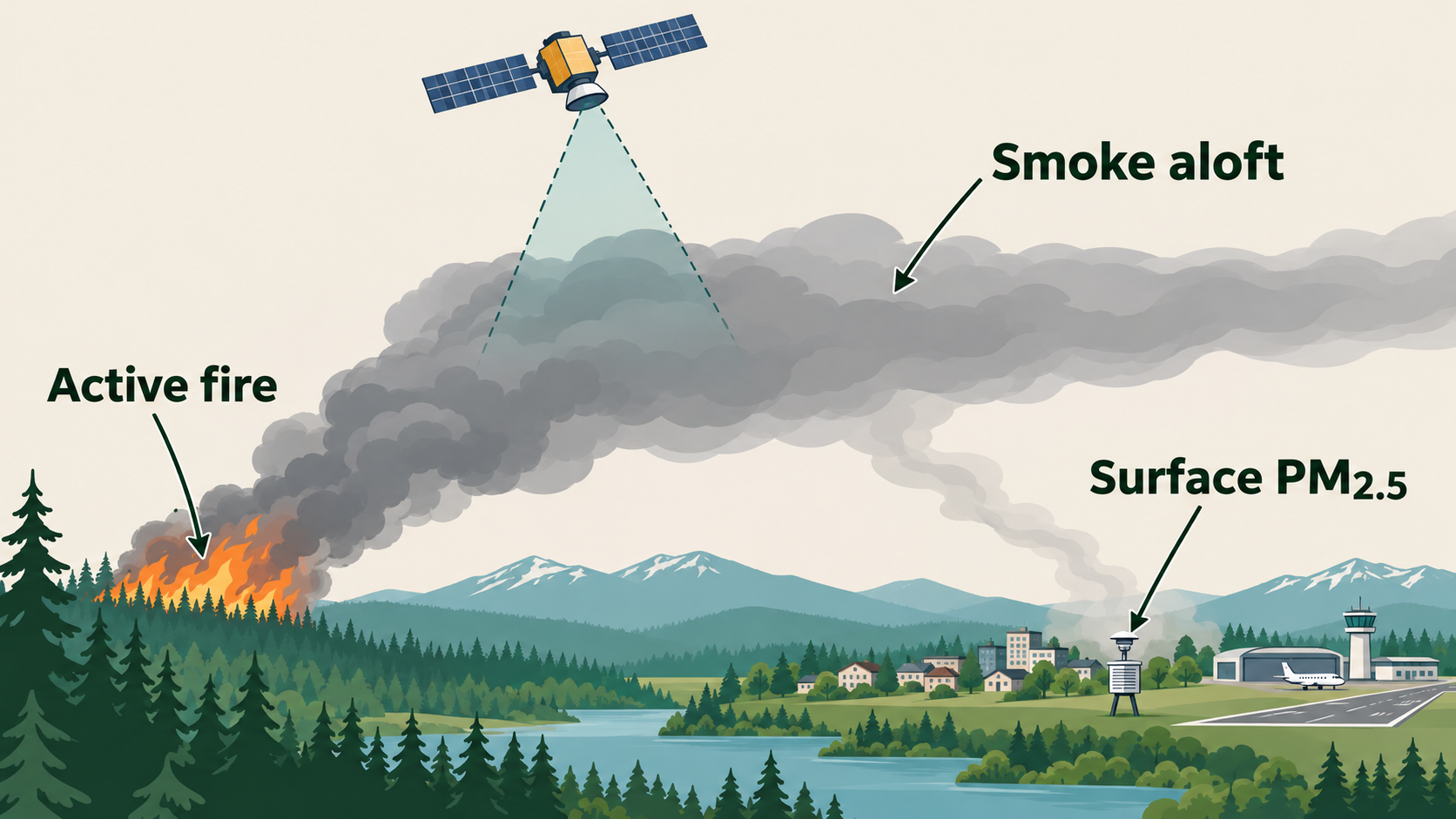
A fire detection, an overhead plume, and surface exposure are different measurements.
Presenter reference: Original AI-generated schematic, not to scale. A surface monitor measures total PM2.5; the nearby-fire share is an attribution proxy.
The course share uses same-day Canadian FRP within 1,500 km divided by nearby total FRP. It does not model wind transport or plume height. A lagged version also exists. Neither is a direct estimate of the Canadian fraction of inhaled pollution. FIRMS records satellite detections, not a census of fire events. HMS can show a plume aloft while ground-level PM2.5 is low. Distinguish total PM2.5 from its smoke component when labeling a threshold or figure.
Detailed reference, moved from the projected slide:
FIRMS detection
A satellite detection of active burning
Counting detections as individual fires
HMS plume
Smoke identified overhead
Assuming surface exposure
CSU / Childs smoke
Estimated surface smoke PM2.5
Treating products as interchangeable
Nearby Canadian fire share
Canadian share of nearby fire radiative power
Calling it the fraction of smoke inhaled from Canada
The nearby-fire share is a descriptive attribution proxy .
Course data definitions and cautions .
Missing, zero, and negative values
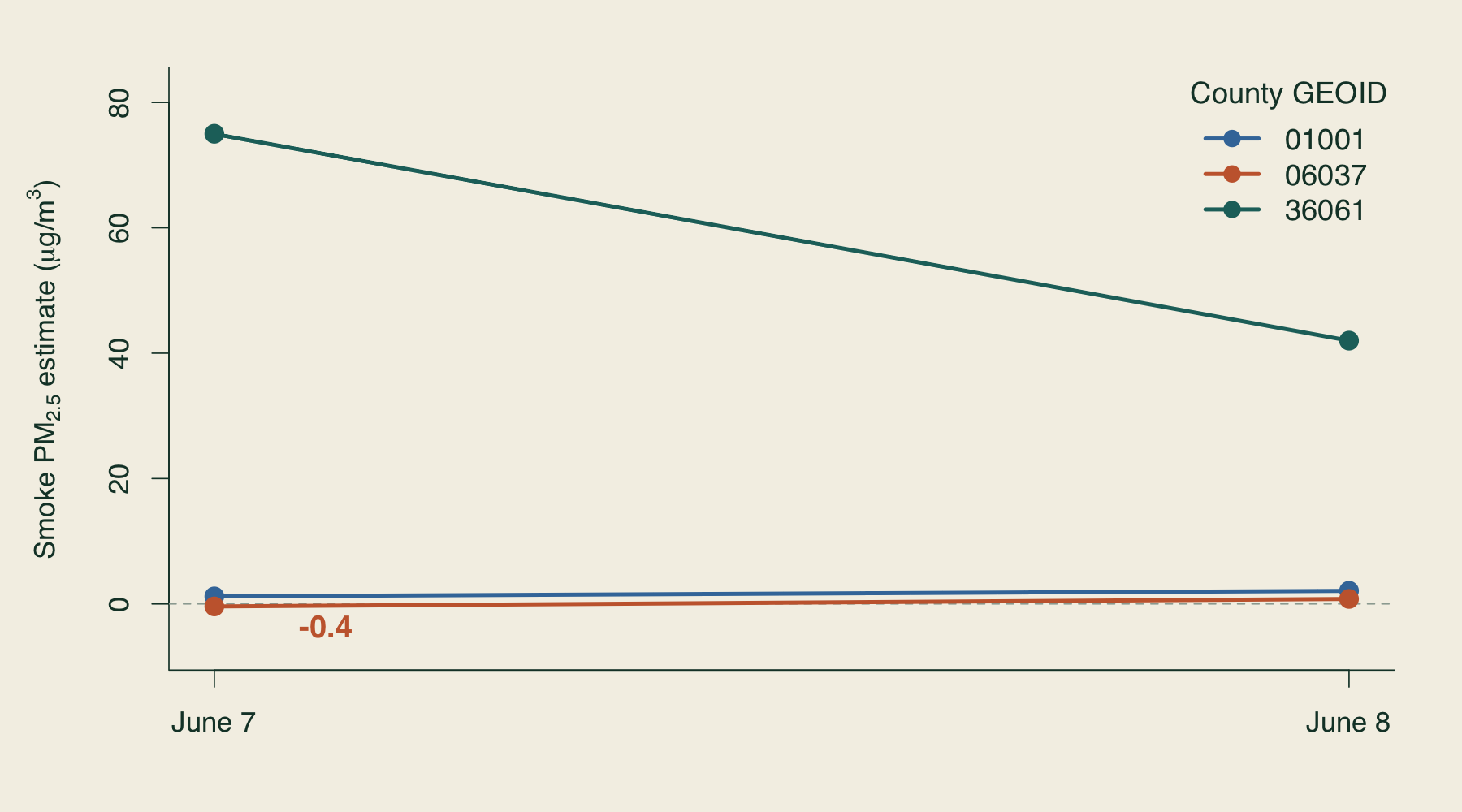
Keep valid negative estimates. Missing weather remains NA.
Presenter reference: Synthetic values, not observations of real smoke. Missing fire-share rows must not zero out the full CSU smoke series.
Important precision: the sparse fire-share table has rows only where unrounded CSU smoke is positive. A missing share row corresponds to smoke zero or below, not necessarily no fires. Do not zero out smoke based on this table. The full CSU series preserves valid negative estimates. Thresholded person-day and episode tables handle nonpositive values differently by construction. In rounded exports use the supplied ca_dominated_sameday flag rather than reapplying a 0.5 cutoff to rounded shares. Use the canonical data guide when summary wording is ambiguous.
Detailed reference, moved from the projected slide:
Missing weather: retain NA until you justify a treatment.Zero cancellations: valid when scheduled flights are positive.Zero scheduled flights: the cancellation rate is undefined.Negative CSU smoke estimates: retain them in the continuous series, as the guide specifies.No fire-share row: the share may be inapplicable. Read smoke from the full CSU series.
Course data guide: smoke, shares, and county panels .
A plausible merge error
The raw weather file repeats this exact record.
060372023-06-07
22 °C
0 mm
060372023-06-07
22 °C
0 mm
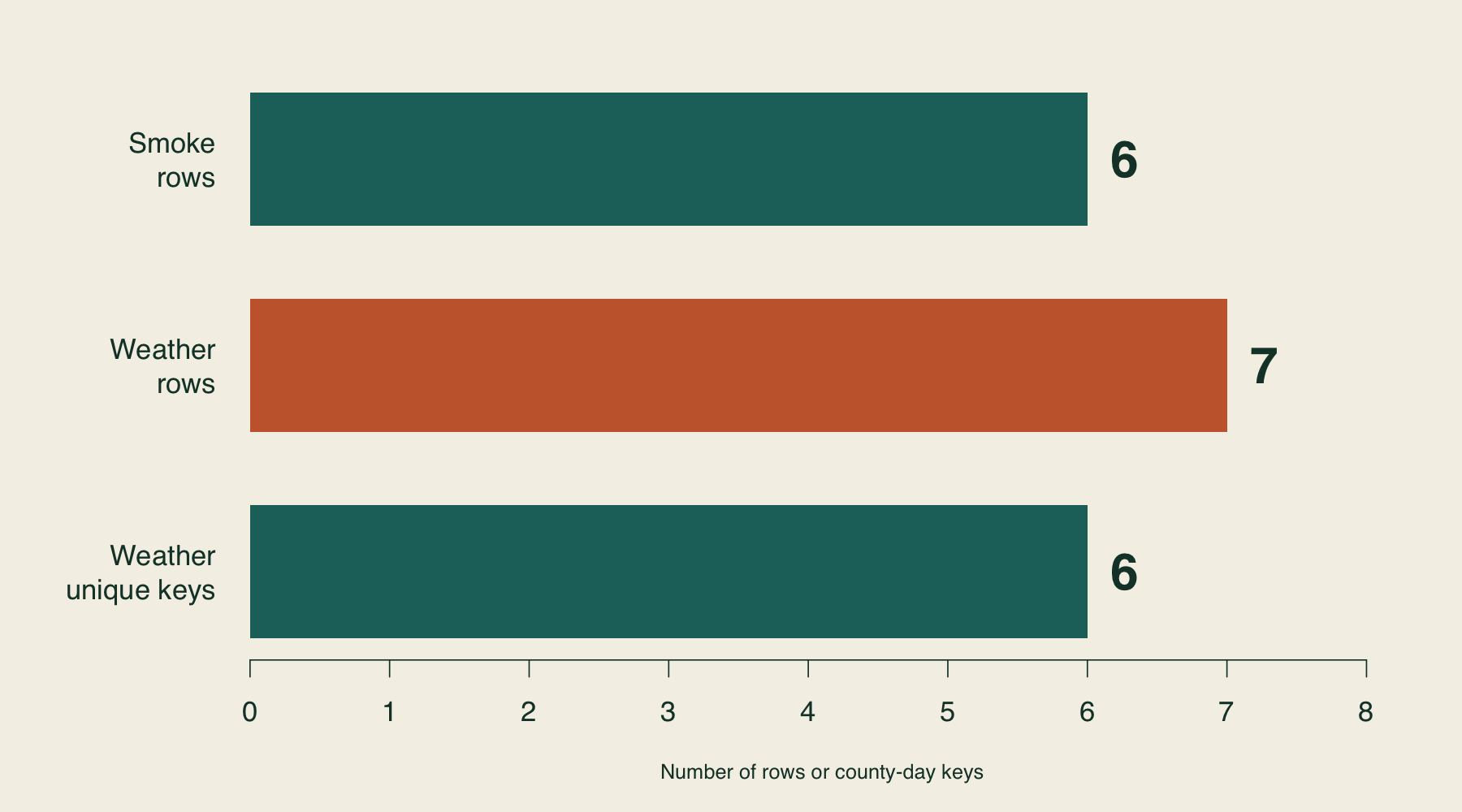
6 smoke rows → 7 joined rows
Inspect the source grain before deciding how to resolve the duplicate.
Presenter reference: Synthetic fixture. An exact-duplicate resolution yields six rows; other duplicate types need investigation.
The supplied toy smoke file has six rows. Weather has seven rows, including one exact duplicate. A left join on GEOID and date therefore yields seven rows until the duplicate is resolved. If the two weather rows were different monitors or measurements, dropping a row would not be justified. Students must inspect all columns and the source grain. The toy data are deliberately synthetic and provide no evidence about the June 2023 episode.
Detailed reference, moved from the projected slide:
Synthetic example: smoke has one row for a county-day.
Row 1
060372023-06-07
0
Row 2
060372023-06-07
0
Joining on county and date gives that smoke observation two matches .
The command can succeed.
The dataset now gives this county-day extra weight.
An exact duplicate needs a documented resolution in the cleaning script.
A key check in R
<- c ("GEOID" , "date" )stopifnot (! anyDuplicated (smoke[key]))stopifnot (! anyDuplicated (weather[key]))The last line should fail. Save the report before stopping.
Read GEOID as text so 01001 keeps its leading zero.
The deck shows this code without executing it. The companion R/01_audit.R saves the audit report before its intentional duplicate-key failure. GEOID is a geographic identifier, not a quantity: reading 01001 as 1001 corrupts a future join. A real pipeline should also validate dates, key format, and the intended join relationship. Checks diagnose a problem; they do not decide how the data should be changed.
Detailed reference, moved from the projected slide:
<- read.csv ("data/raw/smoke_toy.csv" ,colClasses = c (GEOID = "character" ))<- read.csv ("data/raw/weather_toy.csv" ,colClasses = c (GEOID = "character" ))<- c ("GEOID" , "date" )stopifnot (! anyNA (smoke[key]), ! anyNA (weather[key]))stopifnot (! anyDuplicated (smoke[key]))stopifnot (! anyDuplicated (weather[key]))The final line should fail on the supplied weather file.
Transportation: first agent task
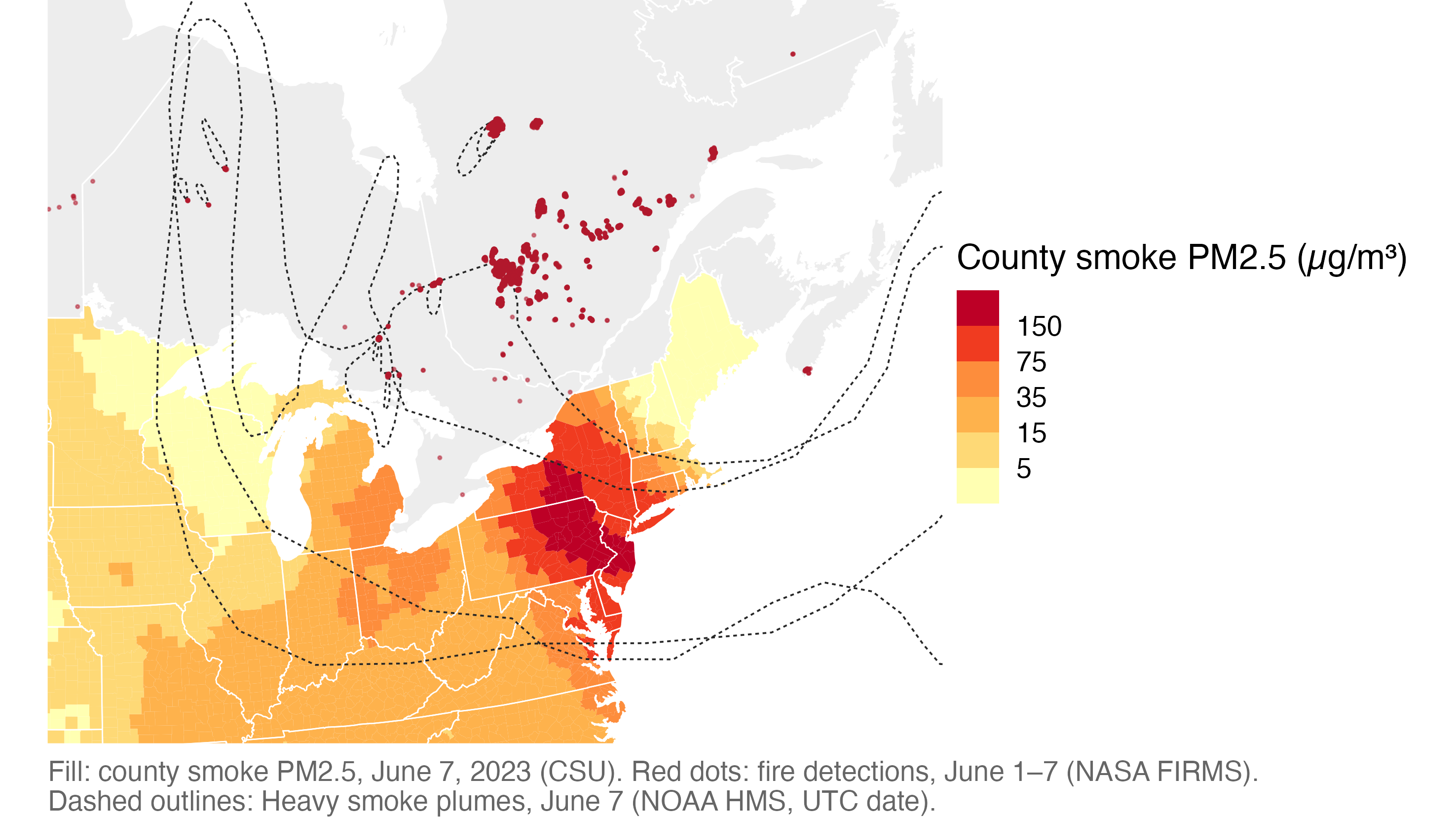
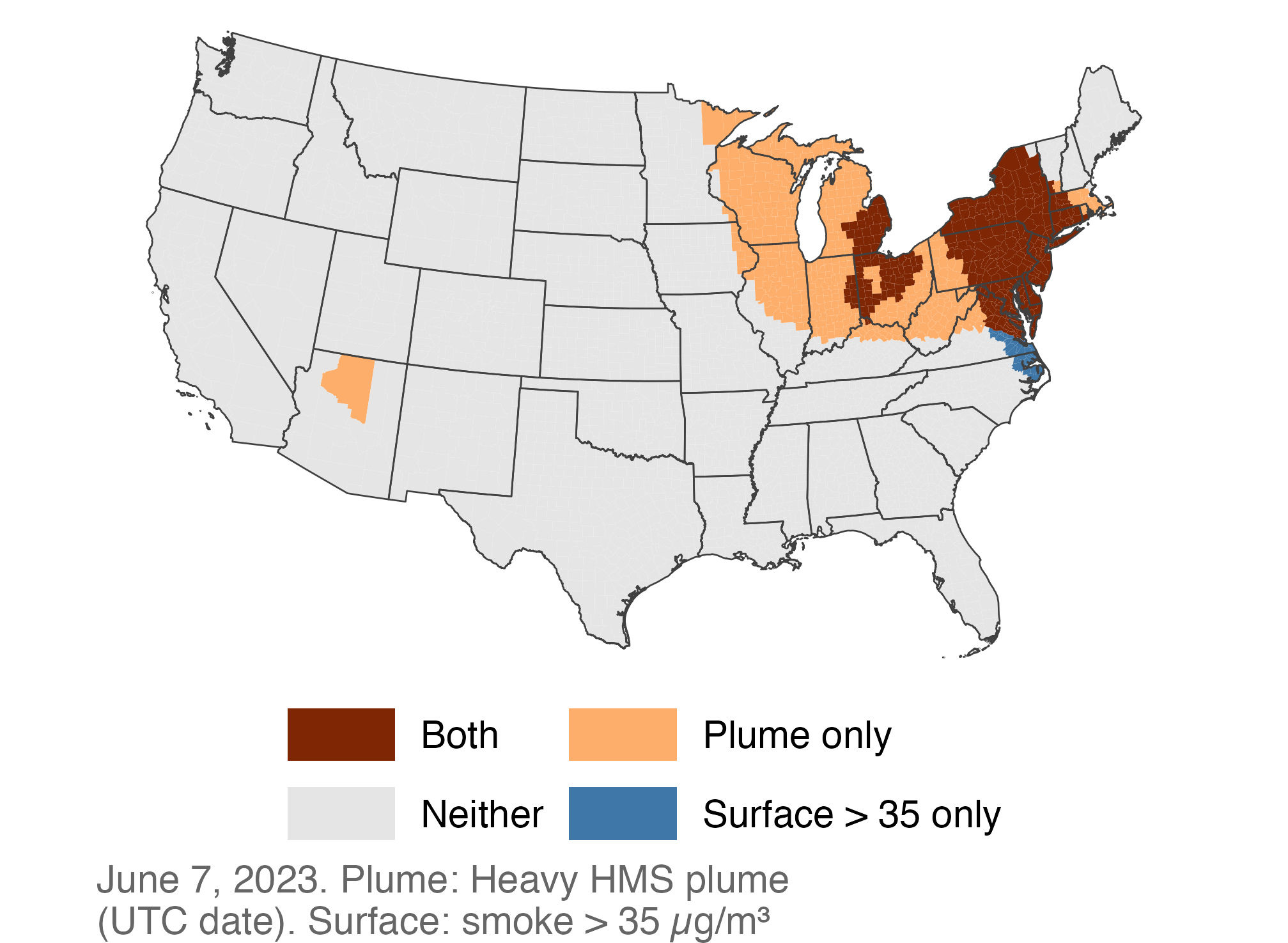
Match airports to counties, then use the documented surface-smoke series .
Presenter reference: Course Lecture 6. Pilot airports: JFK, LGA, EWR, PHL. The map shows exposure, not flight disruption.
Use a documented BTS release or instructor-supplied extract and first verify its reporting universe, cancellation fields, and date convention. Neither the QMD nor the starter includes real BTS data. The pilot is descriptive. Later compare with the same calendar dates in another year, while acknowledging weekday and other differences. Flight operations measure activity; they do not directly measure airline revenue or profitability.
Detailed reference, moved from the projected slide:
Pilot: one month of flight operations at selected airports.
Begin with JFK, LGA, EWR, and PHL in June 2023.
Compute cancellations divided by scheduled flights by airport-day.
Map each airport to a county and audit the matches.
Join the full county-day surface-smoke series.
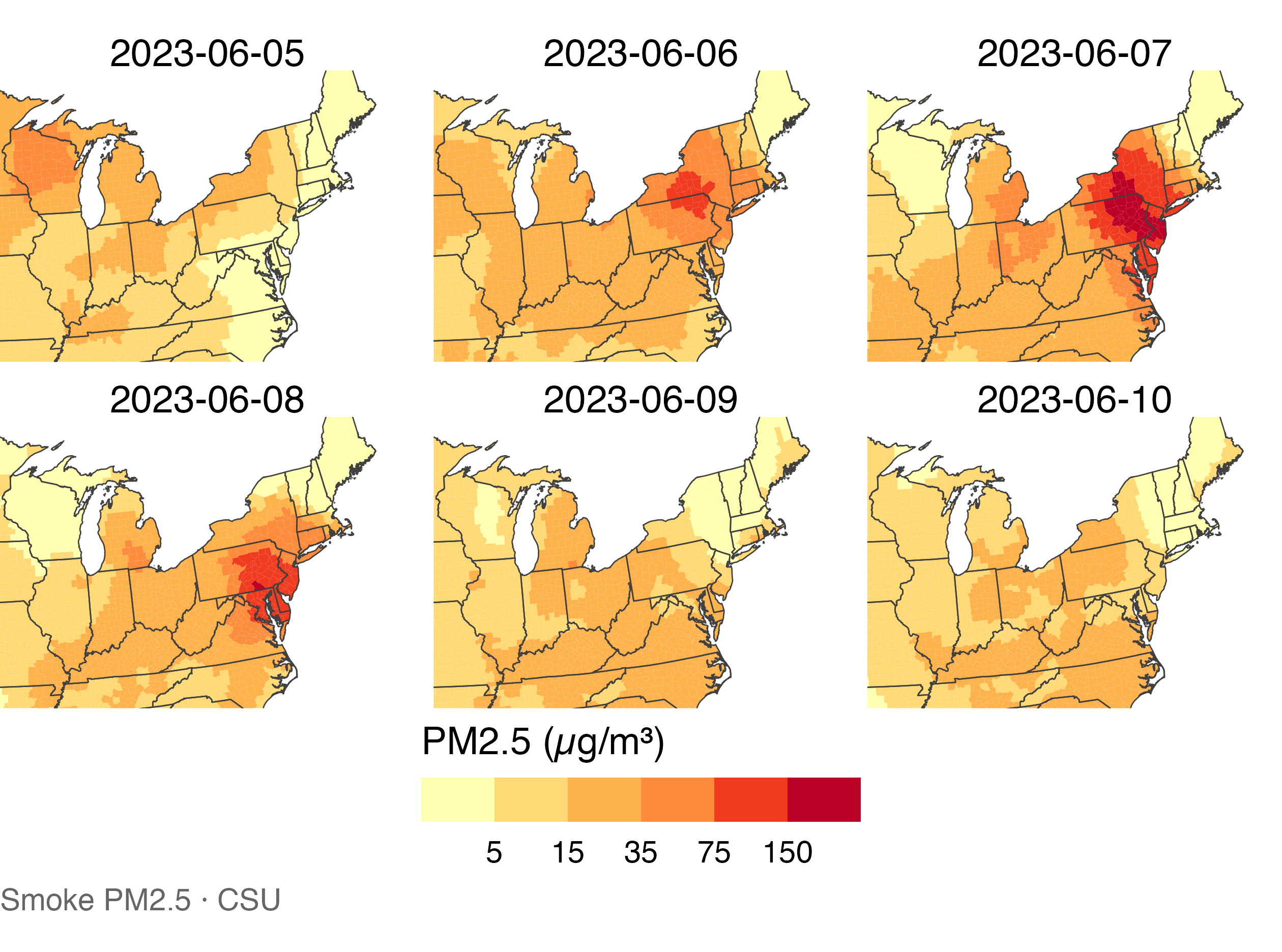
Plot June 1–15 with clear units and source notes.
The episode figure establishes feasibility and suggests patterns to investigate.
Illustrative course pilot. Context: wildfire research guide .
A transportation pilot prompt
Output: a checked table and a June 1–15 episode figure.
Flight operations do not directly measure profits.
Supply the exact filenames before running the task. Decide explicitly whether the analysis covers departures, arrivals, or both. Origin-only outcomes are a useful first scope; a later network analysis may use smoke at destinations as well. Ask Codex to report the script, figure, row counts, and unresolved problems, then inspect several airport-days manually.
Detailed reference, moved from the projected slide:
Transportation design review
What else could explain a disruption?
Weather may move smoke and disrupt flights.
Visibility can be part of smoke’s mechanism.
Airports share regional shocks and network delays.
A predictive model alone cannot identify smoke’s causal effect.
An airport-day design can consider weather controls, airport/calendar effects, and clustering by airport and date. These are candidate design choices requiring justification. Controlling for visibility may remove part of the total effect if smoke reduces visibility. log(cancelled) is undefined at zero. A rate or count model with scheduled-flight exposure may be appropriate. A lead/placebo test and sensitivity checks are useful diagnostics, but cannot prove that all confounding has disappeared. Do not let the agent select specifications by which one gives a significant coefficient.
Detailed reference, moved from the projected slide:
Weather
Could weather drive both smoke transport and cancellations?
Visibility
Could this be part of smoke’s mechanism?
Network effects
Could smoke at other airports disrupt this airport?
Dependence
Do airports share smoke shocks on the same date?
Outcome
Do zero cancellations and zero scheduled flights differ?
An accurate prediction of cancellations does not by itself identify smoke’s effect.
Moisture: first agent task
Forecast date: June 1
Documented preseason moisture
Province-year burned area
Observed summer weather arrives after the forecast date.
Keep the later burned-area/smoke relationship descriptive.
The illustrative moisture pilot uses province-year analysis rather than relying only on 20 national smoke years. Several hundred province-years still share national weather shocks and do not constitute independent replications. A forest-area weighting choice needs documentation. The historical Northwest Territories/Nunavut boundary needs a consistent treatment. NBAC burned_area_may_sep_ha refers to fires that started in May–September, not strictly area burned during those months. Verify product versions and availability before promising a particular historical sample.
Detailed reference, moved from the projected slide:
Pilot: preseason moisture and province-year burned area.
Specify a forecast date, such as June 1.
Inspect a small monthly moisture extract before a large download.
Build features using the agreed preseason windows.
Audit coverage, units, geography, and historical availability.
Link to the documented NBAC burned-area outcome.
Keep the burned-area/eastern-smoke relationship as a separate descriptive link.
Illustrative course pilot. Context: wildfire research guide .
A moisture pilot prompt
Output: feature definitions, an audit, and an evaluation plan.
Fit preprocessing inside each training sample.
This task includes planning and an audit, not an instruction to invent absent predictor data. A feature describing May 31 may be released later; distinguish a historical reanalysis exercise from a real-time forecast. Record the release date or latency when it can be established. Summer temperature can be used in a retrospective explanation, but observed summer temperature cannot enter a genuine June 1 forecast for that summer.
Detailed reference, moved from the projected slide:
Forecast evaluation that respects time
Illustrative rolling evaluation: keep all provinces in a year together.
Predict 2022
Train
Train
Test Later
Predict 2023
Train
Train
Train
Test
Compare with a training-only baseline. Check sensitivity to 2023.
For example, after inspecting coverage, a rolling exercise might train through year t and predict t+1. Choose and record the evaluation years before comparing models. Year-blocked cross-validation answers a different question from strictly forward evaluation because it can train on future years. Use both only with their meanings clear. Report an error metric in the outcome’s units and a comparison with the baseline. A model may fail to outperform the baseline, and that is a useful finding. Forest weights based on historical burned area must also use training data only.
Detailed reference, moved from the projected slide:
Hold out every province in the same year
Keep a shared fire season together
Train on earlier years, evaluate on later years
Approximate a future forecasting task
Fit imputation and scaling on training data
Prevent information from the evaluation sample leaking in
Compare with training-only provincial averages
Measure improvement over a simple baseline
Examine performance with and without 2023
Reveal dependence on one extreme season
A literature assistant needs evidence locations
One claim needs one verifiable location.
Childs et al. (2022)
How is surface smoke estimated?
Page, section, figure, or table
Use “not found” when the assigned text does not establish the claim.
Presenter reference: Childs et al. · Course literature guide
The papers play different roles: measurement, economic consequences, and fire-season mechanisms. Jain et al. describe early snowmelt, drought, and extreme weather in 2023; that does not establish out-of-sample province-year forecasting skill. Borgschulte et al.’s labor outcomes do not provide flight-specific effect estimates. Ask for an evidence table with question, data, unit, method, result, limitation, and relevance. Students should open and check each claim they use. Verify a title and DOI before adding a reference. The source PDFs can be supplied locally if publisher access is unavailable.
Detailed reference, moved from the projected slide:
Childs et al. (2022)
How is surface smoke estimated?
Product definition and limitations
Borgschulte et al. (2024)
How are smoke and labor outcomes linked?
Outcome, time unit, and design
Jain et al. (2024)
Which conditions characterized Canada’s 2023 season?
Evidence for each proposed mechanism
For every claim, save a page, section, figure, or table . Use “not found” when needed.
Childs et al. , Borgschulte et al. , Jain et al. . More references: course literature guide .
Writing and thinking with AI assistance
Write the interpretation first.
Every number should lead back to an output and a script.
Connect to Paul Goldsmith-Pinkham’s writing installment: writing helps a researcher discover what they understand. Have students explain the figure aloud before requesting polished prose. A figure showing smoke and cancellations together supports a descriptive statement about the episode; it does not establish how many cancellations smoke caused. For a forecast, report held-out performance and its baseline rather than interpreting a predictor’s importance as a causal effect. Quarto can read generated outputs to avoid manual transcription. Source: https://paulgp.substack.com/p/writing-and-thinking-with-ai-assistance
Detailed reference, moved from the projected slide:
Write your interpretation first. Then ask:
Every reported number should lead back to an output and a script.
Permissions and data access
These controls do different jobs.
A folder or .gitignore does not isolate its contents.
Presenter reference: Official sandbox guidance . Use approved public teaching data.
Workspace write restrictions do not necessarily prohibit reads outside the workspace. Check effective settings on each student’s client. AGENTS.md is behavioral guidance, and .gitignore controls Git tracking. Neither is an access-control mechanism. Keep restricted data and secrets outside accessible locations. Review requests that expand access, install software, make large downloads, spend money, or publish results. Once a task is bounded and approved, routine local edits and runs can proceed within that scope. Public documents can contain malicious instructions: treat their contents as evidence to analyze, not commands to execute.
Detailed reference, moved from the projected slide:
Sandbox
Enforces configured filesystem and network boundaries
Approval policy
Determines when an action requires approval
AGENTS.mdGives instructions the agent should follow
Git
Records selected file changes for review and recovery
For the pilot, use public teaching data and bounded project writes.
Opening a folder or adding .gitignore does not isolate its contents.
Official sandbox and approval guidance , checked November 2, 2026.
Course data boundaries
Use the approved fire, smoke, air-quality, weather, population, and boundary data.
Add documented public transportation or moisture inputs for the approved project.
Keep passwords, API keys, student records, and restricted microdata out of the agent workspace.
Do not request, open, or share 2006–2026 mortality files. The umbrella project remains outcome-blind.
Presenter reference: Course research guide: student projects and outcome-blind design .
The mortality restriction comes from the existing course research guide, not from a general prohibition on environmental health research. Student work can advance measurement, exposure analysis, forecasting, and approved transportation outcomes without touching the parent project’s mortality pipeline. Do not copy the active instructor research repository into student workspaces. The toy data include no personal records and require no credentials.
Review before accepting an artifact
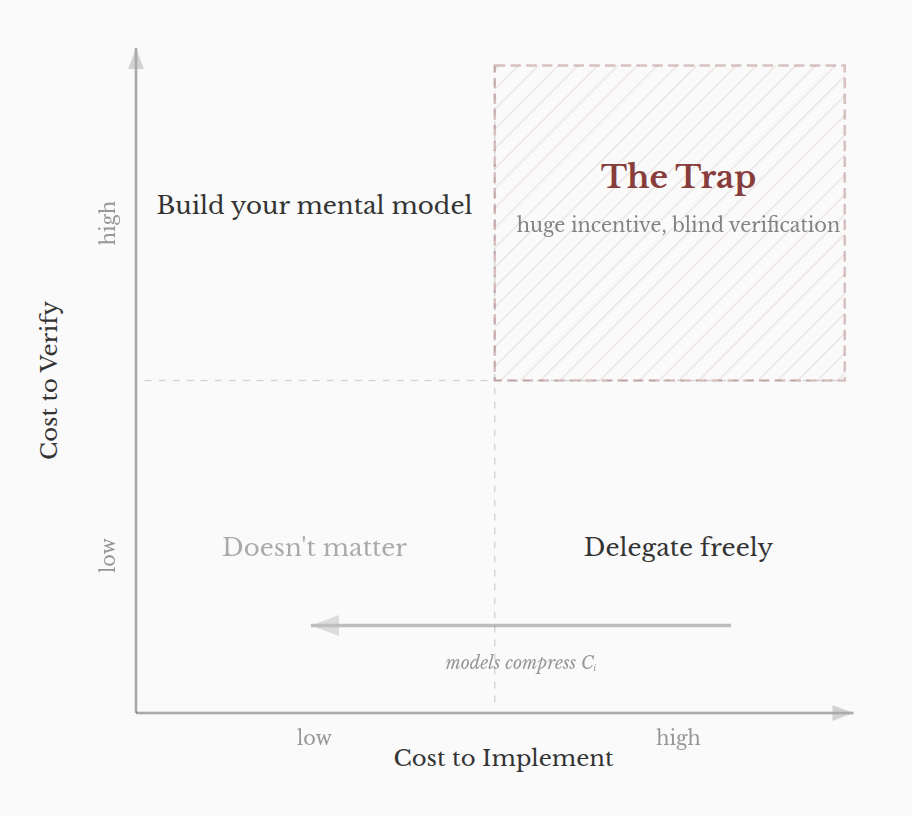
Which tasks are easy to generate but hard to check?
Presenter reference: Visual: Clifford Russell, reproduced in Goldsmith-Pinkham, Part 8 . Conceptual axes, not measured data.
Another model review can share the same blind spots as the first. It is not a certificate of scientific validity. For the lab, students should independently count unique keys and check the precipitation and smoke values in the small CSVs. For a real project, inspect a known event and an ordinary date. Git does not record ignored data by default, so source manifests and rebuild scripts remain essential.
Detailed reference, moved from the projected slide:
Read the changed code or Git diff.
Run the script and inspect its checks.
Verify two or three records by hand.
Open the figure and explain its units and comparison.
Record unresolved issues in lab-notebook.md.
A fresh Codex review can suggest problems. A classmate and source checks supply additional scrutiny.
Keeping the pilot manageable
Keep each task small enough to review. Save decisions beside the code.
Presenter reference: Visual: Paul Goldsmith-Pinkham . The series example repository, not the class project.
These are course workflow recommendations, not a promise of a specific cost saving. Do not assign a fixed number of tasks to $100 or assume all clients and models consume credits identically. The two students can document the task, artifact, corrections, time spent reviewing, and usage information available to them. This provides evidence for deciding whether to expand the pilot. Share research through Git rather than shared account credentials. Avoid parallel agents until a task is large enough and sufficiently independent to justify them.
Detailed reference, moved from the projected slide:
Give Codex one artifact at a time.
Inspect a schema and a small sample before a full archive.
Reuse saved inputs and rerunnable scripts.
Save a short checkpoint before beginning a new task.
Check account usage and the remaining credit balance.
Track review time and useful artifacts , as well as agent usage.
Lab: the duplicated county-day
20-minute lab · synthetic data
Run the audit and explain the failure.
Document a derived-data duplicate fix.
Join and verify six rows with a partner.
Run this command from a separate copy of the starter directory. It intentionally exits with an error after writing output/checks/audit.txt. This is the desired first result. Students then create their own cleaning script, preserving data/raw/. They can use Codex for the implementation or work in RStudio manually. The exercise requires no network, credentials, or new R packages. The instructor answer key is in the starter README. Avoid treating the toy values as observations from any real wildfire dataset.
Detailed reference, moved from the projected slide:
Use the supplied synthetic files in agentic-ai-starter/.
0–4
Open inputs and run the audit
An actual failure report
4–10
Inspect and resolve the exact duplicate in a script
A documented cleaning decision
10–16
Join without changing missing or negative values
A six-row derived table
16–20
Check records and explain the result to a partner
A notebook entry
Lab acceptance checks
6 rows · 6 unique keys · 0 unmatched smoke keys
Keep 01001 as text.
Preserve the missing precipitation value and -0.4 smoke estimate.
Record actual checks and your partner’s review.
The corrected join uses all six smoke rows. The raw weather input stays at seven rows. Exact duplicate removal is justified only because the full duplicated record is identical and the exercise defines the intended weather grain as county-day. Students should say that explicitly. A failed key assertion on the original raw weather file remains correct after the derived file is fixed; do not weaken it simply to make the raw-data audit pass.
Detailed reference, moved from the projected slide:
GEOID remains text, including 01001.The derived weather table has six unique county-day keys.
A left join produces six rows with no unmatched smoke keys.
One precipitation value remains missing.
The negative smoke value remains in the continuous series.
A partner can explain the duplicate decision and verify two rows.
The notebook distinguishes checks that passed from work still proposed.
Exit ticket
One task. One check. One scientific decision.
Name the artifact, an error that could survive a successful run, and a choice you must defend.
Allow five minutes. A transportation example could be an airport-day intake audit and a duplicate-airport-date check. A moisture example could be a predictor availability table and a check for features measured after the forecast date. Collect a concrete task, not an aspiration such as “use AI to do research.” The next-project-meeting language is a suggested follow-up rather than a new dated course requirement.
Detailed reference, moved from the projected slide:
For your own project, write:
One task: name the input and the artifact Codex should produce.One check: identify an error that could survive a successful run.One decision: explain what you must judge yourself.
Bring the artifact, its checks, and your explanation to the next project meeting.
Appendix: adapting the mini-series, 1–4
The course adapts the workflow ideas, with attribution, rather than substituting the word Codex into Claude-specific instructions. The papers-to-evidence-table exercise is an adaptation of the structured-extraction lesson, not something the original EDGAR post demonstrates with wildfire papers. CSV is adequate for the toy exercise. Parquet and DuckDB become useful extensions when actual data size and repeated queries justify them.
Appendix: adapting the mini-series, 5–8
The series is aimed at applied economists using Claude Code. This lecture changes the audience, client, data, and level of autonomy. Its lessons about accumulating unchecked work motivate explicit acceptance checks. Use current official Codex documentation for client features, authentication, permissions, and credit terms. Do not transfer the original series’ product-specific privacy or pricing statements to Codex.
Appendix: what belongs in AGENTS.md?
Keep instructions short enough that students can understand and maintain them.
Presenter reference: Official AGENTS.md guidance . The companion starter contains a complete teaching version.
This is a teaching example of project instructions, not a complete security policy. Do not encode every one-off correction in this file. Put dataset meanings in data/README.md and project-specific scientific choices in project-plan.md or the notebook. More specific or global instructions may also apply. The actual starter contains more precise boundaries around publishing, dependencies, large downloads, and sensitive data.
Appendix: skills after a successful first workflow
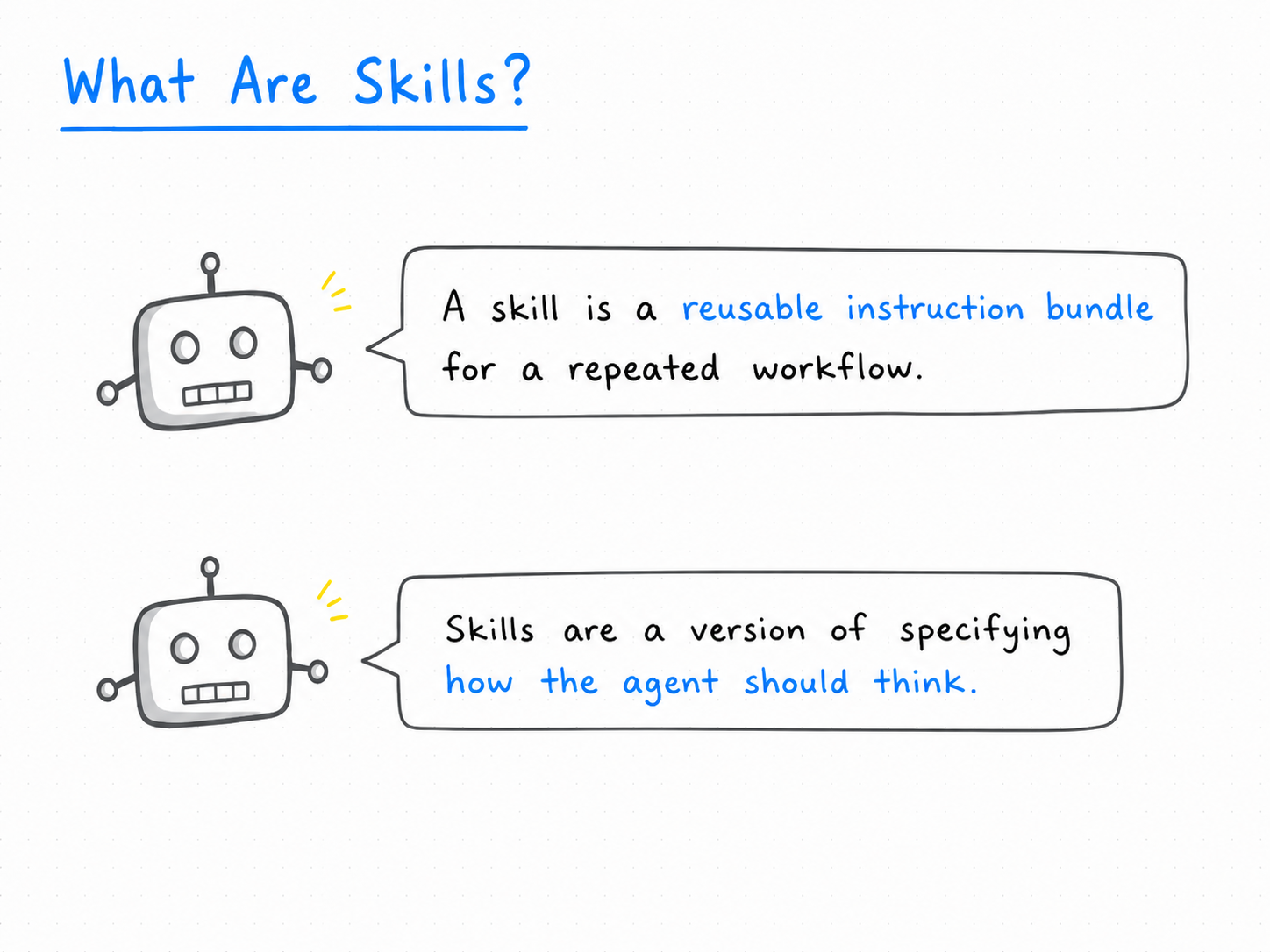
Begin with a tested audit. Package it only after you understand its checks.
Presenter reference: Visual: Paul Goldsmith-Pinkham . Course skills would use .agents/skills/; none are required in the starter.
Begin without custom skills. After an audit has worked and students understand its checks, the instructor can turn that procedure into a small reusable skill. A SKILL.md needs a name and description as well as its instructions. Test it on a known example and a known failure. Avoid using a long skill to disguise unresolved scientific choices. The starter deliberately supplies no hooks, custom agent TOML files, or automatic pipelines.
Detailed reference, moved from the projected slide:
A skill packages a reusable procedure and its instructions.
Data audit
Keys, coverage, missingness, merge and attrition checks
Figure review
Units, geography, sources, and agreement with data
Research checkpoint
Verified progress, decisions, open issues, next task
Repository skills can live under .agents/skills/, each with SKILL.md.
Official skill documentation . These are proposed course skills, not preinstalled features of the starter.
Appendix: a review prompt
Give the reviewer the actual evidence, including failed checks.
This can be a classmate’s checklist or a fresh Codex chat with read-only instructions. The human student remains responsible for accepting or rejecting each issue. Recomputing a number is useful when it could expose a mistake; repeating the same implementation without an independent expectation may add little. Review should focus on material errors and claim limits rather than cosmetic preferences.
Appendix: adapting the instructor’s system
Research strategy and project memory
One project plan and one lab notebook
Data engineering and provenance
Immutable inputs, documented scripts, source manifest
Claim-source map
Each claim linked to a source or generated output
Creator and critic roles
Student/Codex implementation plus classmate review
Quality gates
Concrete checks with observable evidence
Specialized roles, hooks, dashboards, and journal submission workflows can wait.
The teaching template keeps a research system’s useful conventions without reproducing its full infrastructure. Avoid copying an active research checkout or its domain profile, manuscripts, data, and machine-specific configuration. Use explicit evidence requirements rather than numerical quality scores for the class workflow.
Appendix: a two-student rollout
First session
Synthetic audit and corrected join
Can the student explain every check?
Next project task
One real input audited
Are data access and definitions settled?
First analysis
Reproducible figure or baseline forecast
Do claims match the design?
Pilot review
Short account of usage, corrections, and review time
What helped, and what should change?
Expand the system when the project produces a clear reason to do so.
The two students apply individually for credits, then test the same minimal workflow on their different projects. These stages are suggested, not promises tied to calendar weeks. A delayed credit decision should not block learning reproducibility and review with the R starter. Keep the setup portable and avoid imposing the instructor’s full research environment. Add database tools or parallel reviewers only after a specific task warrants them.
Appendix: sources and further reading
The two appendix tables link all eight installments of Paul Goldsmith-Pinkham’s mini-series. The introductory concepts adapt the first companion post and use current official OpenAI documentation for the Codex system. Video chapter labels and times were verified against the official Markus Academy series page, https://markusacademy.substack.com/p/claude-code-for-applied-economists, and the public video description. A full video transcript was not available, so there are no transcript-derived quotations or claims about particular wording. Suggested viewing: the agent-tools chapter beginning at 6:52 and the context chapter beginning at 23:54. Product and credit documentation was checked November 2, 2026 and may change. The project cases are illustrative proposals, not new empirical findings or literature-gap claims.