x <- c(2, 4, 6, 8, 10)Final Exam
DANL 101: Introduction to Data Analytics
Section 3. Data Analysis with R
Question 25
Consider the following vector x:
Write the R code to create a new vector called z, where its \(i\)-th entry (\(i = 1,2,3,4, \text{or } 5\)) is the standardized value of \(i\)-th element of x vector.
\[ z_{i} = \frac{x_{i} - \bar{x}}{\sigma_{x}} \]
- \(\bar{x}\): the mean of values in
x - \(\sigma_{x}\): the standard deviation of values in
x
Answer: ______________________________________
Show answer
z <- (x - mean(x)) / sd(x)Question 26
Given the data.frame df with variables height and name, which of the following expressions returns a vector containing the values in the height variable?
df:heightdf$heightdf::height- Both b and c
Show answer
b. df$height
Question 27
Consider the following data.frame, students:
| Name | Age | Major | GPA |
|---|---|---|---|
| Alice | 22 | Business Administration | 3.8 |
| Bob | 23 | Accounting | 3.2 |
| Charlie | 21 | Data Analytics | 3.9 |
| Diana | 24 | Economics | 3.5 |
Which of the following R codes will correctly create a new data.frame with only the Name and GPA variables?
students |> select(Name, GPA)students |> select(-Age, -Major)- Both a and b
Show answer
c. Both a and b
Question 28
Consider the following data.frame df0:
| x | y |
|---|---|
| Na | 7 |
| 2 | NA |
| 3 | 9 |
What is the result of median(df0$y)?
7NA89
Show answer
b. NA
Question 29
Consider the two related data.frames, df_1 and df_2:
df_1
| id | name | age |
|---|---|---|
| 1 | Bob | 19 |
| 2 | Julia | 21 |
| 4 | Zachary | 20 |
df_2
| id | major |
|---|---|
| 1 | Economics |
| 2 | Business Administration |
| 3 | Data Analytics |
Which of the following R code correctly join the two related data.frames, df_1 and df_2, to produce the resulting data.frame shown below?
| id | name | age | major |
|---|---|---|---|
| 1 | Bob | 19 | Economics |
| 2 | Julia | 21 | Business Administration |
| 4 | Zachary | 20 | NA |
df_1 |> left_join(df_2)df_2 |> left_join(df_1)- Both a and b
- None of the above
Show answer
a. df_1 |> left_join(df_2)
Questions 30-36
For Questions 30-36, consider the following R packages and the data.frame, nyc_dogs, containing individual dog license data from New York City (NYC):
library(tidyverse)
library(skimr)
library(ggthemes)

nyc_dogs <- read_csv("https://bcdanl.github.io/data/nyc_dogs_cleaned.csv")
The first 10 observations in the nyc_dogs data frame are displayed below:
| name | gender | birth_year | breed | borough |
|---|---|---|---|---|
| paige | F | 2014 | pit bull | Manhattan |
| yogi | M | 2010 | boxer | Bronx |
| ali | M | 2014 | basenji | Manhattan |
| queen | F | 2013 | akita | Manhattan |
| lola | F | 2009 | maltese | Manhattan |
| ian | M | 2006 | NA | Manhattan |
| buddy | M | 2008 | NA | Manhattan |
| chewbacca | F | 2012 | labrador | Manhattan |
| heidi-bo | F | 2007 | dachshund smooth coat | Brooklyn |
| massimo | M | 2009 | bull dog, french | Brooklyn |
- The
nyc_dogsdata frame is with 197473 observations and 5 variables.
Description of Variables in nyc_dogs:
name: Dog namegender: Dog gender (F for female; M for male;NAfor missing value)birth_year: Birth year (integer values)breed: Dog breedborough: Borough in NYC
The followings are the summary of the nyc_dogs data.frame, including descriptive statistics for each variable.
| Name | nyc_dogs |
| Number of rows | 197473 |
| Number of columns | 5 |
| _______________________ | |
| Column type frequency: | |
| character | 4 |
| numeric | 1 |
| ________________________ | |
| Group variables | None |
Variable type: character
| skim_variable | n_missing | min | max | empty | n_unique |
|---|---|---|---|---|---|
| name | 2637 | 1 | 30 | 0 | 26770 |
| gender | 6 | 1 | 1 | 0 | 2 |
| breed | 18832 | 3 | 35 | 0 | 295 |
| borough | 0 | 5 | 13 | 0 | 5 |
Variable type: numeric
| skim_variable | n_missing | mean | sd | p0 | p25 | p50 | p75 | p100 |
|---|---|---|---|---|---|---|---|---|
| birth_year | 0 | 2012.94 | 4.91 | 1975 | 2010 | 2014 | 2017 | 2021 |
Question 30
What is the interquartile range of birth_year? Find this value by using the summary of the nyc_dogs data frame.
Show answer
IQR = 7 = 2017 - 2010
Question 31
What R code can we use to count the number of licensed dogs by borough within each birth_year in NYC?
nyc_dogs |> count(birth_year)nyc_dogs |> count(borough)nyc_dogs |> count(borough, birth_year)nyc_dogs |> count(birth_year, borough)- Both c and d
Show answer
e
Question 32
- We are interested in finding the 7 most popular dog breeds in NYC.
- To achieve this, we create a new data.frame, a new data.frame,
top7_breeds, which includes only 7 most popular dog breeds, excluding anyNAvalues.
| breed | n |
|---|---|
| yorkshire terrier | 12804 |
| shih tzu | 12790 |
| chihuahua | 11099 |
| labrador | 11017 |
| pit bull | 10023 |
| maltese | 7750 |
| german shepherd | 5063 |
- The
top7_breedsdata.frame is displayed above.
top7_breeds <- nyc_dogs |>
  filter(___(1)___) |>
  ___(2)___ |>
  ___(3)___(-n) |>
head(7) # returns the first 7 observations of the new data.frame- Complete the code by filling in the blanks (1)-(3).
is.na(breed); (2)count(n); (3)select
is.na(breed); (2)count(n); (3)arrange
is.na(breed); (2)count(breed); (3)select
is.na(breed); (2)count(breed); (3)arrange
!is.na(breed); (2)count(n); (3)select
!is.na(breed); (2)count(n); (3)arrange
!is.na(breed); (2)count(breed); (3)select
!is.na(breed); (2)count(breed); (3)arrange
Show answer
h
Question 33
How would you describe the distribution of breed using the top7_breeds data.frame?
- Note that the
breedcategories are sorted by thenvariable in the plot.
Complete the code by filling in the blanks (1)-(3).
ggplot(data = top7_breeds,
       mapping = aes(___(1)___,
                     ___(2)___ = n)) +
  ___(3)___() +
  labs(y = "Top 7 Dog Breeds")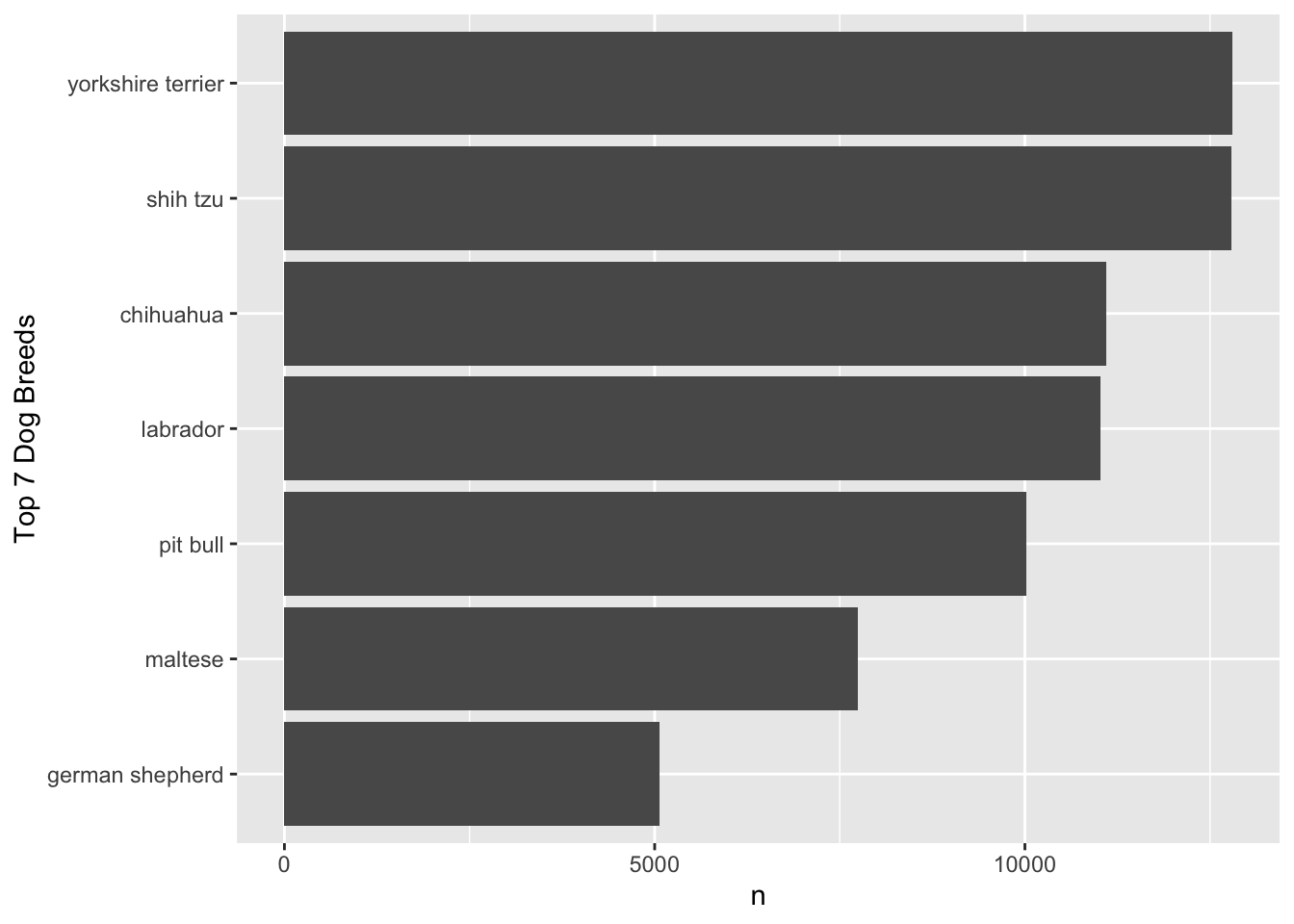
Blank (1)
x = breedy = breedx = fct_reorder(n, breed)y = fct_reorder(n, breed)x = fct_reorder(breed, n)y = fct_reorder(breed, n)- Both c and d
- Both e and f
Show answer
f
Blank (2)
xyfillcolor
Show answer
a
Blank (3)
geom_bargeom_col- Both a and b
Show answer
b
Question 34
- We are also interested in identifying the top five most popular dog names for each gender.
- To do this, we first create a new data frame,
nyc_dogs_filtered, which includes only the observations where (1) the value ofnamevariable is not missing and (2) the value ofgendervariable is not missing.
nyc_dogs_filtered <- nyc_dogs |>
filter(___BLANK___)- Which condition correctly fills in the BLANK to complete the code above?
is.na(name) , is.na(gender)is.na(name) & is.na(gender)is.na(name) | is.na(gender)!is.na(name) , !is.na(gender)!is.na(name) & !is.na(gender)!is.na(name) | !is.na(gender)- Both a and b
- Both a and c
- Both d and e
- Both d and f
Show answer
i
Question 35
- Using
nyc_dogs_filteredfrom Question 34, we are creating thetop5names_Fdata.frame:
| name | n |
|---|---|
| bella | 1291 |
| lola | 1005 |
| luna | 995 |
| lucy | 914 |
| daisy | 851 |
- The
top5names_Fdata.frame provides the five most popular female dog names, displayed above.
Complete the code by filling in the blanks (1)-(2).
top5names_F <- nyc_dogs_filtered |>
  filter(___(1)___) |>
  count(___(2)___) |>
  arrange(___(3)___) |>
  head(5)
Blank (1)
gender == "F"gender != "F"gender == "M"gender != "M"- Both a and b
- Both a and c
- Both a and d
- Both b and c
- Both b and d
- Both c and d
Show answer
g
Blank (2)
namegendernname,ngender,nname,gendergender,name
Show answer
a
Blank (3)
n-ndesc(n)- Both b and c
Show answer
d
Question 36
- Likewise, using
nyc_dogs_filteredfrom Question 34, we are creating thetop5names_Mdata.frame:
| name | n |
|---|---|
| max | 1341 |
| charlie | 1042 |
| rocky | 1020 |
| buddy | 840 |
| teddy | 745 |
- The
top5names_Mdata.frame provides the five most popular male dog names, displayed above.
Complete the code by filling in the blanks (1)-(2).
top5names_M <- nyc_dogs_filtered |>
  filter(___(1)___) |>
  count(___(2)___) |>
  arrange(___(3)___) |>
  head(5)
Blank (1)
gender == "F"gender != "F"gender == "M"gender != "M"- Both a and b
- Both a and c
- Both a and d
- Both b and c
- Both b and d
- Both c and d
Show answer
h
Blank (2)
namegendernname,ngender,nname,gendergender,name
Show answer
a
Blank (3)
n-ndesc(n)- Both b and c
Show answer
d
Questions 37-40
The Nobel Prize in Economic Science in 2021 goes to David Card, Joshua Angrist and Guido Imbens, for their empirical contributions to labor economics, and for their methodological contributions to the analysis of causal relationships.
They have provided us with new insights about the labor market and shown what conclusions about cause and effect can be drawn from natural experiments. Their approach has spread to other fields and revolutionized empirical research.
For Questions 37-40, consider the following R packages and the data.frame, ak91_age, which comes from the 1980 US Census and covers men born 1930–1939, which is used by Joshua Angrist and Alan Krueger’s research article.
library(tidyverse)
library(skimr)
library(ggthemes)

ak91_age <- read_csv('https://bcdanl.github.io/data/ak91_ageW.csv')
The first 20 observations in the ak91_age data frame are displayed below:
| QoB | YoB | YoBQ | W | Educ | Q4 |
|---|---|---|---|---|---|
| 1 | 1930 | 1930.00 | 361.0922 | 12.28041 | FALSE |
| 1 | 1931 | 1931.00 | 365.8181 | 12.54043 | FALSE |
| 1 | 1932 | 1932.00 | 364.9678 | 12.53393 | FALSE |
| 1 | 1933 | 1933.00 | 362.1093 | 12.67319 | FALSE |
| 1 | 1934 | 1934.00 | 363.2739 | 12.64726 | FALSE |
| 1 | 1935 | 1935.00 | 357.7532 | 12.65091 | FALSE |
| 1 | 1936 | 1936.00 | 359.5803 | 12.74304 | FALSE |
| 1 | 1937 | 1937.00 | 362.5073 | 12.83230 | FALSE |
| 1 | 1938 | 1938.00 | 362.9918 | 12.93868 | FALSE |
| 1 | 1939 | 1939.00 | 360.0860 | 13.00299 | FALSE |
| 2 | 1930 | 1930.25 | 364.3105 | 12.42842 | FALSE |
| 2 | 1931 | 1931.25 | 365.2228 | 12.53105 | FALSE |
| 2 | 1932 | 1932.25 | 365.2356 | 12.60960 | FALSE |
| 2 | 1933 | 1933.25 | 365.2171 | 12.63471 | FALSE |
| 2 | 1934 | 1934.25 | 362.2778 | 12.72797 | FALSE |
| 2 | 1935 | 1935.25 | 360.1939 | 12.79693 | FALSE |
| 2 | 1936 | 1936.25 | 360.2046 | 12.81108 | FALSE |
| 2 | 1937 | 1937.25 | 360.7164 | 12.84405 | FALSE |
| 2 | 1938 | 1938.25 | 366.8558 | 13.00766 | FALSE |
| 2 | 1939 | 1939.25 | 365.9290 | 13.01340 | FALSE |
- The
ak91_agedata frame is with 40 observations and 6 variables.
Description of Variables in ak91_age:
QoB: Quarter of birthYoB: Year of birth (1930, 1931, …, 1939)YoBQ: Year and quarter of birth (1930 Q1, 1930 Q2, …, 1939 Q4)W: Wage per weekEduc: Years of educationQ4:TRUEif quarter of birth is 4;FALSEotherwise.
The followings are the summary of the ak91_age data.frame, including descriptive statistics for each variable.
| Name | ak91_age |
| Number of rows | 40 |
| Number of columns | 6 |
| _______________________ | |
| Column type frequency: | |
| logical | 1 |
| numeric | 5 |
| ________________________ | |
| Group variables | None |
Variable type: logical
| skim_variable | n_missing | mean | count |
|---|---|---|---|
| Q4 | 0 | 0.25 | FAL: 30, TRU: 10 |
Variable type: numeric
| skim_variable | n_missing | mean | sd | p0 | p25 | p50 | p75 | p100 |
|---|---|---|---|---|---|---|---|---|
| QoB | 0 | 2.50 | 1.13 | 1.00 | 1.75 | 2.50 | 3.25 | 4.00 |
| YoB | 0 | 1934.50 | 2.91 | 1930.00 | 1932.00 | 1934.50 | 1937.00 | 1939.00 |
| YoBQ | 0 | 1934.88 | 2.92 | 1930.00 | 1932.44 | 1934.88 | 1937.31 | 1939.75 |
| W | 0 | 365.02 | 3.37 | 357.75 | 362.24 | 365.53 | 367.89 | 370.32 |
| Educ | 0 | 12.76 | 0.19 | 12.28 | 12.64 | 12.75 | 12.93 | 13.12 |
Question 37
Here we describe the quarterly trend of years of education. Complete the code by filling in the blanks (1)-(3).
ggplot(data = ak91_age,
       mapping = aes(___(1)___,
                     ___(2)___ = Q4)) +
  ___(3)___ +
  geom_point(size = 2.5) +
  scale_color_colorblind() +
  labs(x = "Year and quarter of birth",
       y = "Years of education")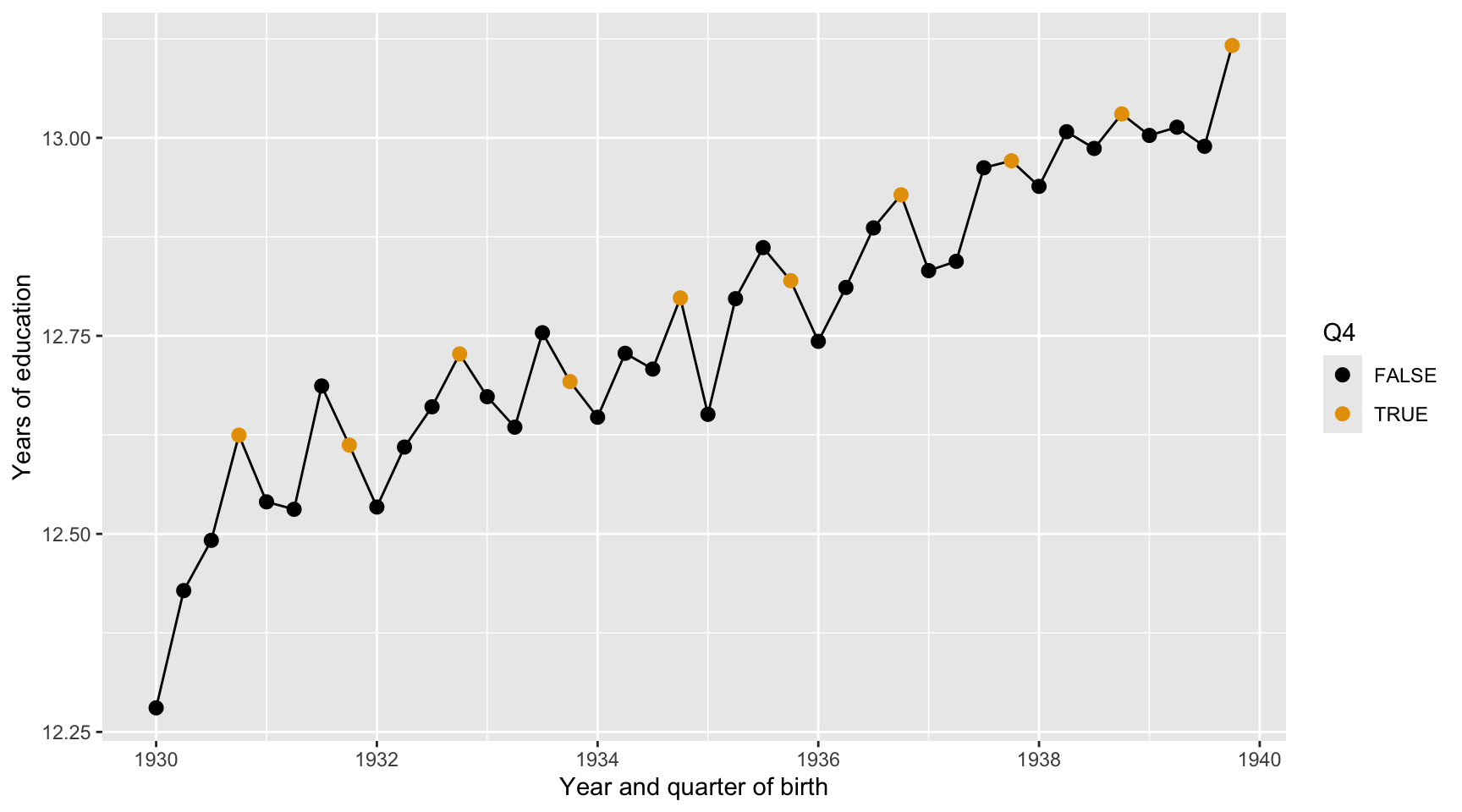
Blank (1)
x = YoBQ, y = Educy = YoBQ, x = Educx = YoB, y = Educy = YoB, x = Educ- Both a and b
- Both c and d
Show answer
a
Blank (2)
fillcolor- Both a and b
Show answer
b
Blank (3)
geom_scatterplotgeom_pointgeom_linegeom_smoothgeom_histogramgeom_boxplotgeom_bargeom_col
Show answer
c
Question 38
Here we describe the quarterly trend of the base-10 log of wage per week. Complete the code by filling in the blanks (1)-(3).
ggplot(data = ak91_age,
       mapping = aes(___(1)___,
                     ___(2)___ = Q4)) +
  ___(3)___ +
  geom_point(size = 2.5) +
  scale_color_colorblind() +
  labs(x = "Year and quarter of birth",
       y = "Wage per week (in base-10 log)")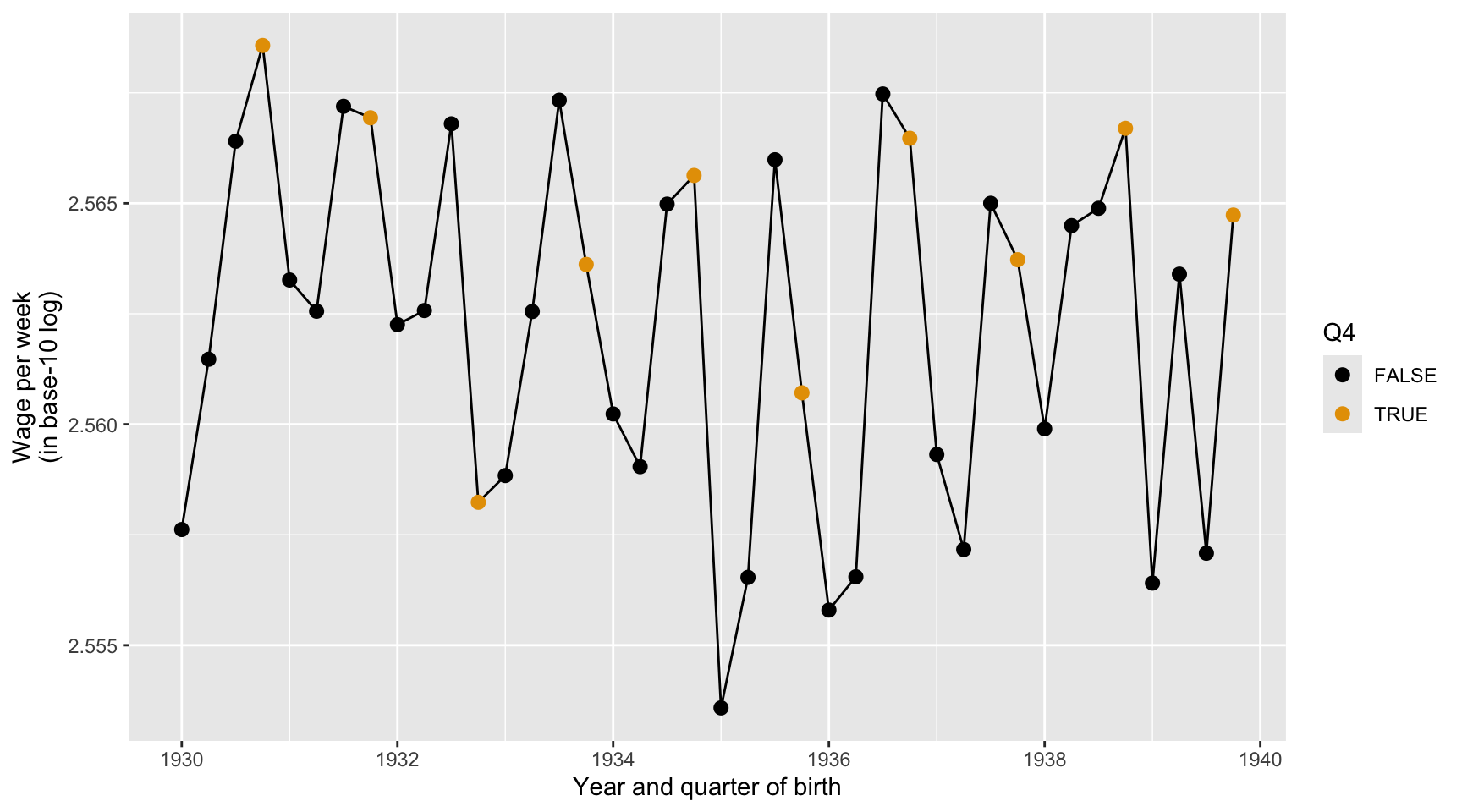
Blank (1)
x = YoBQ, y = log(W)y = YoBQ, x = log(W)x = YoBQ, y = log10(W)y = YoBQ, x = log10(W)- Both a and c
- Both b and d
Show answer
c
Blank (2)
fillcolor- Both a and b
Show answer
b
Blank (3)
geom_scatterplotgeom_pointgeom_linegeom_smoothgeom_histogramgeom_boxplotgeom_bargeom_col
Show answer
c
Question 39
Here we describe how the distribution of the base-10 log of wage per week varies by Q4. Complete the code by filling in the blanks (1)-(3).
ggplot(data = ak91_age,
       mapping = aes(___(1)___,
                     ___(2)___ = Q4)) +
  ___(3)___(show.legend = FALSE) +
  scale_fill_tableau() +
  labs(x = "Wage per week (in base-10 log)",
       y = "Born in the Fourth Quarter?")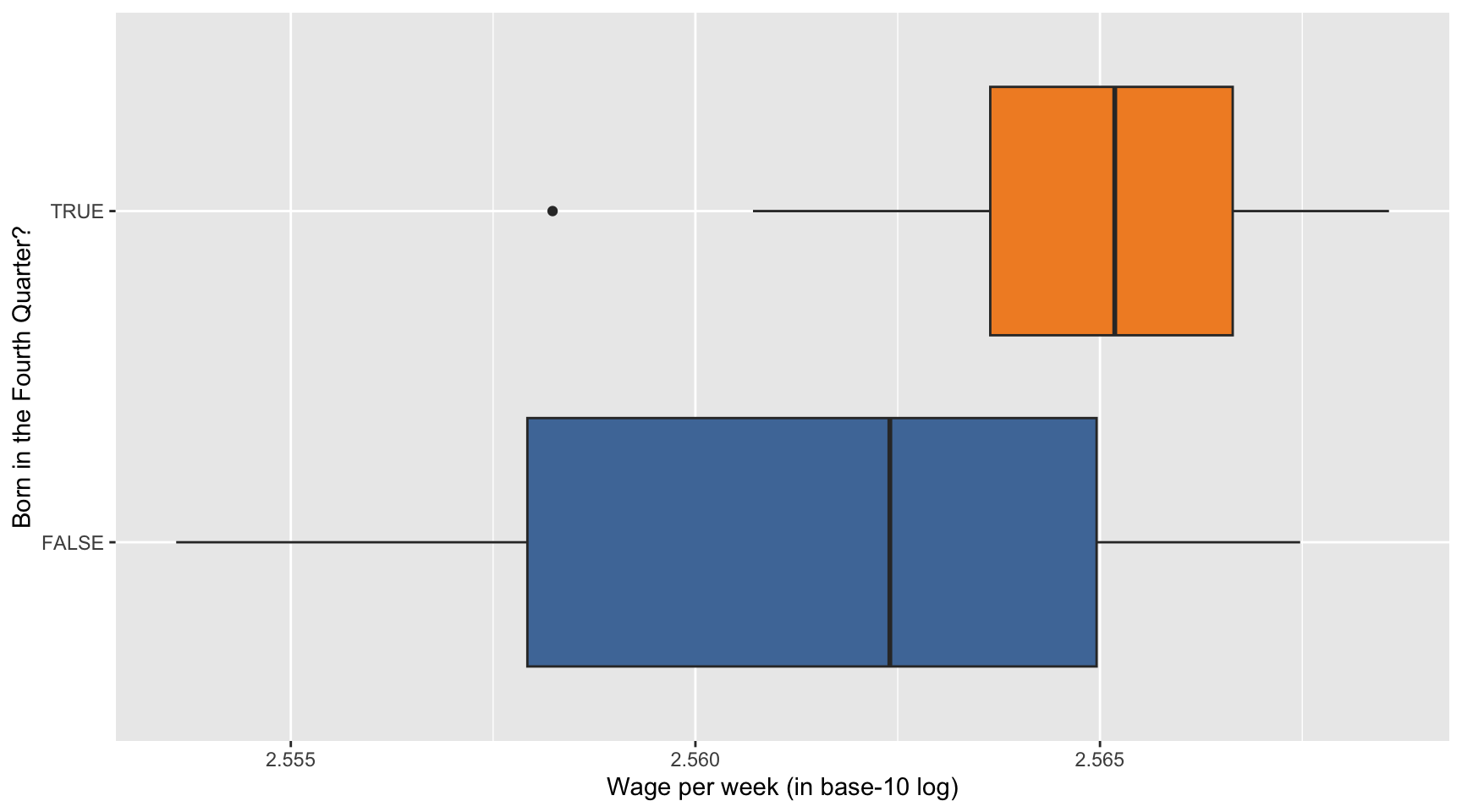
Blank (1)
x = YoBQ, y = log(W)y = YoBQ, x = log(W)x = YoBQ, y = log10(W)y = YoBQ, x = log10(W)x = Q4, y = log(W)y = Q4, x = log(W)x = Q4, y = log10(W)y = Q4, x = log10(W)- Both a and c
- Both b and d
- Both e and g
- Both f and h
Show answer
h
Blank (2)
fillcolor- Both a and b
Show answer
a
Blank (3)
geom_scatterplotgeom_pointgeom_linegeom_smoothgeom_histogramgeom_boxplotgeom_bargeom_col
Show answer
f
Question 40
Provide a data-driven narrative for the ak91_age data frame, incorporating insights from the visualizations created in Questions 37, 38, and 39.
Show answer
First, years of education increase steadily for men born from 1930 to 1939. Later birth cohorts tend to have more schooling than earlier cohorts, suggesting that educational attainment improved over time.
Second, holding birth year constant, men born in the fourth quarter tend to have slightly more years of education than men born in other quarters. This is consistent with the idea that quarter of birth can be related to schooling because of school-entry and compulsory-schooling rules.
Third, men born in the fourth quarter also appear to have slightly higher weekly wages on average. The boxplot shows that the median wage for the fourth-quarter group is a little higher.
Overall, the figures support the idea behind the Angrist and Krueger setting: quarter of birth is related to education, and education may be related to wages. However, the wage differences by quarter of birth are relatively small and variable.
Questions 41-44
For Questions 41-44, consider the following R packages and the data.frame, health_cust, which contains demographic information about individuals with or without health insurance.
library(tidyverse)
library(skimr)
library(ggthemes)

health_cust <- read_csv(
  'https://bcdanl.github.io/data/custdata_rev.csv'
)
The first 10 observations in the health_cust data frame are displayed below:
| custid | sex | is_employed | income | marital_status | housing_type |
|---|---|---|---|---|---|
| 000006646_03 | Male | TRUE | 22000 | Never married | Homeowner free and clear |
| 000007827_01 | Female | NA | 23200 | Divorced/Separated | Rented |
| 000008359_04 | Female | TRUE | 21000 | Never married | Homeowner with mortgage/loan |
| 000008529_01 | Female | NA | 37770 | Widowed | Homeowner free and clear |
| 000008744_02 | Male | TRUE | 39000 | Divorced/Separated | Rented |
| 000011466_01 | Male | NA | 11100 | Married | Homeowner free and clear |
| 000015018_01 | Female | TRUE | 25800 | Married | Rented |
| 000017314_02 | Female | NA | 34600 | Married | Homeowner free and clear |
| 000017383_04 | Female | TRUE | 25000 | Never married | Homeowner free and clear |
| 000017554_02 | Male | TRUE | 31200 | Married | Homeowner with mortgage/loan |
| custid | recent_move | num_vehicles | age | state_of_res | gas_usage | health_ins |
|---|---|---|---|---|---|---|
| 000006646_03 | FALSE | 0 | 24 | Alabama | 210 | FALSE |
| 000007827_01 | TRUE | 0 | 82 | Alabama | 3 | FALSE |
| 000008359_04 | FALSE | 2 | 31 | Alabama | 40 | FALSE |
| 000008529_01 | FALSE | 1 | 93 | Alabama | 120 | FALSE |
| 000008744_02 | FALSE | 2 | 67 | Alabama | 3 | FALSE |
| 000011466_01 | FALSE | 2 | 76 | Alabama | 200 | FALSE |
| 000015018_01 | FALSE | 2 | 26 | Alabama | 3 | TRUE |
| 000017314_02 | FALSE | 2 | 73 | Alabama | 50 | FALSE |
| 000017383_04 | FALSE | 5 | 27 | Alabama | 3 | FALSE |
| 000017554_02 | FALSE | 3 | 54 | Alabama | 20 | FALSE |
Description of Variables in health_cust
custid: ID of customersex: Sexis_employed: Employment statusNA: Unknown or not applicableTRUE: EmployedFALSE: Unemployed
income: Income (in $)marital_status: Marital statushousing_type: Housing typerecent_move:TRUE: Recently movedFALSE: Not recently moved
age: Agestate_of_res: State of residence (Alabama, Alaska, …, New York, …, Wyoming)gas_usage: Gas usageNA: Unknown or not applicable001: Included in rent or condo fee002: Included in electricity payment003: No charge or gas not used004-999: $4 to $999 (rounded and top-coded)
health_ins: Health insuarance statusTRUE: customer with health insuaranceFALSE: customer without health insuarance
The followings are the summary of the health_cust data.frame, including descriptive statistics for each variable.
| Name | health_cust |
| Number of rows | 73262 |
| Number of columns | 12 |
| _______________________ | |
| Column type frequency: | |
| character | 5 |
| logical | 3 |
| numeric | 4 |
| ________________________ | |
| Group variables | None |
Variable type: character
| skim_variable | n_missing | min | max | empty | n_unique |
|---|---|---|---|---|---|
| custid | 0 | 12 | 12 | 0 | 73262 |
| sex | 0 | 4 | 6 | 0 | 2 |
| marital_status | 0 | 7 | 18 | 0 | 4 |
| housing_type | 1720 | 6 | 28 | 0 | 4 |
| state_of_res | 0 | 4 | 20 | 0 | 51 |
Variable type: logical
| skim_variable | n_missing | mean | count |
|---|---|---|---|
| is_employed | 25774 | 0.95 | TRU: 45137, FAL: 2351 |
| recent_move | 1721 | 0.13 | FAL: 62418, TRU: 9123 |
| health_ins | 0 | 0.10 | FAL: 65955, TRU: 7307 |
Variable type: numeric
| skim_variable | n_missing | mean | sd | p0 | p25 | p50 | p75 | p100 |
|---|---|---|---|---|---|---|---|---|
| income | 0 | 41764.15 | 58113.76 | -6900 | 10700 | 26200 | 51700 | 1257000 |
| num_vehicles | 1720 | 2.07 | 1.17 | 0 | 1 | 2 | 3 | 6 |
| age | 0 | 49.16 | 18.08 | 0 | 34 | 48 | 62 | 120 |
| gas_usage | 1720 | 41.17 | 63.05 | 1 | 3 | 10 | 60 | 570 |
Question 41
Here we describe how the distribution of health_ins varies by state of residence and employment status using the health_cust data.frame. Complete the code by filling in the blanks (1)-(4).
ggplot(data = health_cust |> filter(!is.na(is_employed)),
       mapping = aes(___(1)___,
                     fill = ___(2)___)) +
  ___(3)___ +
  ___(4)___(~is_employed) +
  labs(y = "", x= "Proportion") +
  scale_fill_tableau()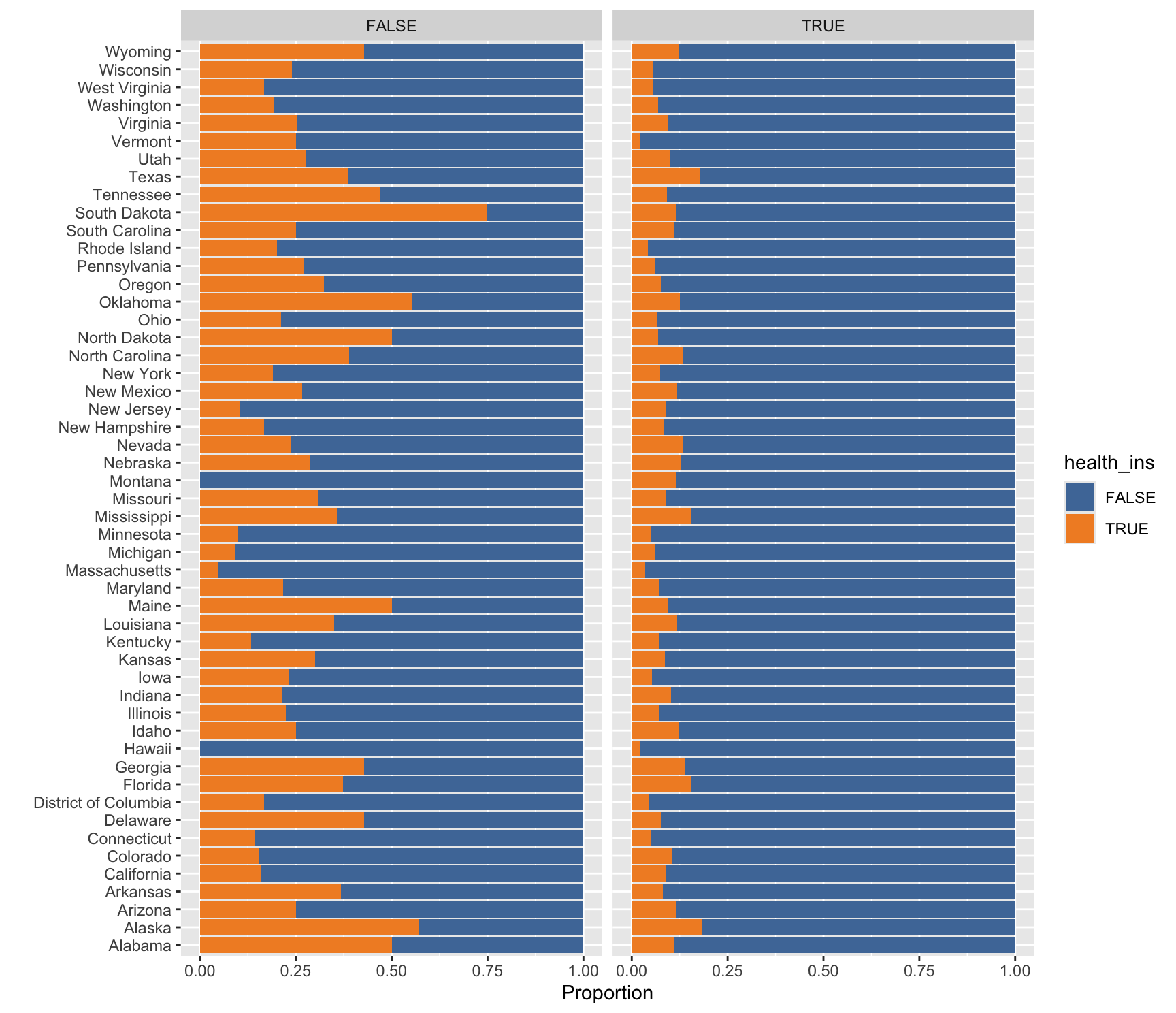
Blank (1)
x = health_insx = state_of_resx = Proportiony = health_insy = state_of_resy = Proportion
Show answer
e
Blank (2)
health_insstate_of_resProportion
Show answer
a
Blank (3)
geom_bar(position = "stack")geom_col(position = "stack")geom_bar(position = "fill")geom_col(position = "fill")geom_bar(position = "dodge")geom_col(position = "dodge")
Show answer
c
Blank (4)
Answer: ________________________________________
Show answer
facet_wrap
Question 42
Here we describe how the distribution of marital_status varies by housing_type using the health_cust data.frame. Complete the code by filling in the blanks (1)-(4).
ggplot(data = health_cust |> filter(!is.na(housing_type)),
       mapping = aes(___(1)___,
                     ___(2)___)) +
  ___(3)___(show.legend = FALSE) +
  ___(4)___(~housing_type) +
  labs(y = "")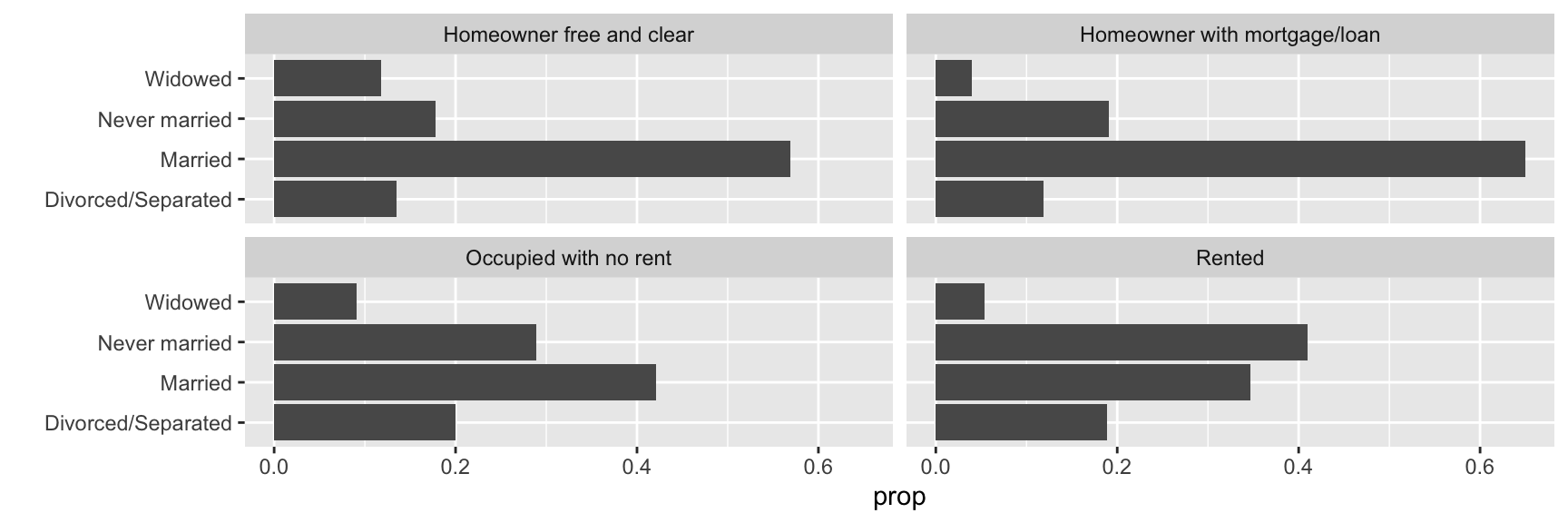
Blank (1)
x = marital_statusy = marital_status
Show answer
b
Blank (2)
x = propx = prop, group = 1- Both a and b
y = propy = prop, group = 1- Both d and e
x = after_stat(prop)x = after_stat(prop), group = 1- Both g and h
y = after_stat(prop)y = after_stat(prop), group = 1- Both j and k
Show answer
h
Blank (3)
geom_bar()geom_col()- Both a and b
Show answer
a
Blank (4)
Answer: ________________________________________
Show answer
facet_wrap
Question 43
Here we describe how the relationship between age and income varies by health_ins using the health_cust data.frame. Note that the new geometric object geom_hex() divides the plane into regular hexagons, counts the number of observations in each hexagon, and then maps the number of observations to the hexagon fill.
Complete the code by filling in the blanks (1)-(4).
# Considering
  # income level between $0 and $250,000
  # age between 20 and 70
ggplot(data = health_cust |> filter(income >= 0 & income <= 2.5*10^5,
                                    age >= 20 & age <= 70),
       mapping = aes(___(1)___)) +
  geom_hex() + # hexbin plot: dividing the plot area into hexagonal bins
  ___(2)___ +
  ___(3)___(~health_ins) +
  scale_fill_viridis_c() # for hexbin color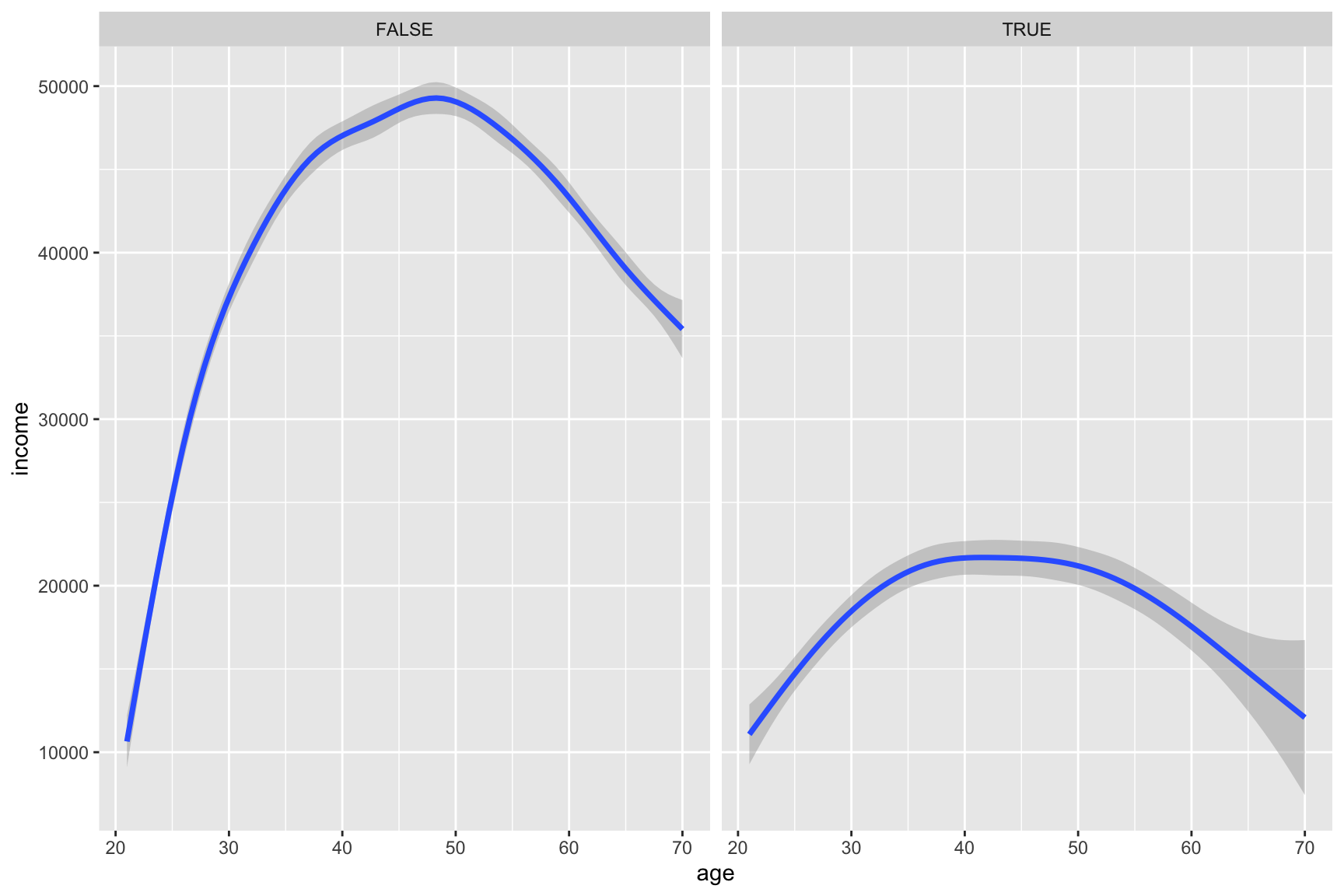
Blank (1)
x = income, y = agex = age, y = income
Show answer
b
Blank (2)
geom_smooth()geom_smooth(method = "lm")- Both a and b
Show answer
a
Blank (3)
Answer: ________________________________________
Show answer
facet_wrap
Question 44
Describe how the overall relationship between age and income varies by health_ins.
Show answer
Overall, both groups show an inverted U-shaped relationship between age and income, but individuals without health insurance tend to have substantially higher incomes and experience a steeper increase in earnings during early and middle adulthood.