Lecture 6

Add Labels and Make Notes on ggplot

Byeong-Hak Choe

SUNY Geneseo

March 25, 2026

Continuous variables by group or category

by_country <- socviz::organdata |>
  group_by(consent_law, country) |>
  summarize(
    donors_mean = mean(donors, na.rm = TRUE),
    donors_sd = sd(donors, na.rm = TRUE),
    gdp_mean = mean(gdp, na.rm = TRUE),
    health_mean = mean(health, na.rm = TRUE),
    roads_mean = mean(roads, na.rm = TRUE),
    cerebvas_mean = mean(cerebvas, na.rm = TRUE)
  )
  • Summarize organdata to calculate the mean and standard deviation of each numeric variable for each consent_law-country pair.
  • Later, we will label points with country names.

summarize_if()

by_country <- socviz::organdata |>
  group_by(consent_law, country) |>
  summarize_if(is.numeric, lst(mean, sd), na.rm = TRUE) |>
  ungroup()
  • We want to apply mean() and sd() to every numeric variable, but only numeric variables.
  • summarize_if(is.numeric, lst(mean, sd), na.rm = TRUE) is a compact way to do that.

🏷📝️ Add Labels and Make Notes

Three common tools

  • geom_text(): write text directly at each observation.
  • geom_text_repel(): write text while automatically pushing labels away from each other.
  • annotate(): add notes, arrows, or text at fixed plot locations.

geom_text() basics

p <- ggplot(
  data = by_country,
  mapping = aes(x = roads_mean, 
                y = donors_mean)
)

p +
  geom_point() +
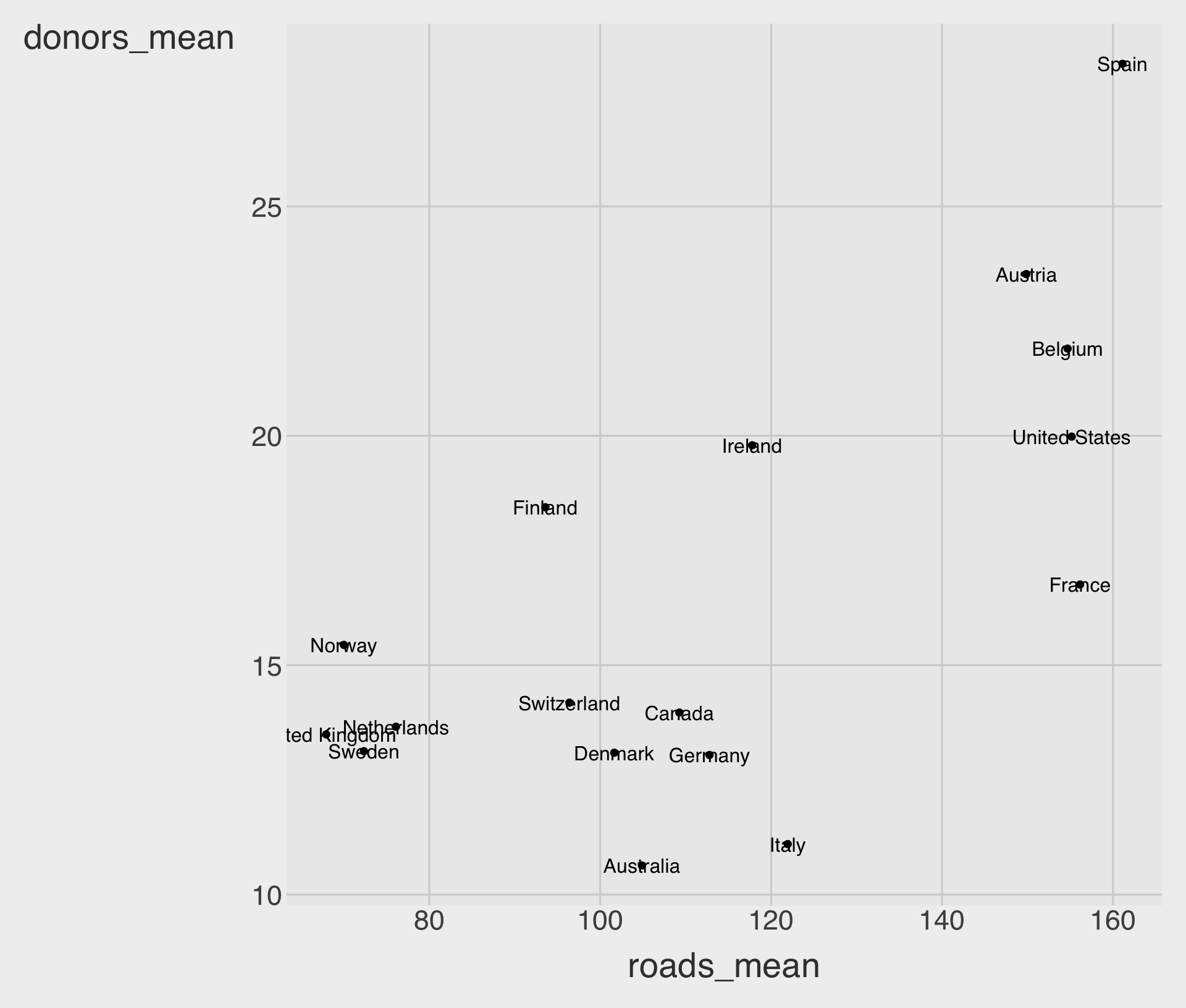
  geom_text(aes(label = country))

  • geom_text() draws text at the coordinates given by x and y.
  • The most important mapped aesthetic is usually label = ....
  • Here, each point is labeled with the country name.

geom_text() often overlaps
p +
  geom_point() +
  geom_text(aes(label = country), 
            hjust = 0)

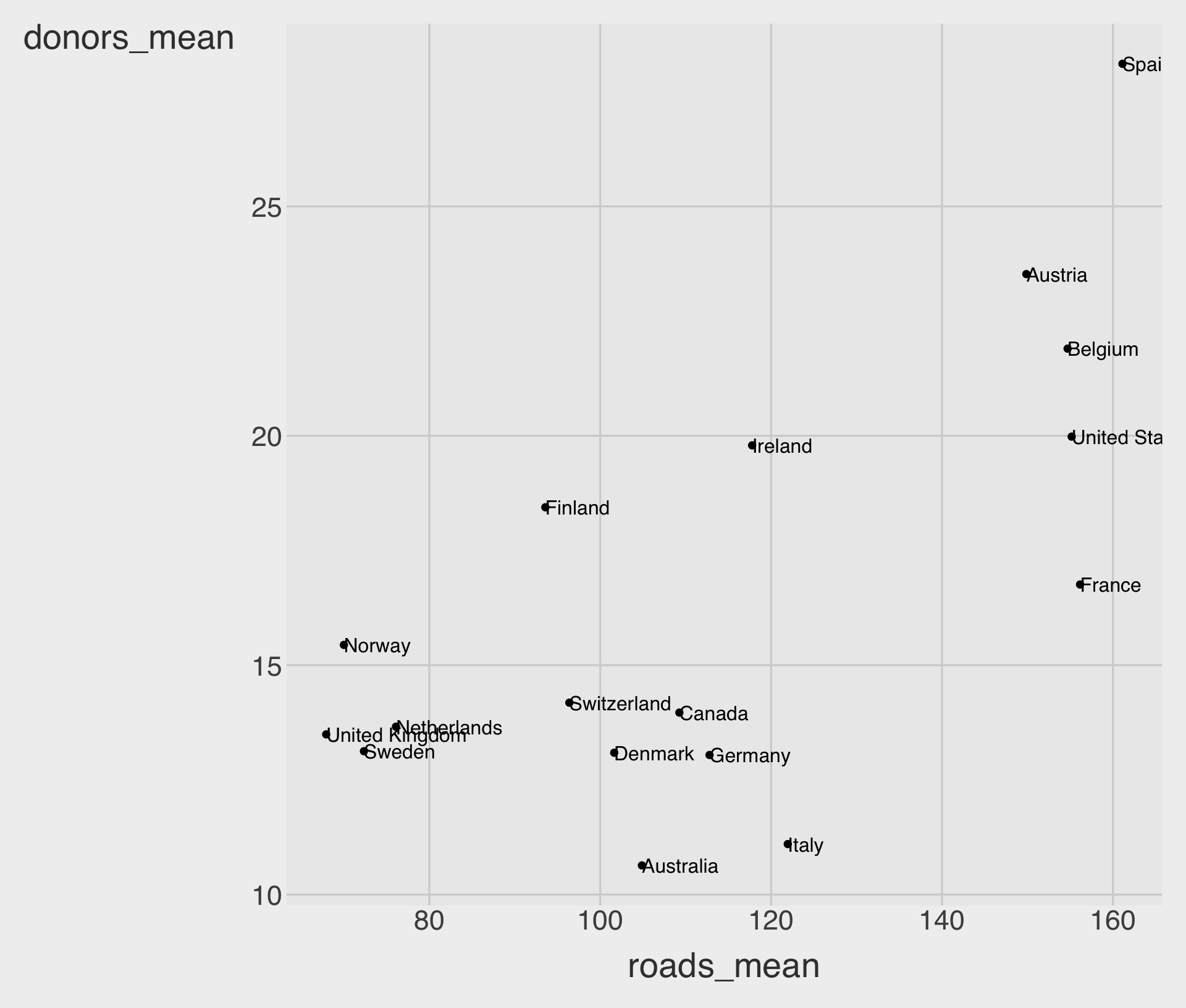
  • By default, labels are centered on the coordinates.
  • hjust = 0 left-justifies text; hjust = 1 right-justifies text.
  • Even with hjust, labels may still overlap each other or cover points.

Useful arguments in geom_text()
p +
  geom_point() +
  geom_text(
    aes(label = country),
    hjust = 0,
    size = 3.5,
    nudge_x = 0.05, # Using the same 
                    # unit on the 
                    # x-axis scale
    check_overlap = TRUE
  )

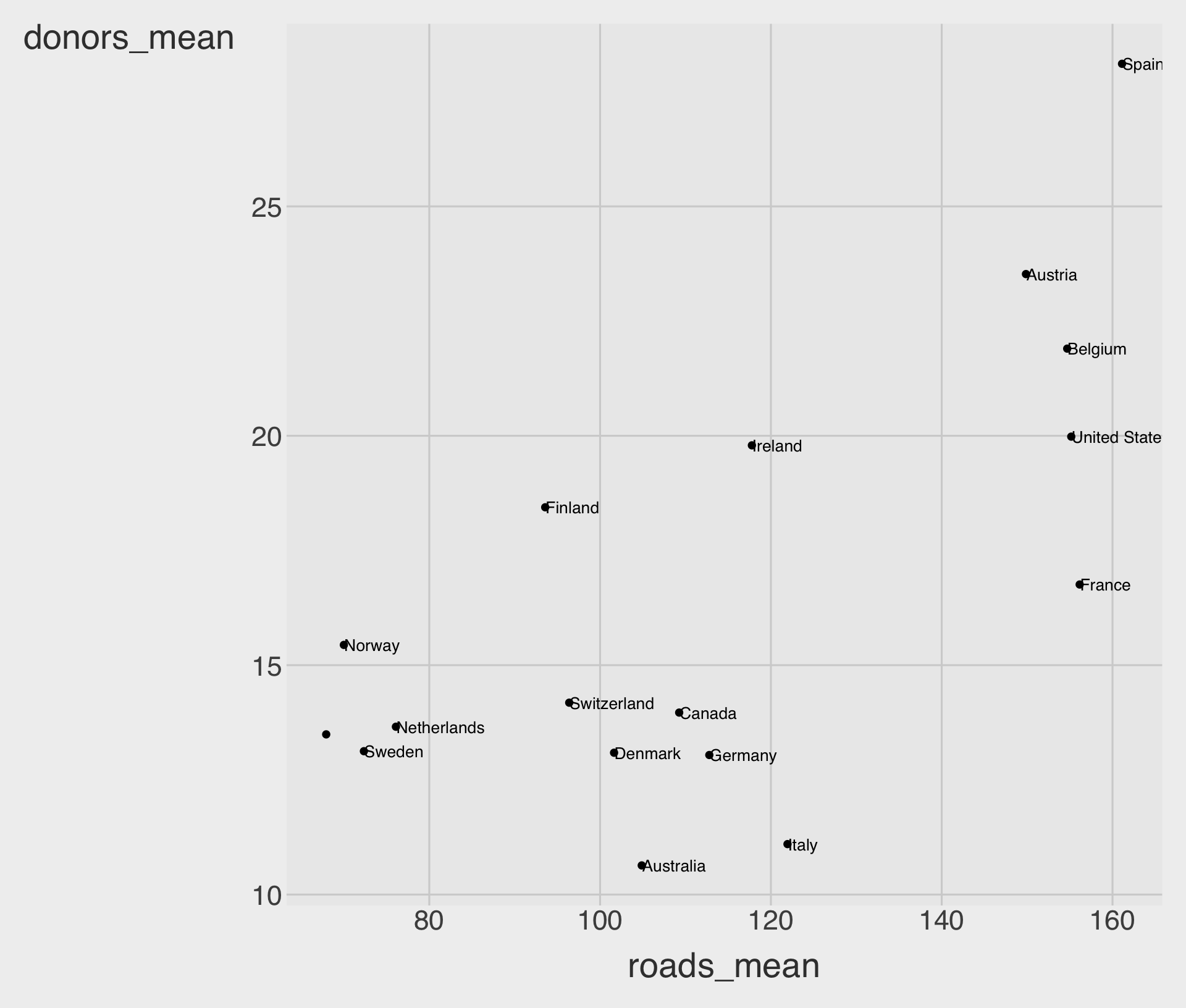
  • size changes text size.
  • nudge_x and nudge_y shift labels a little without changing the data.
  • check_overlap = TRUE drops some labels when they collide.

Common aesthetics for geom_text()

  • Mapped aesthetics: label, color, alpha, family, fontface.
  • Position controls: hjust, vjust, nudge_x, nudge_y.
  • When to use: when there are only a few labels or when you want exact manual placement.
  • Main limitation: crowded scatterplots quickly become messy.

Install and load ggrepel

install.packages("ggrepel")
library(ggrepel)
  • ggrepel extends ggplot2 with repelling text and label geoms.
  • It is especially useful for scatterplots with many nearby points.

Historical election data

We will use historical U.S. presidential election data: socviz::elections_historic.

The goal is to label election winners without making the chart unreadable.

p <- ggplot(
  socviz::elections_historic,
  aes(x = popular_pct, y = ec_pct, label = winner_label)
)
  • x is the winner’s popular vote share.
  • y is the winner’s electoral college vote share.
  • label is the text that will be displayed.

geom_hline() and geom_vline()

p_base <- p +
  geom_hline(yintercept = 0.5, 
             linewidth = 1.4, 
             color = "gray60") +
  geom_vline(xintercept = 0.5, 
             linewidth = 1.4, 
             color = "gray60") +
  geom_point()

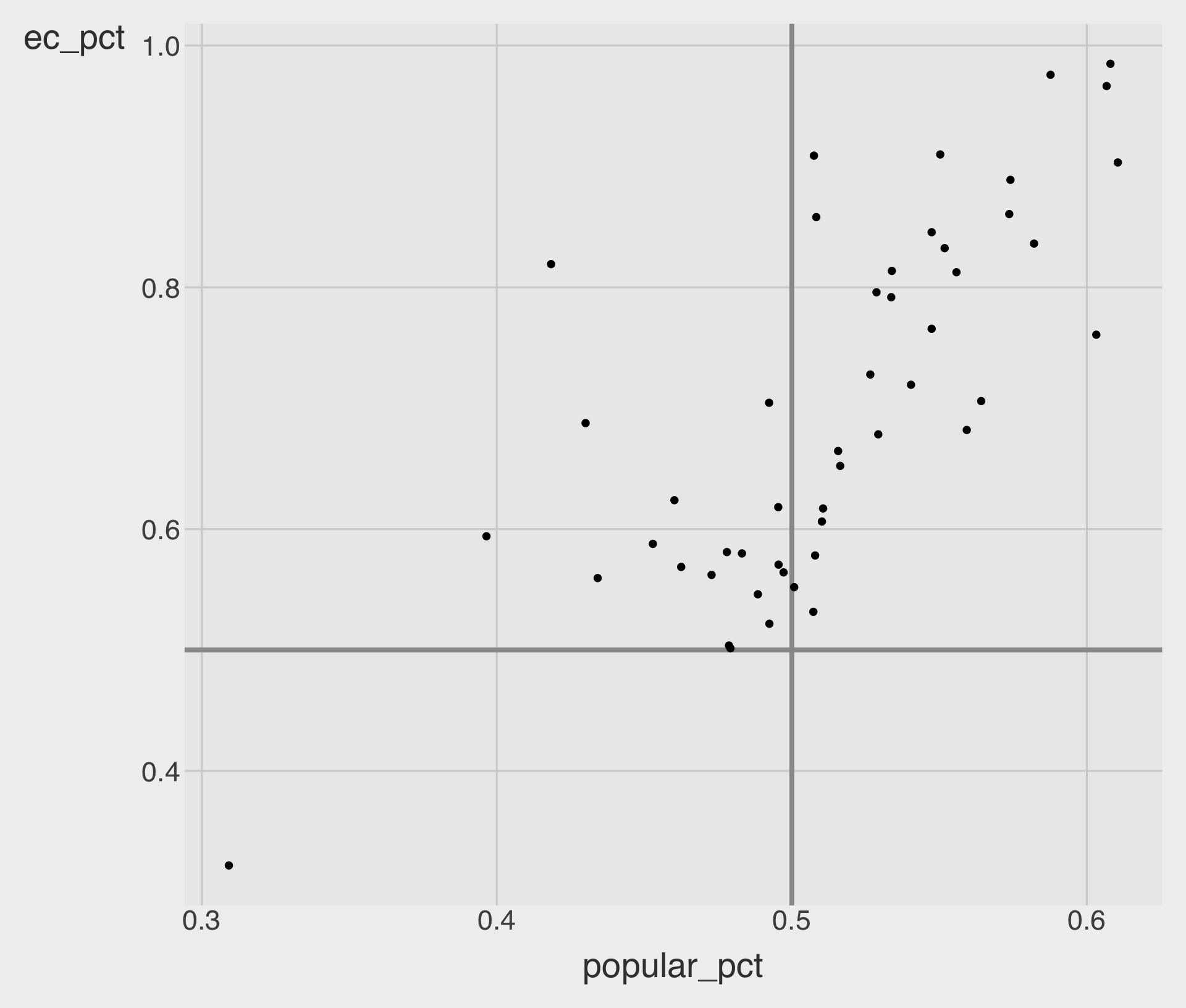
p_base

  • geom_hline(yintercept = ...) adds a horizontal line.
  • geom_vline(xintercept = ...) adds a horizontal line.
  • Reference lines at 50% help us interpret the margins.

geom_text_repel()
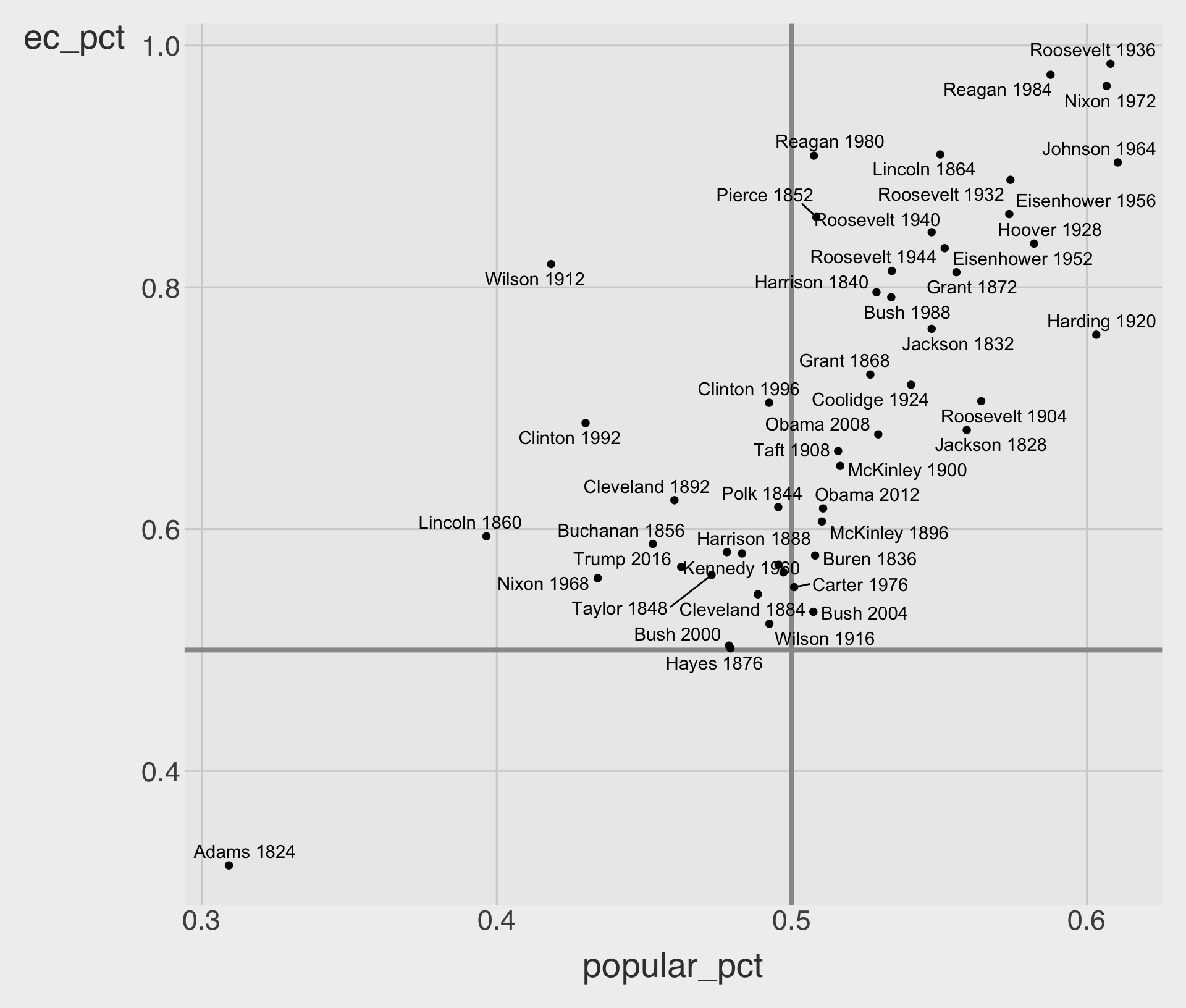
p_base +
  geom_text_repel()

  • geom_text_repel() tries to keep labels from overlapping each other.
  • It also tries to avoid placing labels directly on top of points.
  • This usually produces a much more readable chart than geom_text().

Useful arguments in geom_text_repel()
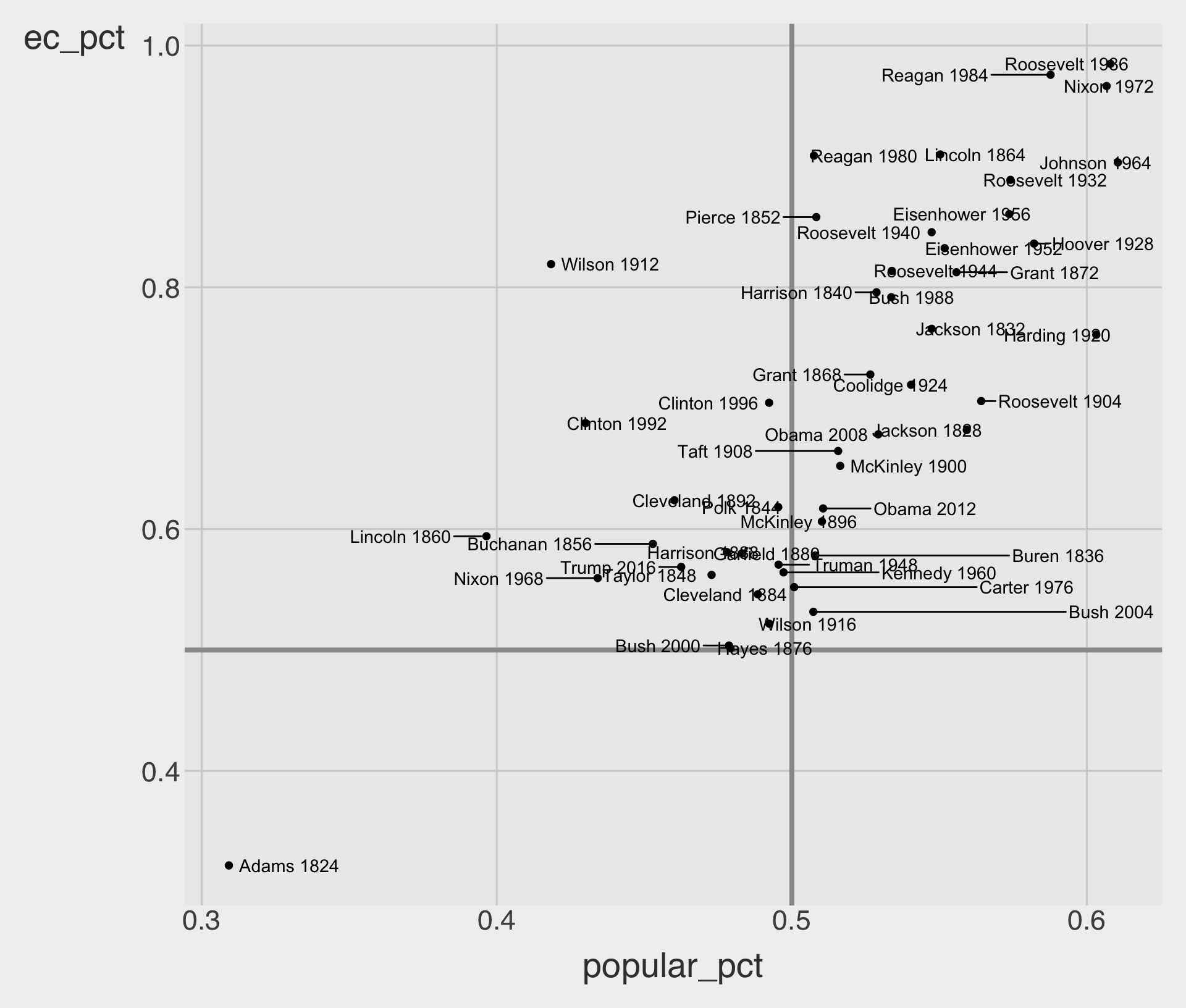
p_base +

# direciton = "x":
#   the labels are repelled only 
#   left/right
# direciton = "y":
#   the labels are repelled only 
#   up/down

    geom_text_repel(
    size = 3.8,
    box.padding = 0.35,
    max.overlaps = 20,
    direction = "x"  # or "y"
  )

  • box.padding adds more empty space around each label, so labels are pushed farther away from nearby labels and points.

  • max.overlaps sets the max. number of overlaps a label can have.

Add scales and labels

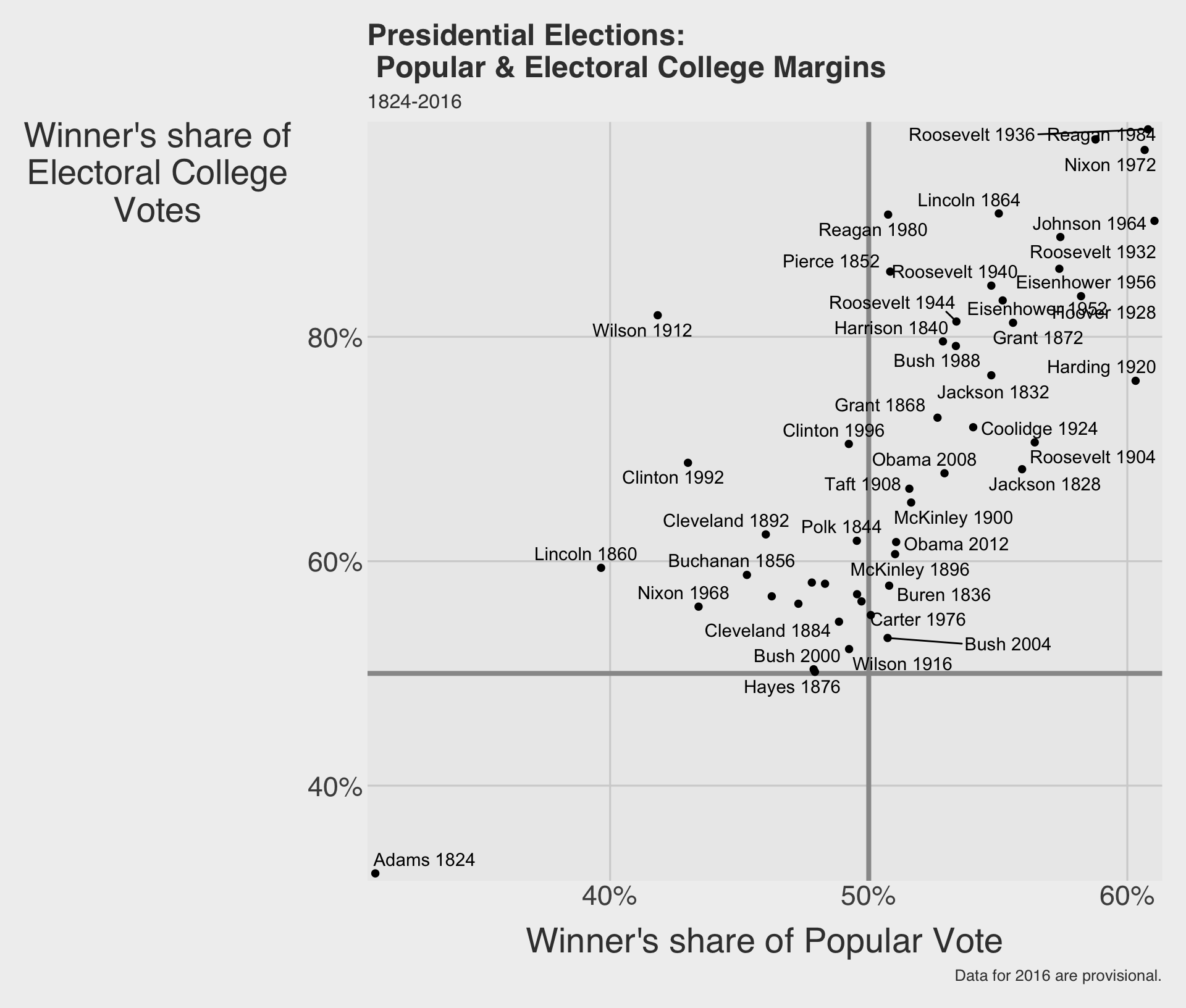
p_title <- "Presidential Elections:\n Popular & Electoral College Margins"
p_subtitle <- "1824-2016"
p_caption <- "Data for 2016 are provisional."
x_label <- "Winner's share of Popular Vote"
y_label <- "Winner's share of\nElectoral College\nVotes"

p_elec <- p_base +
  geom_text_repel() +
  scale_x_percent() +
  scale_y_percent() +
  labs(
    x = x_label,
    y = y_label,
    title = p_title,
    subtitle = p_subtitle,
    caption = p_caption
  )

p_elec
annotate() for fixed notes
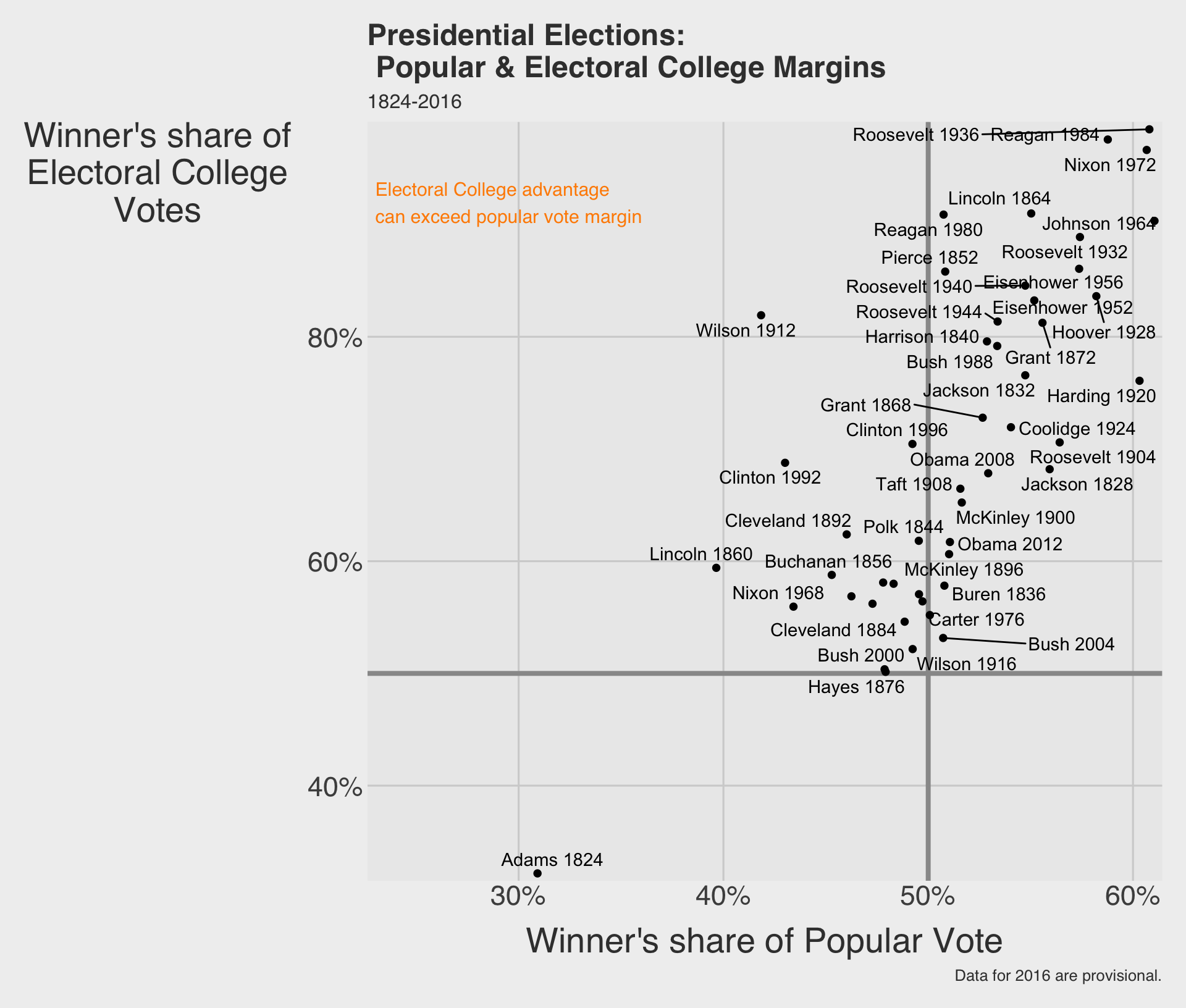
p_elec +
  annotate(
    geom = "text",
    x = 0.23,
    y = 0.92,
    color = "darkorange",
    label = "Electoral College advantage\ncan exceed popular vote margin",
    hjust = 0,
    size = 4
  )

  • annotate() adds something at a fixed location on the plot.
  • Unlike geom_text(), it does not need a whole data frame of observations.
  • This is useful for one-off explanatory notes.

annotate() can add arrows too
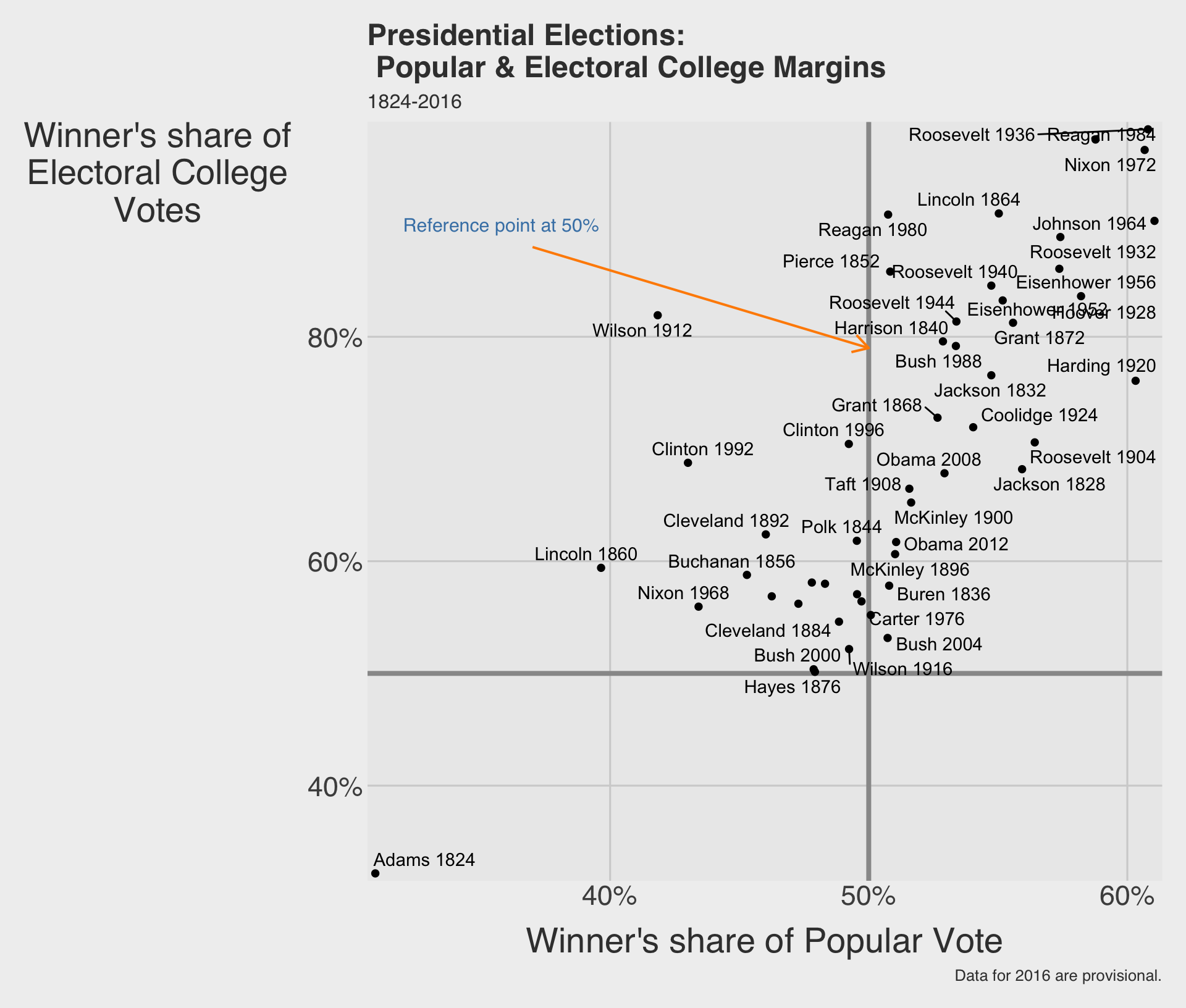
p_elec +
  annotate(
    geom = "segment",
    x = 0.37, xend = 0.5,
    y = 0.88, yend = 0.79,
    color = "darkorange",
    linewidth = 0.7,
    arrow = arrow(length = 
                    unit(0.15, "in"))
  ) +
  annotate(
    geom = "text",
    x = 0.32, y = 0.9,
    color = "steelblue",
    label = "Reference point at 50%",
    hjust = 0, size = 4
  )

  • annotate("segment", ...) can draw arrows or line segments.
  • Pairing text and segments is a common way to call attention to a meaningful part of the chart.

annotate() with images using "richtext"
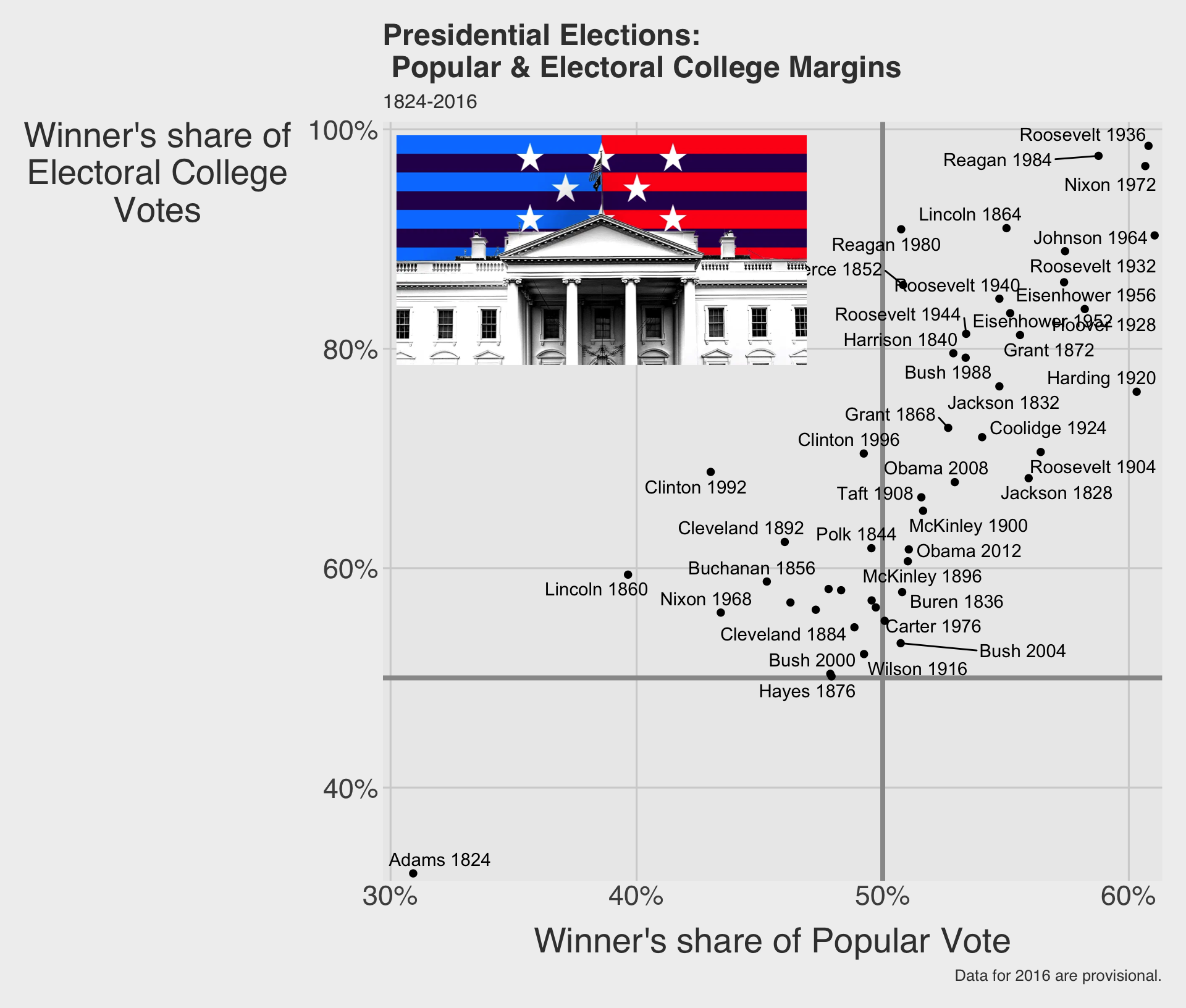
# install.packages("ggtext")
library(ggtext)
img_path <- "<img src='https://bcdanl.github.io/lec_figs/us-elec.png' 
             width='250' height = '140'/>"
p_elec +
  annotate(
    geom = "richtext",
    x = .3,
    y = 1,
    hjust = 0,   # left-align at x
    vjust = 1,   # top-align at y
    label = img_path,
    fill = NA,
    color = NA
  )

  • annotate("richtext", ...) renders HTML inside a ggplot.
  • The label accepts an <img> tag — set src to any image URL and width/height to control its size in pixels.

annotate() versus text geoms

  • Use geom_text() when labels come from rows in your data.
  • Use geom_text_repel() when those row-based labels would otherwise collide.
  • Use annotate() when the note is about the chart itself and is placed manually.
  • In other words, annotate() is for commentary, not for labeling every observation.