Lecture 4

ggplot2: Scales, Guides, and Themes (How to Control What We See)

Byeong-Hak Choe

SUNY Geneseo

February 28, 2026

Scales: scale_*_*()

What is a scale_*_*()?

A scale control aesthetics mappings:

  • x/y position: scale_x_*(), scale_y_*()

  • color/fill: scale_color_*(), scale_fill_*()

  • size/shape/alpha: scale_size_*(), scale_shape_*(), scale_alpha_*()

  • Each deals with one combination of mapping and scale. Too many to memorize (131 distinct scale_*_*() functions)!

    • They are named according to a consistent logic
  • https://ggplot2tor.com/apps provides a complete guide to scales and themes, as well as aesthetics.

Scale Kinds (Choose Based on Our Variable Types)

  • Continuous: numeric with many possible values
    *_continuous(), *_log10(), *_sqrt(), *_date(), *_datetime()

  • Discrete: categories / factors
    *_discrete(), *_manual()

  • Rule of thumb:

    • num/int → continuous
    • factor/chr → discrete

scale_x_continuous(): breaks & labels

gapminder |>
  filter(year == 2007) |>
  ggplot(aes(x = gdpPercap, 
             y = lifeExp,
             color = continent)) +
  geom_point(alpha = 0.8,
             size = 3) +
  geom_smooth(se = F) +
  scale_x_continuous(
    breaks = c(1000, 10000, 50000),
    labels = scales::dollar
  ) +
  labs(
    x = "GDP per capita",
    y = "Life expectancy",
    color = "Continent")

What this controls:

  • Where ticks appear (breaks)
  • How ticks display text (labels)

Common scale_*() Arguments You’ll Use a Lot

For most scales, these are the “big four”:

  • name = legend/axis title (often we can do this in labs() too)
  • limits = c(min, max) what values are shown
  • breaks = where tick marks / legend entries appear
  • labels = how ticks / legend entries display as text

Limits vs. Zooming: limits vs coord_*

Two different ideas:

A) Scale Limits (can drop data)

... + scale_x_continuous(limits = c(0, 20000))

B) Coordinate Zoom (keeps data, just views a window)

... + coord_cartesian(xlim = c(0, 20000))
  • With limits =, ggplot fits the smooth using only data (\(\leq\) 20,000) (outliers removed).
  • With coord_cartesian(), ggplot fits the smooth using all data, then just shows the part of the line within the window.

Color Scales: Discrete vs. Continuous

Discrete Color (Categorical):

... + scale_color_viridis_d()

Continuous Color (Numeric Gradient):

... + scale_color_viridis_c()

Common mistake:

  • Numeric variable that is really a category (e.g., year)
    • Fix with aes(color = factor(year)) or convert to factor

Manual Scales: When We Must Choose Specific Values

gapminder |>
  filter(year == 2007) |>
  ggplot(aes(x = gdpPercap, 
             y = lifeExp, 
             color = continent)) +
  geom_point(size = 3) +
  scale_color_manual(
    values = c(
      "Africa" = "#1b9e77",
      "Americas" = "#d95f02",
      "Asia" = "#7570b3",
      "Europe" = "#e7298a",
      "Oceania" = "#66a61e"
    )
  )

Multiple Scales: One Plot Can Have Many

A single plot can have:

  • x scale
  • y scale
  • color scale
  • fill scale
  • shape scale
  • size scale

Each mapped aesthetic typically has one scale.

🎨 RColorBrewer

Use Color to Your Advantage

  • Choose a color palette based on the type of data you are plotting:
    • Unordered categorical variable (e.g., gender, country) → Distinct colors that won’t be easily confused
    • Ordered categorical variable (e.g., Level of Education) → Graded color scheme running from less to more or earlier to later

RColorBrewer

  • RColorBrewer provides a wide range of named color palettes.
  • Access colors using scale_color_brewer() or scale_fill_brewer() with the palette parameter.

Sequential

  • Sequential palettes are suited to ordered data that progress from low to high.

Diverging
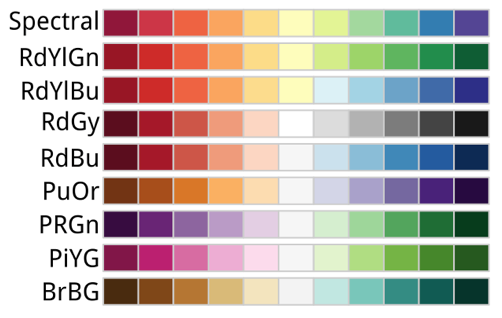
  • Diverging palettes put equal emphasis on mid-range critical values and extremes at both ends of the data range.

Qualitative
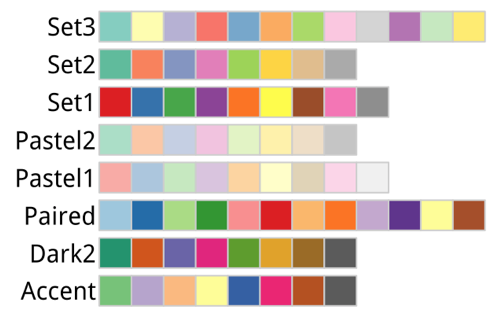
  • Qualitative palettes do not imply magnitude differences between legend classes.

  • Qualitative schemes are best suited to representing unordered categorical data.

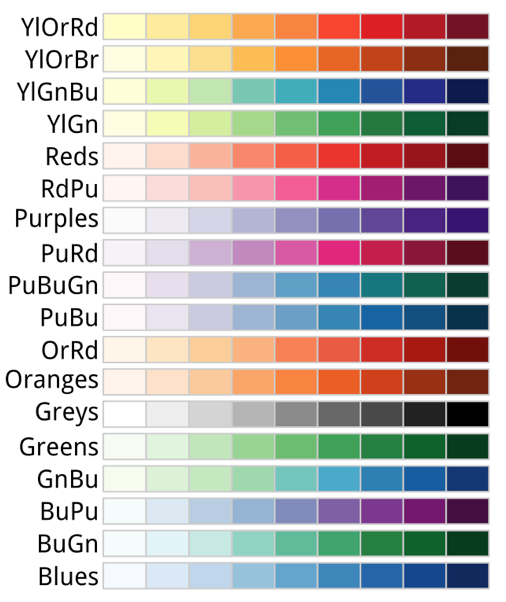
Display All Color Palettes

display.brewer.all()

scale_color_brewer(palette = ...)

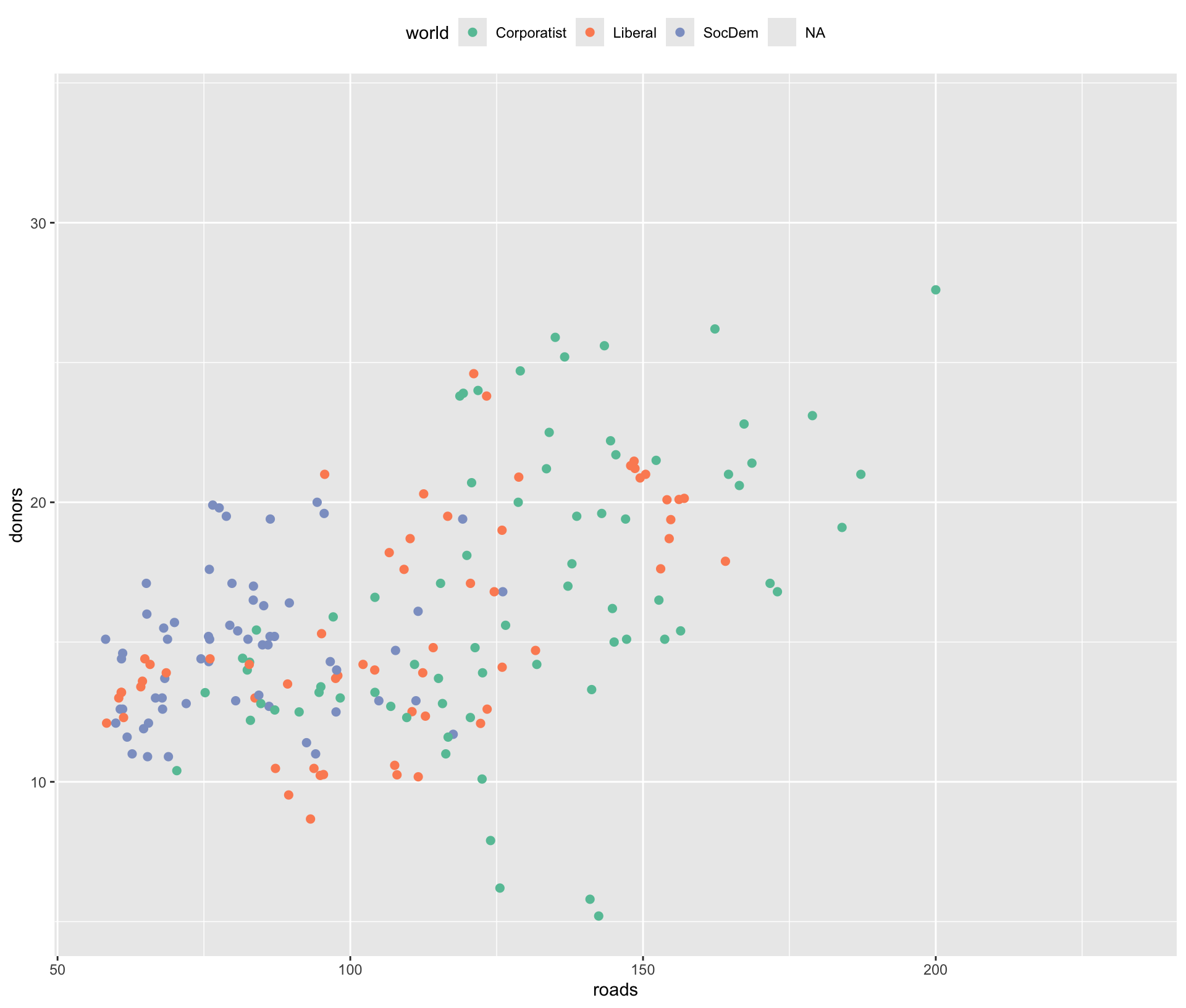
p <- ggplot(data = socviz::organdata,
            mapping = 
              aes(x = roads, 
                  y = donors, 
                  color = world))
p + geom_point(size = 2) + 
  scale_color_brewer(
    palette = "Set2") +
  theme(legend.position = "top")

  • Use named palettes with scale_color_brewer(palette = ...).

Pastel2
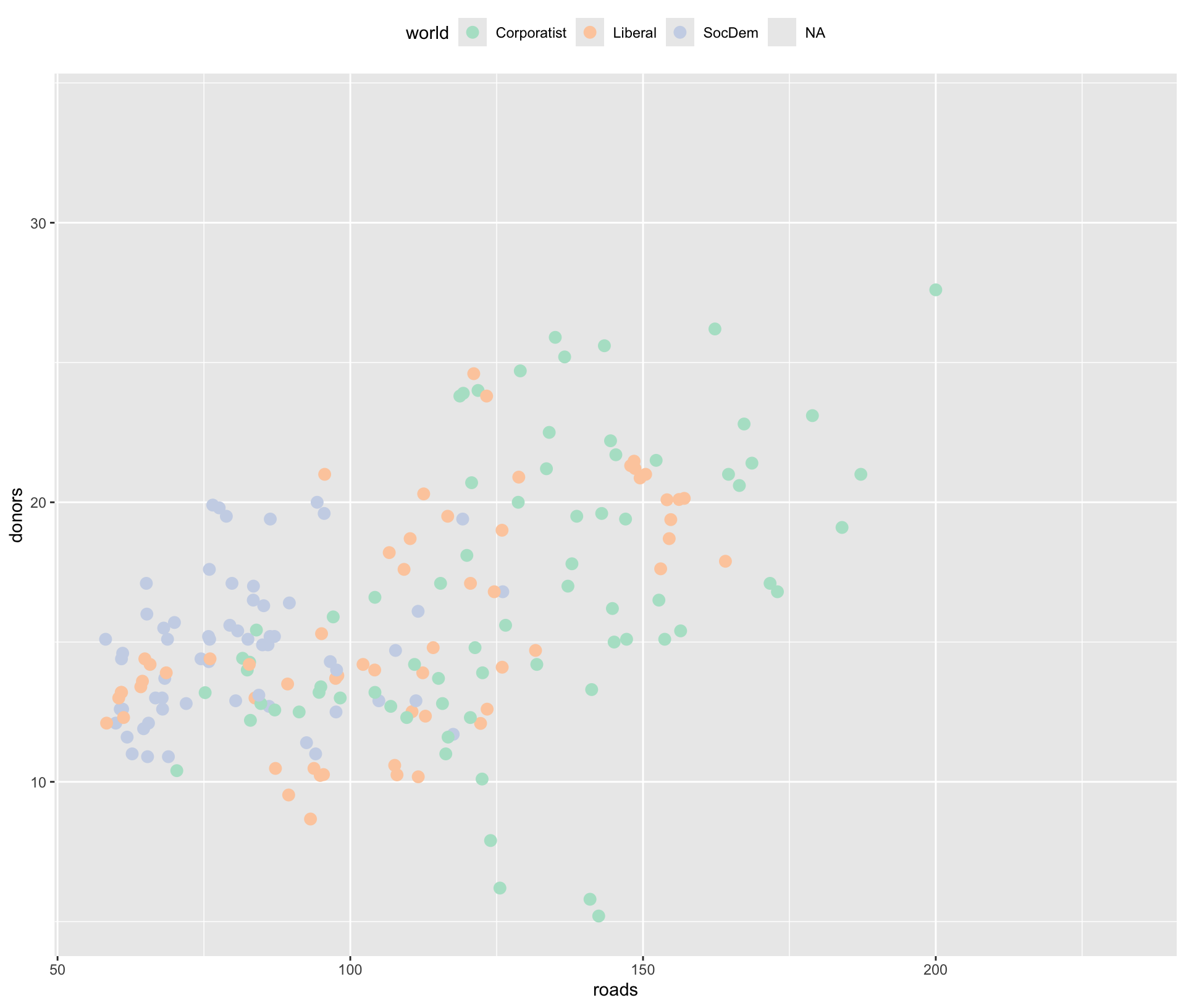
p + geom_point(size = 3) + 
  scale_color_brewer(
    palette = "Pastel2") +
  theme(legend.position = "top")

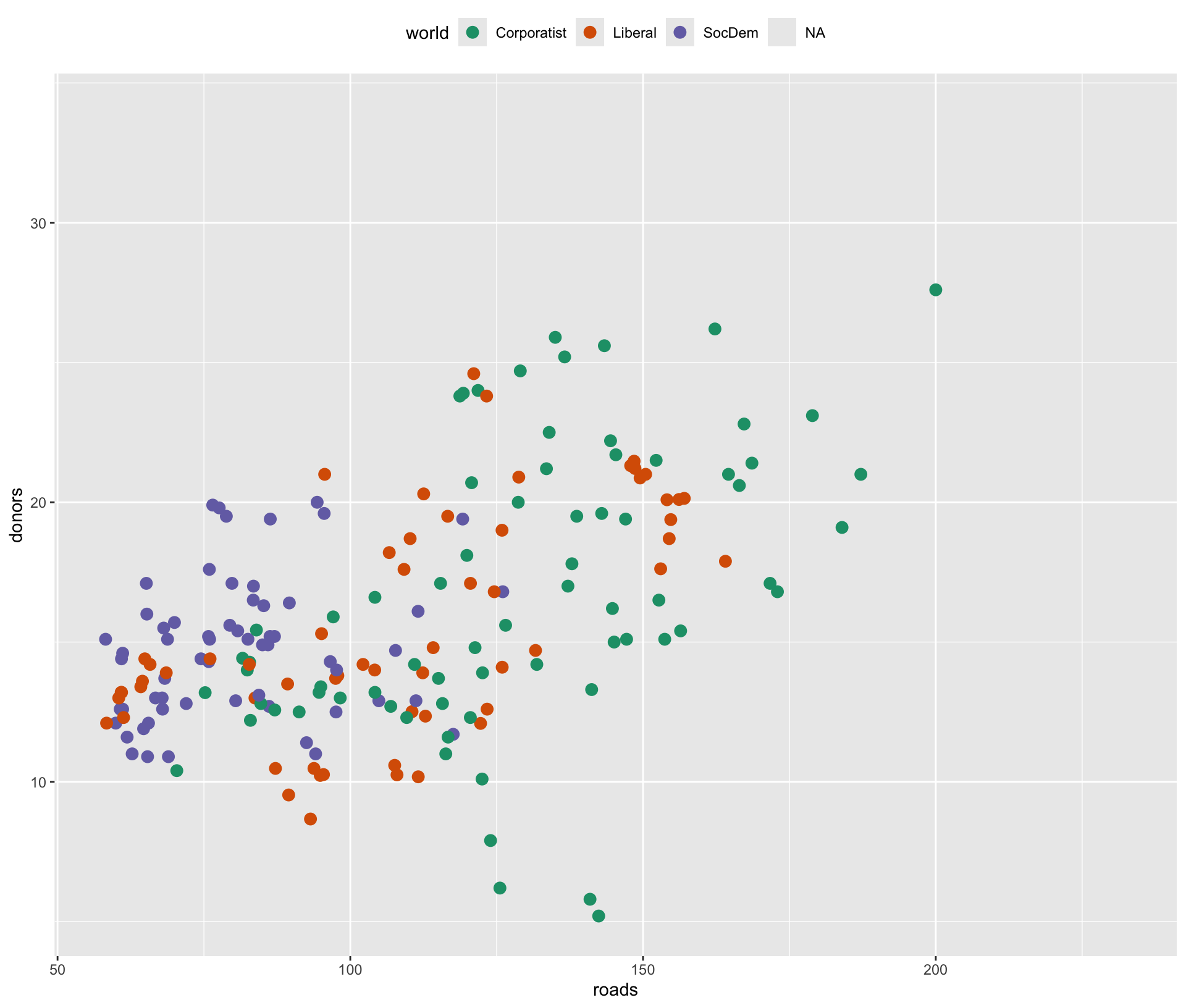
Dark2

p + geom_point(size = 3) + 
  scale_color_brewer(
    palette = "Dark2") +
  theme(legend.position = "top")

Color-Blindness Friendly Palettes

  • RColorBrewer flags palettes that are color-blind friendly in the colorblind column.
  • Prefer these palettes (e.g., "Set2", "Dark2") when designing for broad audiences.

Getting Hex Color Codes from a Palette

# Get 5 hex codes from the "Set2" palette
brewer.pal(n = 5, name = "Set2")
  • Use brewer.pal(n, name) to extract hex color codes from any named palette:
    • n — number of colors to extract (must be between 3 and the palette’s maximum)
    • name — name of the palette (e.g., "Set2", "Blues", "RdBu")
brewer.pal.info  # check the 'maxcolors' column
  • brewer.pal.info provides the maximum number of colors available per palette

scale_*_manual() with brewer.pal()

my_colors <- 
  brewer.pal(n = 4, 
             name = "Dark2")

p + geom_point(size = 3) +
  scale_color_manual(
    values = my_colors) +
  theme(legend.position = "top")

  • You can then pass hex codes directly into scale_color_manual() or scale_fill_manual().

Guides: guides()

What is a Guide?

A guide is the display of a scale:

  • discrete color → legend
  • continuous color → colorbar
  • size → legend
  • shape → legend

Guides answer:

  • “What does this color mean?”
  • “Which categories exist?”
  • “What value corresponds to this gradient?”

Remove a Legend (most common use)

If we don’t want a legend for an aesthetic:
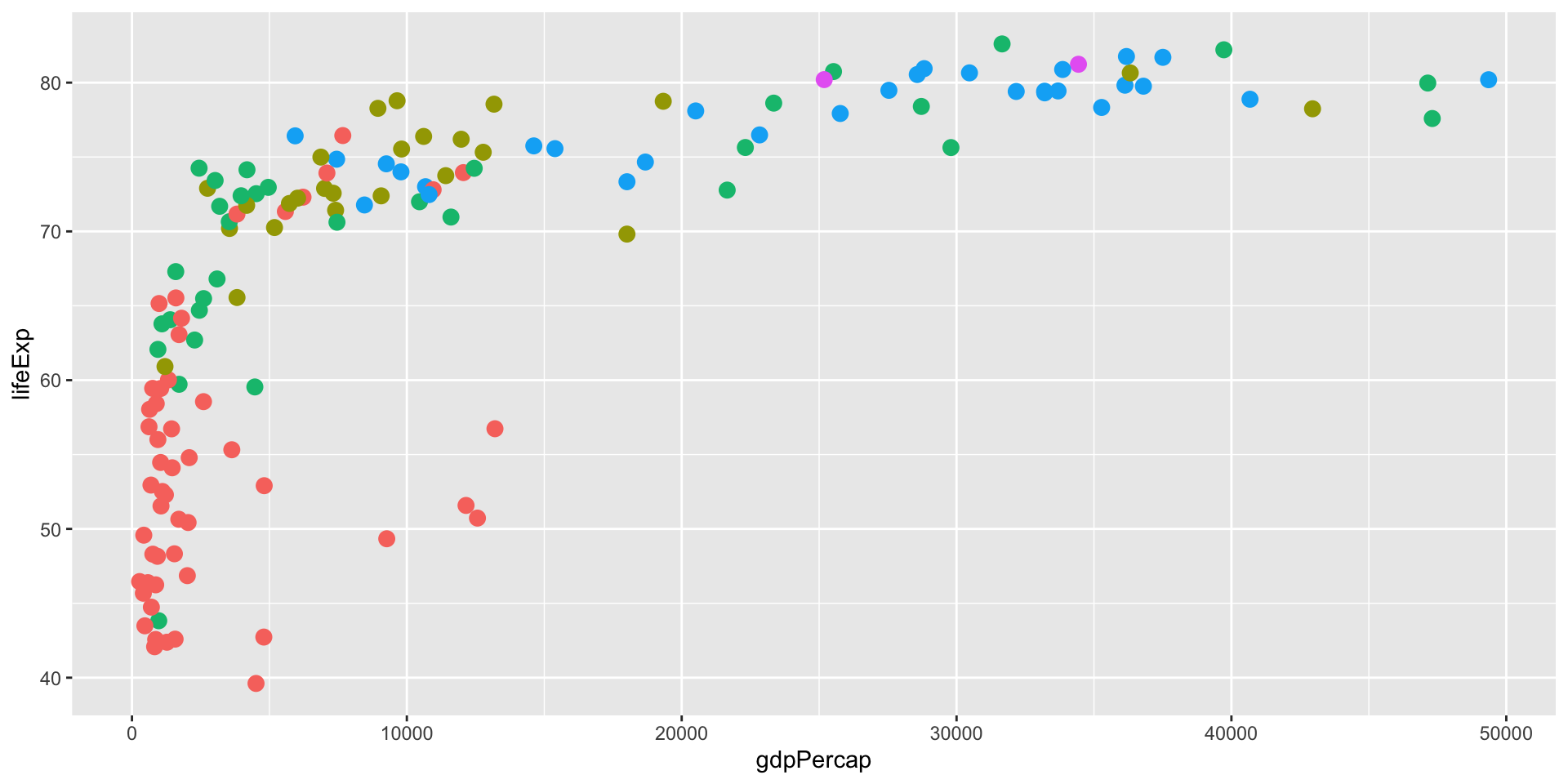
gapminder |>
  filter(year == 2007) |>
  ggplot(aes(gdpPercap, lifeExp, 
             color = continent)) +
  geom_point(size = 3) +
  guides(color = "none")

Equivalent shortcut:

... + theme(legend.position = "none")

Difference:

  • guides(color = "none") removes only that guide
  • theme(legend.position="none") removes all legends

Choose the Guide Type Explicitly

Sometimes ggplot guesses well; sometimes we want control:
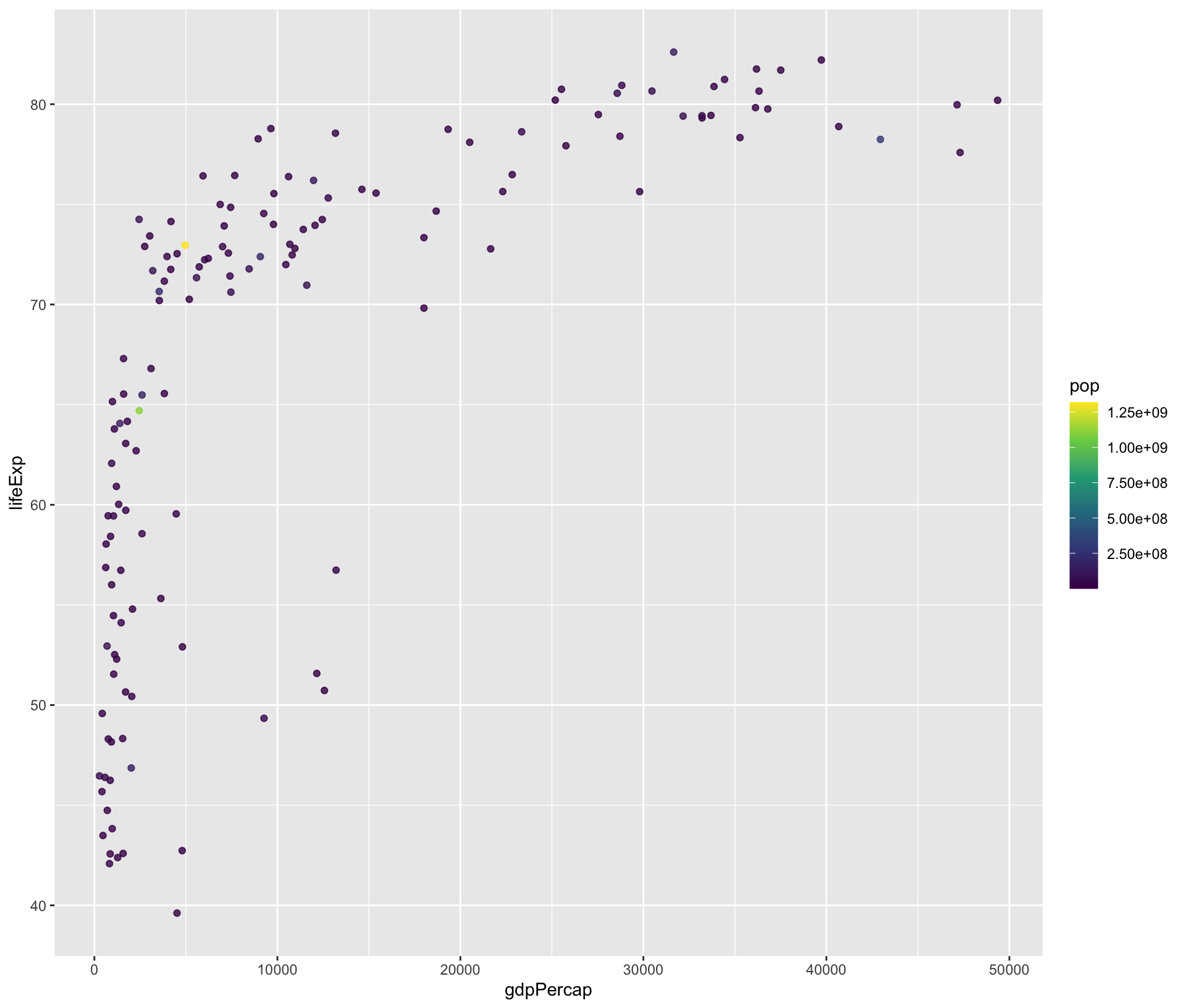
gapminder |>
  filter(year == 2007) |>
  ggplot(aes(gdpPercap, lifeExp, 
             color = pop)) +
  geom_point(alpha = 0.8) +
  scale_color_viridis_c() +
  guides(
    color = 
      guide_colorbar(
        barheight = unit(4, "cm")))

Legend Layout: Rows/Columns

gapminder |>
  filter(year == 2007) |>
  ggplot(aes(gdpPercap, lifeExp, color = continent)) +
  geom_point(size = 3) +
  guides(color = guide_legend(nrow = 1, byrow = TRUE))

Useful when moving legend to top/bottom.

Reorder Multiple Legends (order =)

When we map multiple aesthetics, we can control the order:

gapminder |>
  filter(year == 2007) |>
  ggplot(aes(gdpPercap, lifeExp, 
             color = continent, 
             size = pop)) +
  geom_point(alpha = 0.8) +
  guides(
    color = guide_legend(order = 1),
    size  = guide_legend(order = 2)
  )

Override the Legend Appearance (override.aes)

Sometimes the plot uses alpha/size that makes legend hard to read.

gapminder |>
  filter(year == 2007) |>
  ggplot(aes(gdpPercap, lifeExp, 
             color = continent)) +
  geom_point(alpha = 0.2, 
             size = 3) +
  guides(
    color = 
      guide_legend(
        override.aes = list(alpha = 1)))

When Do We Need guides()?

Use guides() when we want to:

  • remove a specific legend (not all)
  • change legend layout (nrow/ncol, direction)
  • force legend vs colorbar
  • reorder multiple legends
  • override how keys look

If we only want to rename legends, start with labs().

Themes: theme()

What is a Theme?

A theme controls everything that is not our data:

  • backgrounds, gridlines
  • fonts, text size, text alignment
  • spacing/margins
  • legend position and styling
  • facet strip styling

Themes do not change the data mapping.

Theme “Starter Packs”: theme_*()

Try different base themes quickly:

p <- gapminder |>
  filter(year == 2007) |>
  ggplot(aes(gdpPercap, lifeExp, 
             color = continent)) +
  geom_point(size = 3) +
  scale_x_log10()

p + theme_minimal()
p + theme_classic()
p + theme_light()
p + hrbrthemes::theme_ipsum()
p + ggthemes::theme_fivethirtyeight()

The Most-Used Theme Edits

Legend Position

... + theme(legend.position = "top")

Remove Minor Gridlines

... + theme(panel.grid.minor = element_blank())

Emphasize Axis Titles

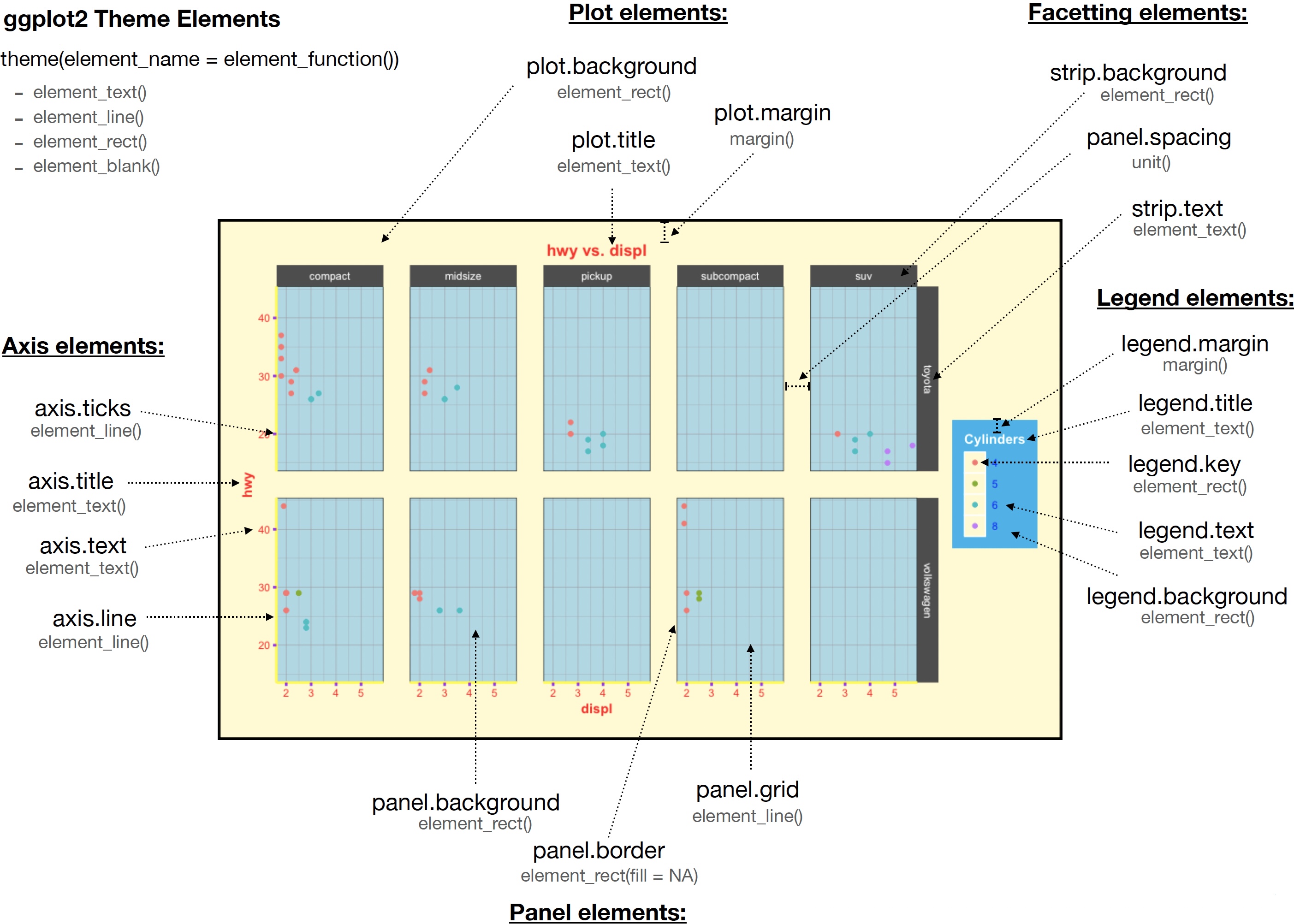
Theme System

ggplot theme elements (https://henrywang.nl/ggplot2-theme-elements-demonstration)

Theme Elements: “What Can I Edit?”

The theme() function has 94 possible arguments!

Common ones:

  • plot.title, plot.subtitle, plot.caption
  • axis.title.x, axis.title.y, axis.text.x, axis.text.y
  • panel.grid.major, panel.grid.minor, panel.background
  • legend.position, legend.title, legend.text, legend.key
  • strip.text, strip.background (facets)
  • plot.margin

The only way to learn how to use theme() is to use it and tinker with it.

Example: a Clean “Presentation-Ready” Theme

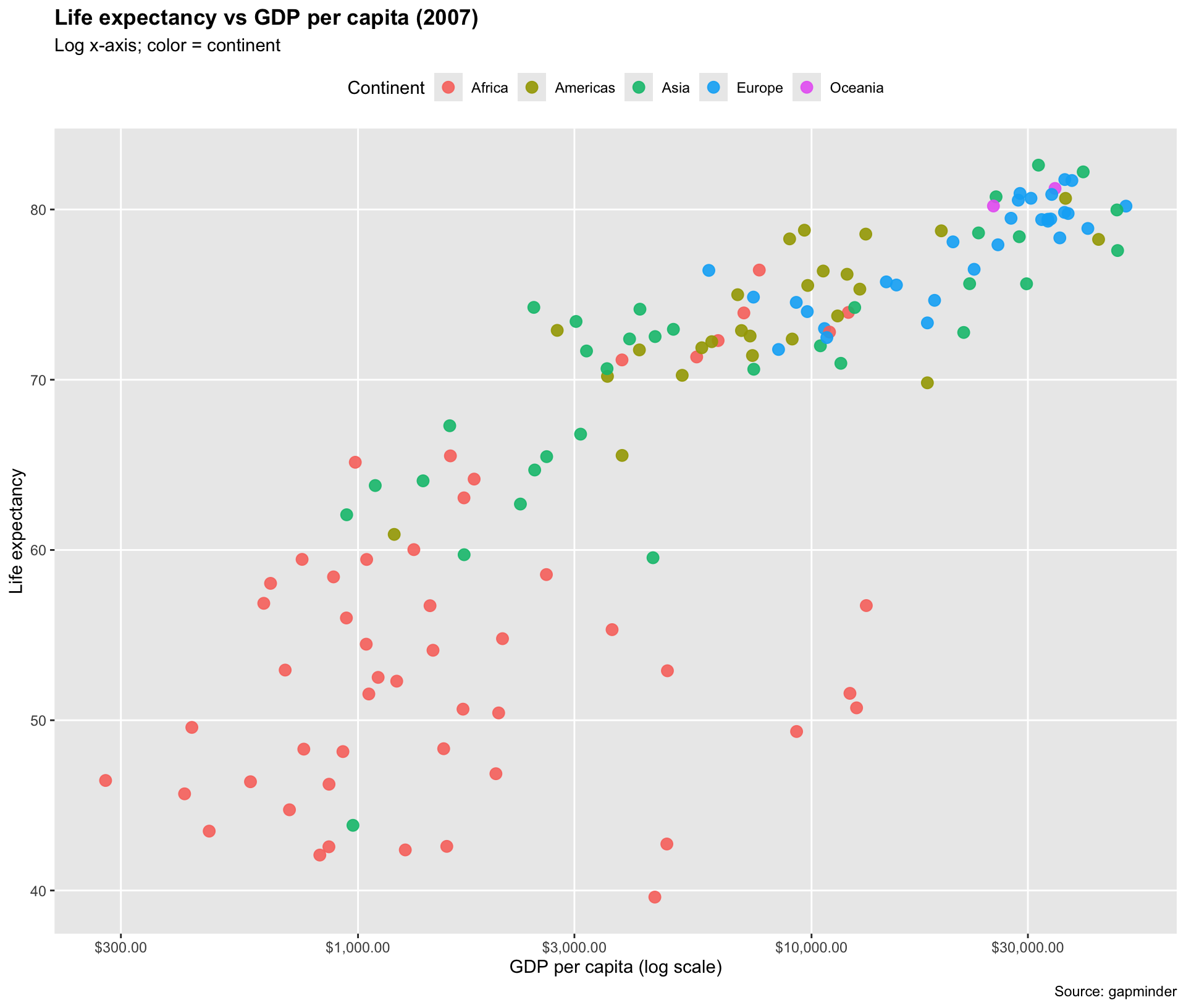
gapminder |>
  filter(year == 2007) |>
  ggplot(aes(gdpPercap, lifeExp, 
             color = continent)) +
  geom_point(size = 3, alpha = 0.9) +
  scale_x_log10(labels = scales::dollar) +
  labs(
    title = "Life expectancy vs GDP per capita (2007)",
    subtitle = "Log x-axis; color = continent",
    x = "GDP per capita (log scale)",
    y = "Life expectancy",
    color = "Continent",
    caption = "Source: gapminder"
  ) +
  theme(
    legend.position = "top",
    plot.title = element_text(face = "bold"),
    panel.grid.minor = element_blank()
  )
Putting It Together

One Plot, All Three Controls

gapminder |>
  filter(year == 2007) |>
  ggplot(aes(gdpPercap, lifeExp, 
             color = continent, 
             size = pop)) +
  geom_point(alpha = 0.7) +

  # SCALES: transform, breaks, labels
  scale_x_log10(
    breaks = c(500, 2000, 10000, 50000),
    labels = scales::dollar
  ) +
  scale_size_continuous(labels = scales::label_number(scale_cut = scales::cut_si(""))) +

  # GUIDES: legend order + layout
  guides(
    color = guide_legend(order = 1, nrow = 1),
    size   = guide_legend(order = 2)
  ) +

  # THEME: layout + typography
  theme(
    legend.position = "top",
    plot.title = element_text(face = "bold"),
    panel.grid.minor = element_blank()
  ) +

  # labels are not scales/guides/themes, but they coordinate everything
  labs(
    title = "Scales + Guides + Themes in one figure",
    x = "GDP per capita (log scale)",
    y = "Life expectancy",
    color = "Continent",
    size = "Population"
  )

Summary

What to Reach for First ✅

  • Data → visual mapping: aes() + scale_*_*()
  • Explaining mappings: labs() + guides()
  • Polish / layout: theme() (or theme_*())

One-Sentence Definitions

  • Scale: converts data values into aesthetic values.
  • Guide: shows the scale to the reader (legend/colorbar).
  • Theme: controls the look of the plot frame.