Lecture 10

Pandas Fundamentals V: Reshaping and Joining DataFrames

Byeong-Hak Choe

SUNY Geneseo

April 20, 2026

🧩 Reshaping DataFrames

✨ Tidy DataFrame

Variables, Observations, and Values
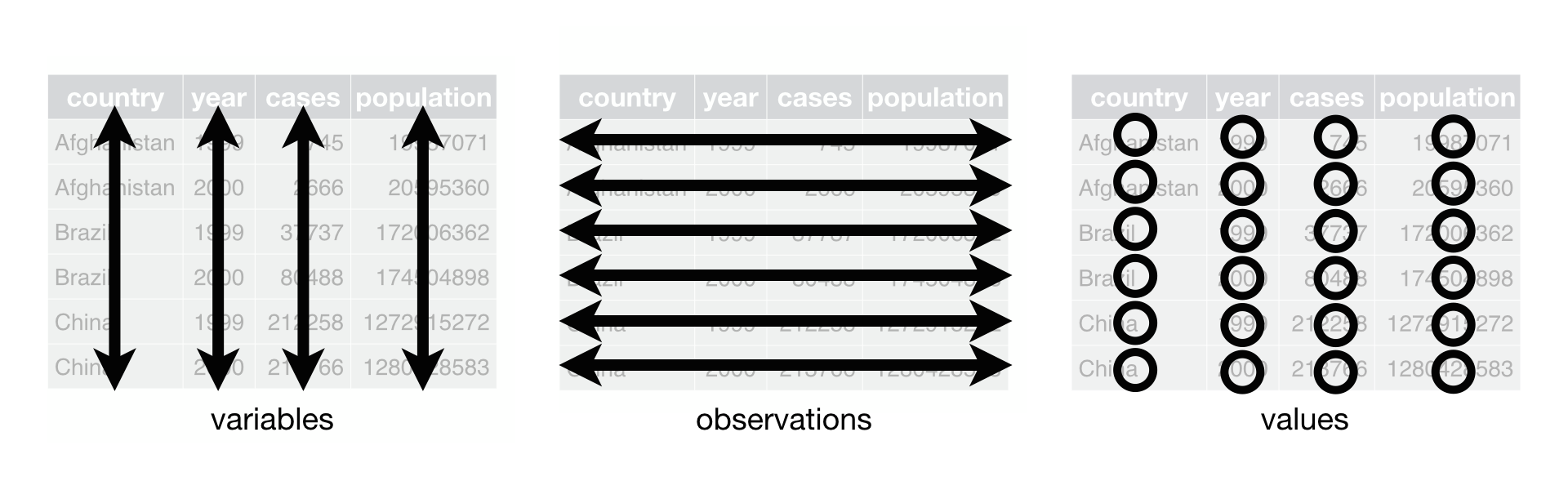
  • A DataFrame is tidy if it follows three rules:

    1. Each variable has its own column.
    2. Each observation has its own row.
    3. Each value has its own cell.
  • A tidy DataFrame keeps your data organized, making it easier to understand, analyze, and share in any data analysis.

🔄 Why Reshape DataFrames?

  • A DataFrame can be given in a format unsuited for the analysis that we would like to perform on it.

    • A DataFrame may have larger structural problems that extend beyond the data.
    • Perhaps the DataFrame stores its values in a format that makes it easy to extract a single row but difficult to aggregate the data.
  • Reshaping a DataFrame means manipulating it into a different shape.

  • In this section, we will discuss pandas techniques for molding a DataFrame into the shape we desire.

🌆🌡️ Long vs. Wide DataFrames: An Example

  • The following DataFrames measure temperatures in two cities over two days.
import pandas as pd
from google.colab import data_table
data_table.enable_dataframe_formatter()

df_wide = pd.DataFrame({
    'Weekday': ['Tuesday', 'Wednesday'],
    'Miami': [80, 83],
    'Rochester': [57, 62],
    'St. Louis': [71, 75]
})

df_long = pd.DataFrame({
    'Weekday': ['Tuesday', 'Wednesday', 'Tuesday', 'Wednesday', 'Tuesday', 'Wednesday'],
    'City': ['Miami', 'Miami', 'Rochester', 'Rochester', 'St. Louis', 'St. Louis'],
    'Temperature': [80, 83, 57, 62, 71, 75]
})

📐 Long vs. Wide DataFrames: Height vs. Width

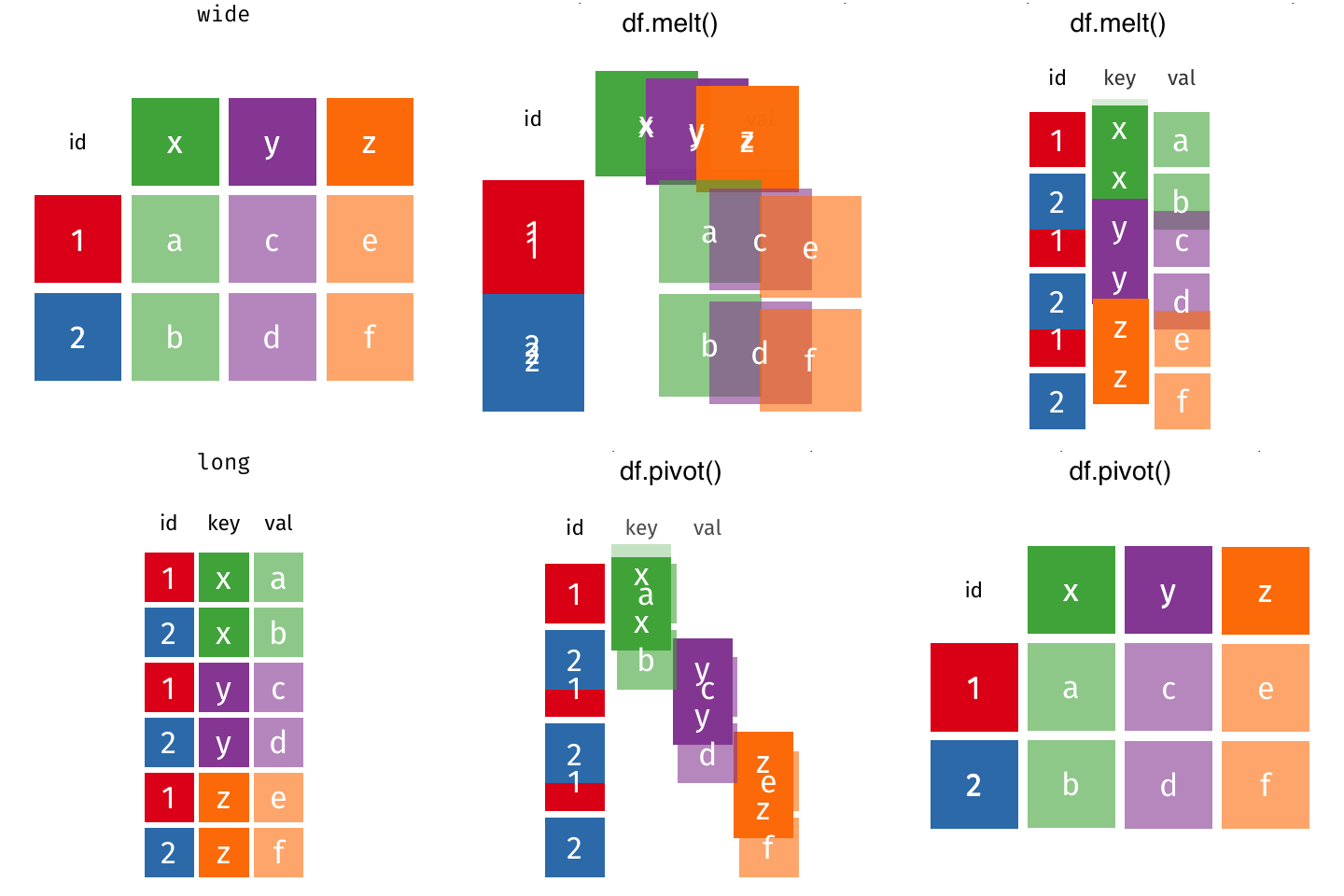
  • A DataFrame can store its values in wide or long format.
  • These names reflect the direction in which the data set expands as we add more values to it.
    • A long DataFrame increases in height.
    • A wide DataFrame increases in width.

🎯 Long vs. Wide DataFrames: Choosing the Right Format

  • The optimal storage format for a DataFrame depends on the insight we are trying to glean from it.
    • We consider making DataFrames longer if one variable is spread across multiple columns.
    • We consider making DataFrames wider if one observation is spread across multiple rows.

🔁 melt() and pivot(): Overview

  • melt() makes DataFrame longer.
  • pivot() makes DataFrame wider.

⬇️ Make DataFrame Longer with melt(): Basics

df_wide_to_long = (
    df_wide
    .melt()
)

🏷️ Make DataFrame Longer with melt(): id_vars

df_wide_to_long = (
    df_wide
    .melt(id_vars = "Weekday")
)
  • melt() can take a few parameters:
    • id_vars is a container (string, list, tuple, or array) that represents the variables that will remain as is.
    • id_vars can indicate which column should be the “identifier”.

🔤 Make DataFrame Longer with melt(): var_name and value_name

df_wide_to_long = (
    df_wide
    .melt(id_vars = "Weekday",
          var_name = "City",
          value_name = "Temperature")
)
  • melt() can take a few parameters:
    • var_name is a string for the name of the variable whose values are taken from column names in a given wide-form DataFrame.
    • value_name is a string for the name of the variable whose values are taken from the values in a given wide-form DataFrame.

↔︎️ Make DataFrame Wider with pivot()

df_long_to_wide = (
    df_long
    .pivot(index = "Weekday",
           columns = "City",
           values = "Temperature"  
        )
    .reset_index()
    )
  • When using pivot(), we need to specify a few parameters:
    • index that takes the column to pivot on;
    • columns that takes the column to be used to make the variable names of the wider DataFrame;
    • values that takes the column that provides the values of the variables in the wider DataFrame.

🧪 Practice: Melting a Multi-Year DataFrame

  • Let’s consider the following wide-form DataFrame, df, containing information about the number of courses each student took from each department in each year.
dict_data = {"Name": ["Donna", "Donna", "Mike", "Mike"],
             "Department": ["ECON", "DANL", "ECON", "DANL"],
             "2018": [1, 2, 3, 1],
             "2019": [2, 3, 4, 2],
             "2020": [5, 1, 2, 2]}
df = pd.DataFrame(dict_data)

df_longer = df.melt(id_vars=["Name", "Department"], 
                    var_name="Year", 
                    value_name="Number of Courses")
  • The pivot() method can also take a list of variable names for the index parameter.

❓ Practice: Pivoting Back to Wide Form

  • Let’s consider the following wide-form DataFrame, df, containing information about the number of courses each student took from each department in each year.
dict_data = {"Name": ["Donna", "Donna", "Mike", "Mike"],
             "Department": ["ECON", "DANL", "ECON", "DANL"],
             "2022": [1, 2, 3, 1],
             "2023": [2, 3, 4, 2],
             "2024": [5, 1, 2, 2]}
df = pd.DataFrame(dict_data)

df_longer = df.melt(id_vars=["Name", "Department"], 
                    var_name="Year", 
                    value_name="Number of Courses")

Q. How can we use the df_longer to create the wide-form DataFrame, df_wider, which is equivalent to the df?

🚀 Classwork 15: Pandas Fundamentals

Let’s do Classwork 15!

🤝 Joining DataFrames

🗂️ Relational Data

  • Sometimes, one data set is scattered across multiple files.
    • The size of the files can be huge.
    • The data collection process can be scattered across time and space.
    • E.g., DataFrame for county-level data and DataFrame for geographic information, such as longitude and latitude.
  • Sometimes we want to combine two or more DataFrames based on common data values in those DataFrames.
    • This task is known in the database world as performing a “join.”
    • We can do this with the merge() method in Pandas.

🔑 Join Types, Keys, and Relational Data

  • The variables that are used to connect each pair of DataFrames are called keys.
  • Each observation in a DataFrame is often uniquely identified by key variable(s).
  • The key variable enables relationships between the DataFrames to be defined.

🔗 Joining DataFrames with merge(): Setup
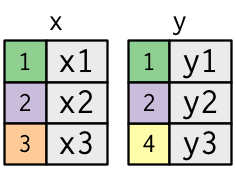
x = pd.DataFrame({
    'key': [1, 2, 3],
    'val_x': ['x1', 'x2', 'x3']
})
y = pd.DataFrame({
    'key': [1, 2, 4],
    'val_y': ['y1', 'y2', 'y3']
})
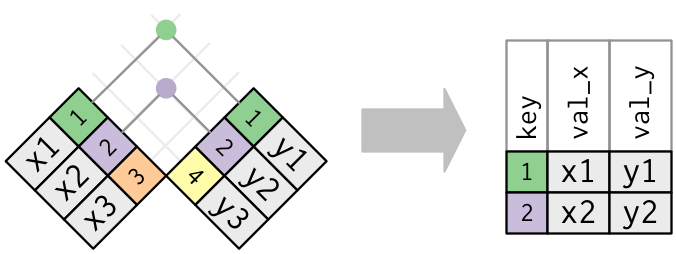
  • The colored column represents the “key” variable.
  • The grey column represents the “value” variable.

🎯 Inner Join

An inner join matches pairs of observations whenever their keys are equal:
# the default value for 'how' is 'inner'
# so it doesn't actually need to be specified
merge_inner_1 = pd.merge(x, y, on='key')
merge_inner_2 = pd.merge(x, y, on='key', how='inner')
merge_inner_3 = x.merge(y, on='key')
merge_inner_4 = x.merge(y, on='key', how='inner')

⬅️ Left Join

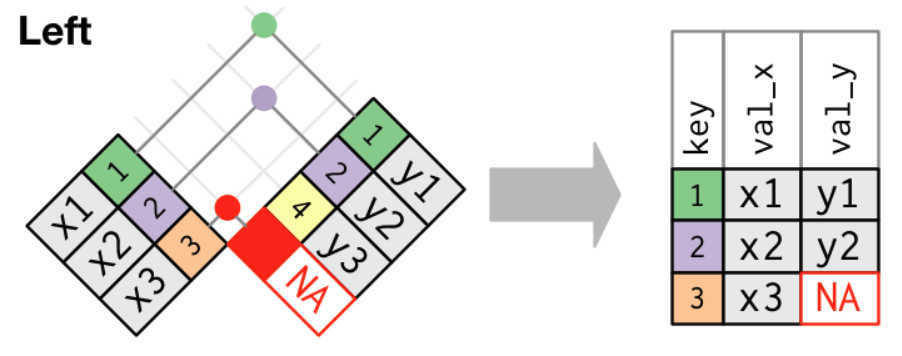
A left join keeps all observations in x.
merge_left = pd.merge(x, y, on='key', how='left')
merge_left_x = x.merge(y, on='key', how='left')
  • The most commonly used join is the left join.

➡️ Right Join

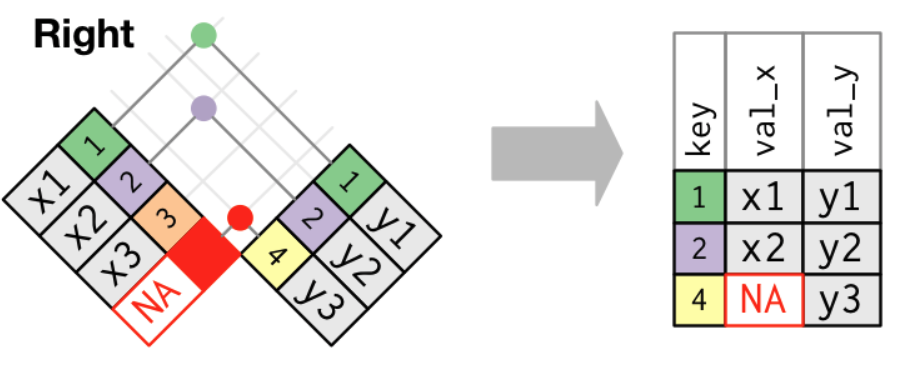
A right join keeps all observations in y.
merge_right = pd.merge(x, y, on='key', how='right')
merge_right_x = x.merge(y, on='key', how='right')

🌐 Outer (Full) Join

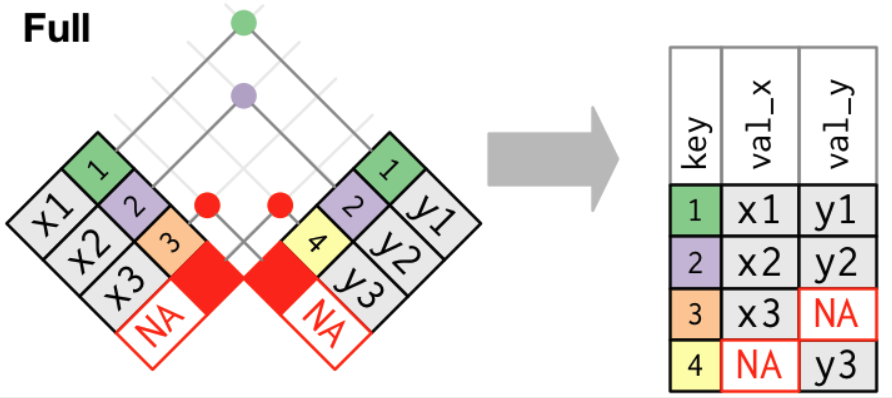
A full join keeps all observations in x and y.
merge_outer = pd.merge(x, y, on='key', how='outer')
merge_outer_x = x.merge(y, on='key', how='outer')

1️⃣⦂️🔢 Duplicate Keys: One-to-Many

One DataFrame has duplicate keys (a one-to-many relationship).
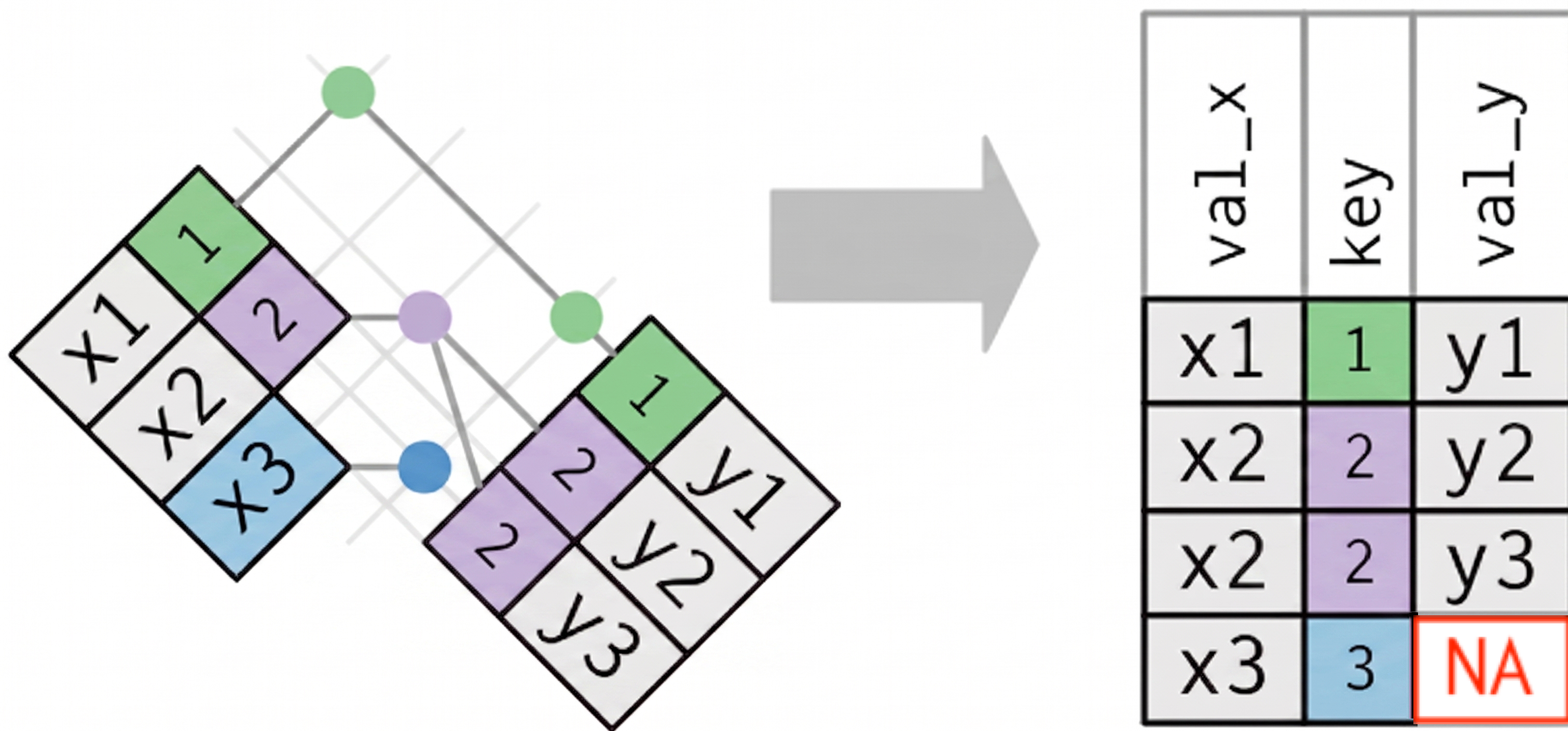
x = pd.DataFrame({
    'key':[1, 2, 2, 3],
    'val_x':['x1', 'x2', 'x3', 'x4']})
y = pd.DataFrame({
    'key':[1, 2],
    'val_y':['y1', 'y2'] })
one_to_many = x.merge(y, on='key', 
                         how='left')

🔢⦂🔢 Duplicate Keys: Many-to-Many

Both DataFrames have duplicate keys (many-to-many relationship).
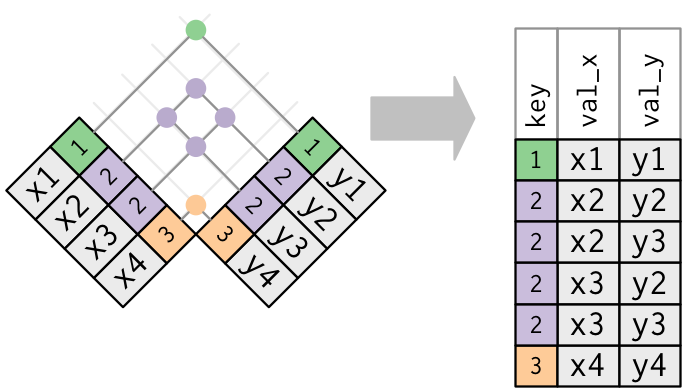
x = pd.DataFrame({
  'key':[1, 2, 2, 3],
  'val_x':['x1','x2','x3','x4']})
y = pd.DataFrame({
  'key': [1, 2, 2, 3],
  'val_y': ['y1', 'y2', 'y3', 'y4'] })
many_to_many = x.merge(y, on='key', 
                          how='left')
  • In practice, it is better to avoid the many-to-many join.

🏷️ Defining the Key Columns with left_on and right_on

If the left and right columns do not have the same name for the key variables, we can use the left_on and right_on parameters instead.

x = pd.DataFrame({
  'key_x': [1, 2, 3],
  'val_x': ['x1', 'x2', 'x3']
})
y = pd.DataFrame({
  'key_y': [1, 2],
  'val_y': ['y1', 'y2'] })

keys_xy = 
  x.merge(y, left_on = 'key_x', 
             right_on = 'key_y', 
             how = 'left')

🚀 Classwork 16: Pandas Fundamentals

Let’s do Classwork 16!