Lecture 8
Pandas Fundamentals III: Data Types; Filtering by a Condition
April 6, 2026
📂 emp DataFrame
🔄 Converting Data Types with the astype() Method
🔍 Inspecting Mgmt Before Conversion
- What values are in the
Mgmtvariable?
- The
astype()method converts aSeries’ values to a different data type.- It can accept a single argument: the new data type.
✅ Converting Mgmt to Boolean
- The above code overwrites the
Mgmtvariable with our newSeriesof Booleans.
⚠️ Why Salary Cannot Yet Become Integer
- The above code tries to convert the
Salaryvariable to integers with theastype()method.- pandas cannot directly convert
NaNvalues to integers.
- pandas cannot directly convert
🩹 Filling Missing Values with the fillna() Method
- The
fillna()method replaces aSeries’ missing values with a value that we specify. - In this example, we use
0only to illustrate the method.- In real analysis, filling missing values with
0may distort the data.
- In real analysis, filling missing values with
🔁 Converting Salary After Filling Missing Values
- The above code overwrites the
Salaryvariable with our newSeriesof integers.
🏷️ Converting Gender to Category
- pandas includes a special data type called
category.- It is useful when a variable has only a small number of distinct values relative to the total number of observations.
- Examples include gender, weekdays, blood types, planets, and income groups.
🏷️ Setting a category order with categories option
pd.Categorical(emp["Gender"], categories = ['Male', 'Female']).sort_values()
pd.Categorical(emp["Gender"], categories = ['Female', 'Male']).sort_values()- Without
categoriesoption, sorting is alphabetical (incorrect for many cases). - Use
categoriesoption to define an order of categories.
📅 Converting Data Types with the pd.to_datetime() Method
# Below two are equivalent:
emp["Start Date"] = pd.to_datetime(emp["Start Date"])
emp["Start Date"] = emp["Start Date"].astype('datetime64[ns]')- The
pd.to_datetime()function converts aSeries, aDataFrame, or a single column into a properdatetimeformat.
🧰 Converting Multiple Columns at Once
emp = pd.read_csv("https://bcdanl.github.io/data/employment.csv")
emp.info()

emp["Salary"] = emp["Salary"].fillna(0)
emp = emp.astype({'Mgmt': 'bool',
                  'Salary': 'int',
                  'Gender': 'category',
                  'Start Date': 'datetime64[ns]',
'Team': 'category'})- We can provide a dictionary of variable-type pairs to
astype().
🚀 Classwork 12: Pandas Fundamentals
Let’s do Questions 1-4 in Classwork 12!
🔍 Filtering by a Condition
🧭 Why Conditional Filtering Matters
We often do not know the exact index labels or positions of the observations we want to extract.
Instead, we can target observations by a Boolean condition.
⚖️ Boolean Conditions with Equality and Inequality
- Here, both
V1andV2are variables or values, and the comparisons are applied element-wise (vectorized).
- For boolean conditions using inequalities, we focus on cases where
V1andV2areintorfloat.
👤 Building One Condition: Name Equals “Donna”
- To compare every value in
Serieswith a constant value, we place theSerieson one side of the equality operator (==) and the value on the other.Series == value
- The above example compares each
First Namevalue with “Donna”.- pandas performs a vectorized operation, meaning it checks every value in the
Series.
- pandas performs a vectorized operation, meaning it checks every value in the
📥 Using a Boolean Series to Filter Rows
- To filter observations, we provide the Boolean
Seriesbetween square brackets following theDataFrame.DataFrame[ Boolean_Series ]
💾 Saving the Condition in an Object
- If the use of multiple square brackets is confusing, we can assign the Boolean
Seriesto an object and then pass it into the square brackets instead.
🚫 Filtering Out the Marketing Team
- What if we want to extract a subset of employees who are not on the “
Marketing” team?
Truedenotes that theTeamvalue for a given index is not “Marketing”, andFalseindicates theTeamvalue is “Marketing”
👔 Filtering Rows Where Mgmt Is True
- What if we want to retrieve all the managers in the company?
- Managers have a value of
Truein theMgmtvariable.
- Managers have a value of
- We could execute
emp["Mgmt"] == True, but we do not need to.
💵 Filtering High Earners with a Numeric Rule
- We can also use arithmetic operands to filter observations based on mathematical conditions.
🔍 Boolean Operators — AND, OR, NOT
- Here, both
xandyarebooleanconditions/variables.
- What boolean operations (
&,|,~) do is combining logical variables/conditions, which returns abooleanvariable when executed.
🎯 Venn Diagram for Boolean Logic
xandyare boolean conditions.- If
xisTRUE, it highlights the left circle.
- If
yisTRUE, it highlights the right circle.
- If
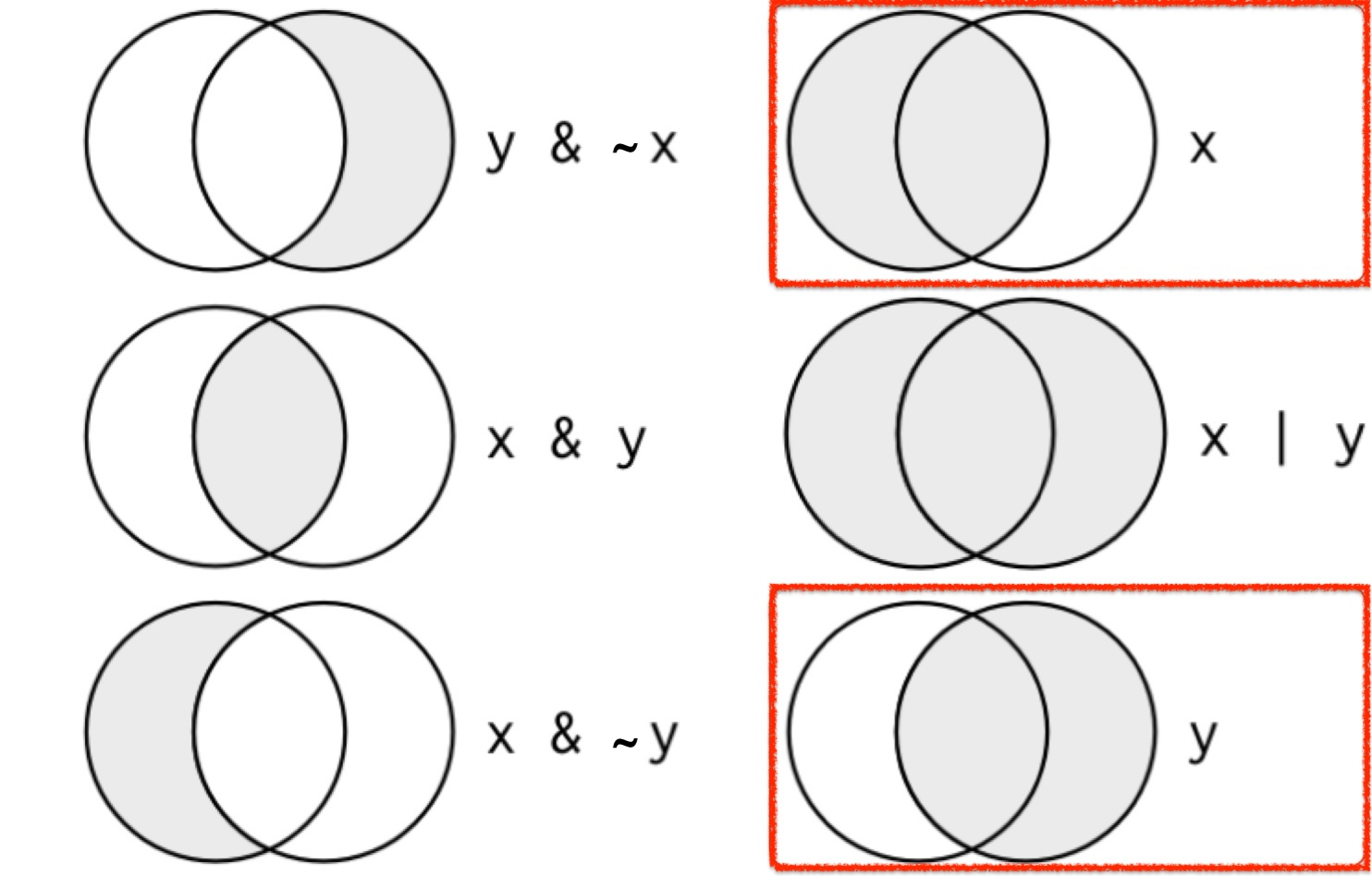
- The shaded regions show which parts each boolean operator selects.
🔀 Combining Multiple Conditions with |
sales = emp["Team"] == "Sales"
legal = emp["Team"] == "Legal"
fnce = emp["Team"] == "Finance"
emp[ sales | legal | fnce ] # '|' means 'or'
We could provide three separate Boolean
Seriesinside the square brackets and add the|symbol to declareORcriteria.What if our next report asked for employees from 30 teams instead of three?
📋 Filtering with the isin() Method
star_teams = ["Sales", "Legal", "Finance"]
on_star_teams = emp["Team"].isin(star_teams)
emp[ on_star_teams ]- A cleaner solution is the
isin()method, which accepts an iterable such as alist,tuple,array, orSeriesand returns a BooleanSeries.
📏 Combining Lower and Upper Bounds with &
- When working with numbers or dates, we often want to extract values that fall within a range.
- E.g., Identify all employees with a salary between $90,000 and $100,000.
higher_than_90k = emp["Salary"] >= 90000
lower_than_100k = emp["Salary"] < 100000
emp[ higher_than_90k & lower_than_100k ] # '&' means 'and'
We can create two Boolean
Series, one to declare the lower bound and one to declare the upper bound.Then we can use the
&operator to mandate that both conditions areTrue.
💰 Filtering Salary Ranges with between()
- A slightly cleaner solution is to use a method called
between().- It returns a Boolean Series where
Truedenotes that an observation’s value falls between the specified interval. - The first argument, the lower bound, is inclusive, and the second argument, the upper bound, is also inclusive.
- It returns a Boolean Series where
🔤 Using between() on Strings
- We can also apply the
between()method to string variables.- The first argument, the lower bound, is inclusive, and the second argument, the upper bound, is exclusive.
🔎 Filtering by a Condition with the query() method!
emp.query("Salary >= 100000 & Team == 'Finance'")
emp.query("Salary >= 100000 & `First Name` == 'Douglas'")- The
query()method filters observations using a concise, string-based syntax.query()accepts a string that describes the filtering condition(s).
- If a column name contains spaces, wrap it in backticks (
`).
✅ ❌ Adding a Variable Based on a Condition with np.where()
- We can use
np.where()from NumPy to add a new variable to a DataFrame based on a condition.
import numpy as np

# Using np.where to add the 'pass_fail' column
emp['high_salary'] = np.where(emp['Salary'] >= 100000, 'Yes', 'No')- We add a new variable called
high_salary:- “Yes” if
Salaryis greater than or equal to 100,000. - “No” otherwise.
- “Yes” if
Note
np.where(emp['Salary'] >= 100000, 'Yes', 'No') treats NaN values in Salary as not satisfying the condition, so they are labeled “No”.
🚀 Classwork 12: Pandas Fundamentals
Let’s do Questions 5-13 in Classwork 12!