Lecture 5
Data Collection III: Collecting Data with requests and APIs
March 4, 2026
⚙️ APIs
💻↔︎️🗄️️ Clients and Servers
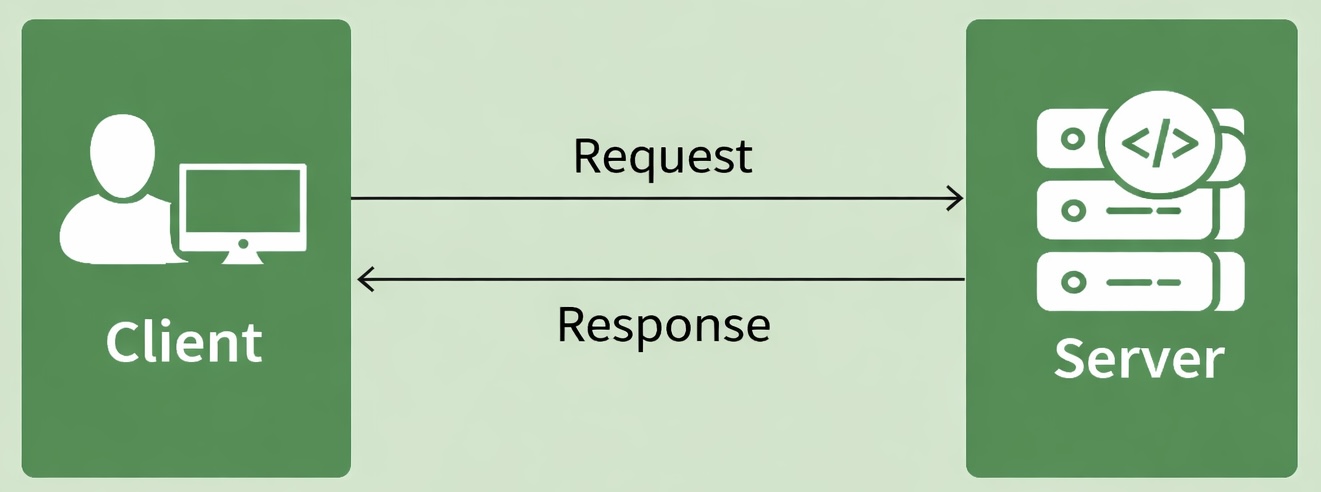
- Devices on the web act as clients and servers.
- Your browser is a client; websites and data live on servers.
- Client: your computer/phone + a browser (Chrome/Firefox/Safari).
- Server: a computer that stores webpages/data and sends them when requested.
- When you load a page, your browser sends a request and the server sends back a response (the page content).
What is an API?
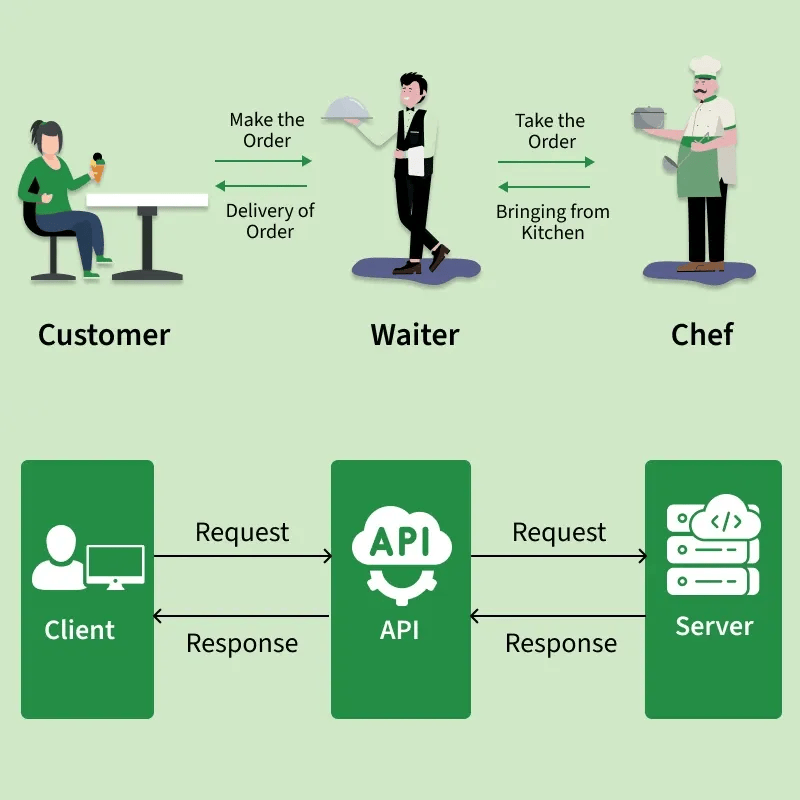
- API stands for Application Programming Interface.
- It enables data transmission between a client and a server.
- Think of it like a waiter in a restaurant:
- Customer (client) → places an order → Waiter (API) → relays it → Kitchen (server) → returns the food (data)
API: Key Concepts
Methods: The “verbs” that define what action the client wants the server to perform.
| Method | Purpose |
|---|---|
GET |
Retrieve data from a server ✅ (main one we use) |
POST |
Send new data to a server |
PUT |
Update existing data on a server |
DELETE |
Remove data from a server |
Request: What the client sends to the server — specifying the method, endpoint URL, and optional parameters (e.g., search terms, API keys).
Response: What the server sends back, consisting of three parts:
- Status Code — indicates success or failure (e.g.,
200 OK,404 Not Found,401 Unauthorized) - Content — the actual data of interest in JSON or XML format
- Header — meta-information about the response
- Status Code — indicates success or failure (e.g.,
🔒🛡️ Hypertext Transfer Protocol Secure (HTTPS)
- HTTP is how clients and servers communicate.
- HTTPS is encrypted HTTP (safer).
When we type a URL starting with https://:
- Browser finds the server.
- Browser and server establish a secure connection.
- Browser sends a request for content.
- Server responds (e.g., 200 OK) and sends data.
- Browser decrypts and displays the page.
🚦🔢 HTTP Status Codes
Understanding the requests Methods
- What is
requests?- A Python library used to make HTTP requests to APIs as well as websites.
- Supports methods like
GET,POST,PUT,DELETE, etc.
- Using
requests.get():- Sends a
GETrequest to retrieve data from a specified URL. - Commonly used when fetching data from APIs.
- Sends a
API Endpoints
- In the case of web APIs, we can access information directly from the API database if we specify the correct URL(s).
- These URLs are known as API endpoints.
- Navigating your browser to an API endpoint will display raw text in one of these formats:
- JSON (JavaScript Object Notation), or
- XML (Extensible Markup Language).
- Install JSONView to render JSON output nicely in Chrome.
Inspecting the Response Object
- Key attributes and methods:
response.status_code: Returns HTTP status code (e.g., 200 for success).response.json(): Converts JSON format data into a Python dictionary.response.text: Decoded text version of theresponse.content
- Best practices:
- Always check
status_codebefore processing the response. - Use
response.json()for easier handling of JSON data.
- Always check
🗽 NYC Open Data APIs
NYC Open Data
NYC Open Data (https://opendata.cityofnewyork.us) is free public data published by NYC agencies and other partners.
Many metropolitan cities have the Open Data websites too:
NYC’s Payroll Data
- Let’s get the NYC’s Payroll Data.
- Open the web page https://data.cityofnewyork.us/City-Government/Citywide-Payroll-Data-Fiscal-Year-/k397-673e in your browser.
- Click the “Actions”, and then “API”
- Choose the Version: “SODA2”
- Copy the API endpoint.
Example Code
import requests
import pandas as pd

endpoint = 'https://data.cityofnewyork.us/resource/ic3t-wcy2.json'  ## API endpoint
response = requests.get(endpoint)
content = response.json() # to convert JSON response data to a dictionary
df = pd.DataFrame(content)- The
requests.get()method sends aGETrequest to the specified URL. response.json()automatically converts JSON data into a dictionary or a list of dictionaries.- JSON objects have the same format as Python dictionaries.
🏦 Federal Reserve Economic Data (FRED) APIs
Federal Reserve Economic Data (FRED)
Most API interfaces will only let you access and download data after you have registered an API key with them.
Let’s download economic data from the FRED https://fred.stlouisfed.org using its API.
You need to create an account https://fredaccount.stlouisfed.org/login/ to get an API key for your FRED account.
FRED API Key
As with all APIs, a good place to start is the FRED API developer docs https://fred.stlouisfed.org/docs/api/fred/.
We are interested in series/observations https://fred.stlouisfed.org/docs/api/fred/series_observations.html
The parameters that we will use are
api_key,file_type, andseries_id.Replace “YOUR_API_KEY” with your actual API key in the following web address: https://api.stlouisfed.org/fred/series/observations?series_id=GNPCA&api_key=YOUR_API_KEY&file_type=json
Example Code
import requests  # to handle API requests
import json      # to parse JSON response data
import pandas as pd
param_dicts = {
  'api_key': 'YOUR_FRED_API_KEY', ## Change to your own key
  'file_type': 'json',
  'series_id': 'GDPC1'    ## ID for US real GDP
}
url = "https://api.stlouisfed.org/"
endpoint = "series/observations"
api_endpoint = url + "fred/" + endpoint   # sum of strings
response = requests.get(api_endpoint, params = param_dicts)- We’re going to go through the
requests,json, andpandaslibraries.requestscomes with a variety of features that allow us to interact more flexibly and securely with web APIs.
Example Code: response.json()
# Convert JSON response to Python dictionary.
content = response.json()

# Extract the "observations" list element.
df = pd.DataFrame( content['observations'] )json(): Converts JSON into a Python dictionary object (or a list of dictionaries).By default, all columns in the DataFrame from
contentarestring-type.- So, we need to convert their types properly.
- The DataFrame may also contain columns we do not need.
Data Collection with APIs
Let’s do Classwork 8!
📰 New York Times APIs
Using the New York Times API
Sign Up and Sign In
- Sign up at NYTimes Developer Portal
- Verify your NYT Developer account via email you use.
- Sign in.
Register Apps
- Select My Apps from the user drop-down at the navigation bar.
- Click + New App to create a new app.
- Enter a name and description for the app in the New App dialog.
- Click Create.
- Click the APIs tab.
- Click the access toggle to enable or disable access to an API product from the app.
Access the API keys
- Select My Apps from the user drop-down.
- Click the app in the list.
- View the API key on the App Details tab.
- Confirm that the status of the API key is Approved.
Collect Data with pynytimes
While NYTimes Developer Portal APIs provides API documentation, it is time-consuming to go through the documentation.
There is an unofficial Python library called
pynytimesthat provides a more user-friendly interface for working with the NYTimes API.To get started, check out Introduction to pynytimes.
Example Code: pynytimes
# Settings
from pynytimes import NYTAPI

# Initialize API with your key
nyt = NYTAPI("YOUR_NYTIMES_API_KEY", parse_dates=True)Example Code: Article Search
🕵️ Hidden APIs
Hidden API
Most industry-scale websites display data from their database servers.
- Many of them do NOT provide official APIs to retrieve data.
Sometimes, it is possible to find their hidden APIs to retrieve data!
Examples:
Hidden API
How can we find a hidden API?
- On a web-browser (FireFox is recommended)
- F12 -> Network -> XHR (XMLHttpRequest)
- Refresh the webpage that loads data
- Find
jsontype response that seems to have data - Right-click that response -> Copy as cURL (Client URL)
- cURL lets you talk to a server by specifying the location of the data you want.
- On an API tool such as Python curlconverter,
- Paste the cURL to the curl command textbox, and then click “Copy to clipboard” right below the code cell.
- Paste it on your Python script, and run it.
References: Details on requests Methods
Our course covers only the basics of the
requestslibrary.For those who are interested in the Python’s
requests, I recommend the following references:
FYI on Web-Data Collection Approaches
- Use API services if available; otherwise, use web scraping tools.
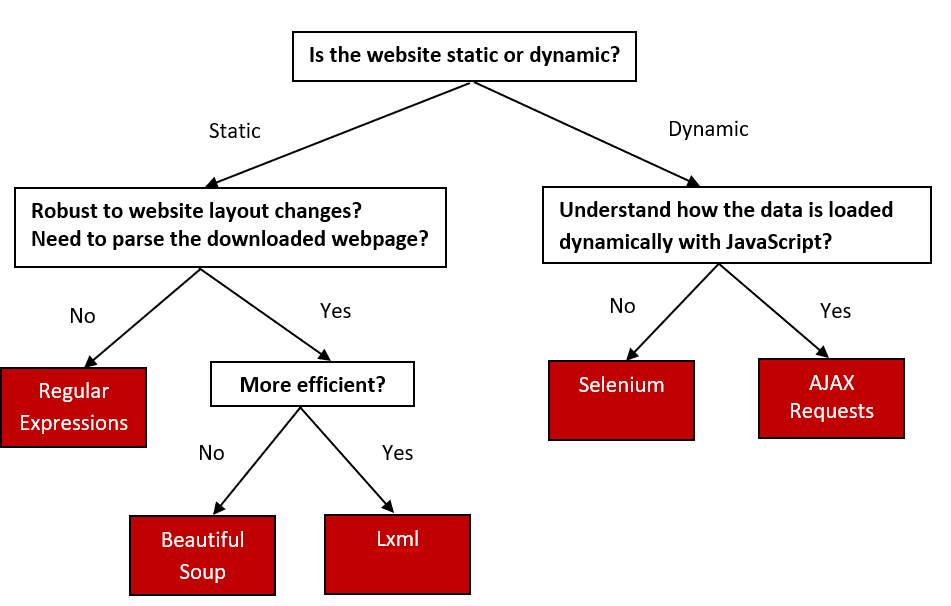
Web-scrapping Decision